Stop Repeating the Prompt: Build a Focused Microsoft 365 Copilot Agent

Writer
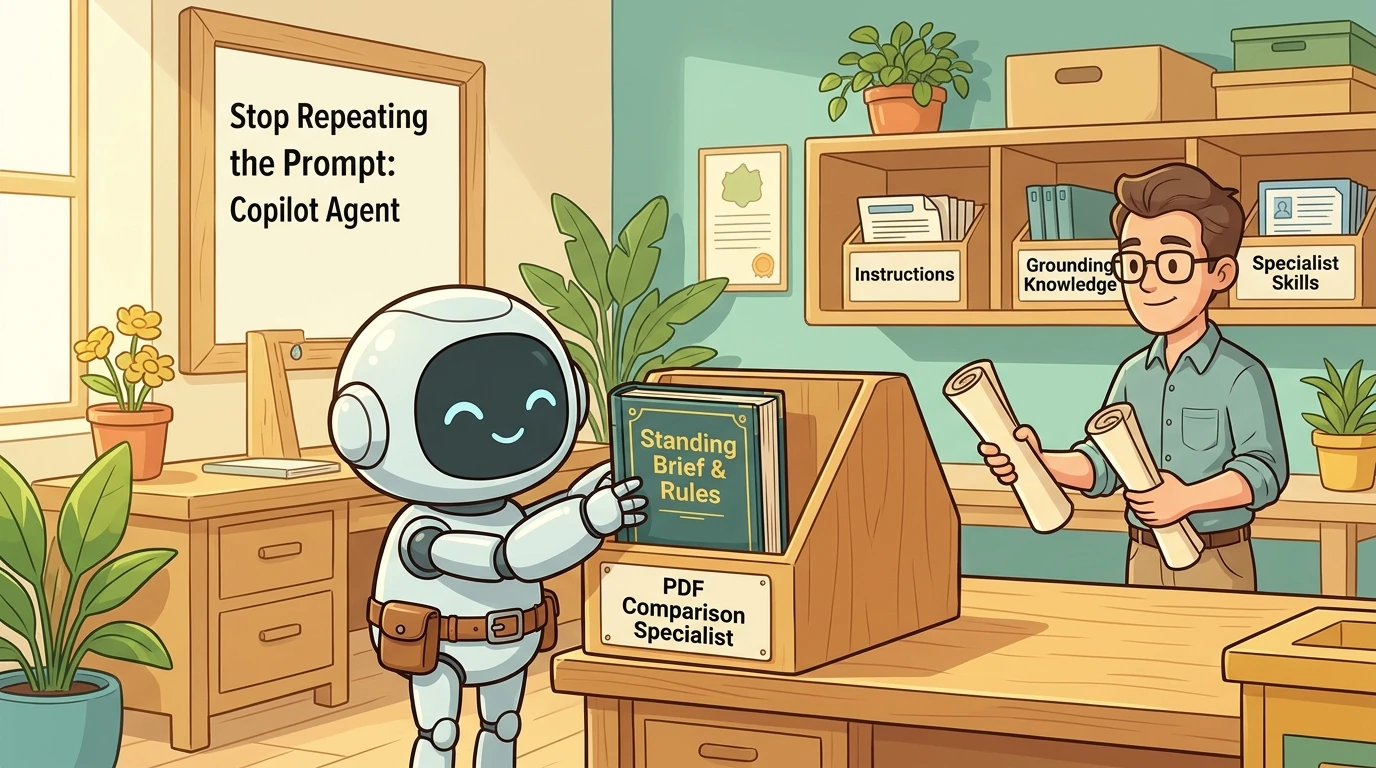
The most useful reason to build a Copilot agent is not that ordinary Copilot cannot do the task. It is that you keep explaining the same task, the same expectations, and the same output format every time.
Compare two reports. Prepare for a presentation. Turn a transcript into a publishable post. Each request is straightforward. The friction comes from repeatedly describing what a good answer should look like.
A focused agent moves that reusable guidance into a dedicated experience. The user supplies the changing input; the agent carries the standing brief.
This guide explains when that approach makes sense, how to build a PDF comparison agent in Microsoft 365 Copilot, and how to extend it with knowledge and custom skills without confusing configuration with model training.
Availability matters. The product behavior described here is based on Microsoft documentation checked on October 24, 2026. Custom skills in Agent Builder remain a Frontier preview feature, not a generally available capability for every tenant.
What an agent actually changes
Microsoft 365 Copilot declarative agents provide a dedicated conversational experience defined through purpose, instructions, knowledge, and supported capabilities. They are powered by Microsoft 365 Copilot rather than requiring you to build a separate conversational system. See Microsoft’s declarative agent overview.
Think of the difference between asking a general assistant for help planning a trip and giving a travel specialist a standing brief: preferred destinations, budget constraints, itinerary structure, and questions to ask before booking.
The analogy is useful, but it has a boundary. Configuring an agent is not the same as training a human specialist or fine-tuning a large language model, or LLM. In Agent Builder, you are specifying behavior and grounding sources. Adding sample documents does not mean you have retrained the model. Microsoft’s Agent Builder documentation describes these as configuration fields and knowledge sources.
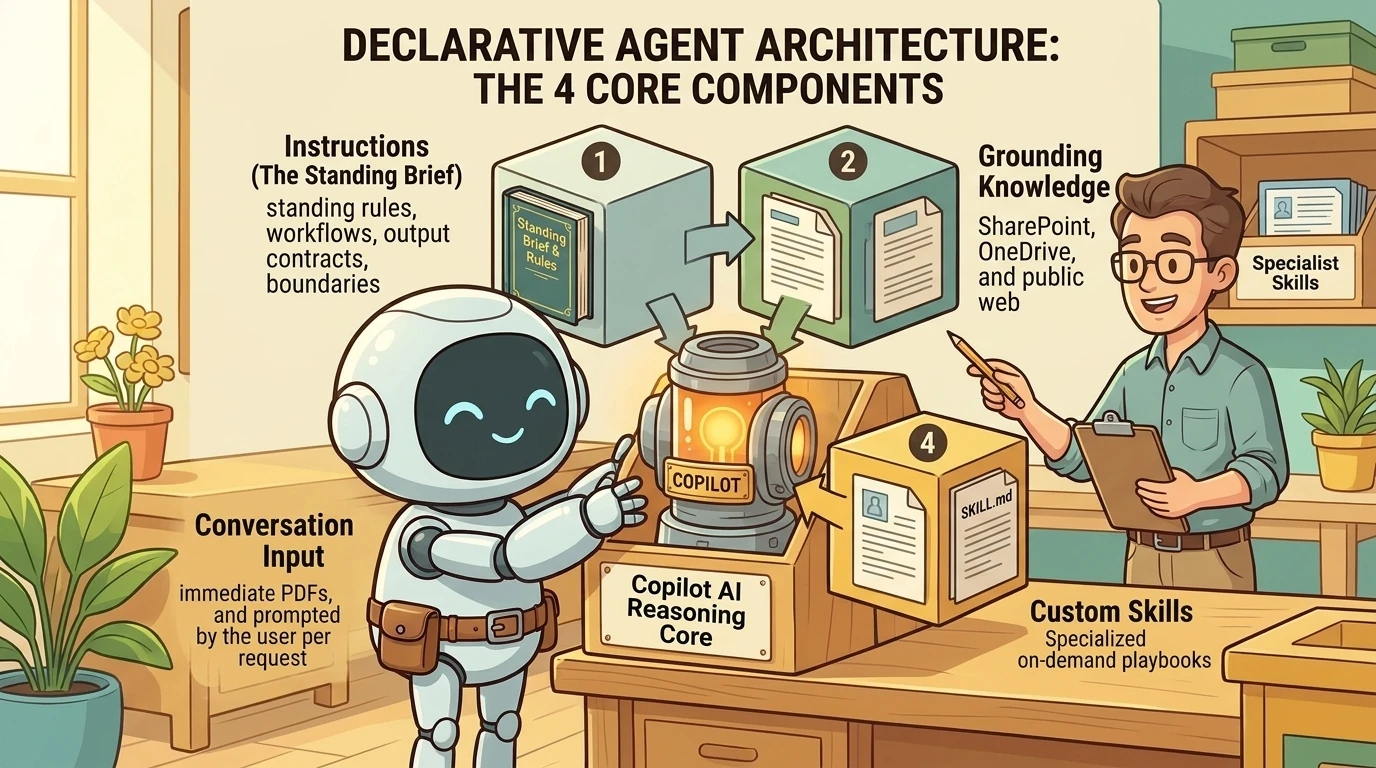
A practical mental model has four parts:
- Instructions: the standing brief describing the job, workflow, boundaries, and output.
- Knowledge: reference material that grounds answers in relevant information.
- Conversation input: the documents and context supplied for this particular request.
- Skills and capabilities: supported ways to carry out specialized work.
These are related, but they are not interchangeable. A document containing facts is not automatically an instruction manual. A skill is not a new permission grant. A short prompt is not a substitute for supplying the files that need comparison.
When the repetition justifies an agent
Consider an agent when the same expectations should apply across many conversations. Microsoft explicitly identifies consistent instructions, curated knowledge, a defined audience, and a named outcome as reasons to choose a declarative agent. It also recommends checking whether an existing experience or approved agent already meets the need. See when to use a declarative agent.
Illustrative examples include:
| Recurring task | What the agent standardizes | What changes each time |
|---|---|---|
| Presentation preparation | Deck overview, slide summaries, and likely audience questions | The presentation and audience context |
| Transcript-to-post drafting | Hook alternatives, editorial structure, and style guidance | The transcript and publishing objective |
| PDF analysis | Executive summary, key facts, and deeper analysis | The document |
| PDF comparison | Material differences, evidence, and decision questions | The documents being compared |
These are proposed patterns, not claims of tested deployments.
The benefit is a reusable working method. It is not guaranteed identical wording or guaranteed correctness. Microsoft warns that automatic model updates can change instruction-following behavior, making continued testing important. See effective declarative agent instructions.
Try the built-in specialist before building your own
A custom agent is not always the best first move.
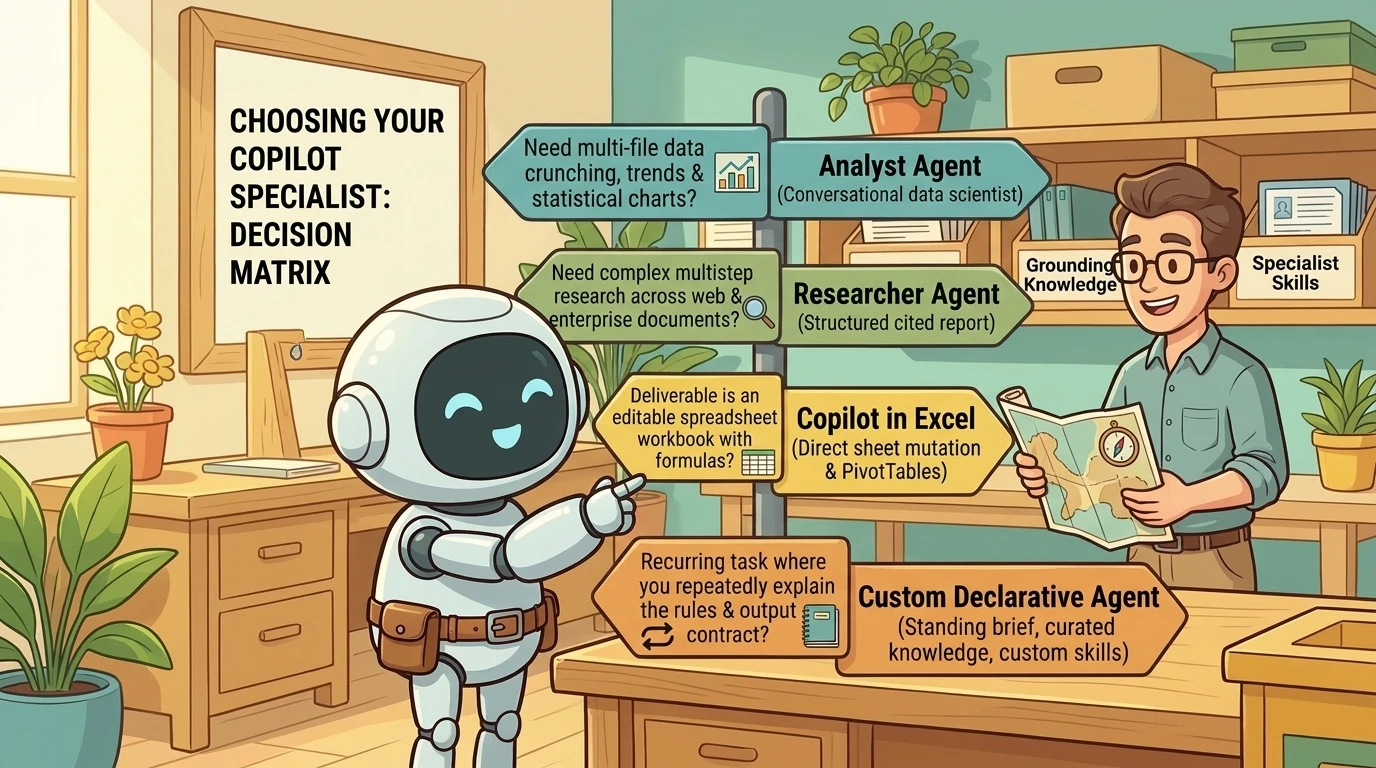
Analyst is Microsoft’s data-analysis agent. It can work across multiple supplied files, calculate statistics, identify trends and outliers, and produce readable reports with charts and tables. Microsoft documents both local uploads and cloud attachments in its Analyst getting-started guide.
For example, imagine a café with separate revenue and expense workbooks. A useful analysis request would specify the reporting period, the meaning of each amount column, how categories should be aligned, and which key performance indicators, or KPIs, are needed. Ask for missing-data checks and explain any assumptions before interpreting the result.
That is a suggested analysis brief, not a promise that any two workbooks can be combined correctly without understanding their structure. A convincing chart still needs reconciliation against the inputs.
Researcher serves a different purpose: complex, multistep research resulting in a structured, source-cited report. At work, it can draw on accessible files, emails, meetings, and chats as well as the web. See Microsoft’s Researcher guide.
Copilot in Excel is often the better fit when the desired deliverable is an editable workbook. It supports formulas, charts, PivotTables, workbook changes, and importing data from other workbooks. The distinction is not “Analyst does complex work; Excel does simple work.” Excel itself supports complex, multistep editing. Choose according to the working surface and output you need. See Copilot in Excel.
My rule of thumb: use Analyst for a conversational analysis across supplied data, Researcher for evidence-led investigation, and Excel when the workbook is the product. Build your own agent when the reusable method is what those experiences do not already provide.
Build a PDF comparison agent around an output contract
A good first agent has a narrow, understandable job: compare supplied PDF documents and explain material differences.
Start by defining what “compare” means. A textual difference is not necessarily a meaningful difference. A changed heading may be cosmetic; a changed reporting period may invalidate an apparent performance comparison.
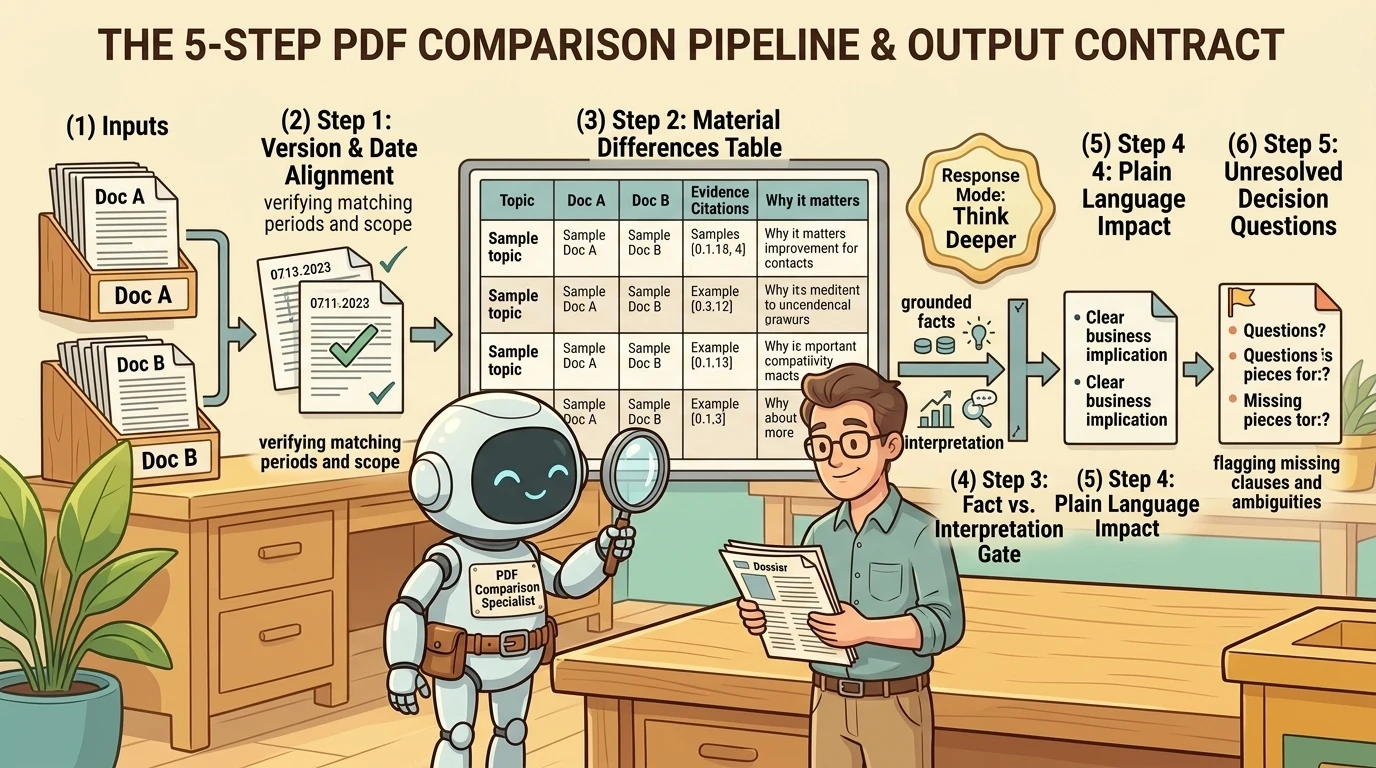
For this example, the proposed output contract is:
- Identify the documents and their relevant dates or versions.
- Begin the substantive comparison with a table of material differences.
- Distinguish source facts from interpretation.
- Explain the implications in plain language.
- End with unresolved questions that affect a decision.
For two documents, useful table columns are Topic, Document A, Document B, Evidence, and Why it matters. For three or more, adapt the layout rather than squeezing every source into a two-document template.
This is an editorial design recommendation. Agent Builder provides the mechanism for configuring instructions and testing them; the comparison method remains something you must design and validate.
Step 1: Create the initial configuration
Microsoft documents three starting paths: describe the agent in natural language, configure it manually, or use a template. In Microsoft 365 Copilot, select New agent and describe the intended comparison task. Alternatively, select Skip to configure to enter the configuration directly. See build agents in Agent Builder.
Describe the inputs, the required output, and the handling of missing evidence. Avoid an expansive brief such as “analyze every business document.” A narrow first version is easier to assess.
Step 2: Review the generated instructions
On Configure, inspect the name, description, instructions, knowledge, and starter prompts. Natural-language creation can populate these fields automatically; that makes it a useful drafting mechanism, not a reason to skip review. Microsoft documents the fields and their behavior in the configuration guide.
Use a descriptive name such as PDF Comparison Analyst. The description should make the scope obvious to someone who did not build it. An identifiable icon helps distinguish it from other agents, but the instructions are where the working method belongs.
Recommended comparison instructions should address:
- How documents are identified and matched.
- What makes a difference material.
- How evidence is referenced, including page or section references when available.
- How missing, unreadable, or ambiguous information is reported.
- Whether recommendations are appropriate and what evidence they require.
- What happens when the request falls outside the agent’s scope.
“Do not hallucinate” is not a validation strategy. A more useful design asks the agent to expose missing evidence, separate interpretation from source statements, and make important findings traceable.
Step 3: Structure the instructions without treating Markdown as code
Microsoft recommends Markdown headings, clear sections, bullets for independent tasks, and numbered steps when sequence matters. It also recommends atomic actions and explicit transitions. See instruction-writing guidance.
A heading organizes the brief. It does not mean “execute this first.” Bold text emphasizes a requirement; it does not create a guaranteed enforcement mechanism. Numbered steps communicate intended order, but they do not turn a language-model workflow into deterministic program execution.
The useful principle is clarity, not formatting magic.
Step 4: Choose a response mode deliberately
Agent Builder supports Auto, Quick response, and Think deeper as default response modes. Users can override the default. Microsoft describes Think deeper as suitable for complex tasks that benefit from more thorough analysis, while Auto balances speed and depth. See default response modes.
Document comparison is a reasonable candidate for Think deeper, especially when conclusions depend on several related passages. But “always choose Think deeper” is too broad. Test whether the extra analysis improves the task enough to justify the wait.
This setting is a response mode, not a documented promise of a permanently fixed underlying model.
Step 5: Test before sharing
Use Try it to test the agent during authoring. Microsoft supports refining instructions and knowledge in that experience. For an existing agent, select Update to make changes available to users; propagation can take several minutes. See testing and updating agents.
A useful test is to add a closing section with decision questions, start a fresh conversation, and check whether the revised output contract is followed. Then verify the content, not just the headings.
Add knowledge only when it serves the job
For a comparison agent, the current PDFs are the task inputs. Persistent knowledge might instead contain a terminology reference or approved examples of the desired output.
A presentation coach might use organizational presentation standards. A writing agent might use selected writing samples. For the latter, explicitly separate style evidence from factual evidence: an old email can illustrate tone without supplying facts for a new message.
Agent Builder supports SharePoint and OneDrive content, embedded files, Teams chats and meetings, Outlook email, public websites, and configured Copilot connectors. Availability varies by source and license. See knowledge sources in Agent Builder.
Narrow retrieval is a design choice, not a universal prohibition
Do not enable every source simply because it is available. Ask what information the task needs and where that information should come from.
For an uploaded-document comparison, web search may add little value. For an investigation requiring current external evidence, it may be essential. Microsoft documents both specific public website sources and a broader web-search option in its knowledge configuration guide.
For recurring reports in SharePoint, select the relevant files, folder, or site. If the agent must find the latest reports, define the selection criteria and check that the correct versions were retrieved. Newly added SharePoint or OneDrive content can remain in a Preparing state and is not used until ready. Selecting a site also does not automatically include its SharePoint lists. These behaviors are documented under SharePoint and OneDrive knowledge.
Two other distinctions matter:
- Email: Agent Builder’s email knowledge cannot currently be scoped; it uses the user’s mailbox. Sharing the agent does not give recipients access to the maker’s mailbox.
- Teams: Knowledge can be scoped to specific chats or meetings. Broad Teams knowledge includes accessible transcripts and calendar information, but Microsoft cautions that not every past transcript may be accessible depending on transcript size.
See email and Teams knowledge behavior.
A meeting-minutes agent also needs an available transcript. Copilot does not automatically create a saved transcript for every meeting. Teams distinguishes “during and after” usage with transcription from “only during” usage based on speech-to-text data that is not saved after the meeting. See Teams transcription and Copilot.
Keep behavior in instructions and facts in knowledge. Microsoft explicitly warns against storing agent instructions in SharePoint or another knowledge source to bypass the instruction limit. Such content is not trusted maker-authored instruction content and may be blocked or sanitized. See instruction boundaries.
Extend the agent with custom skills, not an endless instruction block
A generic PDF comparison method can support related specialties. Sales reports require attention to periods and metric definitions. Supply agreements require attention to renewal, termination, fees, exclusivity, and liability terms.
That is where custom skills can help.
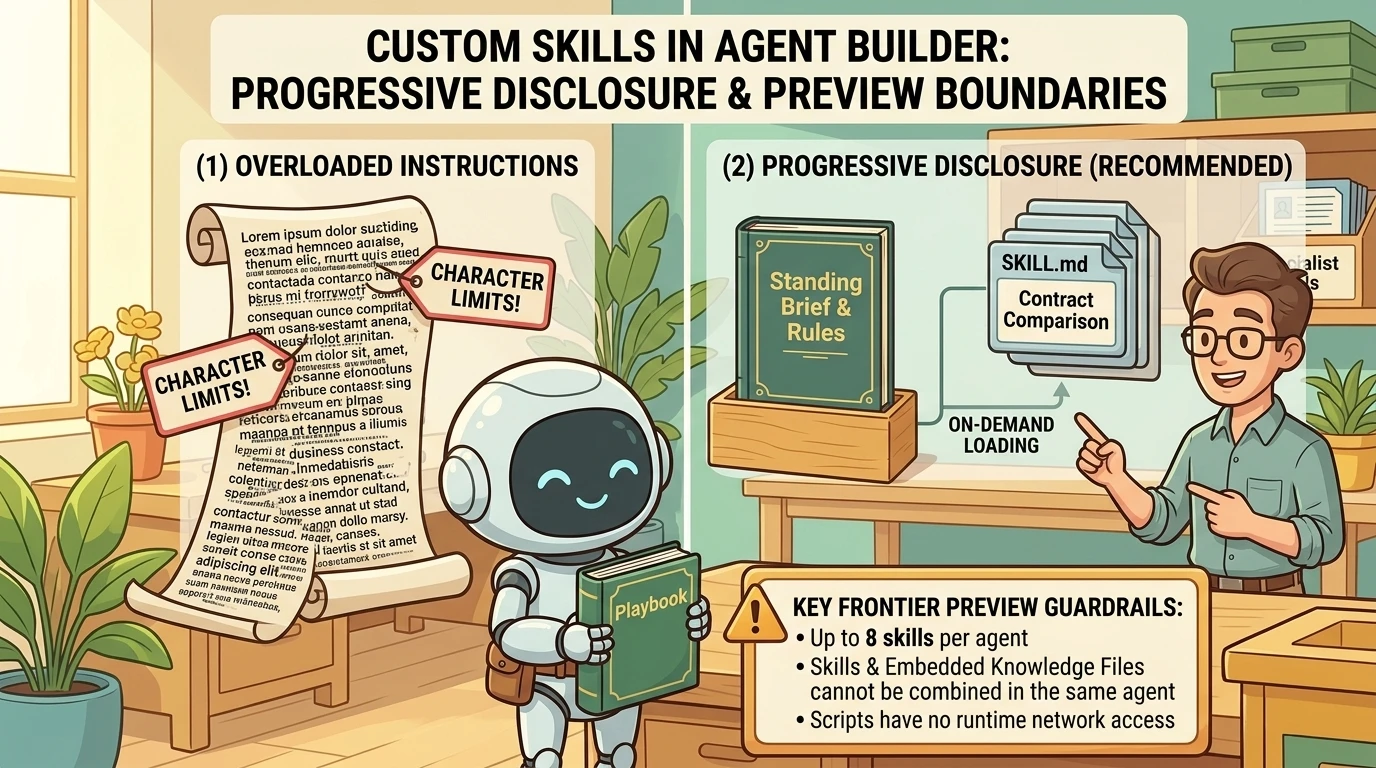
Microsoft defines a custom skill as a separate component containing a required SKILL.md file and optional resources and scripts. Skills use progressive disclosure: their detailed contents are loaded when the task requires them. This is different from the older use of “skills” to mean task descriptions embedded in the agent’s main instructions. See custom skills in declarative agents.
Think of the main instructions as the standing brief and each skill as a specialist playbook. The agent’s main instructions should reference configured skills at a high level rather than duplicate all their steps. A skill does not mean the agent discards its general instructions. See referencing skills.
Example: a contract-comparison skill
An illustrative contract skill could prioritize payment terms, renewal, termination notice, fees, exclusivity, and liability provisions, then finish with evidence-based negotiation questions. The main comparison method would still require source traceability and explicit uncertainty.
This is a proposed review aid, not legal advice or an automated determination of enforceability. Missing clauses should be reported as missing from the supplied documents, not converted into conclusions about legal rights.
Microsoft supports creating a skill through natural-language description or uploading a complete skill package. After creation, inspect it on Configure and test it on Try it. For uploads, Agent Builder requires the complete ZIP package, not SKILL.md alone. See adding skills in Agent Builder.
Preview limitations change the design
As documented at the time of writing:
- Skills require Frontier enrollment and a qualifying license or pay-as-you-go access.
- Agent Builder supports up to eight skills per agent and ZIP packages up to 50 MB.
- Skill instructions must be under 20,000 characters.
- Skills and embedded knowledge files cannot currently be combined in the same agent.
- Cross-agent skill reuse is not supported at this stage of preview.
- Skills are unavailable in tenants using Microsoft Purview Information Barriers.
- Skill scripts have no runtime network access and cannot install packages. Enabled connectors and tools operate through the agent orchestrator, not through network calls from those scripts.
See the skill support matrix and limitations and Agent Builder prerequisites.
The embedded-file limitation is especially important: a design that first embeds example PDFs as knowledge and then adds skills is not currently supported. That restriction concerns embedded knowledge files; do not casually equate them with documents supplied for an individual conversation.
My recommendation is to keep one agent when the specialties share a clear purpose and output contract. Separate agents remain sensible when their audiences, reference material, or responsibilities diverge. Skills reduce duplication; they do not justify an agent that does everything.
Sharing the agent is not the same as sharing every source
Agent Builder distinguishes Can chat from Can edit. Can edit grants ownership rights, including editing, sharing, and management, rather than merely allowing someone to adjust a prompt. See sharing roles.
The knowledge source determines the access implications:
- SharePoint and OneDrive references respect existing permissions and sensitivity labels.
- Embedded files make their information available through the agent to users who can access it, subject to documented sensitivity-label restrictions.
- Email knowledge does not expose the maker’s mailbox to recipients.
See knowledge permissions and embedded content.
There is also a sharing convenience worth checking: Agent Builder can share specifically added SharePoint files and folders when the owner has the necessary sharing rights. It does not automatically grant full site access. Removing access to the agent does not remove independently granted file access. See automatic SharePoint sharing.
The safe mental model is therefore not “sharing never changes document access.” It is “review agent access and source access separately.”
Licensing: check the capability, not just the label
A blanket claim that agents require a paid Copilot license, or that unlicensed users cannot use any knowledge, is misleading.
Microsoft documents instructions and public-web grounding for Copilot Chat, with additional organizational grounding available through qualifying licenses or configured pay-as-you-go access. Email, Teams messages, Teams meetings, and people grounding remain license-only in the published capability matrix. See agent capabilities and licensing models.
Check the exact sources and capabilities in your agent, the recipient’s entitlement, and tenant configuration. Sharing an agent does not create the entitlement needed to use it. Microsoft’s sharing documentation explicitly warns that mismatched licensing can cause errors.
Test the method, not just the demo
A table appearing at the top proves that one formatting instruction was followed. It does not prove that the comparison is complete.
Before sharing, I recommend a small, repeatable evaluation set:
- Known differences: include documents with changes you have independently identified.
- No material change: check whether the agent invents differences to fill its table.
- Missing evidence: omit a page or appendix and verify that the limitation is visible.
- Mismatched periods: check that different reporting windows are not treated as directly comparable.
- Skill selection: test contracts, sales reports, and ambiguous documents to assess routing.
- Different users: verify source access and licensing from a recipient’s perspective.
- Regression: rerun representative cases after instruction, skill, or model changes.
These are suggested validation practices, not results from tests performed for this article. They complement Microsoft’s documented authoring and iteration guidance.
Compare the custom agent with ordinary Copilot using the same documents and request. Judge evidence coverage, factual accuracy, useful structure, and unresolved questions. A more elaborate answer is not automatically a better answer.
Know when Agent Builder is enough
Agent Builder is designed for quick, straightforward declarative-agent projects. It does not support authoring actions that integrate external services. Microsoft directs makers to copy an agent to Copilot Studio when they need low-code actions, connectors, or workflows beyond the embedded authoring experience. See the Agent Builder overview.
For distribution, direct sharing, org-wide chat sharing where permitted, and submission to an administrator-reviewed organizational catalog are distinct options. Publishing across multiple channels requires Copilot Studio. See sharing and catalog management.
For a focused document-comparison assistant, start with the simpler experience. Move to a broader development path because the requirements demand it, not because “enterprise” automatically means the first version needs a complex architecture.
The real win is a reusable working method
A good agent does not eliminate the need to think. It eliminates the need to repeatedly explain how the work should be approached.
Start with a recurring task. Define a clear output contract. Keep reference knowledge purposeful. Add specialist skills only when they genuinely fit, and account for their preview limitations. Validate evidence and permissions before sharing.
The result should be more than a convenient shortcut. It should be a working method that users can understand, inspect, and improve.
Read next
Related articles

Beyond the Chat Pane: Seven Copilot Updates That Turn Intent into Work (November 2026)

From Indispensable Founder to Independent Business: Building Transferable Capability with Practical Copilot Support