The Dataverse Plugin for Copilot Cowork Changes What Makers Build, Not What Architects Must Own

Writer

A drag-and-drop app appears from a plain-language request. It reads real business records, updates relationships, and looks better than the interface it replaces. Then someone asks for a simple rule: an instructor must never have more than two activities.
The app blocks the third activity. Another interface adds it anyway.
That is the tension at the heart of AI-assisted application development. Generating a convincing interface is becoming easier. Establishing what the application actually guarantees is still an architectural responsibility.
The Microsoft Dataverse plugin for Copilot Cowork makes this distinction especially interesting. It combines access to business data with reusable platform expertise, bringing app creation closer to the people who understand the workflow. But its strongest lesson is not that architects are becoming unnecessary. It is that their attention needs to move from assembling screens to validating boundaries, invariants, and operating conditions.
What the plugin actually brings to Cowork
Microsoft announced the Dataverse plugin’s availability in Copilot Cowork in its October 28, 2026 walkthrough. The plugin connects Cowork to a Dataverse environment and supplies skills covering data modelling, records, business logic, security, and solutions.
That combination matters. A connection provides access to tools and data. Skills provide instructions for how to use them in a particular domain. Neither is the same as a guarantee that every generated solution is correct.
Microsoft’s cross-platform explanation describes an overview skill routing requests to specialist skills, which can select tools such as the Dataverse Model Context Protocol (MCP) server, command-line interfaces, or software development kits. MCP is an open protocol through which AI applications access external tools and context.
Think of the plugin as a platform-aware workbench: it gives the assistant both instruments and operating guidance. It does not turn the assistant into the owner of the business requirement.
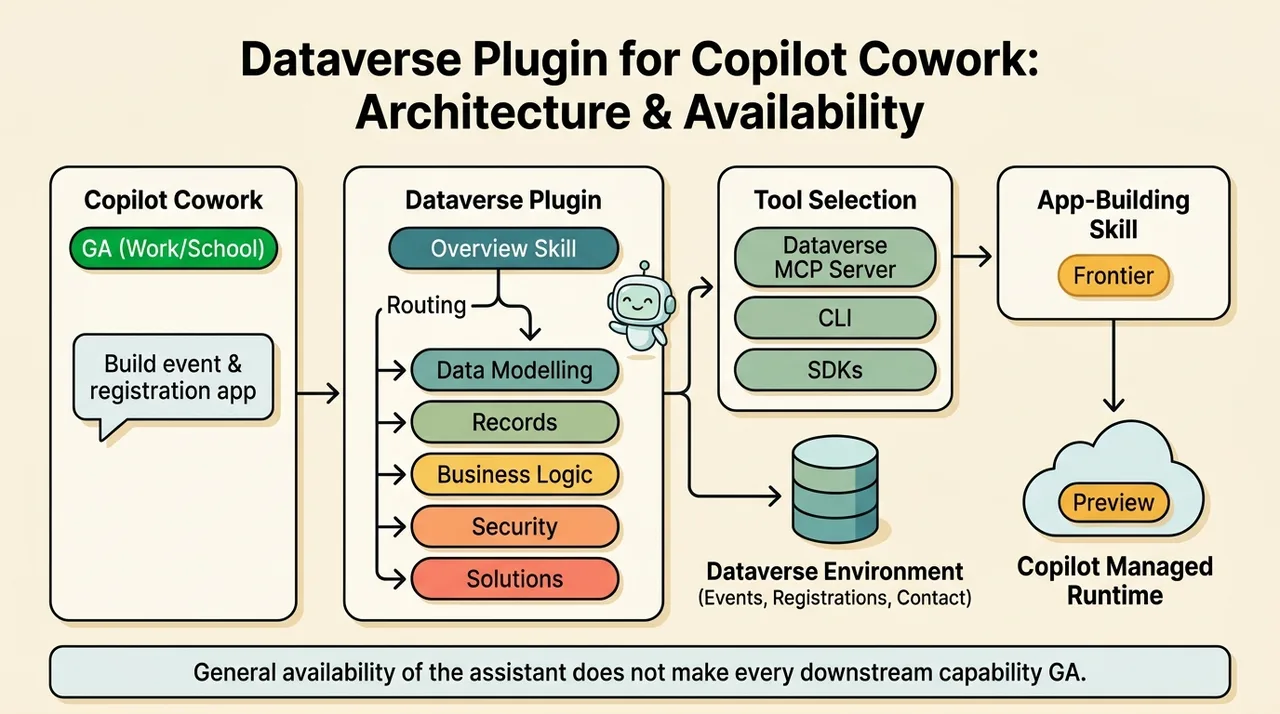
In Microsoft’s published example, Cowork creates event and registration tables, reuses the existing Contact table, adds relationships, and seeds identifiable sample data. It then uses its app-building flow to create and publish an application hosted in Microsoft Copilot Managed Runtime.
There are two important availability distinctions as of November 9, 2026:
- Cowork for work or school accounts is generally available.
- Its app-building skill remains a Frontier capability, and Copilot Managed Runtime is documented as preview.
General availability of the assistant does not make every capability it invokes generally available.
Natural-language data access: exact answers and semantic answers are different problems
The supplied demonstration begins with environment discovery and record queries. The presenter reports 923 tables and a hotel count of roughly 6,100, then asks relationship-based questions about instructors and certifications.
These are useful checks, but they exercise relatively structured reasoning: identify the right tables, apply conditions, traverse relationships, and aggregate results. For sensitive attributes, use an appropriate business purpose and permission model; the query mechanics do not themselves justify the question.
The more interesting test asks for hotels whose descriptions relate to Japan, even when the literal word “Japan” is absent. A description mentioning Tokyo can be relevant without matching that exact keyword. Another question asks which hotel is best for gambling, and the demonstration returns MGM Grand.
These requests introduce a different challenge: translating intent into relevant evidence.
| Question type | What a good answer requires | What to validate |
|---|---|---|
| Exact count | Complete, correctly scoped aggregation | Filters, permissions, and whether the count covers the intended records |
| Relationship query | Correct joins or relationship traversal | Relationship meaning and duplicate handling |
| Semantic discovery | Relevant records beyond literal keyword matches | Supporting descriptions and missed relevant records |
| Recommendation | Evidence plus an explicit interpretation of “best” | Selection criteria, alternatives, and unsupported assumptions |
The current Dataverse MCP documentation lists read_query for supported SQL SELECT queries and search_data for structured and unstructured data search. That supports a broader capability than literal filtering alone.
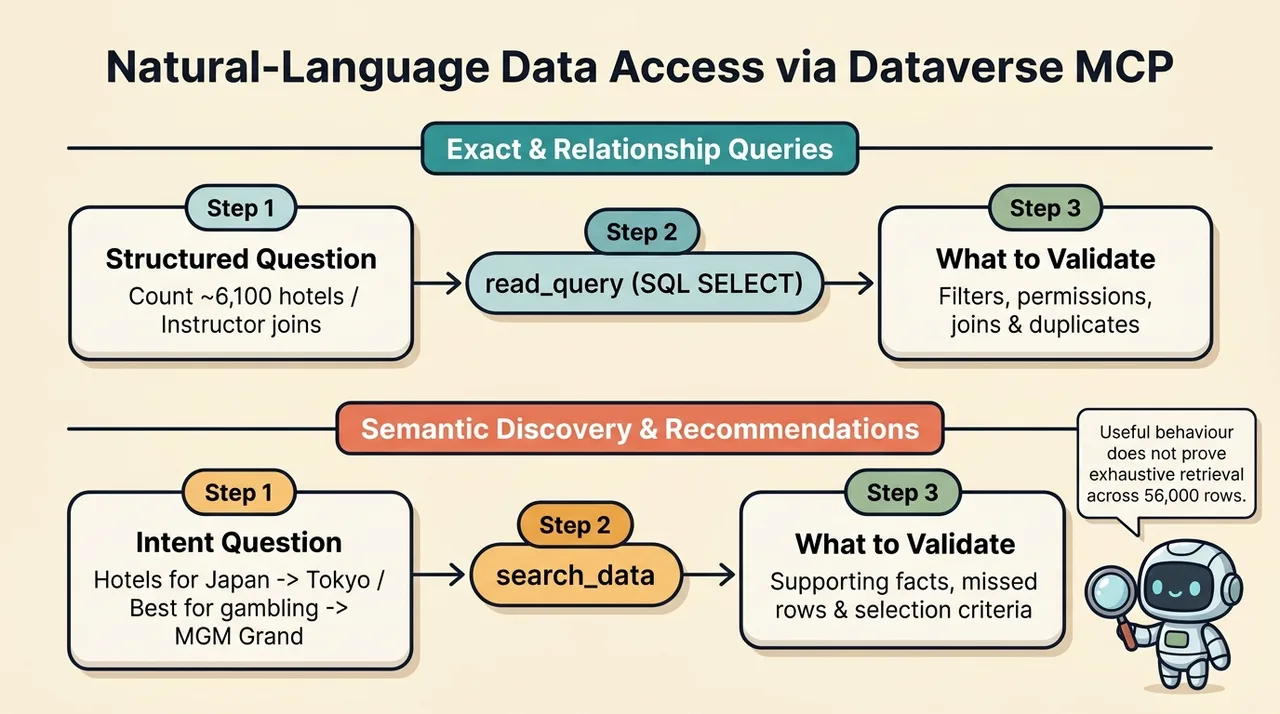
It does not establish the presenter’s explanation that the assistant necessarily retrieved every hotel and interpreted all descriptions in its context. Nor does the visible answer prove that FetchXML was used. The plugin can choose among tools; a successful result does not reveal the complete retrieval plan.
A semantic-looking answer is evidence of useful behaviour, not proof of a particular search architecture or exhaustive coverage.
Later, the presenter reports adding approximately 56,000 hotel records and obtaining similarly strong answers with only a small perceived increase in latency. That is an encouraging demonstration, not a reproducible benchmark. The source does not provide query traces, a relevance-labelled test set, repeated latency measurements, or evidence that every eligible record was considered.
Before relying on this behaviour, test questions with known answers, inspect the returned records, and include ambiguous and negative cases. For recommendations, ask the assistant to explain which stored facts support its choice.
This also limits the claim that the plugin eliminates the need for Azure AI Search. It may remove the need to build a separate search pipeline for some conversational Dataverse scenarios. It does not establish equivalent retrieval controls, relevance tuning, scale characteristics, or economics for every workload.
From a requested workflow to a working application
The central application example is straightforward: select an instructor, show certifications and outdoor activities, and drag records onto the instructor to create associations.
Previously, that interaction might have required accepting the standard model-driven interface, building a canvas app, or developing a Power Apps Component Framework (PCF) control. Each option involves design, implementation, and maintenance decisions.
Cowork compresses much of that initial work into a conversational request. The important result is not merely a polished screen. It is an interface operating on existing Dataverse records rather than a disconnected mock-up.
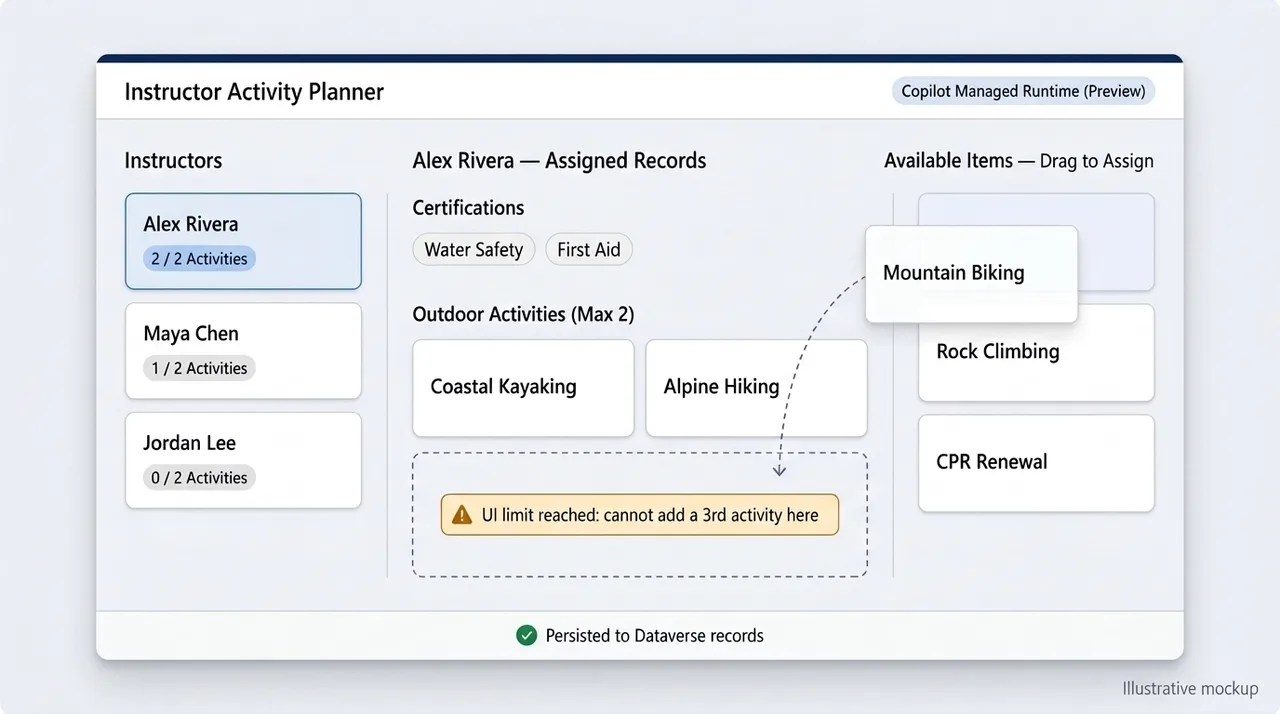
The presenter checks this properly: after assigning a certification, removing another association, and adding an activity, they refresh the underlying records in Power Apps. The changes persist.
That establishes more than a successful animation. It demonstrates that the tested operations reached the system of record.
It still leaves questions worth checking:
- Does removing an item unlink the relationship or delete the underlying record?
- Can a certification belong to multiple instructors?
- Does the application handle failed writes without leaving misleading UI state?
- Are duplicate associations prevented?
- Does it work for users with narrower permissions than the maker?
The source does not establish the relationship schema, so a specific implementation should not be inferred. Dataverse’s Associate operation creates links between records, but the actual write path depends on the data model.
A useful rule of thumb is simple: validate the stored outcome, not just the visible interaction.
A connected assistant does not imply a connected application
The first generated app in the demonstration cannot load its data. The assistant can query Dataverse, yet the application asks for additional connection setup.
That is not inherently contradictory. The assistant’s tool connection and the published application’s data access are separate execution contexts. A successful query during authoring does not prove that the generated app has the correct environment, connection, consent, or user permissions at runtime.
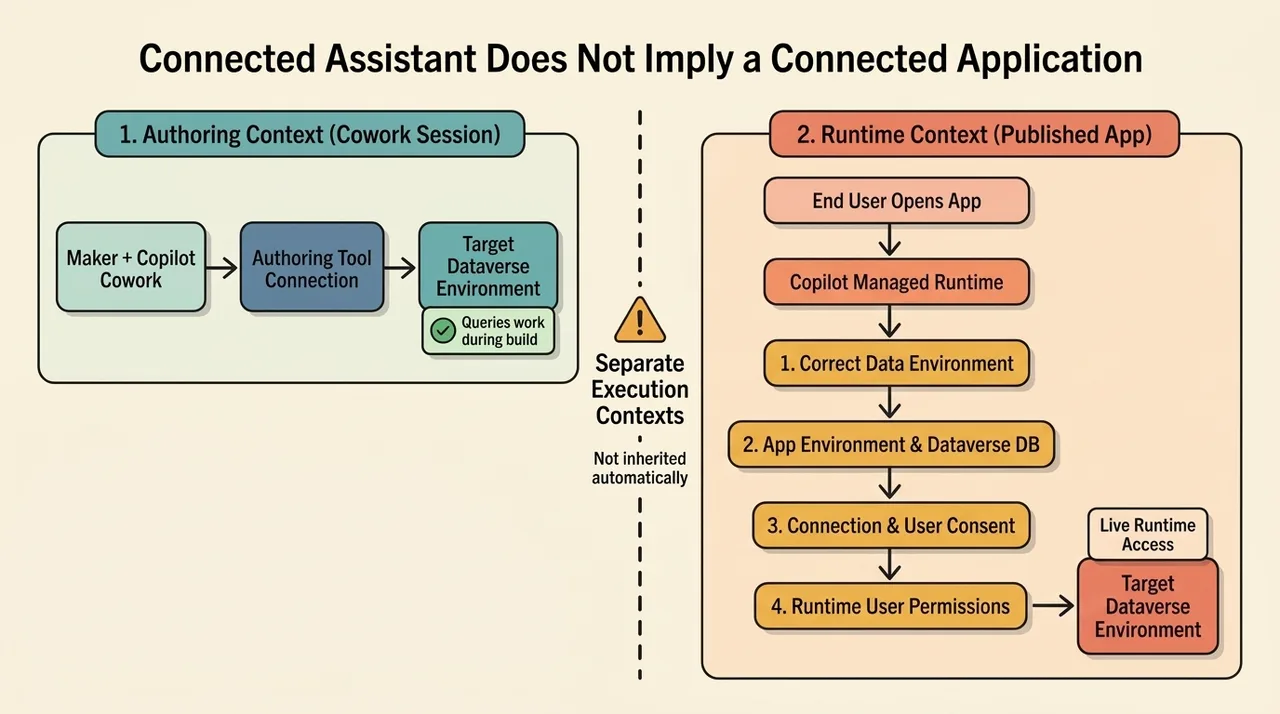
The presenter restarts the task, explicitly targets their own environment, and obtains a working application. They interpret the earlier failure as a problem with using another person’s developer environment.
The successful retry supports the value of explicit environment selection. It does not prove that developer environments are unsupported. In fact, Microsoft’s Dataverse plugin walkthrough recommends a developer environment from the Power Apps Developer Plan as a place to try the feature. Its own example also describes Cowork detecting that the app builder’s default environment lacked a Dataverse database and asking for the correct environment.
The architectural lesson is therefore narrower and more useful:
- Identify the environment containing the data.
- Confirm the intended app environment and its Dataverse database.
- Validate the maker’s access and the runtime user’s access separately.
- Inspect connection and consent requirements rather than assuming the authoring session supplies them.
- Test the published app outside the original creation session.
The source also reports an initial “app not found” experience that resolves after refreshing and completing consent. Treat that as an observed troubleshooting sequence, not a universal fix. An unavailable app can have several causes, and a refresh cannot repair missing permissions or an incorrect deployment.
The two-activity limit exposes the real architectural boundary
The most educational part of the demonstration is the requirement that an instructor must never have more than two outdoor activities.
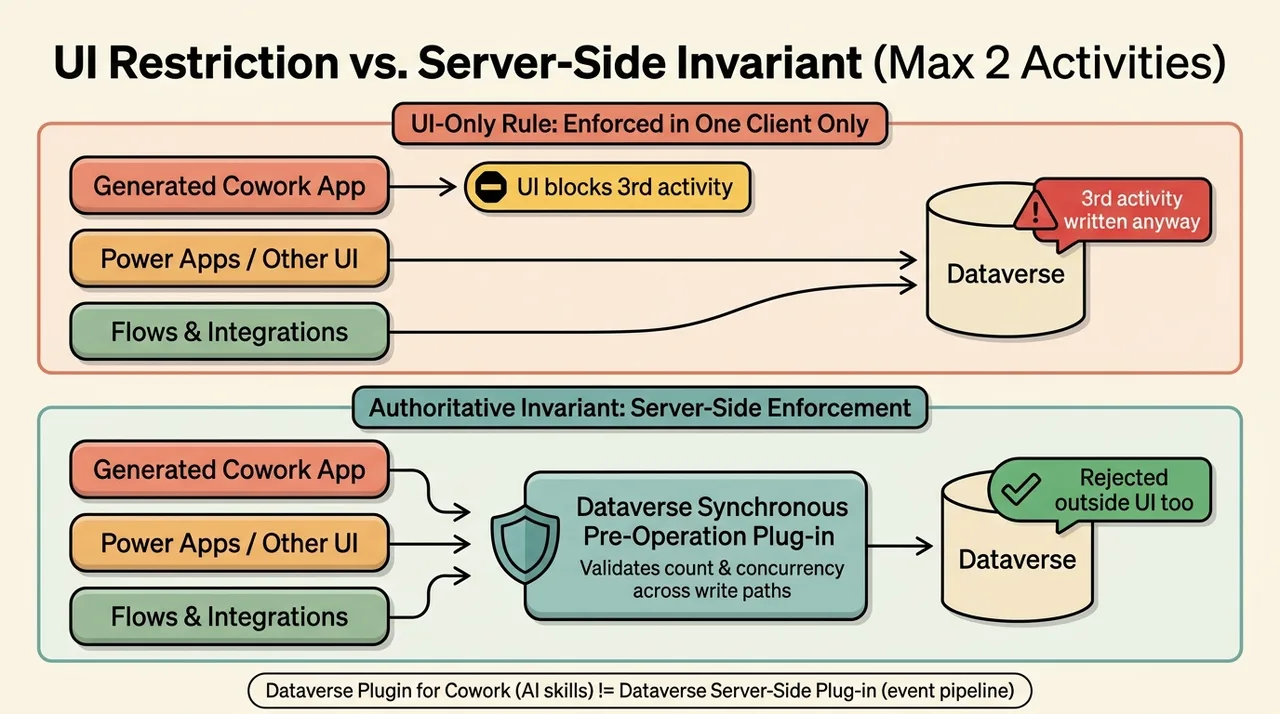
Cowork adds a UI restriction. An instructor already at the limit cannot receive another activity through drag-and-drop, while an instructor below the limit can.
Then the presenter opens another interface and adds a third activity successfully.
The generated app’s explanation explicitly acknowledges the limitation: the rule applies inside that app, not across Dataverse. That is useful architectural guidance. It is also evidence that the requested global invariant has not been implemented.
An invariant is a condition that must remain true regardless of which permitted write path changes the data. “This screen prevents a third assignment” and “an instructor can never have a third assignment” are different requirements.
The first belongs to interaction design. The second requires authoritative enforcement.
UI guidance and server enforcement have complementary jobs
The UI should explain the limit early, disable invalid interactions, and show a clear message. That improves usability and avoids unnecessary requests.
The server must reject invalid changes from other applications, flows, integrations, and relevant imports. Otherwise, the rule is only a convention followed by one client.
Microsoft documents Dataverse plug-ins as event handlers that can cancel a data operation. Synchronous plug-ins run before the operation completes; asynchronous execution occurs after the operation finishes. An after-the-fact correction is not equivalent to preventing an invalid write.
There is also a terminology trap here:
- The Dataverse plugin for Cowork packages AI skills and connectivity.
- A Dataverse server-side plug-in is custom code registered in the data-operation event pipeline.
Installing the first does not automatically create the second for every business rule.
Microsoft recommends considering declarative business-logic options before writing a plug-in. For this particular cross-record limit, choose an enforcement mechanism only after inspecting the schema and all relevant write paths.
“Put it on the server” is necessary, but not a complete design
A robust implementation needs to answer additional questions:
- Is an assignment created through an association operation, a child record, or a lookup update?
- Can a request add several activities at once?
- Can reassignment or another operation bypass the chosen validation event?
- What happens if two users add an activity concurrently?
- How are existing violations detected and corrected?
Concurrency deserves special attention. Two requests could each observe one existing activity and independently decide that adding another is valid. A naive count-and-check implementation should not be assumed to preserve the limit under contention.
The source does not provide a server-side implementation, so it cannot establish transaction or concurrency safety. Those remain design and test responsibilities.
The better follow-up request is not simply “add a rule.” It is: enforce this invariant across every supported write path, identify the mechanism, and demonstrate rejection outside the generated UI.
Govern authority, not just the assistant’s behaviour
The demonstration includes a request to remove a column. The assistant offers an approval step, and the presenter warns against giving ordinary users that level of power.
The concern is valid, but the control should not depend only on whether the user notices the risk in an approval card.
Microsoft’s plugin announcement states that the connection signs in as the user and that Dataverse checks permissions on the server. The assistant cannot exceed that user’s Dataverse security roles.
This is reassuring only if those roles are appropriate. An assistant acting within an overprivileged account can still make an authorized but damaging change.
Separate the following capabilities deliberately:
- Reading business records.
- Creating or updating records.
- Changing relationships.
- Creating or modifying schema.
- Administering environments and security.
The Cowork plugin administration guide documents deployment to selected users and groups. The Dataverse MCP configuration guide documents environment-level MCP enablement and allowed clients. These are useful controls, but client allowlisting is not a replacement for Dataverse authorization; the documentation specifically limits that allowlisting to the /api/mcp entry point.
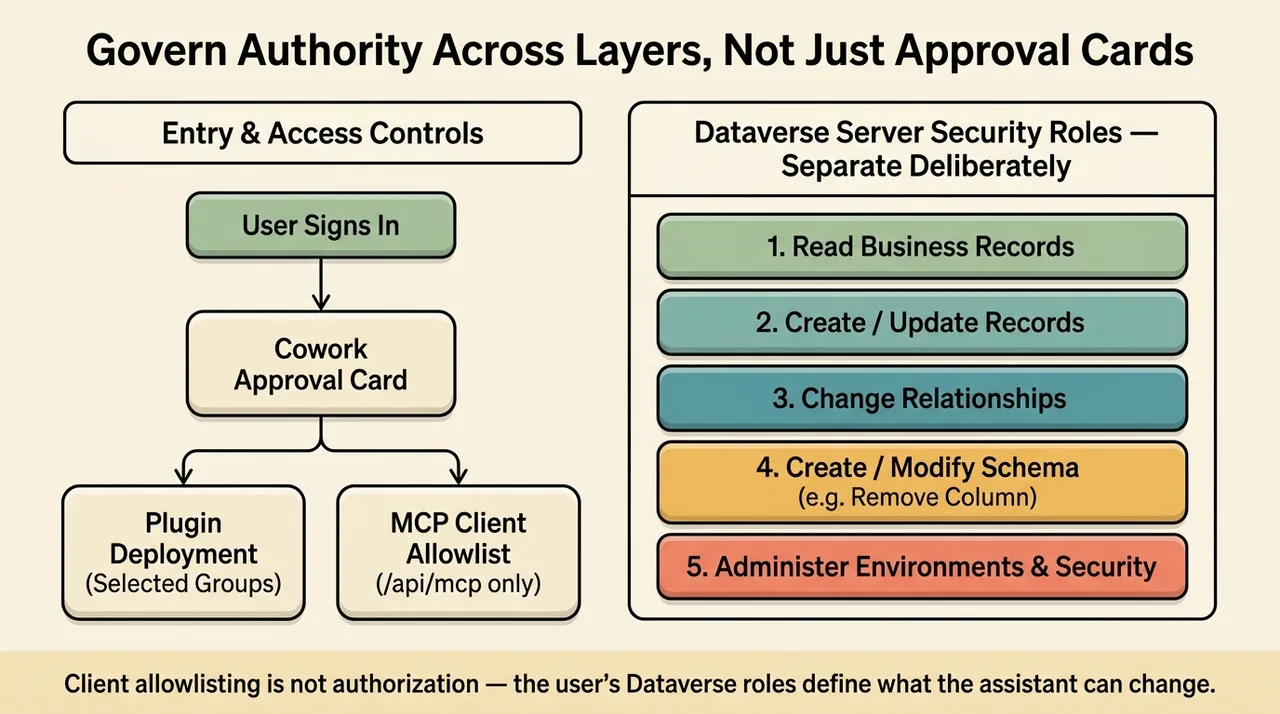
A sensible enablement strategy is to let users shape workflows around approved data while reserving schema changes and authoritative business logic for a controlled lifecycle.
The source argues that restricting app creation can drive users toward shadow IT. That is a reasonable strategic concern, not a measured finding from this demonstration. Empowerment and governance are not opposites: a sanctioned path can make the safe option easier than the unsanctioned one.
Cost: separate the build session from the app’s operation
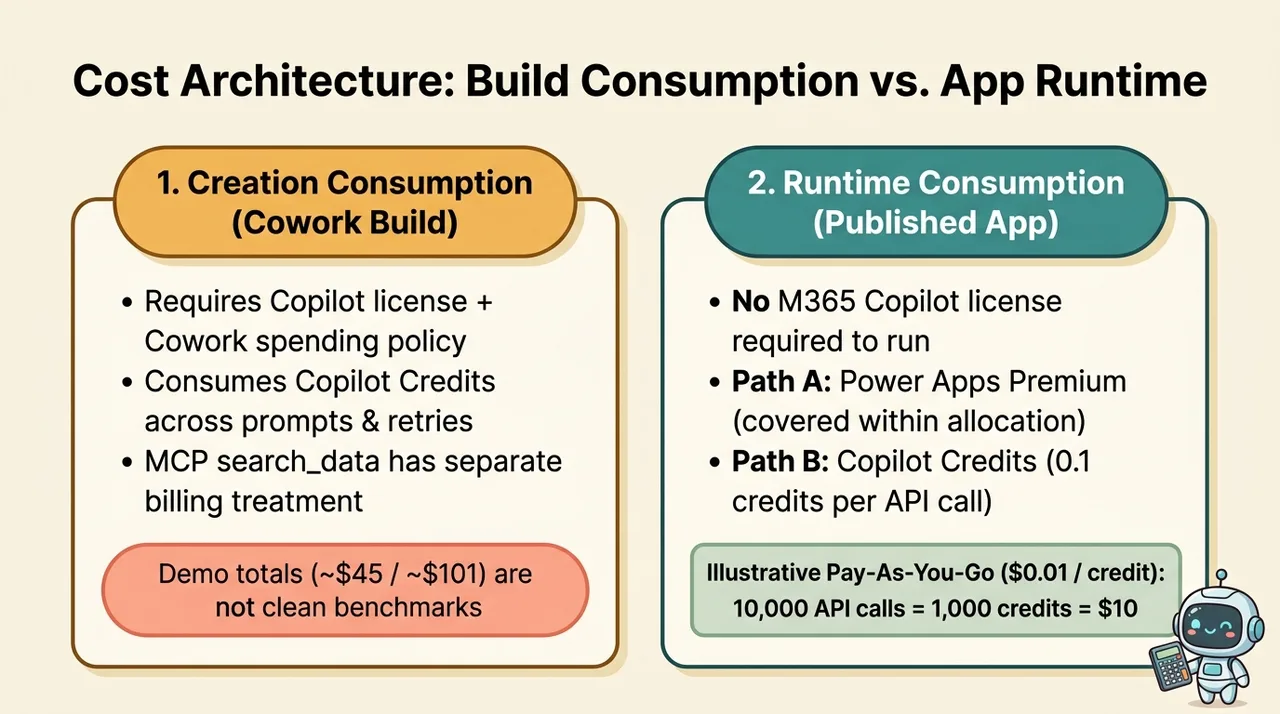
The source reports several usage figures, including an approximately $45 intermediate estimate and an approximately $101 final app-building estimate. It also mixes daily totals with other Cowork work and contains inconsistent credit-to-dollar narration.
Those figures should not become a pricing benchmark. The demonstration does not isolate a clean starting balance, attributable usage, retries, or the applicable purchasing arrangement.
The useful distinction is between creation consumption and runtime consumption.
The Copilot Managed Runtime licensing FAQ states that:
- Building in Cowork requires a Copilot license and consumes Copilot Credits through the maker’s Cowork spending policy.
- Running the app requires Power Apps Premium or Copilot Credits; a Microsoft 365 Copilot license is not itself required to run it.
- Build and runtime consumption are managed separately.
- Runtime API calls consume 0.1 Copilot Credits each. Specialized services are charged separately.
- Power Apps Premium users do not consume runtime credits within their applicable request allocation; excess requests and specialized services have separate treatment.
The Copilot Credits Guide lists a pay-as-you-go price of $0.01 per credit. As a directional illustration, 10,000 runtime calls at 0.1 credits each equal 1,000 credits, or $10 at that published rate. This is not a quote, measured consumption, or an all-in application cost.
The presenter also notices a delay while filtering activities and infers an API call. A delay alone does not prove the request pattern. Inspect network activity before drawing conclusions. If the app queries on every keystroke, debouncing, caching, and more selective retrieval may improve both responsiveness and consumption.
Finally, conversational data access can have its own metering. The current Dataverse MCP tool documentation distinguishes the billing treatment of search_data from other tools. Do not treat a Cowork build, an MCP search, and an ordinary runtime data call as interchangeable units of work.
A practical way to try it
For a controlled evaluation:
- Confirm a Microsoft 365 Copilot license, Cowork enablement, usage-based billing, and Frontier access for the App skill using the Cowork prerequisites.
- Have administrators make the Dataverse plugin available to the intended users.
- In Cowork, open Customize, select Microsoft Dataverse, connect, and enter the target environment URL.
- Use a suitable test environment and appropriately scoped permissions.
- Describe the workflow, existing tables, relationship semantics, and rules that must hold outside the app.
- Review proposed changes before approving them.
- Validate stored records, alternate write paths, runtime identity, and published-app access.
- Measure attributable build consumption and representative runtime usage separately.
The source’s unsuccessful attempts in ordinary Copilot Chat and Copilot Code should remain scoped to that demonstration. They do not establish that Dataverse is exclusive to Cowork. Microsoft’s November 2 platform overview documents Dataverse integrations across GitHub Copilot, Claude Code, Codex and ChatGPT, Cursor, and other tools. The supported packaging and workflow differ by host.
Cowork’s distinctive value here is the conversational, approval-driven path to an app, not exclusive access to Dataverse.
The architect’s job moves toward the guarantees
The unsettling part of this demonstration is not that AI can produce an attractive interface. It is that reusable platform expertise can now travel with the tool: discover the schema, reuse existing data, build an app, and explain an important limitation.
That compresses work that previously required substantial maker effort. It also makes architectural mistakes easier to package inside something that looks finished.
The response should not be to protect manual implementation work for its own sake. It should be to make the acceptance bar explicit: correct data, appropriate authority, enforced invariants, reliable runtime access, and understood consumption.
Users can increasingly describe the workflow they need. Architects still need to establish what that workflow guarantees when another app, another identity, or another simultaneous request enters the picture.
A generated app is an implementation candidate. Its guarantees are what make it a dependable system.
Read next