Copilot Code Explained: From a SharePoint List to a Managed Business App

Writer

A team needs a small equipment-loan application. The data already lives in SharePoint: which items are available, who borrowed them, and when they should come back. The missing piece is a usable interface.
Traditionally, that might mean building a Power Apps canvas app. Copilot Code offers another route: describe the application, inspect a generated preview, correct its behavior, and publish it to a Microsoft-managed host.
The interesting question is not whether AI can generate an attractive screen. It is whether the resulting application connects to real data, behaves correctly, can be maintained, and fits the organization’s operating model.
This article explains that route through an equipment-loan example, then examines the architecture, access requirements, billing, and trade-offs against Power Apps and GitHub Copilot.
Preview context: Product behavior and pricing were checked against Microsoft documentation available on November 2, 2026. Copilot Code remains a Frontier preview feature, and Copilot Managed Runtime is also in preview. Availability, controls, and commercial terms can change. See the Copilot Code documentation and Managed Runtime overview.
What Copilot Code actually is
Copilot Code is an AI-assisted software-building experience in the Code tab of Microsoft Copilot, alongside Chat and Cowork. It generates software from natural-language descriptions, runs it, presents supported artifacts in a preview canvas, and iterates through conversation. Microsoft documents apps, dashboards, internal tools, static websites, data transformations, scripts, and automations as supported categories. It is not limited to front-end pages. Source: Copilot Code overview.
A useful mental model for the three experiences is:
- Chat: Work through a question or produce an answer interactively.
- Cowork: Delegate a multi-step outcome, potentially including building an app.
- Code: Make a software project the center of the interaction, with generation, preview, revision, and optional repository integration.
These are overlapping entry points, not watertight capability boundaries. In particular, both Cowork and Code can build applications for Copilot Managed Runtime. Microsoft’s runtime documentation describes Code cloud sessions as offering a maker experience similar to Cowork, while local Code sessions provide a more code-oriented workflow. Source: Managed Runtime creation paths.
That distinction is more useful than declaring Cowork exclusively for business users and Code exclusively for developers. Both can serve non-developers. The difference is how much of the software-building process the user wants to engage with.
The working loop: describe, inspect, refine, publish
Copilot Code’s basic loop is straightforward:
- Describe the outcome and intended users.
- Let Code generate the project and supported preview.
- Inspect the result, including its data connections and behavior.
- Request focused changes or fixes.
- Test the application as a user.
- Publish and share when it is ready.
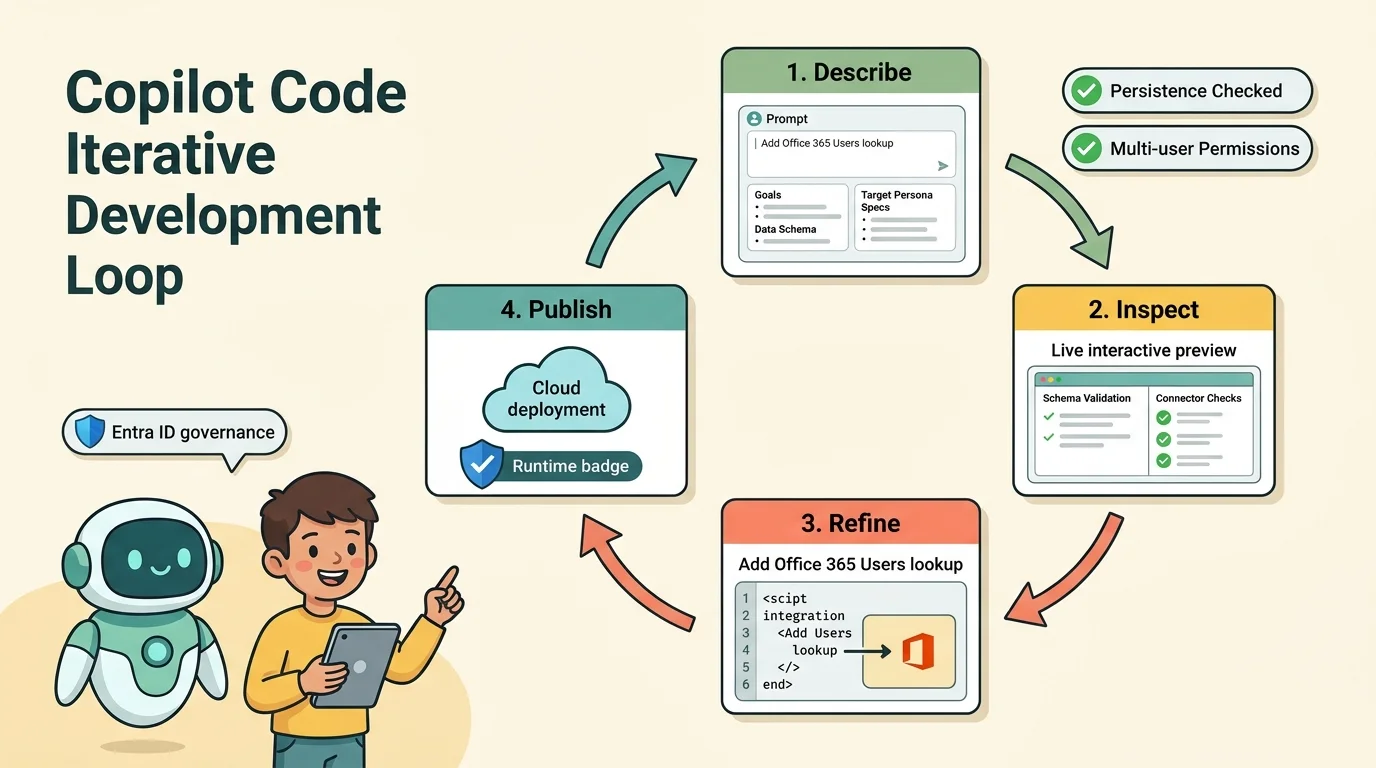
Code supports reverting to an earlier version, and publishing is separate from building. A saved project is not automatically a live release. Preview support also depends on the artifact and platform; a generated project’s existence does not prove that the agent has exercised its interface. Source: Using Copilot Code.
The equipment-loan example: a small app with real integration requirements
The supplied demonstration compares an existing Power Apps canvas app with a Copilot Code implementation of the same equipment-loan scenario. Both use SharePoint data. The required behavior is modest but meaningful:
- Display equipment, availability, images, and loan details.
- Find an employee to assign as the borrower.
- Check out an item with a due date.
- Return an item and restore its availability.
- Identify overdue loans.
The presenter reports roughly an hour or more for the canvas app and approximately ten minutes for the initial Code build, with AI assistance used in both approaches. Those are reported timings from one demonstration, not a controlled benchmark. They do not establish a general productivity multiplier or prove that models reason better about JavaScript than Power Fx.
The stronger evidence is the integration sequence: the generated app displayed equipment, a return action changed the SharePoint record, and a missing employee lookup was corrected through another iteration.
Start with the data contract, not the screen
Before asking AI to build the interface, clarify what the underlying data means.
For an equipment-loan application, that includes item identifiers, status values, borrower identity, due dates, and the relationship between equipment and loan records. If the implementation uses separate equipment and loans lists, explain that relationship. If it uses one combined list, explain which fields represent the current loan.
Do not let the generator invent a schema relationship simply because the prompt says “kit and loans.” The demonstration does not provide enough detail to reproduce its exact schema, internal column names, or connector operations.
An illustrative starting prompt could be:
Build an internal equipment-loan app using the existing SharePoint equipment and loan data at the site I provide. Show available and borrowed items, including images and current loan details. Let authorized users select an employee, check out an available item with a due date, and return an item. Flag active loans whose due date has passed. Inspect the existing schema and ask about ambiguous relationships before implementing writes.
This is an example prompt, not a guarantee that every schema or connector configuration will work without additional clarification.
A people-search box is not a people-search integration
The first generated version in the demonstration had a borrower search field, but entering employee names returned no results. The interface existed; the required lookup did not work.
After the presenter described the failure, Code requested a connection to the Office 365 Users service. The subsequent version returned an employee result. Microsoft documents this connector’s user-search operations separately from SharePoint operations. Source: Office 365 Users connector reference.
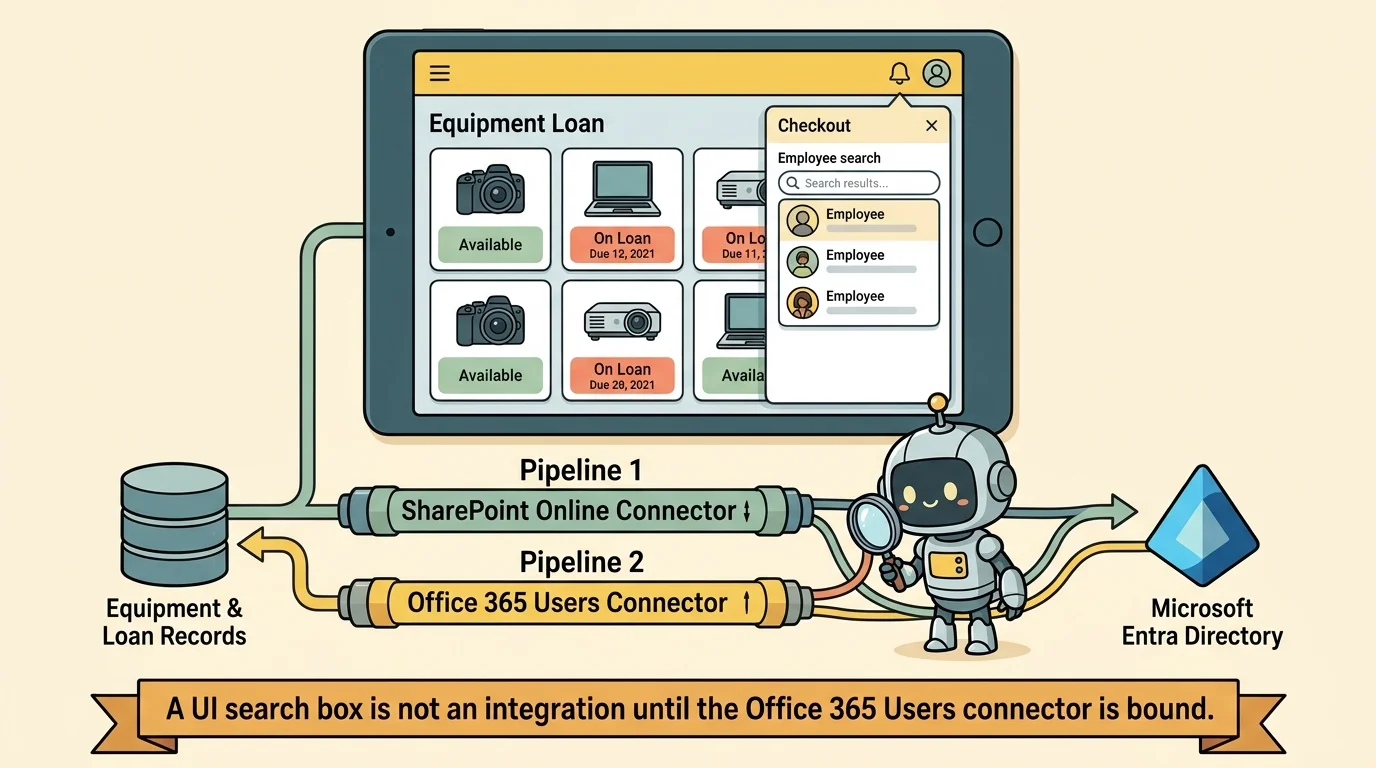
This is the most useful lesson in the example: a generated control can look complete while its dependency is missing.
A good correction request names the failing action and expected behavior: selecting an item, entering an employee name, and receiving directory matches. That gives the coding agent a concrete integration problem rather than a vague instruction to “fix the app.”
The same reasoning applies to persistence. A screen changing from “on loan” to “available” is not enough. The demonstration checked SharePoint after refreshing and observed the corresponding record change. That is stronger evidence of a successful write than an optimistic update in the browser.
Separate editing from testing
During the demonstration, the preview restarted while the presenter was testing a return action because Code was still modifying the project. That makes results harder to interpret: was the failure caused by business logic, a connection problem, or a development reload?
A more reliable approach is to let a focused change finish, then test a stable version. For this scenario, useful acceptance checks include:
- Employee lookup returns expected users and handles no matches.
- Checkout persists the borrower, due date, and status.
- Return updates the underlying record, not just the interface.
- Overdue logic excludes returned items and handles date boundaries consistently.
- A second user sees the expected data with their own permissions.
- Failed writes produce a visible error rather than a false success.
- Two users attempting to borrow the same item do not silently overwrite each other.
These are recommended validation checks, not features proven by the demonstration. Images, overdue handling, concurrency, and every permission path still need their own tests.
Two environments to understand: the coding session and the published app
The word “runtime” can hide two different activities.
During development, Copilot Code needs somewhere to execute its coding work. After publication, the application needs somewhere to run for its users. Treating these as one thing creates confusion about isolation, governance, and cost.
Local and cloud coding sessions
Copilot Code supports local project folders and isolated cloud development sessions. Local sessions work with files on the user’s device; cloud sessions keep the project in a cloud environment. Administrators can control the permitted execution locations. The documented organizational default is cloud-only when billing is configured, rather than an unconditional promise that every user can switch to local execution. Sources: Code usage guide, Code administration.
By default, actions such as network calls, terminal commands, extensions, and access outside project folders require permission. An “Always allow” choice persists until disabled and applies across existing and new sessions, so it deserves deliberate consideration. Organizational-data access also has different documented defaults for cloud and local sessions. Sources: Code permissions, Code administrative controls.
Copilot Managed Runtime: the operating foundation
For published interactive business apps, Copilot Managed Runtime provides a shared hosting and governance foundation. Apps built through Code, Cowork, Copilot Studio’s app-building experience, or the runtime SDK can use this host. That does not mean every Copilot Studio agent or every Code-generated script runs there. Source: Managed Runtime overview.
The architecture separates three responsibilities:
- Application code: The interface and business logic.
- Runtime SDK: The software development kit that exposes host capabilities and generated connector models and services.
- Runtime host: Microsoft-operated hosting, end-user authentication, app loading, and policy enforcement.
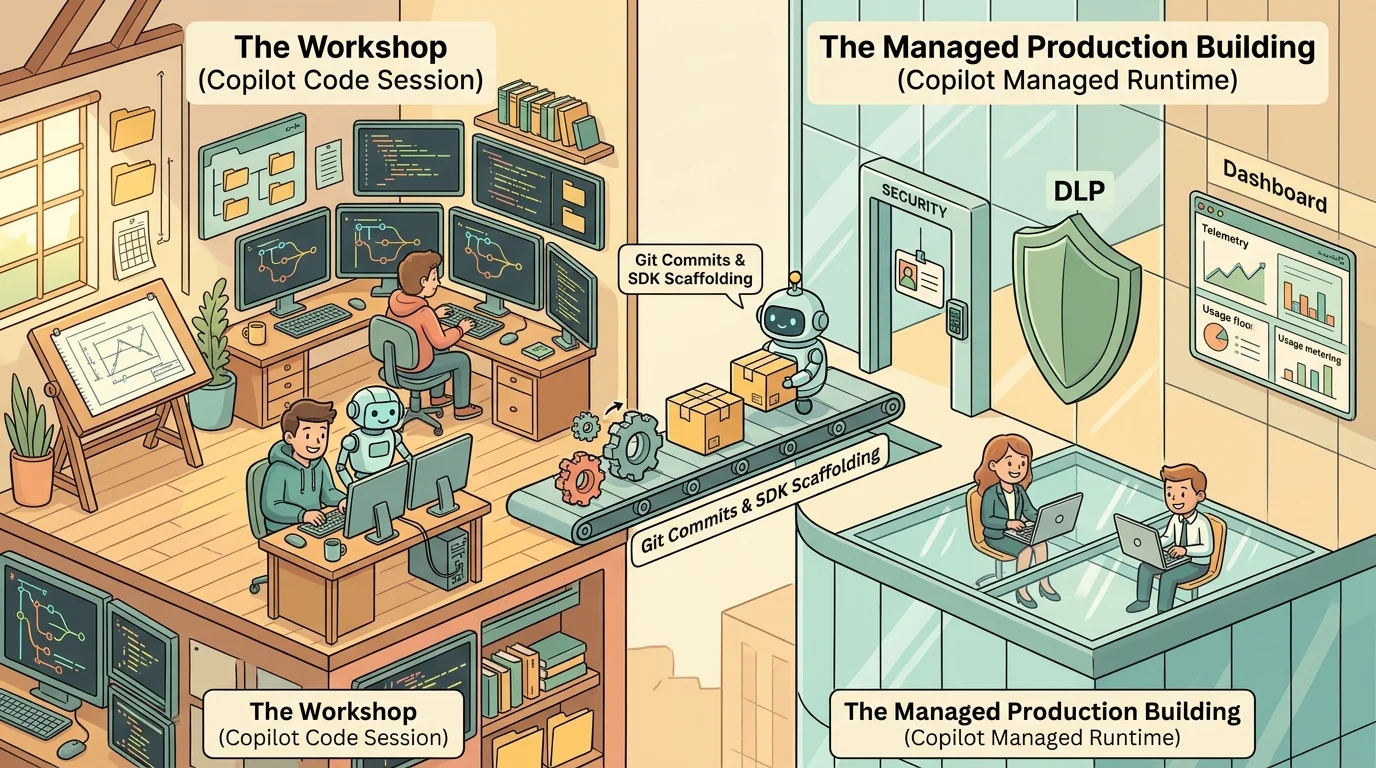
The documented app architecture uses JavaScript or TypeScript single-page applications. The command-line interface, or CLI, scaffolds and configures projects, registers connectors, and deploys apps. Git is the source of truth, using either a platform-managed repository or an approved external repository. React may be used, but the runtime does not require a particular front-end framework. Source: Managed Runtime architecture.
Think of Code as the workshop and Managed Runtime as the managed building in which the finished application operates. The workshop helps create the app; the building supplies common infrastructure. Neither guarantees that the app’s business rules are correct.
Managed does not mean governance-free
It is tempting to conclude that building inside Microsoft 365 removes security and governance concerns. A narrower claim is accurate: the platform supplies important controls that a team would otherwise need to assemble.
Microsoft documents Entra authentication, Conditional Access, data loss prevention (DLP), advanced connector policies, sharing limits, centralized inventory, usage analytics, and health monitoring for Managed Runtime. Code also has controls for execution location, GitHub connectivity, organizational context, and spending. Describing the experience as having “no governance” is therefore misleading. Sources: Runtime administration, Code administration.
Those controls do not replace application validation. A permitted connector can still be called incorrectly. A signed-in user can still encounter a faulty checkout rule. A well-governed application can still lose data through bad logic.
Sharing the app does not share the data
Publishing makes a live version available; sharing grants access to that application. Neither automatically grants access to its underlying SharePoint records. Recipients need the relevant source permissions and may need to approve a connection when they first open the app. Source: Publish and share Code apps.
For the equipment app, this means testing with an ordinary intended user, not only the maker’s account. A successful maker preview does not establish that another employee can read the list, search the directory, or update a loan.
Environment isolation exists, but do not assume ALM equivalence
The demonstration suggests there is no development, test, and production separation. Current documentation needs a more precise reading.
Managed Runtime provisions personal developer environments that are isolated from production and managed by default. Environment routing is automatically enabled, and existing routing rules can affect which makers are able to create apps. These environments do not initially include Dataverse, although it can be added. Sources: Runtime admin concepts, Environment routing.
That is not the same as proving parity with a team’s established Power Platform application lifecycle management (ALM) process. Power Platform ALM uses solutions to move components between environments and supports deployment pipelines and source-control practices. Teams dependent on that model should evaluate the actual release path, rather than assuming either that Managed Runtime has no lifecycle controls or that its controls are interchangeable with solution-based ALM. Source: Power Platform ALM overview.
Getting access: license, preview enrollment, policy, and client
For an organizational pilot, verify four separate prerequisites:
- A Microsoft Copilot license and enabled Code experience. Work-account access is license-controlled and administered by the organization.
- Frontier access. Code remains a Frontier preview feature.
- Usage-based billing and spending-policy coverage for Code. A visible tab is not sufficient evidence that consumption is funded.
- A supported client and rollout configuration. Windows, Mac, and web cloud development are documented; there is no mobile Code app at this release.
Microsoft’s current Windows onboarding guidance includes deploying the unified Copilot app and setting its update target channel to Beta. Follow the documented deployment steps rather than identifying the app by its logo. Sources: Code requirements, Getting started, Usage-based billing services.
In the Microsoft 365 admin center, Copilot > Cost management is the starting point for billing configuration and spending policies. Scope the pilot to appropriate users or groups, confirm Code is covered, and set limits. Configure runtime coverage separately for users who will consume the published app through credits. The builder’s policy is not automatically the application’s user entitlement. Sources: Billing setup, Runtime licensing FAQ.
Billing: separate building the software from using it
The source’s two-part cost model is useful, provided its units and exceptions are handled correctly.
Building: variable Copilot Credit consumption
Copilot Code consumes Copilot Credits as users create, refine, and publish solutions. Microsoft’s November 2026 guide identifies four consumption drivers: models, context, tools, and managed orchestration runtime. There is no universal fixed price per build. A ten-minute demonstration does not establish its cost without consumption data. Source: Copilot Credits Guide, Code section.
The published pay-as-you-go rate is $0.01 per Copilot Credit. Pre-purchase plans offer tier-dependent discounts of up to 20%, but those discounts require the corresponding commitment; they are not an automatic benefit of buying any credit pack. Unused annual pre-purchase credits expire at the end of the term. Source: Copilot Credits purchasing guidance.
Model selection can influence consumption, but avoid treating a model list from a video as permanent availability. Code lets users choose a model or let the service choose; the current picker and documentation should guide selection. Source: Code models.
Running: Premium entitlement or usage-based credits
Users running Managed Runtime apps need either a Power Apps Premium license or Copilot Credits. They do not need a Microsoft 365 Copilot license merely to run the app. Conversely, Power Apps use rights included with Microsoft 365 or Dynamics 365 do not provide Managed Runtime app access, even when the app uses only a SharePoint connector. Source: Runtime licensing FAQ.
Runtime usage is measured in API calls at 0.1 Copilot Credits per call. Typical counted actions include app launches, connector reads and writes, and publishing. One user click or one business transaction is not necessarily one API call. Sources: Runtime licensing FAQ, Copilot Credits Guide.
Premium users’ ordinary app runtime is covered subject to applicable Power Platform request limits. Usage above those limits can consume credits, and specialized services such as Work IQ APIs are billed separately. “Premium means no credits under any circumstances” is too broad. Source: Runtime licensing FAQ.
Correcting the break-even calculation
At the published pay-as-you-go rates, the illustrative runtime cost is:
API calls × 0.1 credits per call × $0.01 per credit = API calls × $0.001.
Therefore, 7,920 calls consume 792 credits and cost $7.92. This is directional runtime-only math, not measured consumption from the equipment demo. It excludes building, separately billed services, taxes, discounts, and other applicable charges.
The standard US Power Apps Premium list price is currently $20 per user per month, paid yearly. Microsoft has announced $22 from January 1, 2027, with existing subscriptions retaining their price through their current term and the new price applying under the announced purchase and renewal conditions. Sources: Power Apps pricing, Price-change announcement.
| Runtime-only comparison | At $20 Premium | At $22 Premium |
|---|---|---|
| One user’s monthly license price | $20 | $22 |
| Equivalent API calls at $0.001 each | 20,000 | 22,000 |
| Credits consumed by those calls | 2,000 | 2,200 |
| Twenty users’ monthly license price | $400 | $440 |
| Equivalent aggregate API calls | 400,000 | 440,000 |
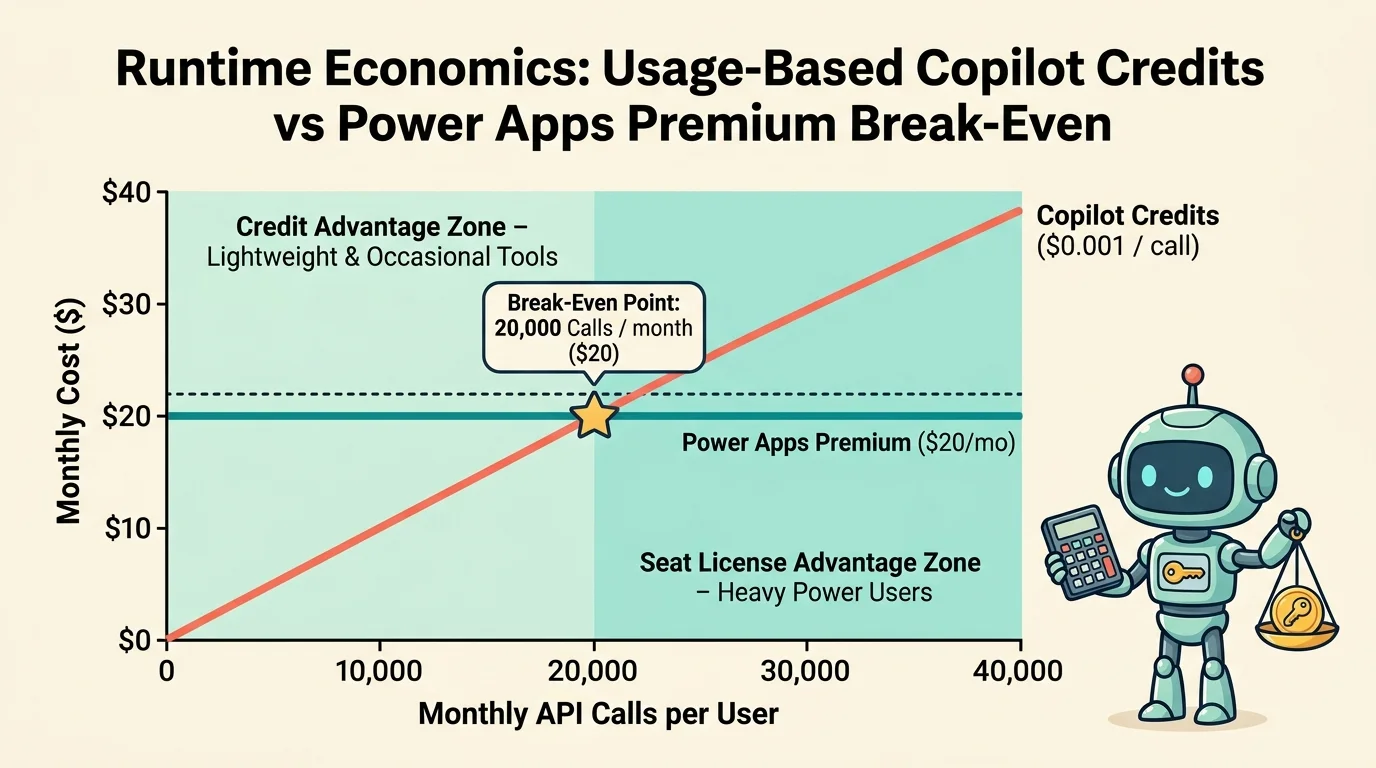
The important correction is the unit: 20,000 API calls, not 20,000 credits, correspond to $20 at these rates. Twenty thousand credits would cost $200.
Even the corrected threshold is only a planning aid. Runtime entitlement is per user, existing Premium licenses may already cover users, and Premium supports more than one application. A team with many occasional users and a few heavy users should not assume a single aggregate average captures the best licensing approach.
Credit funding may be easier to position as a shared innovation budget than purchasing licenses for one small app. That is a budgeting argument, not proof of lower total cost. Use observed API-call volumes and existing entitlements before deciding.
Where Code fits beside Power Apps and GitHub Copilot
These options are not three mutually exclusive replacements. Power Apps is an application platform. GitHub Copilot is a coding assistant used within developer workflows. Copilot Code is a software-building experience with a managed publication route.
| Starting point | Strong reason to choose it | Important boundary |
|---|---|---|
| Power Apps | The app fits canvas or model-driven patterns and established Power Platform solutions, environments, and ALM | Validate connector entitlements and the app’s actual licensing requirements |
| GitHub Copilot | Developers own the code, repository, tests, reviews, and delivery workflow | The coding assistant does not itself replace the hosting platform |
| Copilot Code | A team wants to describe, preview, and iterate on a lightweight internal tool | Generated behavior and preview-stage operating requirements still need validation |
Power Apps Premium also supports code-app scenarios, so the choice is not simply “Power Fx versus real code.” Meanwhile, GitHub Copilot can participate in Managed Runtime development through the runtime’s coding-agent plugin. A developer workflow and a Microsoft-managed host can coexist. Sources: Power Apps capabilities and pricing update, Managed Runtime SDK overview.
A practical selection sequence is:
- Does the application depend on an established solution-based Power Platform release process? Start by evaluating Power Apps against that requirement.
- Will developers own and maintain the source? Consider a repository-centered workflow with GitHub Copilot, including Managed Runtime as a possible host.
- Is this a bounded internal tool whose requirements can be validated quickly? Copilot Code is a reasonable pilot candidate.
- Is the primary requirement a business-process workflow rather than an interactive app? Evaluate Power Automate or the relevant Copilot Studio workflow experience. Code’s support for scripts and automations does not automatically make it the best operational home for every process.
These are architectural recommendations, not hard product restrictions. The right answer depends on ownership, data, release requirements, and operational fit more than on which tool generates the first screen fastest.
GitHub handoff is real, but it is not an automatic migration
Code can connect to GitHub, work with existing repositories, create new repositories, and produce branches, commits, and draft pull requests. Administrators control whether GitHub connections are permitted. Sources: Code GitHub capabilities, Code administration.
That creates a useful path from an exploratory app toward developer ownership. It does not automatically make the project production-ready or remove dependencies on its runtime SDK, connectors, and deployment configuration. Managed Runtime external-repository support also has specific GitHub Enterprise Cloud organizational prerequisites. Source: Runtime SDK repository requirements.
The real opportunity: shorten the first build, strengthen the feedback loop
The equipment-loan demonstration is compelling because it moves beyond a mock-up: it shows a SharePoint write and a broken directory lookup repaired through iteration. It also shows why the first generated version should be treated as a draft.
Copilot Code can reduce the effort required to reach something testable. Managed Runtime can reduce the infrastructure work required to host it under organizational controls. Neither removes the need to establish what correct behavior looks like.
For a pilot, choose a bounded scenario, define acceptance checks before generation, verify real persistence and ordinary-user access, and measure build and runtime consumption separately. Then decide whether the app should remain a lightweight managed tool, enter an established Power Platform lifecycle, or move into a developer-owned repository workflow.
The central shift is not from “developers” to “no developers.” It is from spending most of the first iteration assembling an application to spending more of it validating an application that already exists. That is valuable, provided the faster build does not become an excuse for a weaker review.
Read next