Dataverse Skills Plugin: Terminal-Driven Solutions

Writer
Quiz available
Take a quick quiz for this article.

Microsoft is aggressively positioning Dataverse as the intelligent nerve center for enterprise business data. For those of us architecting AI agent orchestration and enterprise automation, the recent release of the open-source Dataverse Skills Plugin fundamentally shifts how we interact with this ecosystem.
Instead of relying solely on the traditional Power Platform UI, developers can now instruct coding agents—like GitHub Copilot CLI and Claude Code—to query, structure, and populate Dataverse environments directly from the terminal. By unifying the PAC CLI, the Python SDK, and Model Context Protocol (MCP) capabilities, the plugin bridges the gap between local agentic workflows and managed cloud environments.
This is a practical breakdown: where the plugin fits in Microsoft’s broader strategy, how to install and connect it, and a full hands-on walkthrough—building a real solution end to end, including the gotchas you’ll hit along the way.
The Three Tiers of Dataverse AI Architecture
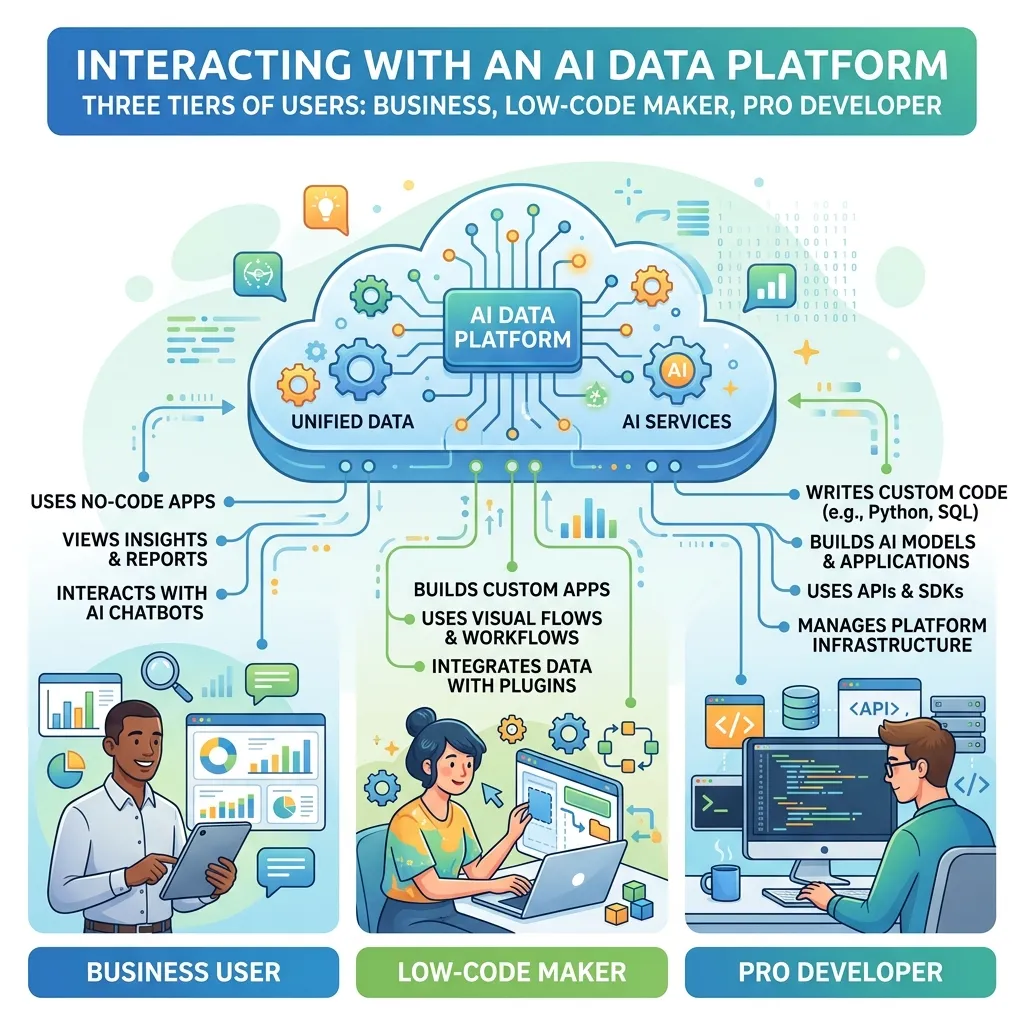
To understand the value of the Dataverse Skills Plugin, look at the three distinct personas Microsoft is targeting with its AI data platform story. The key axis is when the AI does its work—at consumption time, at runtime, or at build time.
- Business User (“I use AI”) — consumption time: Interacts via Microsoft 365 Copilot. Capabilities are fueled by Work IQ and Dataverse Search natively surfacing CRM/Sales intelligence at execution time. No building involved—just asking.
- Maker (“I build agents”) — runtime: Operates within low-code interfaces. Uses the Dataverse MCP server, runtime Business Skills, and Prompt Columns to define how a deployed agent uses Dataverse while it runs.
- Developer (“I code with AI”) — build time: Operates in the terminal. Uses GitHub Copilot CLI or Claude Code powered by Dataverse Skills to architect backend structures before anything is deployed.
The Dataverse Skills Plugin lives squarely in that third tier. It is a build-time toolkit—it helps you create and shape the environment, not run an agent inside it.
Crucial Distinction: Do not confuse Dataverse Skills with Dataverse Business Skills. The former is a build-time toolkit for developers to create environments; the latter is a runtime feature dictating how a deployed agent utilizes Dataverse data. Same word, opposite ends of the lifecycle.
Prerequisites & Installation
Here is the part most overviews skip—what you actually need before the first prompt, and how to get the plugin running.
What you need:
- A Dataverse environment. Any Power Apps, Dynamics 365, or Power Platform plan works. If you just want to experiment, the free Power Apps Developer Plan gives you a personal environment at no cost.
- A supported coding agent. The plugin ships for Claude Code, GitHub Copilot CLI, Cursor, and Codex.
- Local tooling—handled for you. You do not need to manually install the PAC CLI, the Dataverse CLI, or the Python SDK first. The plugin’s
dv-connectskill verifies and provisions that tooling on the first connection. You only bring the agent and an environment.
Install the plugin. From inside your agent, run the one-liner for your client:
Verify it’s active. Run /plugin (Claude Code) or /plugin installed (Copilot CLI) and confirm the dataverse plugin appears in the list. That’s it—you’re ready to connect.
The plugin is open source (MIT) and lives at
github.com/microsoft/Dataverse-skills. If you want to read exactly what
each skill instructs the agent to do, browse
.github/plugins/dataverse/skills/—the prompts are plain Markdown, no black
box.
Inside the Plugin: The 8 Skills
The Dataverse Skills Plugin unifies the Dataverse MCP server, the Dataverse CLI, the PAC CLI, and the Python SDK behind a set of natural-language skills. Each skill is a focused instruction set that teaches your agent how to drive one slice of Dataverse correctly—so it stops guessing schema and OData syntax. There are eight:
| Skill | What it does |
|---|---|
dv-overview | Cross-cutting rules and tool routing. Loaded first, it directs each request to the right specialist skill below. |
dv-connect | One-time setup: installs the Dataverse CLI, Python SDK, and PAC CLI, authenticates against your environment, and registers the Dataverse MCP server with your agent. |
dv-query | Reads, filters, paginates, and aggregates records. Handles questions like “show me my open deals,” multi-page result sets, and pandas DataFrame loading for analysis. |
dv-data | Single-record CRUD plus bulk import—CSV loads, multi-table imports with foreign-key dependencies, upsert by alternate key, and AI-generated sample data. |
dv-metadata | Authors and edits the data model itself: tables, columns, relationships, forms, and views. |
dv-solution | Solution lifecycle management—create, export, import, promote across environments, and validate deployments. |
dv-security | Assigns security roles, manages user access, adds application users, configures business units, and handles admin self-elevation. |
dv-admin | Environment-level administration: bulk delete, retention/archival, organization and OrgDB settings, recycle bin, audit, and allowlisted PPAC toggles. |
Functionally, these eight skills map onto three operational pillars you’ll move through in order.
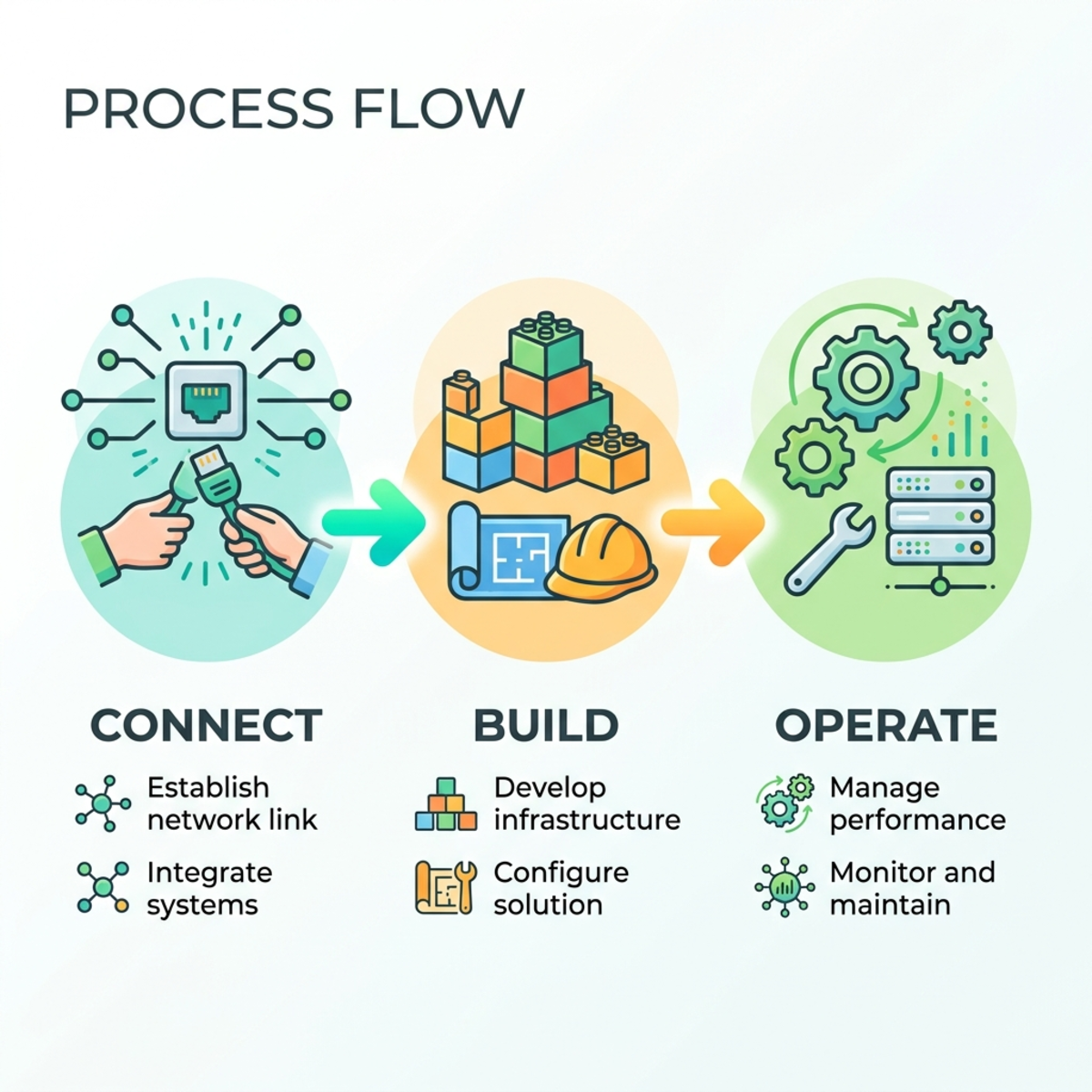
1. Connect
The agent leverages dv-connect (which calls the PAC CLI under the hood) to discover your available environments and handle authentication. By simply asking the agent to connect to Dataverse, it verifies local prerequisites, runs pac auth list, and guides you through the OAuth device flow to lock onto the correct development environment.
2. Build
With dv-metadata and dv-solution, you instruct the agent to architect complex schemas. From a single prompt, it can generate unmanaged solutions, provision tables, map entity relationships, and deploy forms—without you ever touching the Power Apps portal.
3. Operate
Once the schema is live, dv-data and dv-query take over. The agent can bulk-load CSVs, generate relational sample data across multiple tables, and run analytical queries against the live database, formatting the JSON payloads into clean terminal output.
Hands-On Walkthrough: Building a Workshop Tracker
Theory is fine, but the plugin earns its keep in a real session. Let’s build a Workshop Tracker—three related tables (Company, Workshop, Workshop Attendee), seeded with sample data and queried—entirely from the terminal. Each step shows the prompt to use and what to expect back.
Step 0 — Set up a clean workspace
Coding agents maintain context based on their working directory. Create a dedicated, empty folder and launch your agent from inside it:
Trick 1 (Workspace): Launch from a dedicated, empty folder. If you start the agent in a cluttered directory, it may try to continue an unrelated session, causing the plugin to stall during execution steps.
Step 1 — Connect
Ask the agent in plain language—you can name the exact environment so it doesn’t have to ask:
You: Connect me to my Dataverse environment. Use the “YouTube Development” environment.
The agent runs its pre-checks, executes pac auth list, and—if you’re not already authenticated—generates a Microsoft Entra ID device login link. You’ll see something like:
Trick 2 (Authentication): If you paste the device login link into a normal browser session with heavy caching, you may hit a “Request headers are too long” error and the auth fails. Always paste the authentication URL into an Incognito / InPrivate window to force a clean token exchange.
Step 2 — Build the schema
Before you prompt, do one bit of manual prep that pays off later: create the unmanaged solution and publisher yourself in the Power Apps portal (or have the agent do it as an explicit, named step). This locks in your naming conventions and publisher prefix instead of letting the agent invent them.
Then point the agent at that solution explicitly:
You: I have an unmanaged solution named WorkshopTracker. Inside it, create three tables—Company, Workshop, and Workshop Attendee—with sensible columns. Relate Workshop to Company (many-to-one), and relate Workshop Attendee to both Workshop and Company. Add everything strictly to the WorkshopTracker solution.
The agent uses dv-metadata to provision the tables, columns, and lookups, then confirms each object as it lands:
Trick 3 (Solution Building): If you ask the agent to “build a workshop tracker application,” it will often auto-generate a new publisher and solution based on its own assumptions—which breaks naming conventions and governance in enterprise environments. Pre-provision the solution and publisher first, then prompt the agent to build strictly within the named solution.
Step 3 — Seed data
Now switch to the Operate pillar. Ask for relational test data and the agent will write and run a Python script (dv-data) that respects your foreign-key order—companies first, then workshops, then attendees:
You: Generate realistic sample data: 10 companies, 20 workshops across them, and 30 attendees. Make the relationships consistent.
Data Generation Observation: The agent can generate realistic test data (e.g., 60 records across related tables) from a single script. Always verify the result in the Power Apps UI, though—on iterative loops the agent can occasionally trigger duplicate inserts, which a quick follow-up prompt (“de-duplicate the attendees you just created”) will clean up.
Step 4 — Query
Finally, ask a real business question. This is where the plugin’s metadata awareness shines:
You: Show me all workshops delivered in the last 3 months, grouped by company.
Because date-filter formats in Dataverse are highly specific, the agent’s first query may return zero rows or fail on a schema mismatch. Don’t intervene.
Self-Healing Queries Observation: When the first query fails, do not jump in. The plugin is built with metadata awareness—the agent reads the failure, re-inspects the schema, rewrites its own query, and pulls the clean, tabular output on the second pass. Watching it correct a date-format mismatch on its own is the clearest proof that this is more than a thin CLI wrapper.
Governance, Cost & Guardrails
Before you turn this loose on a production tenant, three things every architect should know:
- Managed vs. unmanaged ALM. The plugin builds in unmanaged solutions by design—correct for development. Keep your usual ALM discipline: export and import as managed when promoting to test and production. The
dv-solutionskill handles export/import/promote, so you can script the handoff rather than click it. - Least privilege. Give your build identity only the security roles it needs (
dv-securitycan assign them, but that doesn’t mean you should grant System Administrator everywhere). Treat the agent’s identity like any other service principal. - Destructive actions are gated. The underlying Dataverse MCP server requires explicit user approval before any
delete_recordordelete_tablecall—so an over-eager prompt can’t silently drop a table. - Watch the meter. Since December 15, 2025, Dataverse MCP tools are metered (Copilot Credits) when called by agents created outside Microsoft Copilot Studio—which includes terminal agents like these. If you hold Dynamics 365 Premium licenses or a Microsoft 365 Copilot User Subscription License, access to Dynamics data is exempt. Factor this into how you run large bulk-data or query loops.
Conclusion
The Dataverse Skills Plugin is a massive leap forward for developers who prefer terminal-driven, code-centric workflows over clicking through low-code menus. By packaging the Dataverse MCP server, the PAC CLI, the Dataverse CLI, and the Python SDK into eight task-focused skills, it lets you prototype, build, and populate complex Dataverse architectures in a fraction of the time.
If you want to try it today:
- Spin up a free Power Apps Developer Plan environment.
- Install the plugin in Claude Code or Copilot CLI with the one-liner above.
- Open a clean folder and prompt: “Connect me to my Dataverse environment.”
From there, the walkthrough in this post takes you the rest of the way—from an empty environment to a populated, queryable solution without a single click in the portal. The source is open at github.com/microsoft/Dataverse-skills; read the skills, file an issue, or extend them for your own org’s conventions.
Read next