Dataverse in Copilot Cowork: The App Is Easy. The Architecture Still Matters.

Writer

A drag-and-drop app that assigns certifications and outdoor activities to instructors is a useful productivity improvement. Generating it from a natural-language prompt is impressive. But neither tells us whether the resulting system is correct.
The revealing test comes later: an instructor must never have more than two activities. The generated interface blocks a third assignment. Another app, working against the same Dataverse records, allows it.
That gap is where the real story begins.
Microsoft’s Dataverse plugin for Copilot Cowork brings natural-language app creation closer to people who understand a business process but do not write code. It also raises a more consequential question for Power Platform professionals: when AI can produce a convincing application, what remains the architect’s responsibility?
The answer is not simply “write better prompts.” It is to distinguish a useful interface from a trustworthy system, and to make that distinction operational.
Availability context: Microsoft’s documentation identifies the Dataverse plugin in Cowork as a preview feature. Building and publishing apps through Cowork requires Frontier enrollment. The product details in this article reflect official documentation available on November 23, 2026. Preview behavior can change. See Microsoft’s Dataverse plugin documentation.
More Than a Connection to Business Data
Dataverse is the business-data platform behind many Power Apps and Dynamics 365 applications. In Cowork, the Dataverse plugin provides a connection to an environment alongside skills for working with data models, records, business logic, security, and solutions.
That combination matters. A connection lets an AI system reach data. Skills provide guidance about how to work with it.
Microsoft documents workflows in which Cowork inspects existing tables, proposes a model, reuses established entities, creates relationships, loads sample data, and builds an application. In Microsoft’s event-registration example, registrations reference the existing Contact table rather than introducing a duplicate list of people. The app-building workflow also performs type checking, linting, a build, and a visual review before publishing. These are documented behaviors, not a guarantee that every generated application is architecturally complete. See Microsoft’s app-building demonstration.
A useful mental model is a capable maker with a platform playbook, not an autonomous architect with complete knowledge of your organization.
The playbook can encourage good decisions. It cannot supply business requirements that were never stated, resolve every ambiguity in the data model, or prove that an invariant survives every integration path.
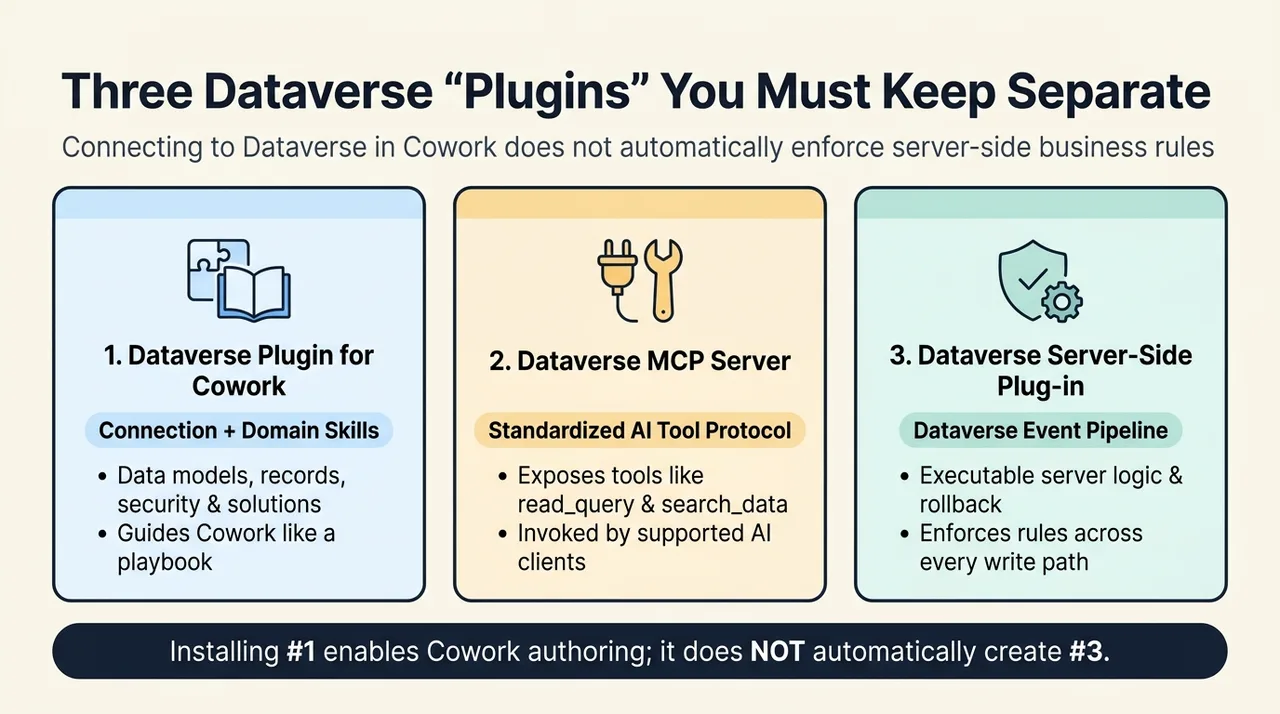
Keep three different “plugins” separate
The terminology can obscure the architecture:
- The Dataverse plugin for Cowork packages the capabilities and guidance Cowork uses to work with Dataverse.
- The Dataverse Model Context Protocol server exposes tools that supported AI clients can invoke. Model Context Protocol, or MCP, standardizes access to external tools and resources.
- A Dataverse server-side plug-in is executable business logic registered in Dataverse’s event pipeline.
Installing the first does not automatically create the third. That distinction becomes critical when a requirement must be enforced outside the generated app. Microsoft’s MCP documentation and server-side plug-in exception guidance describe these separate mechanisms.
From Asking Questions to Changing Relationships
The supplied demonstration begins with data exploration: counting tables, listing hotels, and finding instructors over a particular age with particular certifications.
These questions exercise different capabilities.
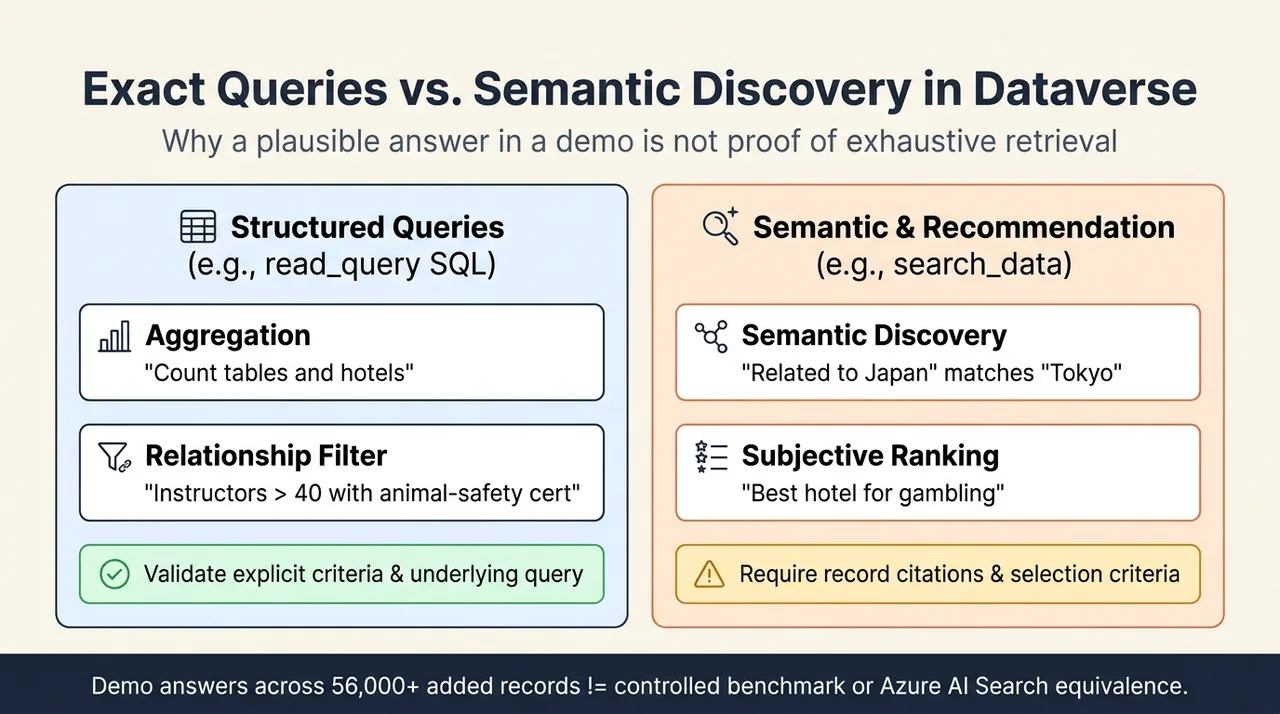
A count is an aggregation. “Instructors older than 40 with an animal-safety certification” requires filtering and traversing relationships. Both have relatively explicit criteria that can be translated into structured queries.
“Which hotels mention something related to Japan?” is different. A description might mention Tokyo without containing the word Japan. Answering the question requires more than matching the literal search term.
Likewise, “Which hotel is best for gambling?” requires interpreting descriptions and deciding what “best” means. It might mean proximity to casinos, on-site facilities, or the strongest textual association with gambling. A plausible answer is not necessarily an objectively ranked recommendation.
Semantic relevance is not proof of exhaustive retrieval
In the demonstration, the presenter reports useful answers first with several thousand hotel records and later after adding approximately 56,000 more. That is encouraging evidence from a particular demonstration. It is not a controlled benchmark.
The transcript does not establish:
- Which retrieval operations were invoked.
- Whether every eligible record was examined.
- How pagination or result limits were handled.
- Whether answers were evaluated against a complete reference set.
- How repeatable the reported latency was.
It also does not prove the presenter’s explanation that the system fetched all the data and then interpreted its meaning. The visible answer alone cannot establish the internal retrieval strategy.
Microsoft’s current MCP documentation distinguishes read_query, which runs supported SQL SELECT queries, from search_data, which searches structured and unstructured data. That confirms multiple documented access patterns, but not which pattern produced a particular answer in the video. See the current Dataverse MCP tool list.
For exact counts and compliance-sensitive reporting, require explicit criteria and validate the underlying query. For exploratory recommendations, require record references and an explanation of why each result fits.
The same caution applies to the claim that this capability eliminates the need for Azure AI Search. A successful conversational search demonstration does not establish equivalence with a separately designed search system’s indexing, retrieval controls, evaluation, or workload economics. These may overlap in usefulness without being interchangeable architectures.
The Instructor App: A Better Interface Over the Same Records
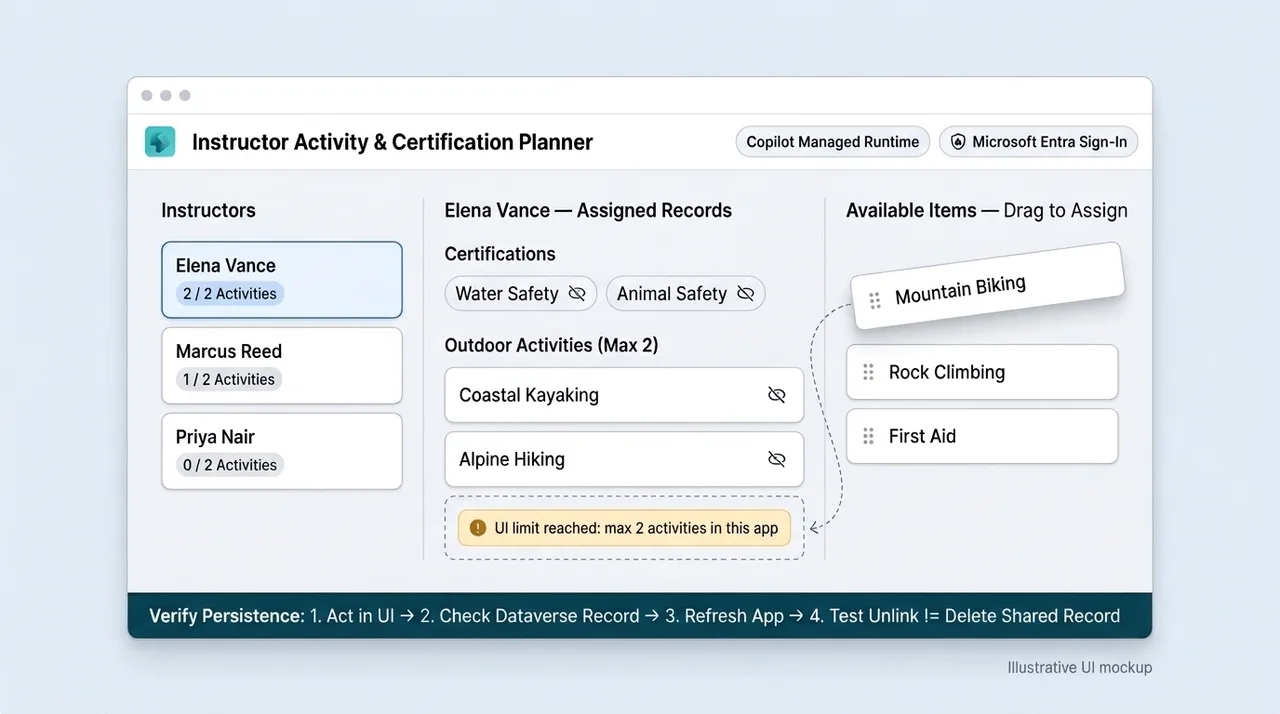
The app request in the demonstration is straightforward: select an instructor, show certifications and outdoor activities, and let the user drag records onto the instructor to create the corresponding relationships.
Traditionally, a Power Platform team might address that experience with a canvas app or a custom Power Apps component framework control. The demonstration instead shows Cowork generating a purpose-built interface.
The important validation is not that the cards move. It is that the relationships change in Dataverse.
The presenter checks the underlying records after assigning a certification, removing another, and adding an activity. Those checks establish something the interface alone cannot: the demonstrated actions persist beyond the app’s local state.
That is a useful testing habit for any generated application:
- Perform an action in the generated interface.
- Inspect the affected Dataverse record or relationship independently.
- Refresh or reopen the app to confirm the state persists.
- Test the reverse operation and its failure cases.
Also distinguish removing an association from deleting a record. Removing an instructor’s certification relationship should not casually become deletion of the shared certification itself. The exact operation depends on the data model, but the business meaning must be explicit.
Microsoft documents that apps built through this workflow run on Copilot Managed Runtime, use Microsoft Entra sign-in, and remain connected to Dataverse. They are not automatically canvas apps merely because they use Power Platform data. See the Cowork build-and-publish workflow.
The Environment Failure: A Diagnosis, Not a Platform Rule
The first generated app in the demonstration fails to display data. The presenter attempts a connection-related repair, then starts a new session targeting a different environment. The next attempt works.
The proposed explanation is that the original developer environment was not the account’s own environment and therefore did not fit the tool’s intended personal-productivity model.
That is a hypothesis, not a confirmed restriction.
Microsoft explicitly recommends a sandbox or managed developer environment for experimentation. Its documentation also says that each plugin connection targets one environment, that other Cowork tools can target a different environment, and that users should name the intended environment and check approval cards. Microsoft’s published demonstration describes selecting an environment with a Dataverse database and creating the app alongside its data. See the plugin’s prerequisites and limitations.
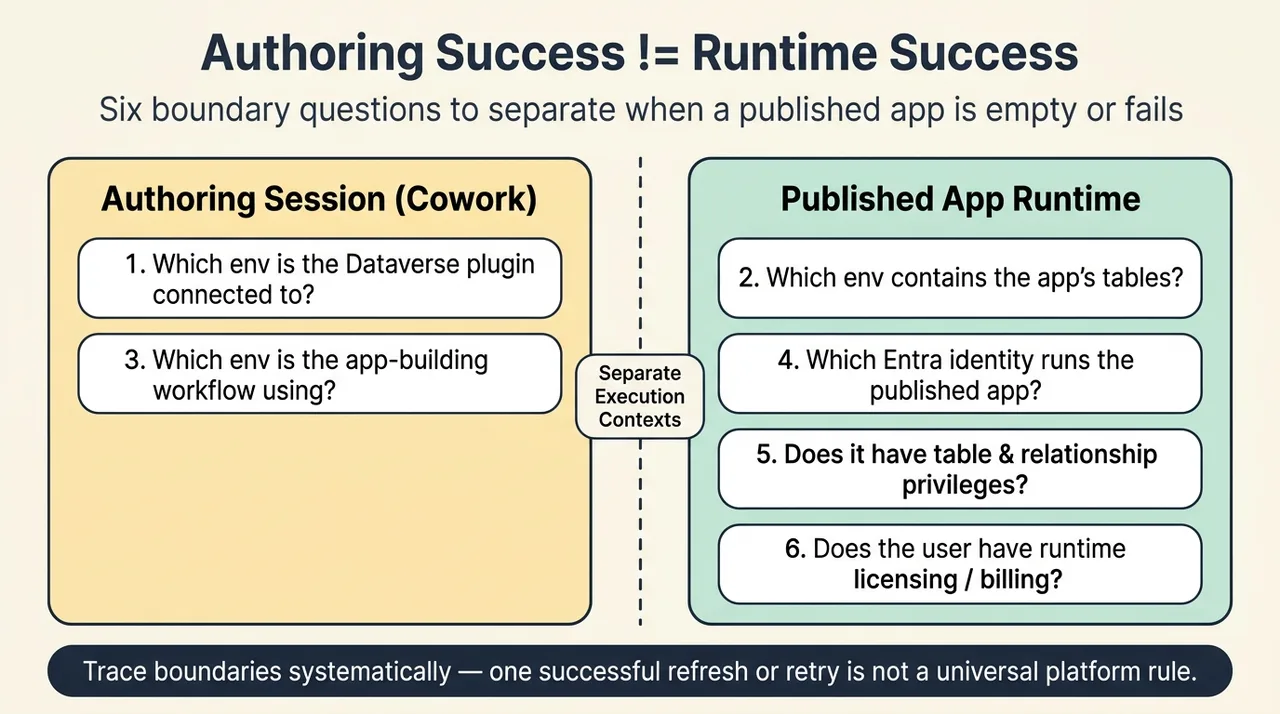
The defensible lesson is therefore narrower and more useful: successful access during authoring does not prove that the published app has the correct environment, identity, permissions, and data connection.
When an app is empty or fails after publishing, separate these questions:
- Which environment is the Dataverse plugin connected to?
- Which environment contains the app’s tables?
- Which environment is the app-building workflow using?
- Which identity is running the published app?
- Does that identity have the required table and relationship privileges?
- Does the user have the required runtime licensing or billing coverage?
The transcript’s later “app not found” error disappears after a refresh and permission prompt. That is an observed recovery, not evidence that refreshing is a universal fix or that a particular credential-storage mechanism caused the problem.
Architectural troubleshooting means tracing boundaries, not converting one successful retry into a general product rule.
A Disabled Button Is Not a Business Invariant
The strongest part of the demonstration is the two-activity limit.
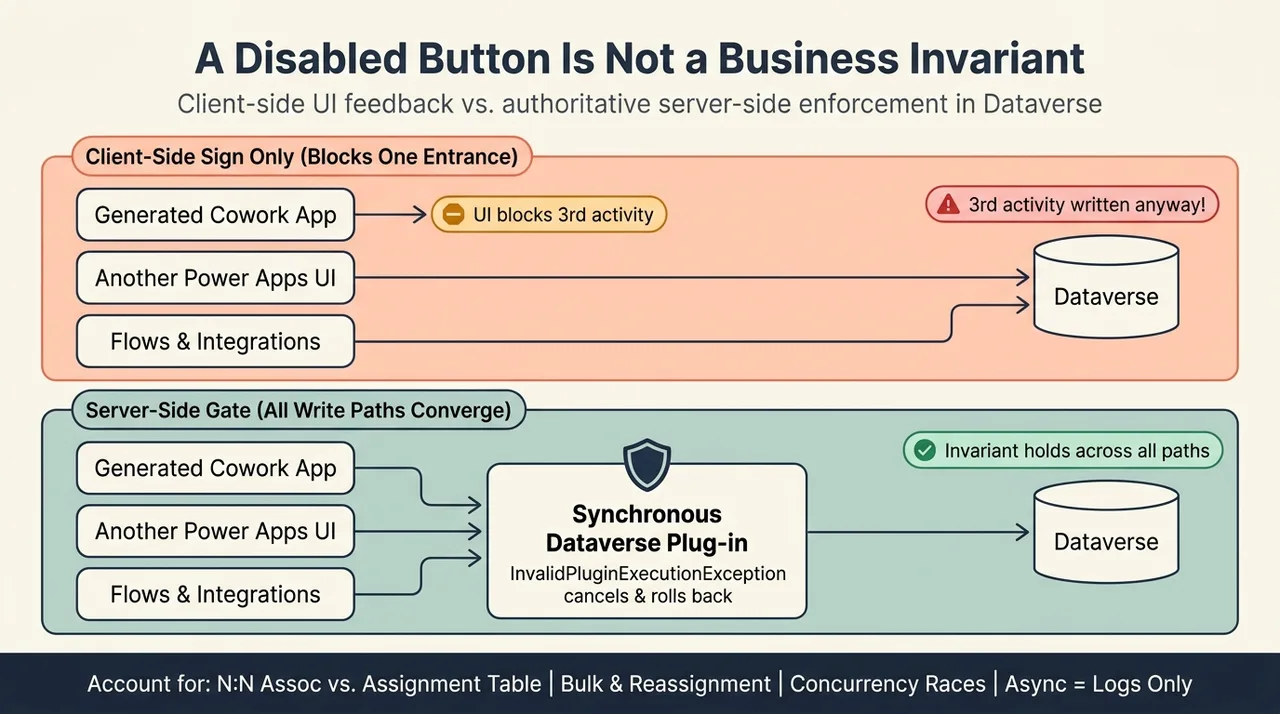
Cowork updates the interface so an instructor with two activities cannot receive a third through drag-and-drop. It also explains that the restriction applies only inside that app. The presenter then uses another Power Apps interface to add a third activity successfully.
Both observations matter. The generated app provides useful feedback, and the system still permits invalid business state.
Think of client-side validation as a sign at one entrance: “No more than two activities.” Server-side enforcement is the gate every relevant entrance must pass through.
The analogy has a boundary. A gate only protects paths that actually use it. Server logic must be attached to the operations that can create the prohibited state, not merely to one convenient endpoint.
Put authoritative rules where writes converge
For this requirement, the user interface should help users avoid invalid actions. Dataverse must provide authoritative enforcement across the applicable write paths.
Microsoft documents that synchronous Dataverse plug-ins can reject an operation with InvalidPluginExecutionException. Exceptions in synchronous steps cancel the operation and roll back transactional work where applicable. Asynchronous plug-ins do not provide the same immediate rejection behavior; their failures are logged as system jobs. See Microsoft’s exception-handling guidance.
However, “add a plug-in” is not a complete design. The implementation must match the relationship model:
- A many-to-many association requires attention to the relationship-association operation.
- An explicit assignment table requires attention to creating assignments and updating the instructor reference.
- Reassignment and bulk operations need coverage where they can change the count.
- Concurrent requests need testing, because two requests can each observe an available slot before either completes.
The concurrency point is an architectural concern, not a claim that the demonstration tested or solved it. A naive count-then-write check is not, by itself, proof of a concurrency-safe limit.
A custom API can provide a controlled operation, but it does not protect the invariant if other permitted operations can bypass it. The enforcement design must account for those paths too.
Make the requirement testable
A stronger illustrative prompt would be:
Build an instructor-assignment app. An instructor may have at most two outdoor activities. Provide immediate feedback in the interface, but treat this as a Dataverse-wide invariant. Identify the relationship model and the server-side enforcement required for other apps, flows, and integrations. If you cannot implement that enforcement, state the limitation clearly and do not describe the rule as complete.
Then test it through more than the generated interface:
- Assign a first and second activity: both should succeed.
- Assign a third through the generated app: it should fail clearly.
- Attempt the same write through another app or integration: it should also fail.
- Remove an assignment and add a replacement: it should succeed.
- Attempt competing assignments: the final state must still satisfy the limit.
The point is not to distrust AI-generated work categorically. It is to apply the same acceptance criteria that a human implementation should meet.
Governance: Empowerment Without Schema-Level Freedom
The demonstration also shows a request to delete a column. That shifts the discussion from app usability to authority over a shared system of record.
A person may legitimately need to assign certifications without needing permission to redesign the tables that store them.
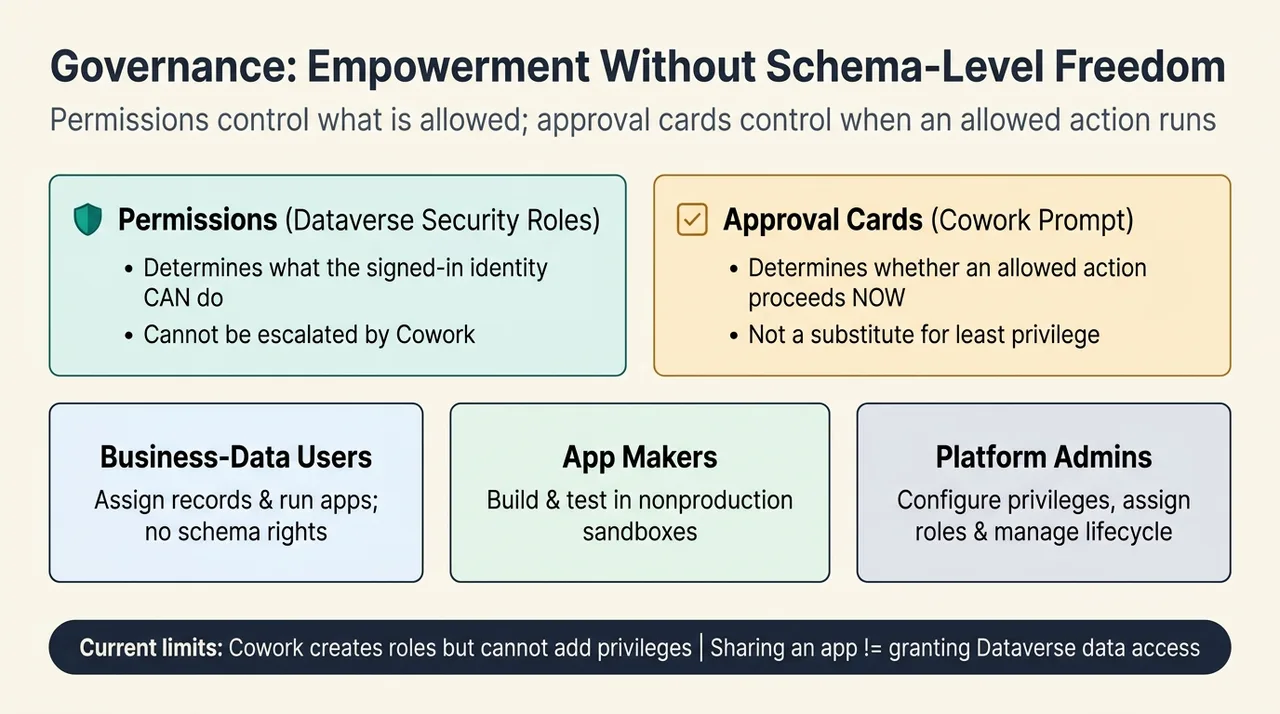
Microsoft documents two relevant controls: the plugin acts under the signed-in user’s Dataverse permissions, and changes require approval cards. The plugin cannot bypass or escalate those permissions. See how Cowork keeps users in control.
Those controls solve different problems:
- Permissions determine what the identity is allowed to do.
- Approval determines whether a proposed allowed action should proceed now.
Approval is not a substitute for least privilege. A user with broad customization rights can approve a destructive change without understanding its dependencies.
A practical operating model separates business-data users, app makers, and platform administrators. Start experimentation in nonproduction, grant only the privileges required for the task, review the target environment on each change, and apply lifecycle practices to shared data models.
There is also a current limitation worth knowing: Cowork can create security roles but cannot yet add privileges to them. Administrators must configure the proposed privileges and assign the roles. Sharing the app does not grant access to its Dataverse data. Both points are explicit in Microsoft’s security setup guidance.
The strategic case for enabling users is reasonable: people close to a process often know which interface would help them. But the transcript’s assertion that blocked users will inevitably turn to shadow IT is an argument, not a measured result. Enablement should be paired with boundaries, not justified by an unsupported inevitability.
Cost: Separate Building, Running, and Querying
The transcript includes several credit readings and dollar estimates, ending with a claimed app-building total of roughly $101. The readings are inconsistent and include unrelated Cowork activity. They cannot support a reproducible per-app price.
The useful distinction is between three workloads:
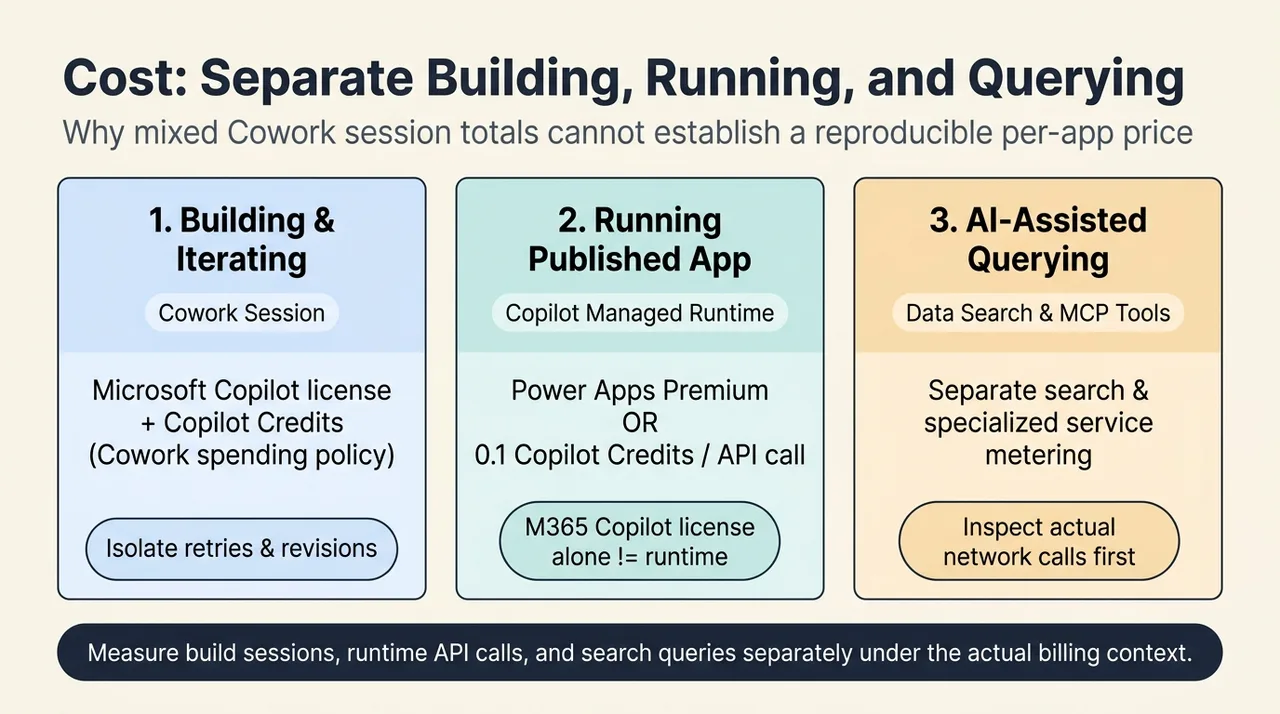
- Building and iterating: planning, generating, repairing, and testing through Cowork.
- Running the published app: loading assets and reading or writing data.
- AI-assisted querying: interpreting questions and invoking data-search capabilities.
Microsoft documents separate build and runtime billing policies. Building in Cowork requires a Microsoft Copilot license and Copilot Credits through the maker’s Cowork spending policy. Running an app requires Power Apps Premium or coverage through a Copilot Managed Runtime spending policy; a Microsoft 365 Copilot license alone does not cover runtime. See the licensing and credits guide for managed apps.
The same documentation lists runtime usage at 0.1 Copilot Credits per API call. Calls include asset loading and data access, so an app launch is not necessarily one call. Power Apps Premium coverage changes how normal runtime usage is billed, and specialized services can incur separate charges.
This makes the presenter’s observation about search latency worth investigating, but not accepting at face value. A delay while typing does not prove that every keystroke triggers an API call. Inspect actual requests before recommending debouncing, caching, or query changes.
For a meaningful pilot estimate, isolate the build session, record retries and revisions, measure runtime calls separately, and verify the applicable billing context. Do not compare a mixed Cowork session with a search-service bill and call the difference an architectural conclusion.
Cowork Is One Experience, Not the Entire Dataverse AI Story
The presenter cannot use the same plugin successfully in ordinary Copilot chat or Copilot Code during the demonstration. Those observations should remain scoped to that experience and point in time.
Microsoft separately documents a Dataverse plugin for AI coding agents and MCP connectivity for GitHub Copilot in Visual Studio Code and the command-line interface. Cowork uses the same open-source Dataverse skills, but its connection and administration path differ: Microsoft says Cowork connects through the Power Platform Dataverse connector and does not require adding Cowork as an allowed MCP client. Coding-agent MCP access has its own consent and client-allowlisting requirements. See Cowork setup and the coding-agent plugin documentation.
The distinction is not that one audience can reach Dataverse and another cannot. It is that different experiences expose different workflows and prerequisites.
Cowork’s significance is the reduction in friction for a business user. Developer tooling remains relevant when code-level inspection, custom implementation, and controlled engineering workflows are needed.
The Architect’s Job Moves Toward Proof
The demonstration does not establish that architects are obsolete. It establishes that producing a polished interface is becoming a weaker measure of architectural value.
The harder work remains:
- Translating business intent into precise invariants.
- Choosing a data model that supports those invariants.
- Verifying identity, environment, and permission boundaries.
- Testing persistence and cross-channel enforcement.
- Reviewing performance and consumption with measurements.
- Deciding when a personal tool is ready to become a shared dependency.
AI can increasingly participate in that work too. The generated explanation of the two-activity limit is evidence that it can recognize an important architectural boundary. Recognition, however, is not implementation, and implementation is not proof.
The most useful question is no longer simply, “Can it build the app?”
It is: “What must remain true when someone uses a different app, a different identity, or a different write path?”
Dataverse in Cowork makes app creation more accessible. The architect’s responsibility is to make the resulting system dependable beyond the prompt.
Read next