Mastering Copilot Studio Security Roles & Sharing

Writer

Building an agent in Microsoft Copilot Studio is the exciting part. Governing who can use it, who can change it, who can inspect its analytics, and who can accidentally turn a small pilot into a tenant-wide cost event is the grown-up part.
That is where many organizations get surprised.
The sharing button looks harmless. The role names look simple. But underneath Copilot Studio sits on top of Power Platform environments, Dataverse security, Microsoft Entra ID groups, tenant policies, licensing, and consumption-based billing. In other words, agent sharing is not just a collaboration feature. It is a governance lever.
This guide is written for IT leaders, FinOps practitioners, tenant administrators, and Power Platform governance teams who care about three questions:
- Who can access the agent?
- Who can change the agent?
- Who can create cost, security, or compliance exposure at scale?
If you remember only one thing, remember this:
Treat every Copilot Studio agent like a business application with an AI interface, not like a document someone casually shares.
The mental model: keys, rooms, and buildings
The easiest way to understand Copilot Studio permissions is to stop thinking about individual menu options and start thinking about keys.
| Layer | Mental model | What it controls | Governance risk |
|---|---|---|---|
| Tenant | The city | Broad Microsoft 365 and Power Platform policy boundaries | Uncontrolled org-wide sharing, weak lifecycle oversight |
| Environment | The building | Who can make or manage apps, flows, agents, and Dataverse assets in that environment | Overpowered makers, privilege conflicts, noisy production environments |
| Agent | The room | Who can chat, edit, publish, or inspect a specific agent | Accidental edits, poor separation of duties, excessive access |
| Data and tools | The locked cabinets inside the room | What the agent can retrieve, call, automate, or expose | Data leakage, premium connector spend, workflow side effects |
Agent-level sharing only gives someone a key to a room. Environment Maker gives them a wider building badge. If someone already has the building badge, trying to give them a tiny room-only badge can produce confusing behavior because the broader permission often wins.
That is the core problem behind many Copilot Studio sharing surprises.

Why IT and FinOps should care about sharing
In traditional apps, access control mainly protects data and functionality. In AI agents, access control also protects spend.
A user who can edit an agent may be able to add new knowledge sources, connect tools, publish to new channels, or create agent behaviors that increase consumption. A user who can share broadly may turn a low-volume pilot into a high-volume production workload before finance, security, or support teams are ready.
Microsoft documents Copilot Credits as the usage currency for Copilot Studio capabilities. Usage can be purchased through pay-as-you-go meters, prepaid packs, or prepaid subscriptions, and credit consumption depends on the capabilities the agent uses, such as classic answers, generative answers, actions, grounding, flows, AI tools, and voice scenarios. Prepaid capacity is pooled across the tenant, so one enthusiastic agent rollout can consume shared capacity intended for other workloads. See Microsoft Learn: Copilot Studio licensing and Billing rates and management.
Here is the practical leadership translation:
Sharing is not just access. Sharing is demand generation. Demand generation creates consumption. Consumption creates cost.
The three access patterns that matter
Copilot Studio sharing is usually discussed as a role assignment topic. I prefer to frame it as three operating patterns.
| Pattern | Who it is for | Typical permission | Business goal | Watch-out |
|---|---|---|---|---|
| Consume | Employees or business users who need answers or actions | User can use/chat with the agent | Drive adoption and productivity | Broad sharing can create unexpected volume |
| Observe | Managers, support owners, adoption leads, FinOps analysts | Analytics Viewer | Monitor performance without changing behavior | Environment-level roles may override restricted agent-level roles |
| Build | Makers, agent owners, solution teams | Editor/co-author access plus required environment permissions | Maintain and improve the agent | Editors can materially change data access, actions, channels, and cost profile |
This distinction matters because different personas need different controls.
A business sponsor needs adoption metrics. They do not need to change the prompt. A compliance reviewer may need visibility into usage trends. They do not need to publish an updated version. A maker needs authoring access. They should not automatically gain the right to share every agent across the entire organization.
Good governance is not about blocking everyone. It is about matching the key to the job.
Copilot Studio role guide for administrators
Microsoft’s sharing documentation describes several sharing scenarios: granting users, security groups, or the whole organization permission to use an agent; inviting collaborators to work on an agent; and sharing agent analytics. The documentation also notes prerequisites such as authentication settings and licensing requirements, and it calls out that security groups are a supported way to manage access. See Microsoft Learn: Share agents with other users.
For governance conversations, use this simplified role map.
| Role or access type | Best-fit persona | What they can do | What they cannot do | UI impact | Governance watch-out |
|---|---|---|---|---|---|
| Agent Viewer / agent user | Employees, frontline users, support teams | Converse with the agent, trigger the agent, manage their specific connections for that agent, and configure it to chat or operate autonomously where that capability is enabled | Cannot edit prompts, add knowledge sources, change configuration, or publish updates | No meaningful authoring UI expansion because this is a consumption role, not a maker role | Broad viewer rollout can still create real usage volume and cost |
| Analytics Viewer | Product owner, adoption lead, service owner, FinOps analyst | View agent usage, adoption, performance, and conversation analytics | Cannot edit topics, update knowledge, change tools, publish, or share the agent | Opens into a heavily restricted experience where only the Analytics area is visible and authoring, configuration, and publishing areas are hidden | Environment-level roles can block or override this restricted model |
| Editor / collaborator | Agent maker, solution owner, CoE engineer | View, edit, configure, share, test, and publish updates to the agent | Cannot delete the agent. Deletion remains with the primary owner or authorized owner-level control | Full authoring interface with the relevant tabs and configuration options | Editors can materially change data access, tool usage, channels, and cost profile |
| Environment Maker | Power Platform maker or environment-level builder | Create and manage resources within the environment, depending on environment configuration | Not a narrow, agent-level read-only role | May expose broader maker capabilities across the environment | Do not use this just to make analytics or sharing work |
| Power Platform / tenant admin roles | Platform administrators | Configure environments, policies, access, and broader governance features | Should not become the default business owner for every agent | Administrative surfaces outside the agent itself | Platform admins set guardrails, but business owners still need accountability |
Rule of thumb
Give business stakeholders observability. Give makers edit rights. Give environment-level privileges only when the person genuinely needs to build across the environment.
Environment Maker is not a fancy version of Analytics Viewer. It is a different class of permission.
How sharing actually works
The mechanics are simple. The governance implications are not.
To share an agent from Copilot Studio:
- Go to your list of agents.
- Select the three dots (
...) next to the agent you want to share. - Select Share.
- Choose the target audience: a named user, an email address, a Microsoft Entra ID security group, or, where allowed, Everyone in the organization.
- Assign the appropriate access level for the job: consume, observe, or build.
And just as importantly, access can be revoked from the same sharing surface. Remove a user or group by selecting the remove icon next to the entry. For organization-wide access, set the organization permission back to no permissions and save the change.
This is the part many teams forget: revocation is not an edge case. Revocation is part of the lifecycle. Every shared agent should have an owner who knows how to reduce access, not only how to expand it.
The Environment Maker conflict: why the platform says no
One of the most common sharing problems looks like this:
“We encountered an error while sharing because an environment maker can’t be added as an analytics viewer for this agent.”
This is not the platform being difficult. This is the platform refusing to pretend that a restricted agent-level role can meaningfully constrain someone who already has broader environment-level power.
Think about the keys again.
You are trying to give Alex a visitor badge for one meeting room. But Alex already has a building-wide badge. The visitor badge does not make Alex less powerful. It only creates a false sense of restriction.

So the fix is not to click harder. The fix is to decide which privilege model Alex should actually have.
| If Alex is… | Recommended action | Why |
|---|---|---|
| A business stakeholder who only needs adoption metrics | Remove Environment Maker, then assign Analytics Viewer | Least privilege and cleaner separation of duties |
| A real maker who builds agents, apps, or flows in that environment | Keep Environment Maker, do not force Analytics Viewer | Their job requires broader authoring capability |
| A temporary reviewer | Use time-boxed access through a group or process | Avoid permanent privilege creep |
| A senior sponsor | Provide dashboard-style reporting instead of maker access | Sponsorship does not require platform privileges |
Step-by-step: fixing the role conflict safely
Use this when someone needs analytics-only access but currently has broader environment privileges.
-
Confirm the actual business need.
Do they need to edit, or only observe? If they only need usage and performance visibility, do not keep them as Environment Maker out of convenience. -
Review the user’s environment roles.
In the Power Platform admin center, review the user’s assigned security roles for the relevant environment. -
Remove broad roles that are no longer justified.
If the user does not need maker-level access, remove the Environment Maker role. -
Assign the scoped agent role.
Return to Copilot Studio and share the agent with the Analytics Viewer role. -
Ask the user to refresh and retest.
Role changes can take time to propagate. A hard browser refresh can help clear stale UI state, but do not treat the UI as the source of truth. Recheck actual permissions if behavior looks inconsistent. -
Document the decision.
Record why the user was downgraded or scoped. This helps during audits and avoids a future admin “fixing” the issue by re-adding Environment Maker.
The governance lever most teams underuse: groups
Individual sharing is easy. It is also how governance slowly turns into archaeology.
Six months later, nobody remembers why Alex, Priya, two contractors, a test account, and a former project manager all have access to a business-critical agent.
Use Microsoft Entra ID security groups wherever possible.
| Access need | Recommended group pattern | Example |
|---|---|---|
| Users who can chat with the agent | Business audience group | SG-CopilotStudio-HR-Agent-Users |
| People who can inspect analytics | Service owner or FinOps group | SG-CopilotStudio-HR-Agent-Analytics |
| Makers who can edit | Small controlled maker group | SG-CopilotStudio-HR-Agent-Editors |
| Temporary pilot group | Time-boxed pilot group | SG-CopilotStudio-HR-Agent-Pilot-Q3 |
Microsoft’s sharing documentation supports sharing agents with security groups and with the whole organization, depending on scenario and configuration. The new agent experience documentation also distinguishes viewing and testing from editing capabilities, and notes that some capabilities are preview or experience-specific. See Microsoft Learn: Share agents with other users and Share agents with other makers and groups.
Rule of thumb
If access matters enough to approve, it matters enough to put in a group.
Groups make access review, removal, automation, and audit much easier.
Org-wide sharing: the big red button
“Everyone in the organization” is seductive because it feels like adoption.
Sometimes it is exactly the right move. A well-tested HR policy agent, IT helpdesk agent, or benefits assistant may genuinely belong in front of everyone.
But for most agents, org-wide sharing should be treated like production release, not like sending a Teams message.
Before you share broadly, ask these questions.
| Question | Why it matters |
|---|---|
| Is the agent published and tested? | Draft behavior can become enterprise behavior very quickly |
| Are data sources approved? | The agent may expose or reason over sensitive content depending on permissions and configuration |
| Are actions safe? | Agent actions can trigger workflows, connectors, or downstream business processes |
| Do we understand expected usage volume? | Broad access can multiply consumption quickly |
| Is there a support owner? | Users will report issues somewhere, whether you planned for it or not |
| Do we have a rollback plan? | You need a way to remove access or disable channels quickly |
Microsoft documents that agents can be shared with an entire organization in supported scenarios, and that Copilot Studio governance includes controls such as data policies, auditing, environment routing, maker warnings, and runtime protection signals. See Microsoft Learn: Share agents with other users and Security and governance in Copilot Studio.
The practical recommendation:
Use org-wide sharing only after the agent has passed security, cost, data, and operational review.
Directional cost intuition for FinOps teams
The exact cost of a Copilot Studio agent depends on licensing model, channel, user licensing, feature mix, and the current Microsoft pricing and billing rules. Do not treat the following as a quote. Treat it as planning intuition.
Microsoft’s current documentation describes Copilot Credits as the common consumption unit and lists different credit rates for different agent capabilities. For example, classic answers, generative answers, agent actions, grounding, AI tools, and voice scenarios can have different consumption rates. Microsoft also states that some employee-facing scenarios used by Microsoft 365 Copilot licensed users may be included rather than consuming billed credits, subject to the licensing terms and billing guide. Always validate with the latest Copilot Studio licensing documentation, billing rates documentation, and your agreement.
Directional planning aid, not a price quote
Assume a department has 500 users and launches an internal knowledge agent.
| Scenario | Assumption | Directional monthly volume | Cost intuition |
|---|---|---|---|
| Light pilot | 100 active users, 5 interactions per week | About 2,000 interactions/month | Usually manageable, useful for measuring baseline behavior |
| Department rollout | 300 active users, 2 interactions per workday | About 12,000 interactions/month | Needs usage monitoring and owner accountability |
| Everyday utility | 500 active users, 5 interactions per workday | About 50,000 interactions/month | Now you are in real FinOps territory, especially if actions, grounding, or premium tools are used |
The most important cost lesson is not the exact number. It is the multiplier effect.
A simple scripted or classic answer pattern is financially different from an agent that performs generative answers, grounds against tenant data, calls tools, invokes flows, or uses voice. One user interaction may not equal one unit of cost in a way business leaders intuitively expect.
Cost control rules of thumb
| Lever | What to do | Why it helps |
|---|---|---|
| Start with PAYG or constrained pilot where appropriate | Measure actual demand before committing broadly | Real usage beats spreadsheet guesses |
| Separate pilot groups from production groups | Avoid accidental enterprise-wide demand | Keeps blast radius small |
| Track feature mix, not just user count | Generative answers, grounding, tools, and voice change consumption | Cost is driven by capability design |
| Route makers to governed environments | Keep experiments away from production workloads | Reduces accidental exposure and noisy billing |
| Review analytics regularly | Identify agents with high usage, low resolution, or expensive behavior | FinOps is an operating rhythm, not a one-time estimate |
| Use admin policies and DLP controls | Control which connectors and capabilities can be used | Prevents “just one connector” from becoming unmanaged risk |
The safe rollout model: crawl, walk, run
Here is the rollout pattern I recommend for most enterprise agents.
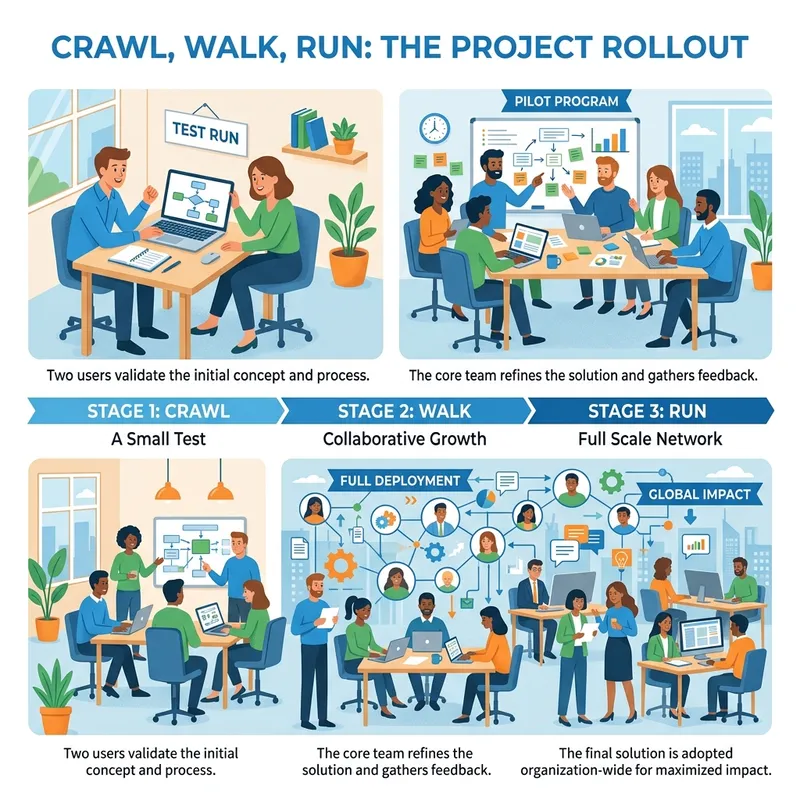
| Phase | Audience | Access posture | Admin focus | Exit criteria |
|---|---|---|---|---|
| Crawl | Makers and test users | Small named or group-based pilot | Validate security, data sources, answers, and actions | Agent behaves safely and value is proven |
| Walk | Department or controlled business group | Security group-based sharing | Monitor usage, cost, feedback, and support tickets | Adoption and cost are understood |
| Run | Broad department or organization | Controlled broader sharing or approved org-wide publication | Ongoing governance, analytics, lifecycle management | Stable operations, clear owner, documented controls |
Do not skip crawl because the demo looked good.
AI agents are deceptively easy to build and surprisingly easy to over-distribute. The governance maturity comes from treating rollout as a staged operating model.
UI delays are real, but do not let them become your excuse
After changing roles, the target user may still see tabs they should not see, or the UI may not immediately reflect the new access model.
That can happen because permissions and browser state may need time to settle.
Recommended response:
- Ask the user to sign out and back in.
- Ask for a hard refresh:
Ctrl + F5on Windows orCmd + Shift + Ron macOS. - Wait a few minutes if the role change was just made.
- Recheck the user’s actual environment and agent-level permissions.
- Test in a private browser session if needed.
But be careful with the conclusion.
If the UI looks wrong, troubleshoot caching. If the permission model is wrong, fix the role assignment. Do not confuse the two.
Troubleshooting matrix
| Symptom | Likely cause | What to check | Recommended fix |
|---|---|---|---|
| User cannot be added as Analytics Viewer | User has broader environment-level role such as Environment Maker | Security roles in the environment | Remove unnecessary broad role, then assign scoped role |
| User sees authoring tabs after downgrade | Propagation delay or cached UI | Browser session, role assignment timing | Hard refresh, sign out/in, retest after propagation |
| User can chat but agent fails on actions | Connection identity or connector access issue | Tool/action authentication model | Use appropriate user authentication, service principal where supported, or environment-level connection pattern |
| Agent works for maker but not for users | Maker’s permissions or connections differ from users’ | Data source permissions and connection model | Validate least-privilege user experience before rollout |
| Share button or sharing action is unavailable | Insufficient authoring/environment permissions or experience limitations | User role, environment access, current Copilot Studio experience | Use appropriate maker role and check current product experience documentation |
| Spend rises after broad sharing | Adoption or feature mix increased consumption | Usage analytics and billing consumption | Reduce audience, tune agent design, review tools and grounding patterns |
Microsoft’s documentation specifically warns that agents connected to external services can behave differently for makers and users because connections may be tied to individual user identities. It recommends patterns such as service principals when supported, environment-level connections, or requiring users to authenticate individually for OAuth-based scenarios. See Microsoft Learn: Share agents with other users.
Governance checklist before sharing an agent
Use this as the practical pre-flight checklist.
Access and ownership
- Is there a named business owner?
- Is there a named technical owner?
- Are editors limited to a small group?
- Are viewers assigned through security groups where possible?
- Has Environment Maker been removed from users who only need analytics or consumption access?
Data and security
- Are knowledge sources approved?
- Do users only receive answers from data they are allowed to access?
- Are connectors covered by DLP policy?
- Are actions safe, explainable, and auditable?
- Are sensitive use cases reviewed before broad release?
Cost and operations
- Has expected usage been estimated?
- Is consumption visible to the platform or FinOps team?
- Are pilot and production audiences separated?
- Is there a process to pause, unshare, or roll back?
- Is support ownership clear?
Legacy thinking vs. modern agent governance
| Old habit | Why it fails with agents | Better approach |
|---|---|---|
| “Just share it with the team.” | Agents can drive consumption and automate actions | Share through groups with owner approval |
| “Give them Environment Maker so it works.” | Overprivileged users create security and role conflicts | Assign the narrowest required role |
| “We will monitor later.” | Usage can scale before controls exist | Monitor during pilot, not after production |
| “It is only a bot.” | Agents can access data, call tools, and trigger processes | Treat it as a governed business app |
| “Everyone should have access.” | Broad access multiplies cost and support burden | Use staged rollout and explicit approval |
My opinionated recommendation
If you are running Copilot Studio at enterprise scale, your default posture should be:
- Separate maker environments from production environments.
- Use security groups for agent access.
- Avoid individual exceptions unless they are time-boxed.
- Do not give Environment Maker to people who only need analytics.
- Treat org-wide sharing as a production release.
- Make FinOps part of the rollout conversation before adoption spikes.
- Review agents like applications, not like documents.
This is not bureaucracy. This is how you let the business move fast without letting every promising pilot become an unmanaged platform liability.
Final takeaway
Copilot Studio makes it easy to build and share agents. That is the point.
But enterprise value does not come from the share button. It comes from using the share button with intent.
The winning organizations will not be the ones with the most agents. They will be the ones with the clearest operating model: right users, right roles, right environments, right cost controls, and right business owners.
In Copilot Studio governance, the question is not “Can we share it?”
The better question is:
Are we sharing the right capability, with the right audience, under the right controls, at a cost we understand?
That is the difference between agent sprawl and agent strategy.
Sources consulted
- Microsoft Learn: Share agents with other users
- Microsoft Learn: Share agents with other makers and groups
- Microsoft Learn: Security and governance in Copilot Studio
- Microsoft Learn: Copilot Studio licensing
- Microsoft Learn: Billing rates and management
Read next