Copilot Projects vs. Workspaces: Personal Work, Shared Context, and the Limits of Grounding

Writer

The difficult part of a technical engagement is rarely collecting the documents. It is discovering that the documents describe different versions of reality.
A requirements document asks for controlled external collaboration. An architecture proposal blocks external sharing entirely. A roadmap assumes 50 pilot users, while the pilot plan names 75. Each document may look reasonable on its own. Together, they expose decisions that nobody has actually settled.
That is the useful starting point for understanding Copilot Projects and Workspaces. Both organize work around an ongoing initiative, but they serve different working relationships:
A Project is “me plus Copilot.” A Workspace is “we plus Copilot.”
Microsoft’s Projects and Workspaces comparison makes this distinction explicit: Projects organize personal chats, tasks, files, and results; Workspaces provide a shared place for a team to work with Copilot. The distinction is useful, but it is not the whole story. Context availability, collaboration, and output capabilities also matter.
First, understand the naming transition
As of November 2026, Microsoft is transitioning Copilot Notebooks to Copilot Workspaces, alongside a new Copilot Home experience. Microsoft says the Workspace rollout begins in phases from late October 2026, so navigation and labels can differ across organizations.
Existing notebooks automatically become workspaces. Their content remains available, existing sharing continues, and previously unshared notebooks remain private. No manual content migration is required. See Microsoft’s Notebooks-to-Workspaces transition guidance.
This corrects a common misunderstanding: a Workspace is designed for collaboration, but it does not have to be shared. A private Workspace is still possible. A Project, by contrast, is documented as private to its individual creator in the Copilot Cowork Projects guide.
The navigation is also in transition. Microsoft’s comparison places Projects on Home for use with Chat and Cowork, while the Cowork-specific guide describes opening Projects from the Cowork navigation. Treat those as experience-specific instructions, not evidence that every tenant should display the same interface.
The mental model: a workbench and a team room
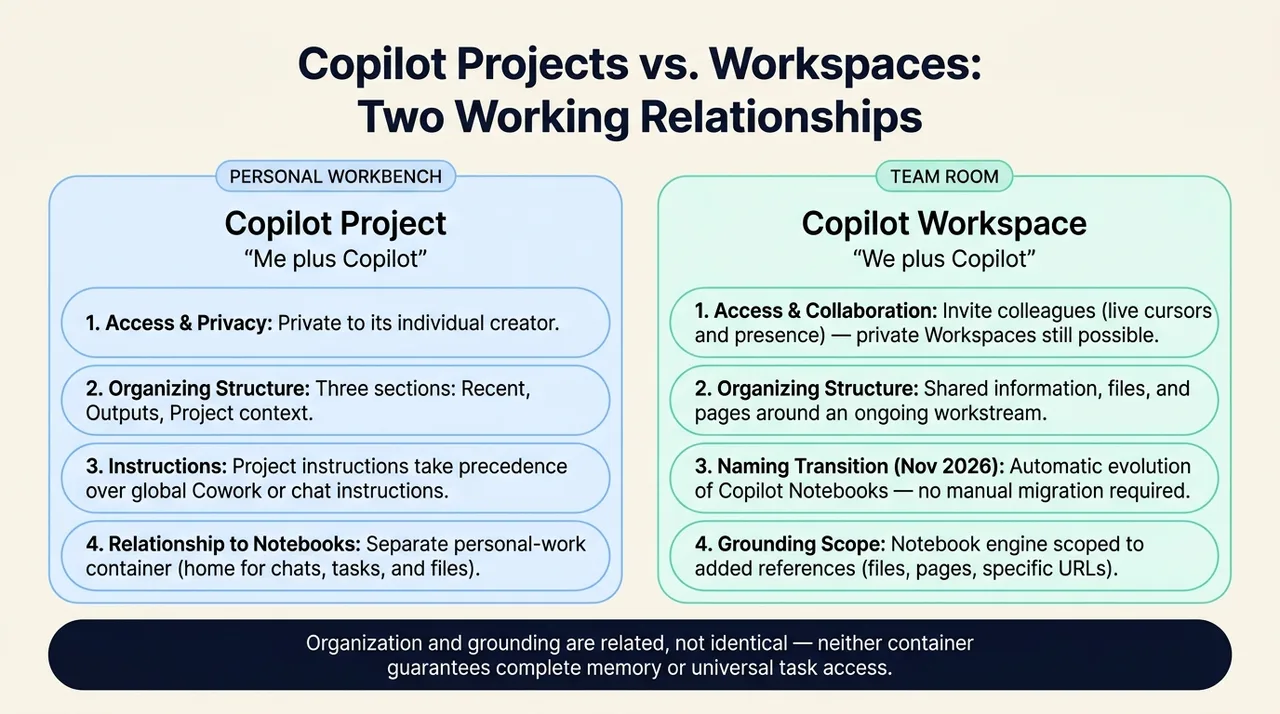
Think of a Project as your personal workbench. It groups the material you are working with, the conversations and tasks associated with it, and the files those tasks produce. Microsoft documents three Project sections: Recent, Outputs, and Project context. You can return to earlier tasks rather than starting every analysis from a blank conversation. Source: Project organization and navigation.
A Workspace is closer to a team room. It brings shared files and pages together around a workstream, with collaboration features such as visibility into who is present and live cursors across documents. You can invite colleagues when creating a workspace or use Invite in an existing one. Source: Workspace collaboration.
The analogy has a boundary. Neither container should be treated as an infallible memory of everything that has happened, or as proof that every task can access every listed item. Organization and grounding are related, but they are not identical.
| Question | Project | Workspace |
|---|---|---|
| Who is it designed for? | An individual developing their own work | A team working around shared context |
| Can colleagues join the container? | Projects are private to their creator | Colleagues can be invited; a workspace can also remain private |
| What is the organizing emphasis? | Related chats, tasks, instructions, context, and outputs | Shared information, files, pages, and collaboration |
| How does it relate to Notebooks? | A separate personal-work container | The evolution of Copilot Notebooks |
These distinctions follow Microsoft’s Workspace comparison and Projects documentation. They do not imply complete feature parity.
Grounding is not the same as putting files in one place
Grounding means supplying reference material that Copilot can use to support its response. A collection of relevant documents can make an answer more useful, but three separate questions remain:
- Is the material associated with this initiative?
- Can this particular task actually use it?
- Does the response accurately represent what the material says?
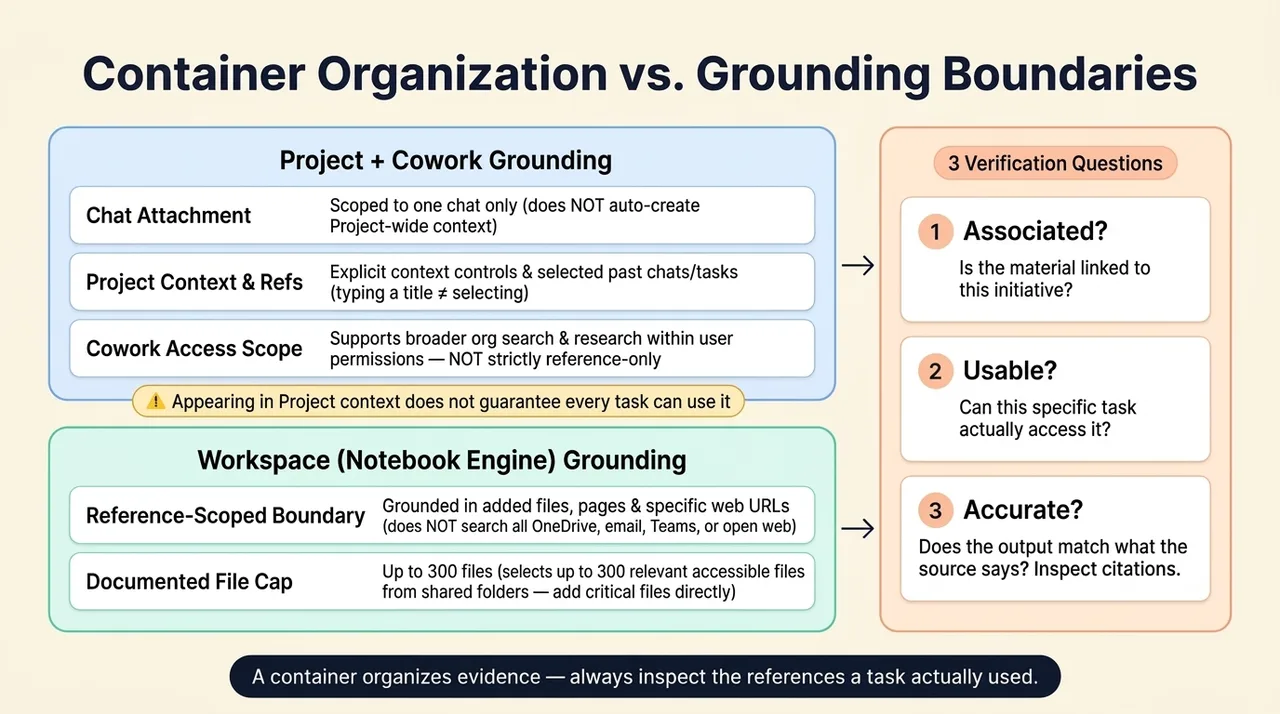
The second question is especially important for Projects. Microsoft explicitly warns that adding Project context differs from attaching a file to one chat, and that an attachment appearing in Project context does not mean every task in the Project can use it. Source: Review Project context and outputs.
Do not assume that dragging files into a chat creates reusable Project-wide context. Use the context controls available in your experience, inspect the references used in the response, and explicitly attach or reference critical material when necessary. Cowork also supports selecting previous chats and tasks as context for a new request; simply typing a conversation’s title is not equivalent to selecting its reference. Source: Reference previous chats and tasks.
There is another important distinction. Microsoft describes the Notebook experience underlying Workspaces as scoped to the references you add, rather than searching your entire OneDrive, email, Teams chats, or the open web. Specific web URLs can be added as references. Cowork, however, supports broader organizational search and research tasks within the user’s permissions. A Project used with Cowork should therefore not be assumed to enforce the same reference-only boundary. Sources: Notebook grounding, Cowork capabilities and access.
A container helps organize evidence. It does not automatically guarantee complete retrieval, exclusive source use, or correct conclusions. Check what the task actually used.
A worked example: reviewing a Purview deployment proposal
Consider an illustrative consultant engagement for Contoso Financial Services. The consultant must develop an initial Microsoft Purview deployment recommendation before bringing it to a wider review group.
The material includes:
- Business and technical requirements.
- A proposed architecture.
- Workshop notes and a data assessment.
- A sensitivity-label design.
- Data loss prevention (DLP) requirements.
- Licensing assumptions.
- A deployment roadmap and pilot plan.
Purview is the subject of the example, not the main topic of this article. The same method could apply to a migration assessment, competing proposals, contract review, or another initiative with interdependent documents.
A Project is a sensible starting point because the consultant owns the initial analysis. The goal is not simply to store files. It is to develop a defensible recommendation from evidence that may be incomplete or inconsistent.
Set instructions that establish evidence discipline
Project instructions can specify how Cowork should approach the work. Microsoft documents that they apply to subsequent Project interactions and take precedence over global Cowork or chat instructions. Source: Project instructions.
For this example, an instruction could be:
Act as a senior Microsoft Purview architect. Analyze the supplied materials from technical, operational, security, licensing, and user-adoption perspectives where relevant. Distinguish confirmed requirements, assumptions, conflicting statements, risks, and unresolved decisions. Do not invent missing requirements. Cite supporting documents and identify unavailable evidence. Separate document-based findings from external product verification.
The role gives the analysis a perspective. The evidence rules make it reviewable. Neither turns the Project into a separately deployed agent, nor guarantees that the model will avoid mistakes.
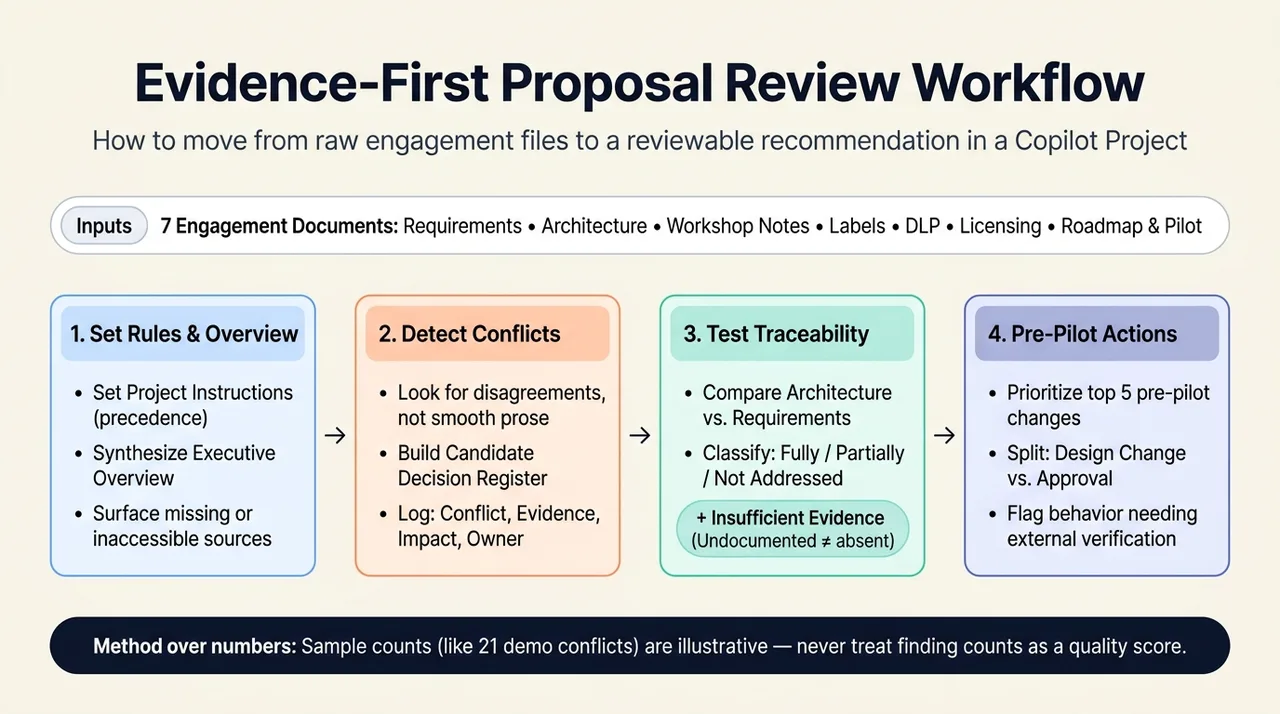
Start with the engagement, not one document
An opening prompt might be:
Review the available engagement materials and produce an executive overview. Include business drivers, proposed scope, key stakeholders, deployment phases, documented risks, and the five most consequential unresolved decisions. Identify any expected source you could not access.
This asks for cross-document synthesis rather than a sequence of disconnected summaries. It also avoids pretending that “review all materials” proves every document was actually read.
The overview should establish the landscape. The more valuable work comes next.
Move from summarization to contradiction detection
A summary can make inconsistent documents sound coherent. A conflict review deliberately looks for where they disagree.
Use a prompt such as:
Identify material conflicts across the available documents. For each, provide the documents involved, the competing statements, the likely deployment impact, and the decision needed to resolve it. Distinguish a genuine contradiction from a missing detail, an assumption, or an explicitly superseded draft.
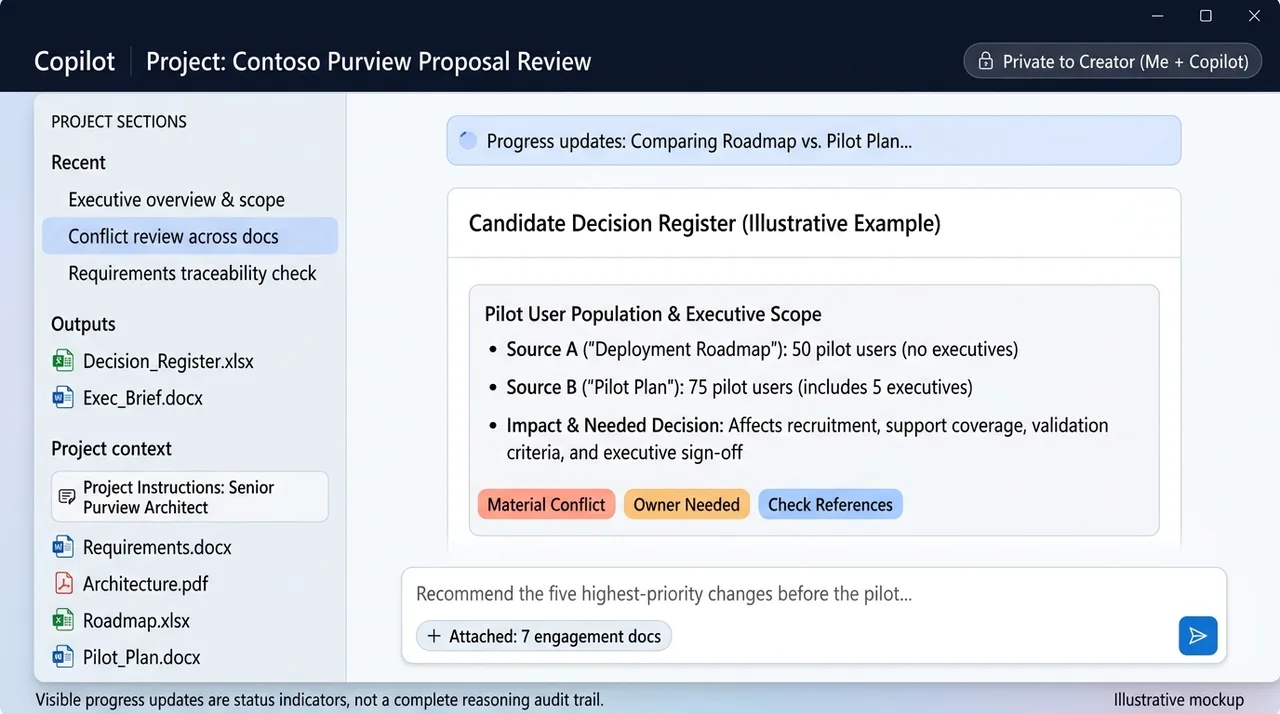
In the illustrative pilot example, the roadmap specifies 50 participants without executives, while the pilot plan specifies 75 participants including five executives. That is not just a numerical discrepancy. It can affect recruitment, support coverage, validation criteria, and who must approve the pilot population.
The useful output is a candidate decision register, not merely a list of inconsistencies. Each finding should make clear:
- What disagrees.
- Where the evidence appears.
- Why it matters.
- Who needs to decide, if an owner is documented.
- What remains unknown.
A follow-up can group findings into architecture, labeling, DLP, pilot scope, timeline, and business-process categories. This helps readers see whether several apparent problems depend on the same unresolved decision.
Do not treat the number of conflicts found as a quality score. The supplied demonstration reports 21 conflicts in a deliberately inconsistent dataset. That is a demonstration result, not a benchmark, an exhaustive audit, or an expected outcome for another engagement.
Test requirements against the proposed design
A requirements document describes what the organization needs. An architecture document describes what someone proposes to build. Those are not automatically the same thing.
Ask for a traceability review:
Compare the proposed architecture with the documented business and technical requirements. Classify each requirement as fully addressed, partially addressed, or not addressed. Include the supporting evidence and explain what is missing. Use “insufficient evidence” when the available documents do not support a classification.
The extra category matters. A requirement absent from the architecture document is not necessarily absent from the actual solution. It may be undocumented, covered elsewhere, or dependent on a decision that has not yet been made.
The demonstration reports four fully addressed requirements, ten partially addressed requirements, and two unaddressed requirements. Those figures describe its sample material only. The transferable lesson is the review method: connect each requirement to evidence rather than accepting a polished architecture narrative at face value.
Then ask:
Recommend the five highest-priority changes before the pilot. Tie each recommendation to a documented requirement, conflict, or risk. Separate proposed design changes from decisions requiring stakeholder approval, and flag any product behavior that needs external verification.
This keeps recommendations from quietly becoming approved requirements. A suggested change to external-sharing rules, for example, still needs validation against the organization’s actual policy and the applicable Purview behavior.
Separate document analysis from product verification
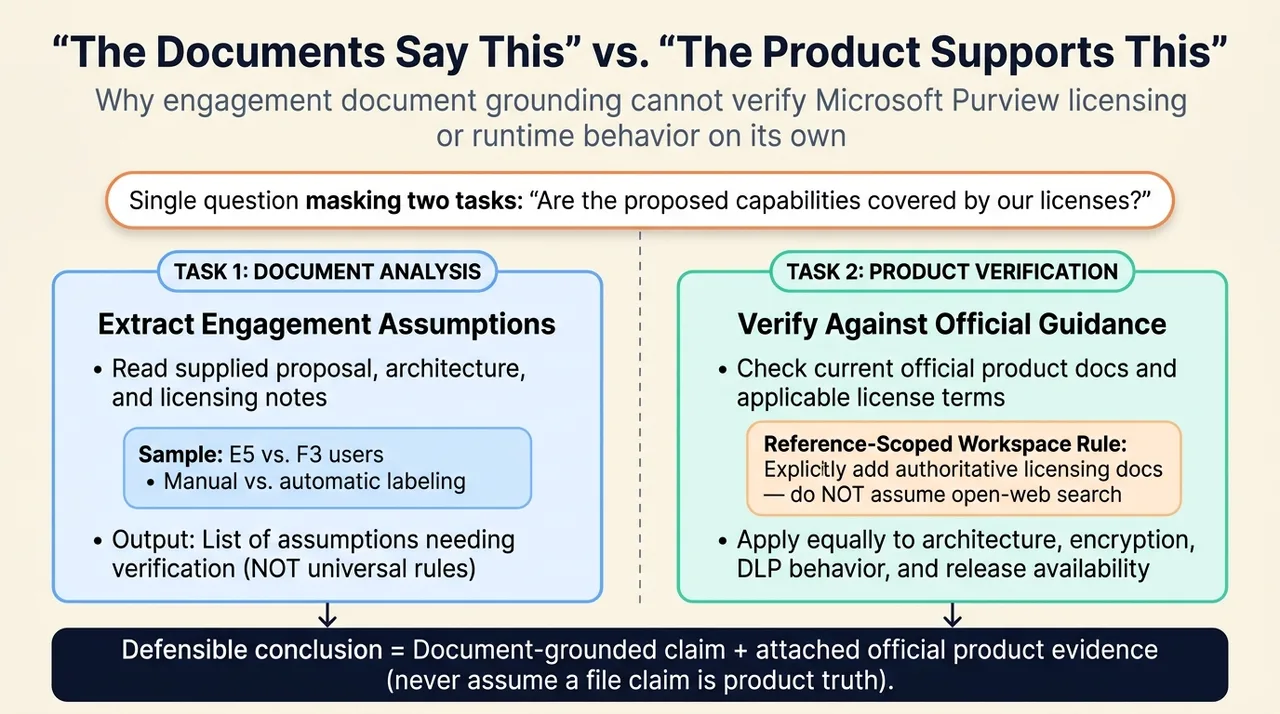
A document-grounded answer can establish what the engagement assumes. It cannot, by itself, establish that the assumption is correct.
This is particularly important for licensing. Asking “Are the proposed capabilities covered by our licenses?” combines two different tasks:
- Extract the proposed capabilities and license assignments from the engagement material.
- Verify entitlement against current official product documentation and applicable terms.
The source demonstration discusses E5 and F3 users, manual labeling, and automatic labeling. Those statements should not become a universal licensing rule here. Exact entitlements depend on the capability and applicable licensing context. The right output is a list of assumptions to verify, with official evidence attached to each conclusion.
In a reference-scoped Workspace, add the relevant authoritative material if you want it considered. Do not assume the experience independently searched for current licensing documentation. Microsoft’s Notebook grounding guidance explicitly distinguishes curated references from access to the wider web.
The same discipline applies to architecture, encryption settings, DLP behavior, and release availability: “the documents say this” and “the product supports this” are different claims.
Turn reviewed findings into deliverables
Once the findings have been checked, they can support an executive overview, decision register, weekly status report, architecture-review pack, or leadership presentation.
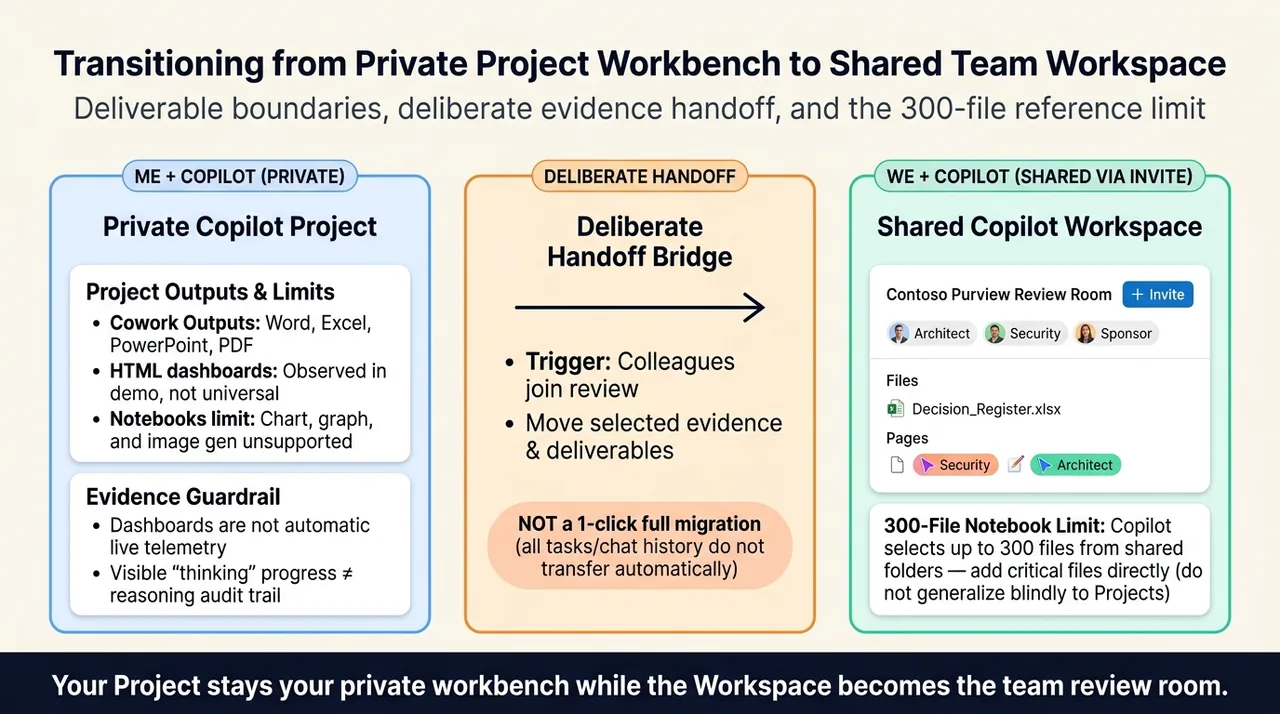
Projects expose task-created files in Outputs, and Cowork documents support for creating Word, Excel, PowerPoint, and PDF files. Sources: Project outputs, Cowork file creation.
The supplied demonstration also produces an HTML dashboard. Treat that as an observed output in that experience, not proof that every Project or Workspace has an identical dashboard-generation capability. Microsoft’s current Notebook documentation still lists direct chart, graph, and image generation as unsupported. Source: Notebook limitations.
More importantly, a generated dashboard is not automatically a live monitoring system. A detection-quality percentage or pilot-readiness gate should come from documented measurements or approved criteria. If the evidence is missing, the dashboard should say so rather than inventing a reassuring indicator.
Likewise, visible “thinking” updates are progress information, not an audit trail of the model’s complete internal reasoning. Microsoft describes these as indicators and step-by-step updates, and notes that some background operations do not display individual steps. Validate the sources and conclusions, not the apparent confidence of the progress messages. Source: Follow along as Cowork works.
Move to a Workspace when the work becomes shared
The transition point is not necessarily when the personal analysis is finished. It is when colleagues need to participate in the same workstream.
For the Contoso example, that might be when architects, security stakeholders, and the program sponsor need to review the evidence, resolve conflicts, and maintain shared review material. A Workspace provides the collaborative container; a Project remains the consultant’s private working area.
Microsoft says files or other items can be brought from a Project into a Workspace as changes roll out. That is not a promise of a one-click conversion that transfers the complete Project, every task, and all conversation history. Plan the handoff around the evidence and deliverables the team actually needs. Source: Using Projects and Workspaces together.
There are also practical boundaries to keep in mind. The current Notebook documentation specifies grounding on up to 300 files; when a shared location is added, Copilot selects up to 300 relevant accessible files. Add critical files directly rather than assuming a large folder guarantees their inclusion. That documented limit belongs to the Notebook experience and should not be casually generalized to Projects. Source: File-grounding limits.
Choose the working relationship, then verify the evidence
Use a Project when you are developing your own analysis and want related tasks, conversations, context, and outputs organized together. Use a Workspace when the initiative needs a shared place for colleagues to work with the same material. A private Workspace remains an option, and the two containers can support different stages of the same engagement.
But the deeper lesson is not about choosing a navigation label.
The value comes from asking questions that expose the distance between the documents and the decisions: Where do the sources disagree? Which requirements have evidence behind them? What is merely assumed? What must be verified outside the engagement material?
Projects organize personal work. Workspaces organize shared work. Neither replaces the responsibility to establish what is actually true.
Read next