Securing Agentic Workflows with Docker Sandboxes

Writer
Autonomous coding agents are not just another developer tool. They are junior employees with terminal access, infinite confidence, and no natural fear of production impact.
That is exciting when they are fixing tests at 2 AM. It is terrifying when they can install packages, modify files, call external APIs, create containers, and touch credentials without a human in the loop.
Most organizations respond by forcing agents to ask for permission before every meaningful command. That feels safe, but it quietly destroys the business case. If every agent action requires human approval, you have not created autonomy. You have created a very expensive autocomplete system with extra meetings.
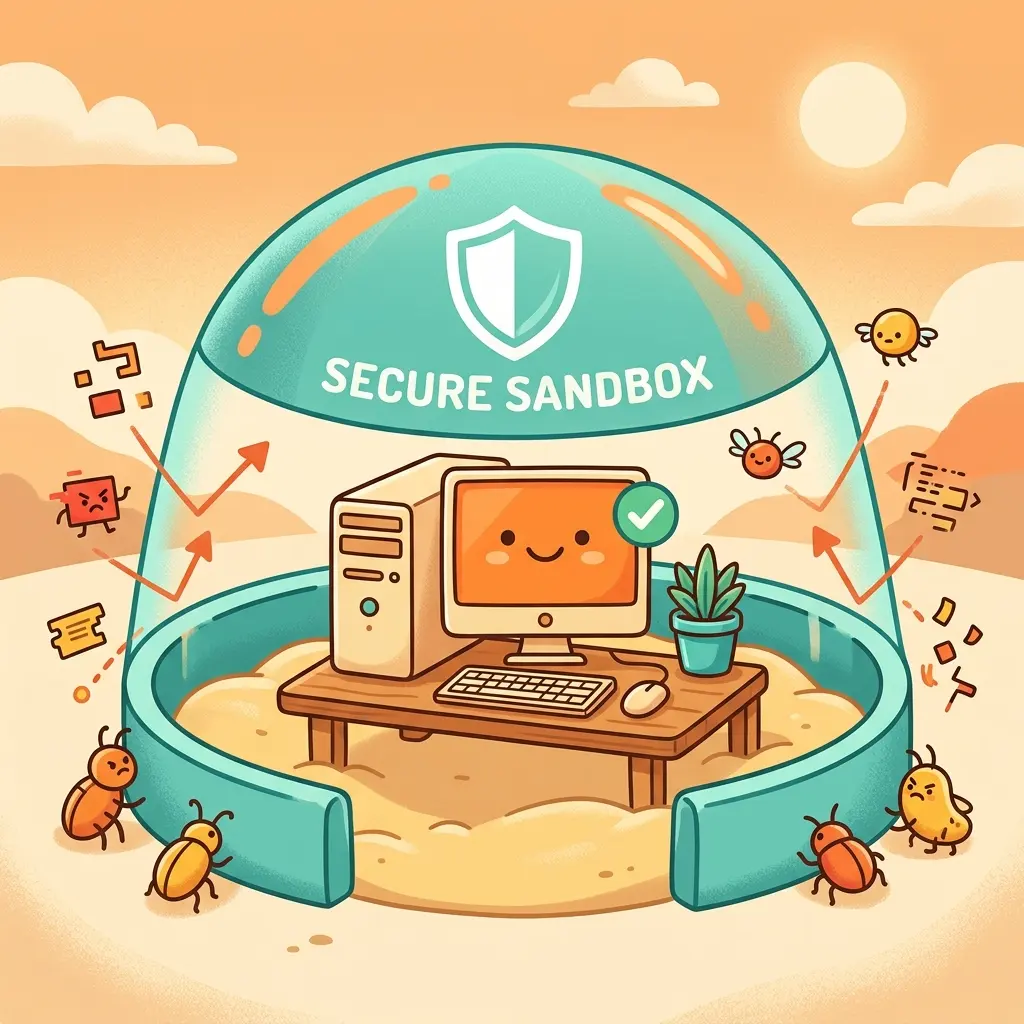
Docker Sandboxes attack the problem from a better angle: do not slow the agent down, shrink the blast radius around it.
Think of it like giving an intern a fully stocked lab, not the keys to the headquarters. Inside the lab, they can break glass, build prototypes, install questionable tools, and make a mess. Outside the lab, your host machine, credentials, Docker daemon, network, and sensitive files remain protected by policy.
This article is not only about how Docker Sandboxes work. It is about how IT leaders, FinOps teams, platform owners, and tenant administrators should think about cost control, governance, rollout strategy, and business value when agentic AI starts executing real work.
Validation note: This article was refreshed against Docker’s public
documentation on July 7, 2026. Docker currently documents the CLI as sbx,
not spx. The earlier spx naming has been replaced throughout this article.
The Mental Model: Agents Need Guardrails, Not Handcuffs
A useful way to think about agentic execution is a three-zone model.
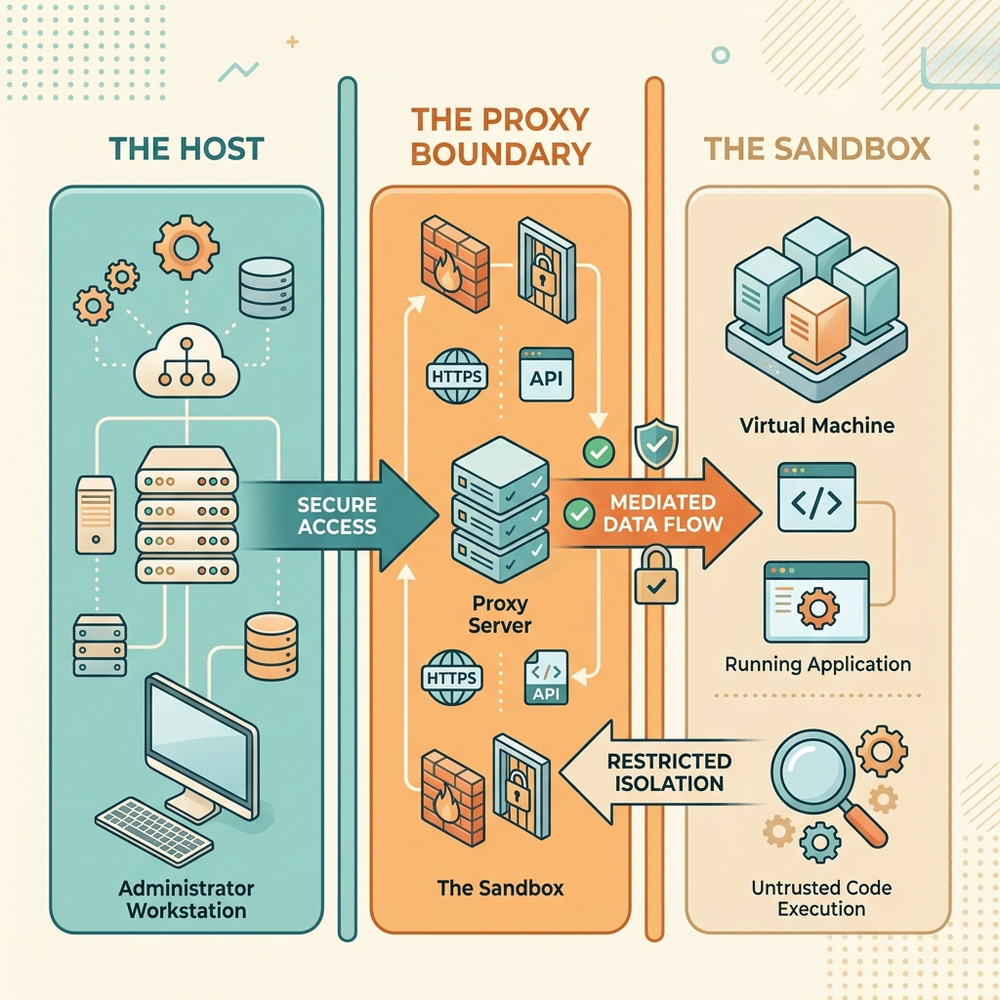
| Zone | What lives there | Risk level | Governance goal |
|---|---|---|---|
| The host | The developer device, local repos, host Docker daemon, SSH keys, browser sessions, enterprise network access | High | Keep the agent away unless access is explicitly intended |
| The sandbox | The microVM where the agent runs, installs tools, writes code, builds containers, and makes mistakes | Controlled | Let the agent move fast inside a bounded environment |
| The proxy boundary | The host-side control plane for network access and credential injection | Strategic | Decide what leaves the sandbox and which secrets are injected |
This is the governance pattern that matters: move from command-by-command approval to environment-level control.
Instead of asking, “Should the agent run this command?”, ask better questions:
- Which workspace can this agent touch?
- Which domains can it reach?
- Which credentials can it use?
- Which teams are allowed to loosen policy?
- Which requests should be logged for compliance?
- Which workloads deserve local models versus paid API calls?
That is the shift from developer convenience to enterprise operating model.
Why Traditional Containers Are Not Enough
Standard containers are great for packaging software. They are not the same as a hardened execution boundary for untrusted autonomous agents.
Docker Sandboxes use isolated microVMs. Each sandbox gets its own filesystem, network, and Docker daemon, so an agent can build containers, install packages, and modify files without directly touching the host system. The official architecture also calls out that each sandbox has its own Docker daemon state, image cache, and package installations, which is important for both security and cost planning.
| Approach | Isolation model | Docker access | Best fit | Leadership readout |
|---|---|---|---|---|
| Host execution | None | Host Docker daemon | Manual trusted development | Fast, but unacceptable for autonomous agents |
| Container with host socket | Partial process isolation | Shared host Docker daemon | Trusted tools | Convenient, but a risky pattern for agents |
| Docker-in-Docker | Partial nested daemon model | Nested Docker daemon | CI/CD style automation | Useful, but not a strong agent trust boundary |
| Docker Sandbox | MicroVM isolation | Private Docker daemon per sandbox | Autonomous AI coding agents | Higher overhead, but much better blast-radius control |
The business version is simple: a container is a shared apartment; a microVM is a locked hotel room. In the shared apartment, one bad tenant can still create shared-kernel problems. In the hotel room, the guest can make a mess, but the building remains controlled.
Product Reality Check: What Docker Sandboxes Actually Provide
Docker’s current documentation describes Docker Sandboxes as isolated microVM environments for AI coding agents. The sbx CLI is documented as free to use, including commercial use, while organization governance requires a separate paid subscription. Organization administrators can centrally manage sandbox network and filesystem policies from Docker Admin Console when that governance capability is enabled.
Docker currently documents out-of-the-box support for agents including Claude Code, Codex, Copilot, Cursor, Droid, Gemini, Kiro, OpenCode, Docker Agent, and Shell. That does not mean every enterprise workflow is magically supported. It means the platform has native agent integrations and a customization model for teams that need more control.
| Capability | Current documented behavior | Why IT leaders should care |
|---|---|---|
sbx CLI | Used to install, sign in, run, list, and manage sandboxes | Standardizes the developer entry point |
| MicroVM execution | Each sandbox runs with its own VM boundary, filesystem, network, and Docker daemon | Reduces host compromise risk |
| Network policies | Local policy via CLI, organization policy via Admin Console or Governance API | Enables controlled egress and compliance alignment |
| Credential proxy | Secrets stay on the host and are injected by a proxy into outbound requests | Reduces secret exposure inside the agent runtime |
| Clone mode | Agent works on a private repository clone and host repository is mounted read-only | Turns agent output into reviewable change sets |
| Audit logging | Available with Docker AI Governance when centralized governance is enforced | Supports SIEM and compliance review |
| Sign-in enforcement | Available through endpoint management as part of AI Governance | Prevents developers from bypassing policy with personal accounts |
The important governance distinction is this: local policy is developer-controlled; organization policy is administrator-controlled. If you are trying to build a repeatable enterprise control plane, local policy is not enough.
Getting Started Without Losing Control
A basic sandbox flow looks like this:
At first login, Docker prompts for a default network policy. The documented choices are Open, Balanced, and Locked Down.
| Preset | Behavior | When to use it | Governance opinion |
|---|---|---|---|
| Open | Allows outbound traffic broadly | Short-lived experiments with non-sensitive code | Avoid as the default. It teaches the wrong habit |
| Balanced | Default deny with common development destinations allowed | Most developer pilots | Good starting point, but review the baseline allowlist |
| Locked Down | Blocks outbound traffic unless explicitly allowed | High-risk codebases, regulated workloads, sensitive tenants | Best for production-grade governance, but requires allowlist planning |
My recommendation: start pilots with Balanced, graduate sensitive teams to Locked Down, and reserve Open for disposable labs.
That gives you a practical adoption path. You do not need to start with maximum friction on day one, but you also do not want your first enterprise default to be “anything can call anything.”
The Credential Proxy: Secrets Should Not Live Where Agents Experiment
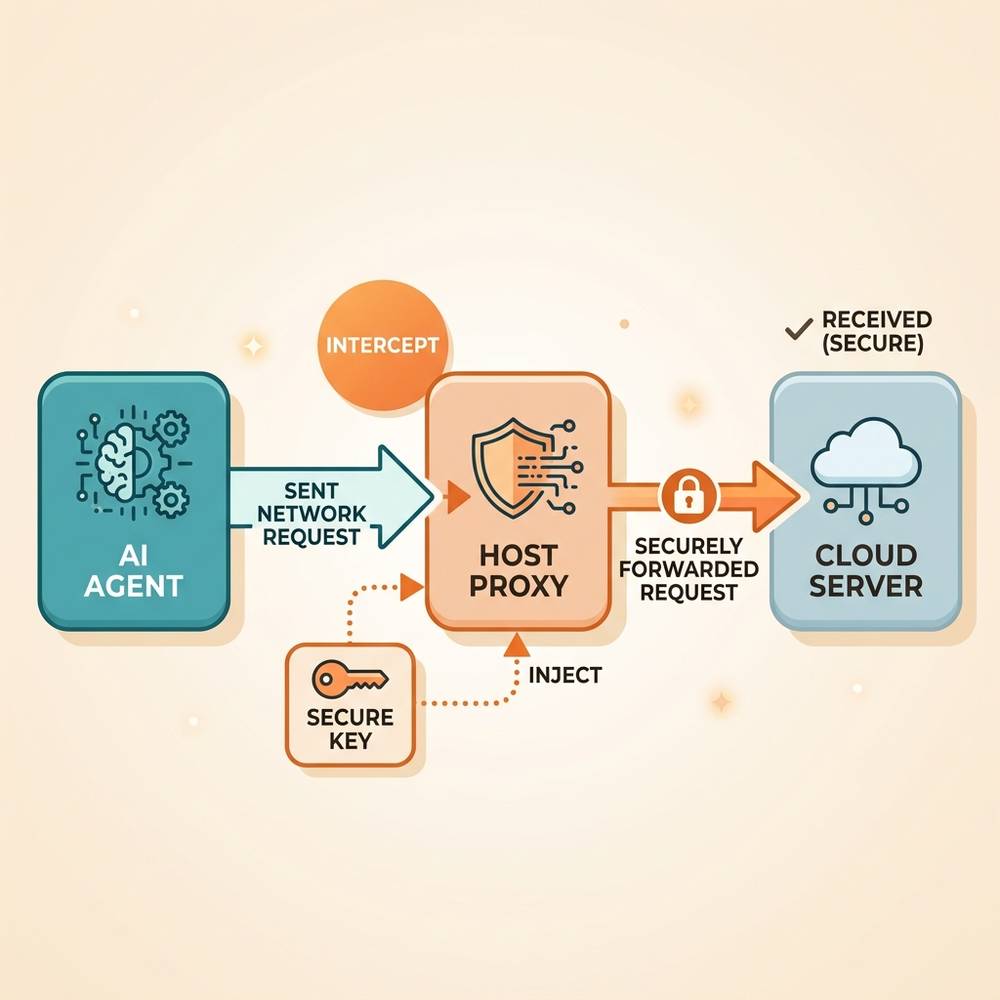
The single most important rule in this space is boring, but it saves careers:
Never place raw production credentials directly inside an agent sandbox unless you are fully prepared for the sandbox contents to become hostile.
Docker’s credential model is designed around a proxy. The real credential stays on the host, often in the operating system keychain or credential manager. Inside the sandbox, the agent sees a sentinel value such as proxy-managed. When the sandbox makes an outbound HTTP or HTTPS request to a matching service, the host-side proxy injects the real authentication header before forwarding the request.
For example, to give an agent access to GitHub without placing the raw token into the sandbox:
The mental model is a hotel concierge, not a room safe. The guest does not hold the master key. The concierge validates the request and opens only the door that policy allows.
| Secret pattern | What happens | Risk posture | Recommendation |
|---|---|---|---|
| Raw API key inside sandbox | Agent and installed packages can potentially read it | High | Avoid for enterprise use |
| Host environment variable | Useful for one-off testing or CI patterns | Medium | Acceptable for short-lived controlled workflows |
sbx secret set | Stored by service and injected by proxy | Lower | Preferred default |
| Sandbox-scoped secret | Available to one named sandbox | Lower | Use for sensitive experiments or least privilege |
| Global secret | Available to new sandboxes at creation | Medium | Use carefully and document owners |
A subtle operational point: globally stored secrets apply when a sandbox is created. If you change a global secret while a sandbox is already running, recreate the sandbox for the new value to apply. Sandbox-scoped secrets can take effect immediately for a running sandbox.
Workspace Isolation: Direct Mode Is Convenient, Clone Mode Is Safer
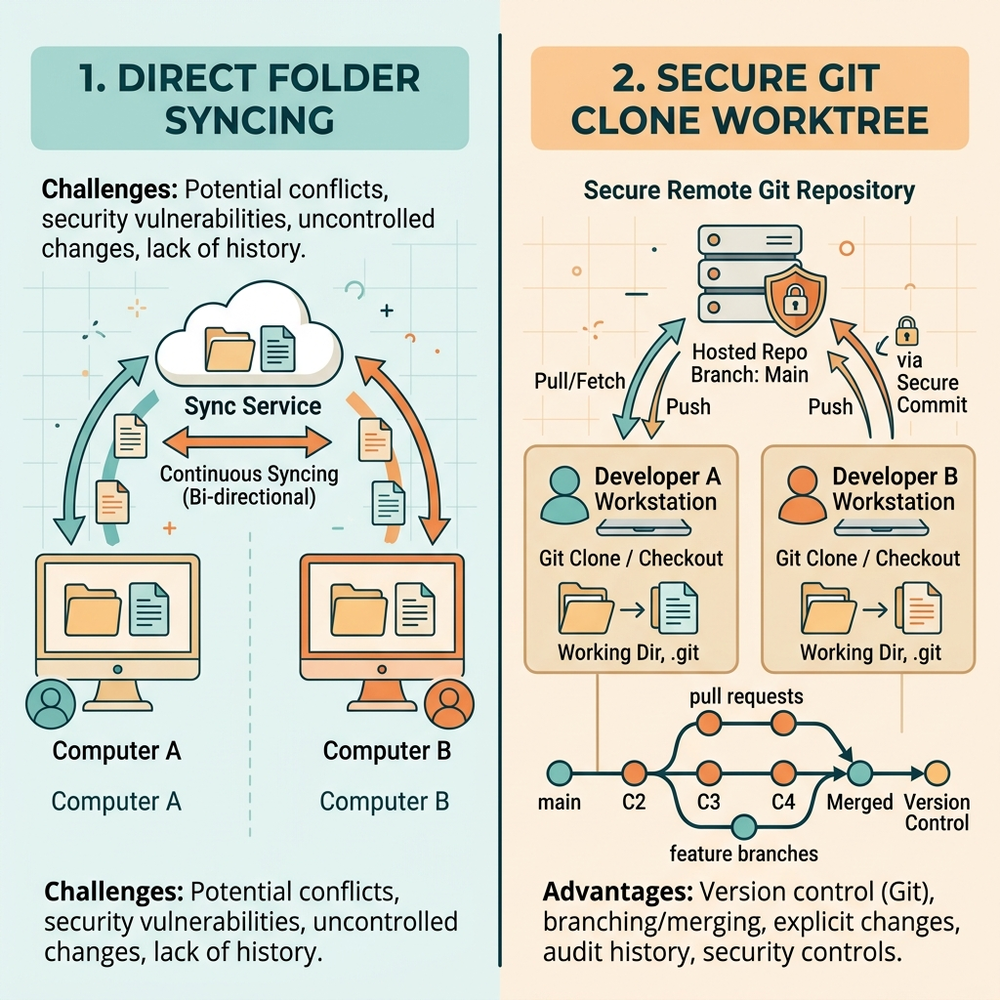
By default, Docker Sandboxes can mount the workspace directly. That means file changes are visible on the host in real time. This is convenient, but it is not the same as fully isolating the repository workflow.
The trap is not only rm -rf. The more realistic enterprise risk is quieter:
- A malicious package modifies Git hooks.
- The agent edits a
Makefile, task runner, or package script. - The host developer later runs a normal command outside the sandbox.
- The malicious change executes on the real host.
Docker’s own security documentation calls out this class of risk: direct workspace changes can affect files that execute implicitly during normal development, including Git hooks, CI configuration, IDE task configs, Makefile, and package.json scripts.
Clone mode changes the operating model:
In clone mode, the sandbox works on a private Git clone inside the microVM while the host repository is mounted read-only. The sandbox exposes its clone as a sandbox-<sandbox-name> remote, so the developer reviews the work like a normal branch.
| Workspace mode | Developer experience | Risk profile | Governance rule of thumb |
|---|---|---|---|
| Direct mode | Fast, live edits in the host working tree | Host sees changes immediately | Use for low-risk repos and trusted experiments |
| Clone mode | Agent works in a private clone, then developer reviews changes | Stronger review boundary | Use for sensitive repos, regulated work, and team pilots |
This is one of the most important business design choices. Clone mode turns agent output into a pull-request-shaped artifact. That is exactly the pattern most organizations already understand how to govern.
Cost Intuition: The Sandbox Is Not the Expensive Part, Until It Is
Let’s be clear: Docker Sandboxes are primarily a risk-control layer. The obvious cost target is usually model consumption, but the hidden costs are operational.
Docker documents that the sbx CLI is free to use, including commercial work, while organization governance is a separate paid subscription. That means the base experimentation cost may look low, but enterprise standardization, centralized policies, sign-in enforcement, and audit logging belong in a different budget conversation.
Here is the directional planning model I would use.
Directional planning aid, not a quote: Your actual cost depends on your Docker subscription terms, model provider pricing, developer behavior, hardware, and retention choices.
| Cost bucket | What drives it | Directional intuition | FinOps control lever |
|---|---|---|---|
| Docker Sandboxes CLI | Base sbx usage | Documented as free, including commercial use | Encourage safe experimentation |
| AI Governance | Organization policy, sign-in enforcement, audit capabilities | Separate paid subscription, contact Docker Sales | Fund centrally if you need enterprise controls |
| Model API usage | Tokens, tool calls, retries, long-running agents | Often the largest variable cost | Route workloads, cap usage, monitor prompts and loops |
| Local model infrastructure | GPU workstation or server, power, maintenance | Shifts spend from API OpEx to hardware and operations | Use for privacy-sensitive or high-volume repetitive tasks |
| Disk and compute overhead | One VM, private Docker daemon, image cache, package installs per sandbox | Multiplies with parallel agents and large images | Reuse templates, prune regularly, limit parallelism |
| Human review | Pull request review, security review, incident handling | Can dominate savings if workflows are poorly designed | Standardize review patterns and risk tiers |
A simple way to forecast model usage is:
Now add a productivity lens:
That last term matters. If autonomous agents increase speed but create uncontrolled blast radius, your spreadsheet will lie to you. The savings show up immediately. The incident cost arrives later and louder.
Routing Strategy: Not Every Agent Task Deserves the Same Model
Agentic AI needs a routing strategy. Otherwise, every task goes to the most convenient model endpoint, and FinOps only discovers the bill after the behavior has already become culture.
Think about model routing like cloud storage tiers.
| Workload type | Example | Recommended routing pattern | Why |
|---|---|---|---|
| Low-risk repetitive code edits | Rename variables, update docs, simple tests | Lower-cost hosted model or local model | Cost efficiency matters more than frontier reasoning |
| Sensitive proprietary code review | Security-sensitive repos, regulated codebases | Local model or tightly governed hosted endpoint | Data exposure and compliance matter more |
| Complex architecture refactoring | Large multi-file reasoning task | Higher-capability hosted model | Better reasoning may reduce retries and human rework |
| Build and test automation | Run tests, fix linting, package updates | Sandbox plus allowlisted registries | Strong egress control reduces supply-chain risk |
| Internet-heavy research | Dependency investigation, public docs lookup | Sandbox with monitored allowlist | Allow access intentionally, not accidentally |
If you run local inference through tools such as LM Studio or llama.cpp, remember the networking mental model: localhost inside the microVM is the sandbox itself, not your host. In typical Docker-style networking patterns, the host bridge endpoint is exposed through names such as host.docker.internal, but validate your exact platform behavior before standardizing it.
The bigger governance point is this: local models are not automatically cheaper or safer. They reduce API spend and can keep sensitive code closer to home, but they introduce hardware lifecycle, patching, model governance, and capacity planning. Use them deliberately.
Network Policy: Egress Is Your Agentic Firewall
Most agent incidents will not look like a science-fiction AI escape. They will look like normal software supply-chain problems moving faster than humans can track.
An agent installs a dependency. That dependency runs a post-install script. The script calls an external endpoint. If your egress policy is wide open, the agent’s sandbox becomes a data exfiltration machine with a very polite chat interface.
Docker Sandboxes route outbound HTTP and HTTPS traffic through a host-side proxy that enforces network access rules. Local policy can be managed with sbx policy; organization policy can be centrally managed through Docker Admin Console or Governance API when AI Governance is enabled.
A practical policy strategy looks like this:
| Rollout stage | Network posture | Filesystem posture | Admin action |
|---|---|---|---|
| Lab | Balanced preset | Direct or clone mode | Let champions experiment with non-sensitive repos |
| Pilot | Balanced plus explicit removes | Prefer clone mode | Review actual policy logs and tighten domains |
| Sensitive pilot | Locked Down | Clone mode | Allow only required package registries, model APIs, and source control |
| Enterprise standard | Organization policy | Filesystem allow and deny rules | Move control from local developer devices to Admin Console |
| Regulated operation | Organization policy plus audit logs | Team-scoped policies | Forward durable records to SIEM and review exceptions |
Local policy is useful for learning. Organization policy is how you prevent policy drift.
Governance Levers for Tenant Administrators and Platform Owners
If you own the tenant, endpoint fleet, developer platform, or AI governance program, do not focus only on the sandbox command line. Focus on the control levers.
| Lever | What it controls | Why it matters | Suggested owner |
|---|---|---|---|
| Default network preset | First-run egress posture | Sets the developer habit | Developer platform team |
| Local allow and deny rules | Machine-level network access | Useful for pilots and debugging | Developer or platform champion |
| Organization network policy | Centralized egress rules | Prevents inconsistent local exceptions | Security platform team |
| Organization filesystem policy | Which host paths can be mounted | Prevents agents from working in unsafe directories | Endpoint or tenant admin |
| Sign-in enforcement | Requires users to sign in with approved Docker org membership | Stops personal-account bypass | Endpoint management team |
| Audit logging | Durable policy decision records | Supports compliance and SIEM ingestion | Security operations |
| Secret scoping | Which credentials are available to which sandbox | Supports least privilege | Platform and app owners |
| Clone mode standard | How agent changes reach host repos | Forces review before adoption | Engineering leadership |
A good governance design does not say “no agents.” It says “agents can run fast inside approved lanes.”
A Safe Rollout Plan That Does Not Kill Adoption
Here is a rollout pattern I would use in a real enterprise.
Phase 1: Pick the Right Pilot Repos
Start with repositories that are meaningful but not existential:
- Internal tools
- Documentation-heavy repos
- Test automation projects
- Low-risk services with good CI coverage
Avoid starting with payment systems, regulated data processing, identity infrastructure, or production deployment pipelines. You want learning signal, not a board-level incident.
Phase 2: Use Balanced, Then Observe
Use the Balanced preset for the first pilot wave. Ask developers to record:
- Which domains were blocked?
- Which allow rules were required?
- Which package registries were truly necessary?
- Which credentials did the agent request?
- Which tasks generated low-value token burn?
This gives FinOps and security teams real behavior data instead of theoretical architecture debates.
Phase 3: Move Sensitive Workloads to Clone Mode
For any repo that matters, default to clone mode. Treat the agent branch like a contractor’s pull request.
Review especially:
- Git hooks
- Package scripts
- Build files
- CI workflow definitions
- Dependency lock files
- Dockerfiles and compose files
- Any configuration that changes deployment paths
If an agent changes something that can execute later, assume it deserves human review.
Phase 4: Centralize Policy
Once the pilot patterns are known, move from local policy to organization policy where available. Docker documents that when organization governance is active, local sbx policy rules are no longer evaluated and cannot supplement or override the organization policy.
That is exactly what administrators want. Exceptions should move through a governed path, not a developer’s terminal history.
Phase 5: Add Audit and FinOps Review
If you enable AI Governance audit logging, policy decisions can be written as structured JSON Lines records on the local machine for SIEM ingestion. Use that to answer questions such as:
- Which domains are agents trying to reach?
- Which teams are generating the most denies?
- Which allowed destinations are rarely used?
- Which policies create productivity friction?
- Which repos or teams show risky automation patterns?
Pair that with model spend review. Governance without cost telemetry is half a control plane.
Templates and Kits: Standardize the Golden Path
Docker documents two customization approaches: templates and kits.
- Templates are reusable sandbox images. Use them for heavy, stable dependencies such as system packages, language runtimes, and toolchains.
- Kits are YAML artifacts applied at sandbox creation. Use them for agent-specific behavior, files, credentials, network rules, and team-specific configuration.
| Need | Better fit | Governance value |
|---|---|---|
| Preinstall large toolchains | Template | Faster startup, consistent baseline |
| Add team-specific config | Kit | Easier updates without rebuilding base images |
| Declare service credentials | Kit | Cleaner secret injection model |
| Define network rules for a workflow | Kit or org policy | Makes egress explicit |
| Define a new agent | Kit | Extends platform support carefully |
Important caveat: Docker currently labels customization as Early Access, and kits are documented as experimental. Treat kit-driven enterprise patterns as powerful but evolving. Build version control, review, and rollback around them.
Advanced Operating Patterns: Kits, Local Models, and Remote Governance Artifacts
This is where Docker Sandboxes move from “safe developer experiment” to “repeatable enterprise pattern.” The goal is not to make every developer memorize YAML. The goal is to give platform teams a way to package approved tools, approved credentials, approved network access, and approved agent behavior into reusable building blocks.
Think of kits as policy-aware onboarding packs for agents. A good kit says: “Here is the toolchain, here are the files the agent needs, here are the services it may call, and here is how it should start.”
Custom kits for unsupported agents
Docker supports several agents out of the box, but real enterprises always have exceptions: internal CLIs, niche coding assistants, research tools, or team-specific wrappers. A custom kit lets you define those workflows declaratively in a spec.yaml file.
A simplified example for an unsupported agent named pi might look like this:
The important part is not the specific agent. The important part is the governance pattern:
- Use a minimal base environment when you want a clean slate.
- Install only the tools the workflow needs, not every tool a developer might someday want.
- Run install commands as the agent-level user where possible, such as
user: 1000, instead of defaulting everything to root. - Keep the kit in source control so changes are reviewed like product code, not passed around as tribal knowledge.
You would launch that kind of customized agent with a kit-based run command:
For IT leaders, the value is consistency. Instead of every team creating snowflake agent environments, the platform team publishes a small number of blessed kits and updates them through a controlled release process.
Local LLM integration without losing the network plot
Local inference can be attractive for three reasons: lower variable API spend, better data locality, and faster experimentation on high-performance workstations. Tools such as LM Studio or llama.cpp can expose an OpenAI-compatible local endpoint, but the sandbox networking model matters.
Inside the sandbox, localhost means the sandbox itself. It does not mean the host machine running your GPU-backed inference server. In many Docker-style networking patterns, the host is reachable through host.docker.internal, so a model endpoint might look like this:
Treat this as a platform pattern, not a developer hack:
- Allow the required local endpoint intentionally. If policy blocks localhost or host bridge access, add only the specific destination and port needed.
- Seed configuration files through the kit. A
files/home/folder in the kit can be used to place files such asauth.jsonormodels.jsoninto the sandbox home directory at creation time. - Use dummy or scoped local keys where the tool requires a key-shaped value. Do not confuse a placeholder required by a local server with a real production secret.
- Document the routing decision. Local models reduce API bills, but they introduce hardware, patching, model quality, and capacity responsibilities.
This is where FinOps and security need to collaborate. A local model may be cheaper per request, but not cheaper per outcome if it causes more retries, lower-quality fixes, or hidden workstation support cost.
Mixins: reusable skills without rebuilding the world
Not every capability deserves a new full kit. Sometimes you just need to add a tool, extension, scanner, or project-specific helper to an existing sandbox.
That is the role of mixins. Conceptually, a mixin is a smaller spec.yaml that omits the full agent definition and focuses on adding commands, files, credentials, or network rules.
You can inject a mixin into a running sandbox with a command like this:
The enterprise use case is powerful:
- Security team publishes a scanner mixin.
- Platform team publishes a build-tooling mixin.
- FinOps team publishes a cost-check or telemetry helper.
- App teams opt into the mixin without rebuilding the base environment.
My rule of thumb: templates are for heavy foundations, kits are for agent operating models, and mixins are for reusable capabilities.
Remote Git kits as governance artifacts
For mature organizations, the kit should not live only on one developer’s laptop. It should live in a reviewed repository with owners, versioning, and release notes.
A remote kit pattern can look like this:
This pattern lets you chain multiple kits together. For example:
- One kit defines the agent.
- One kit adds approved tools.
- One kit injects team-specific configuration.
- One kit adds a security scanner or policy helper.
The governance benefit is that agent environments become versioned platform artifacts. You can review them, test them, roll them back, and assign owners. That is dramatically better than telling every developer to paste commands from a wiki page.
Advanced pattern checklist
Before standardizing these capabilities, ask the following:
| Pattern | Key question | Practical control |
|---|---|---|
| Custom kit | Who owns and reviews the spec.yaml? | Store kits in source control with code owners |
| Agent install command | Does it run as root unnecessarily? | Prefer agent-level users such as user: 1000 where possible |
| Local model routing | Is this cheaper because it is efficient, or just because the cost moved somewhere else? | Track quality, retries, hardware, and support time |
files/home/ injection | Are seeded files configuration-only, or do they contain secrets? | Keep real secrets in sbx secret, not static files |
| Mixins | Can teams add capabilities without weakening policy? | Review mixins and avoid broad network allowances |
| Remote Git kits | Can you prove which kit version was used? | Pin, tag, or release kit versions for important workflows |
| Chained kits | Do combined kits create accidental privilege expansion? | Test effective network, filesystem, and credential access |
Advanced customization is not about clever YAML. It is about making the safe path easier than the unsafe path.
Decision Guide: When Should You Use Docker Sandboxes?
Use Docker Sandboxes when the benefit of autonomous execution is real and the cost of an agent mistake is non-trivial.
| Scenario | Use Docker Sandboxes? | Rationale |
|---|---|---|
| Agent edits toy project locally | Maybe | Useful for habit-building, but not mandatory |
| Agent runs tests and installs dependencies | Yes | Supply-chain and filesystem blast radius matter |
| Agent touches sensitive enterprise repos | Yes, with clone mode and tight policy | Review boundary is essential |
| Agent needs Docker build access | Yes | Private Docker daemon is a major safety benefit |
| Agent needs broad internet browsing | Yes, but with monitored allowlists | Egress control matters more, not less |
| Human manually runs trusted commands | Not necessarily | The sandbox overhead may not add enough value |
| Regulated team wants autonomous coding | Yes, with org governance and audit | Local-only controls are not enough |
My bias: if an agent can install packages, call APIs, or modify files, it deserves a sandbox. If it can do all three, it deserves a governed sandbox.
The Admin Checklist
Before scaling beyond a pilot, answer these questions.
| Question | Why it matters |
|---|---|
| Which teams are allowed to use autonomous agents? | Defines adoption scope |
| Which repos require clone mode? | Protects sensitive source trees |
| Which domains are allowed by default? | Controls exfiltration and supply-chain exposure |
| Which credentials can be injected, and at what scope? | Reduces secret sprawl |
| Who can approve network exceptions? | Prevents policy drift |
| Are developers forced to sign in with the approved organization? | Prevents personal-account bypass |
| Are policy decisions logged for regulated teams? | Supports compliance and incident review |
| How will model/API spend be monitored? | Gives FinOps a control loop |
| How will sandboxes be cleaned up? | Controls disk growth and stale state |
| Which template or kit versions are approved? | Standardizes the golden path |
This is the difference between a cool demo and an enterprise capability.
Common Mistakes I Would Avoid
Mistake 1: Treating Sandboxes as a Developer-Only Feature
The CLI experience is developer-facing, but the risks are enterprise-facing. Security, platform, FinOps, and tenant administration teams should be involved before broad rollout.
Mistake 2: Confusing “Free CLI” with “Free Operating Model”
The sbx CLI may be free to use, but governance, audit, model usage, endpoint management, review time, and operational support are not free. Budget for the system, not just the binary.
Mistake 3: Leaving Egress Broad Because “It Is Only Dev”
Development environments often contain secrets, internal package names, source code, and credentials. They are not harmless. Agents make dev environments more active, not less sensitive.
Mistake 4: Ignoring Direct Workspace Side Effects
Direct mode is productive, but it can modify files that later execute on the host. Clone mode is the safer default for serious work.
Mistake 5: Letting Every Team Invent Its Own Pattern
Without templates, kits, organization policies, and clear routing guidance, every team will build a different agentic operating model. That is how experiments become uncontrolled platforms.
Final Takeaway: Autonomy Needs a Control Plane
Agentic AI changes the risk equation because it turns intent into action. The agent is not just suggesting code. It is running commands, installing dependencies, changing files, and calling services.
The old answer was to interrupt the agent constantly. That feels safe, but it defeats the point.
The better answer is to give the agent a governed execution zone:
- MicroVM isolation for host protection
- Private Docker daemon for safe build and test workflows
- Proxy-injected credentials so secrets stay out of the sandbox
- Network policies so egress is intentional
- Clone mode so code changes become reviewable
- Organization governance so controls are not optional
- Audit records so regulated teams can prove what happened
- Routing and cost models so FinOps can manage scale
Docker Sandboxes are not magic. They do not eliminate the need for review, secure coding, dependency hygiene, or cost management.
But they do provide a very practical control plane for the next phase of software development: agents that can move fast without being allowed to burn down the building.
Sources Validated
- Docker Sandboxes overview
- Docker Sandboxes get started
- Docker Sandboxes architecture
- Docker Sandboxes security model
- Docker Sandboxes credentials
- Docker Sandboxes local policy
- Docker Sandboxes organization policy
- Docker Sandboxes governance
- Docker Sandboxes audit logging
- Docker Sandboxes sign-in enforcement
- Docker Sandboxes supported agents
- Docker Sandboxes customization
Read next