Mastering Multi-Agent Orchestration in Microsoft Copilot Studio: From Architecture to Advanced Customization

Writer
Quiz available
Take a quick quiz for this article.
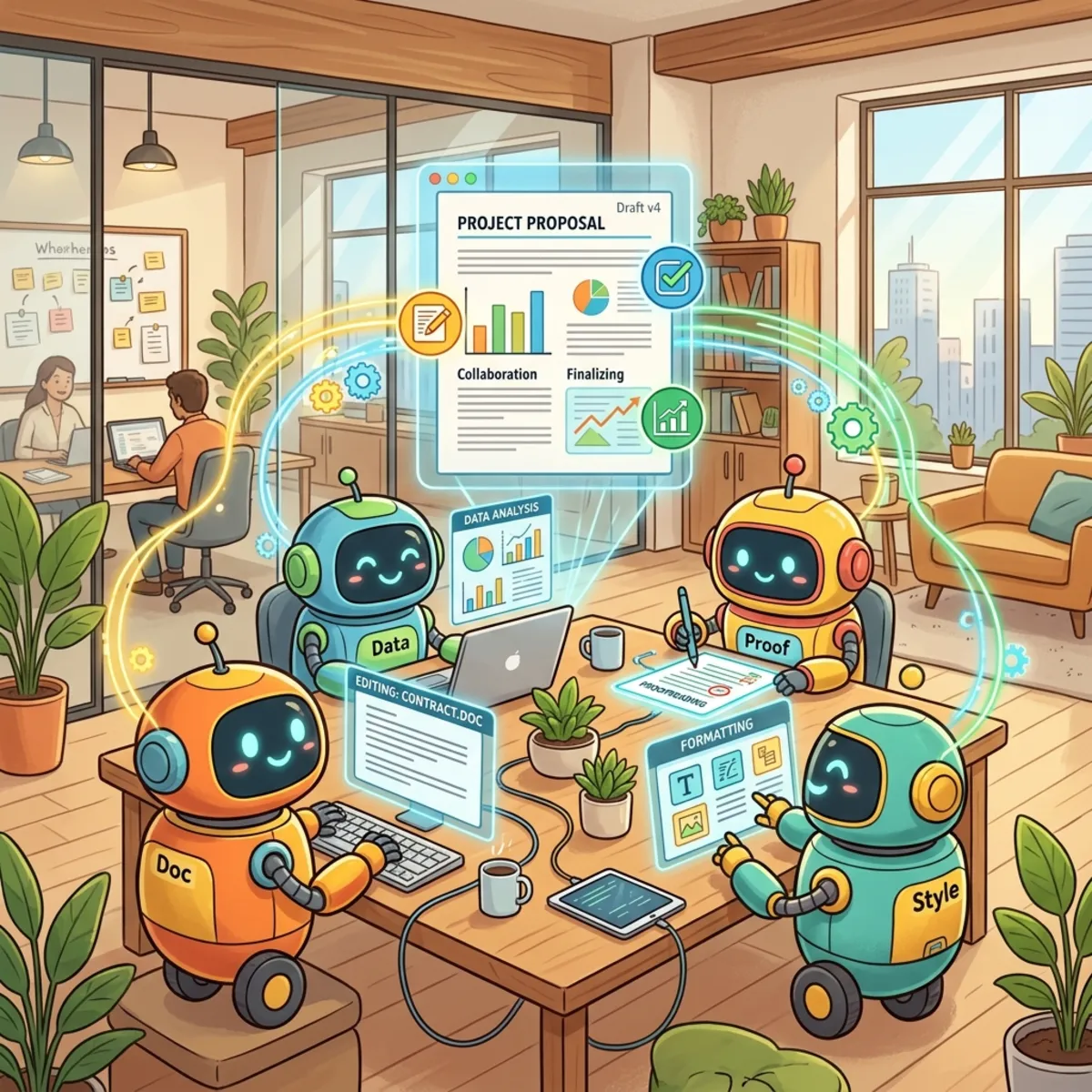
The landscape of conversational AI has shifted permanently. We are no longer building linear, deterministic chatbots; we are designing autonomous Agentic Ecosystems. As enterprise workloads grow increasingly complex, a single monolithic agent quickly degrades in accuracy, hits strict context windows, or suffers from tool dilution.
This technical guide breaks down the core architectural patterns of multi-agent systems within Microsoft Copilot Studio, drawing on the latest Spring 2026 platform capabilities.
1. Ecosystem Briefing: Platform News & Core Concepts
March 2026 Rollouts
Before diving into orchestration, architectural design must account for three massive platform expansions released recently:
- Work IQ (Preview): Copilot Studio now natively integrates with Work IQ Model Context Protocol (MCP) servers. Developers can map agents directly to specialized operational contexts like Work IQ Mail, Work IQ Calendar, and Work IQ Teams for hyper-personalized, context-aware execution.
- Multi-Turn Conversation Testing: Moving past traditional singleton testing tools, this evaluation matrix simulates long-horizon user interactions to assess an agent’s capability to maintain deep context, self-correct, ask for clarifications, and resolve multi-step operational chains.
- ChatGPT-5 GA: ChatGPT-5 is now generally available globally for production-grade workloads within Copilot Studio ecosystems, excluding Government Community Cloud (GCC) environments.
The Shift to Generative Orchestration
In the legacy Power Virtual Agents (PVA) era, conversation routing was deterministic—hand-wired via hard-coded intents and strict conditional branching. Copilot Studio’s modern backbone relies on Generative Orchestration.
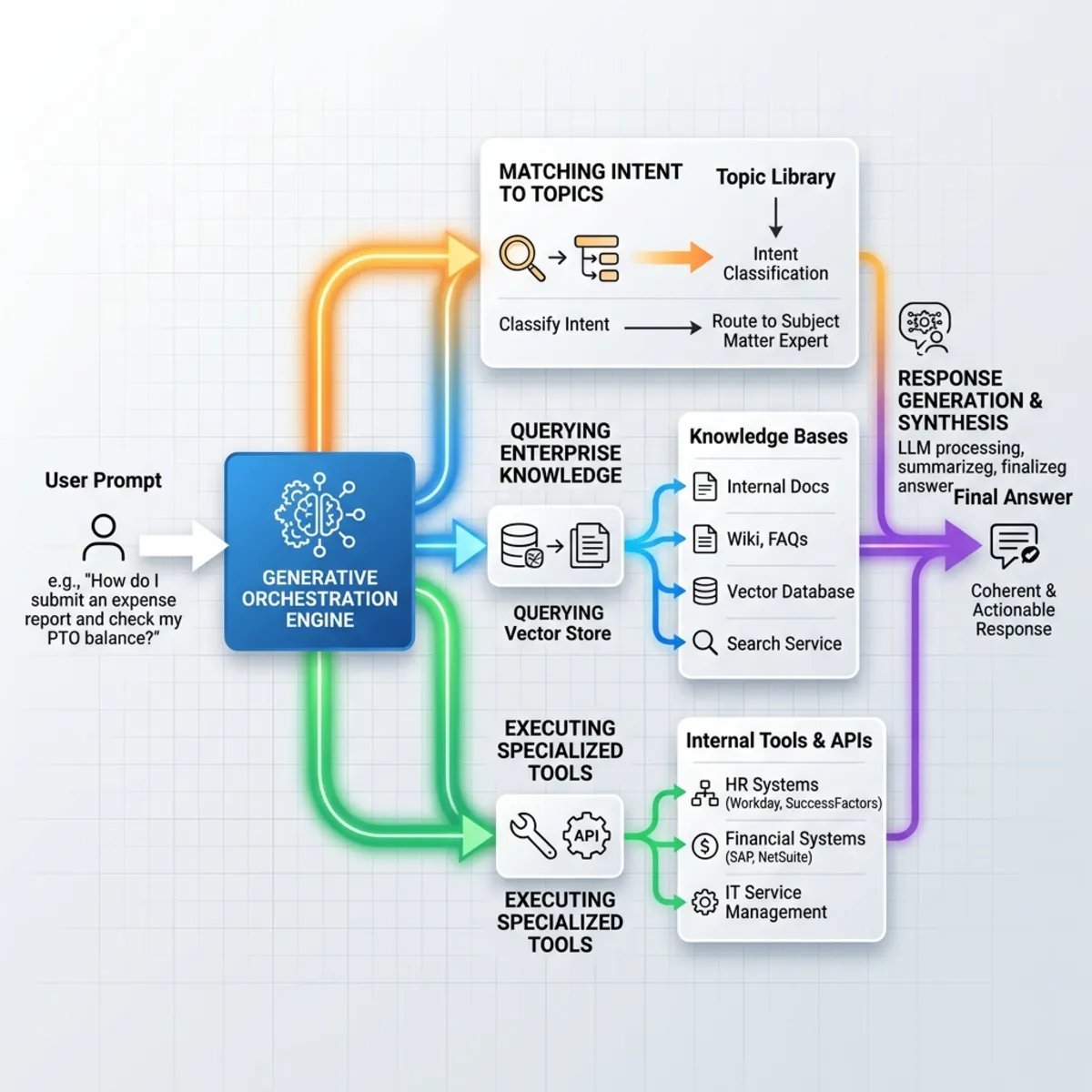
The underlying Large Language Model (LLM) evaluates user prompts dynamically, mapping intents directly to the closest semantic match among custom topics, connected knowledge bases (SharePoint, Fabric, Dataverse, Salesforce, ServiceNow), or extensibility tools.
2. Why Multi-Agent Systems are Imperative
Placing an entire enterprise’s documentation, API hooks, and logic into a single agent inevitably leads to failure. Multi-agent orchestration solves this through six fundamental architectural advantages:
- Bypassing Context Window Limits: Dividing workloads across separate specialized agents assigns distinct, manageable context windows to each underlying LLM instance.
- Parallelization: Multi-agent architectures allow concurrent async processing across separate components to solve multi-faceted prompts efficiently.
- Hyper-Specialization: Forcing an agent to wear one specific “persona” (e.g., Code Gen vs. Code Tester) keeps instructions clean, reducing the probability of selecting an incorrect tool at runtime.
- Error Checking: Agents can act as critics or validation nodes for other agents, catching logical flaws before surfacing data to the user.
- Long-Horizon Execution: Complex, multi-stage workflows are broken into discrete, bite-sized tasks managed sequentially by specialized entities.
- Overcoming Platform Limits: Copilot Studio enforces a strict hard limit of 128 tools/topics per agent. Sub-routing to sub-agents cleanly bypasses this ceiling.
3. Deep-Dive: Child Agents vs. Connected Agents
When establishing a multi-agent system in Copilot Studio, developers must choose between two distinct integration architectures: Child Agents or Connected Agents.
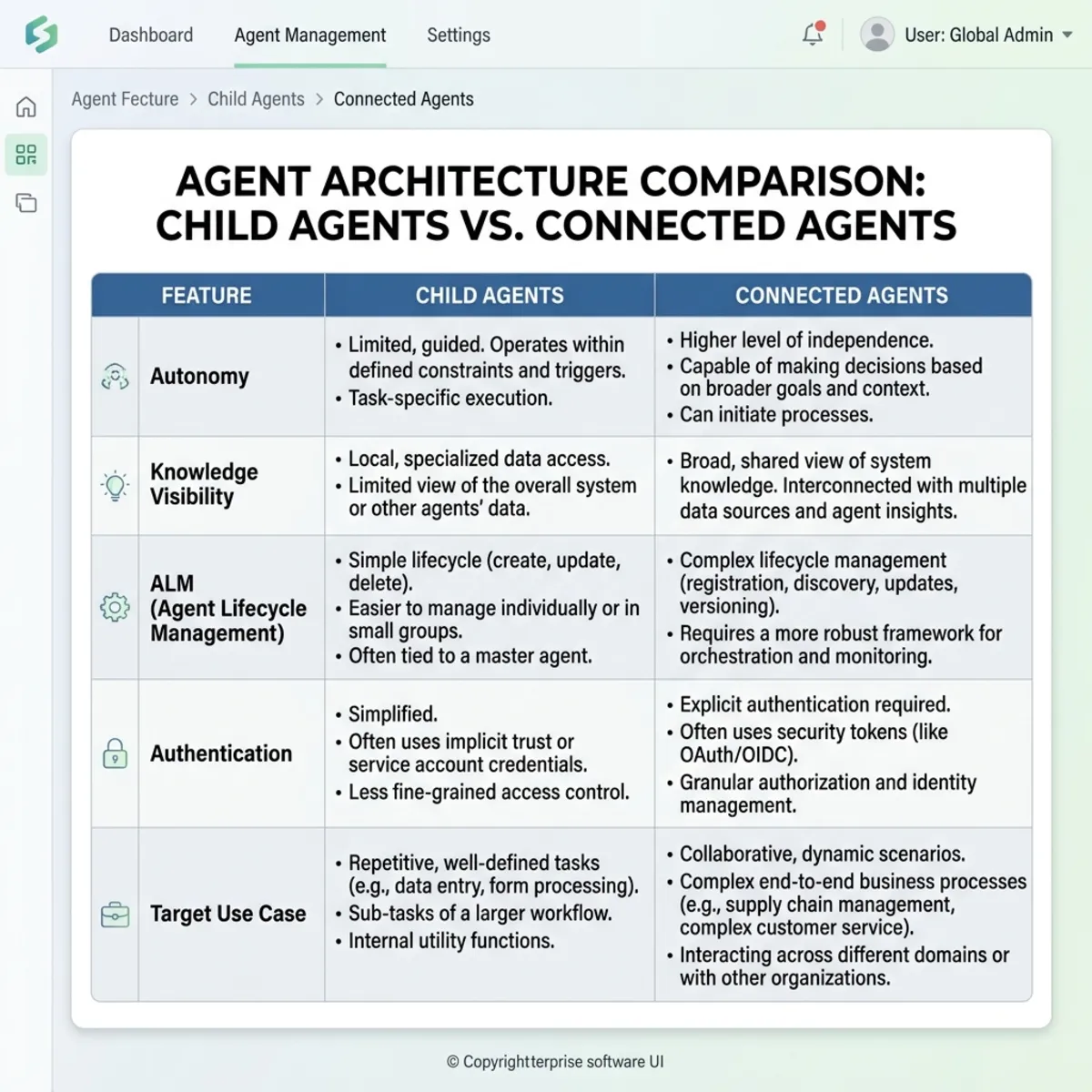
4. Architectural Topologies for Agent Coordination
Depending on your enterprise requirements, multi-agent systems generally fall into one of three distinct topological patterns:
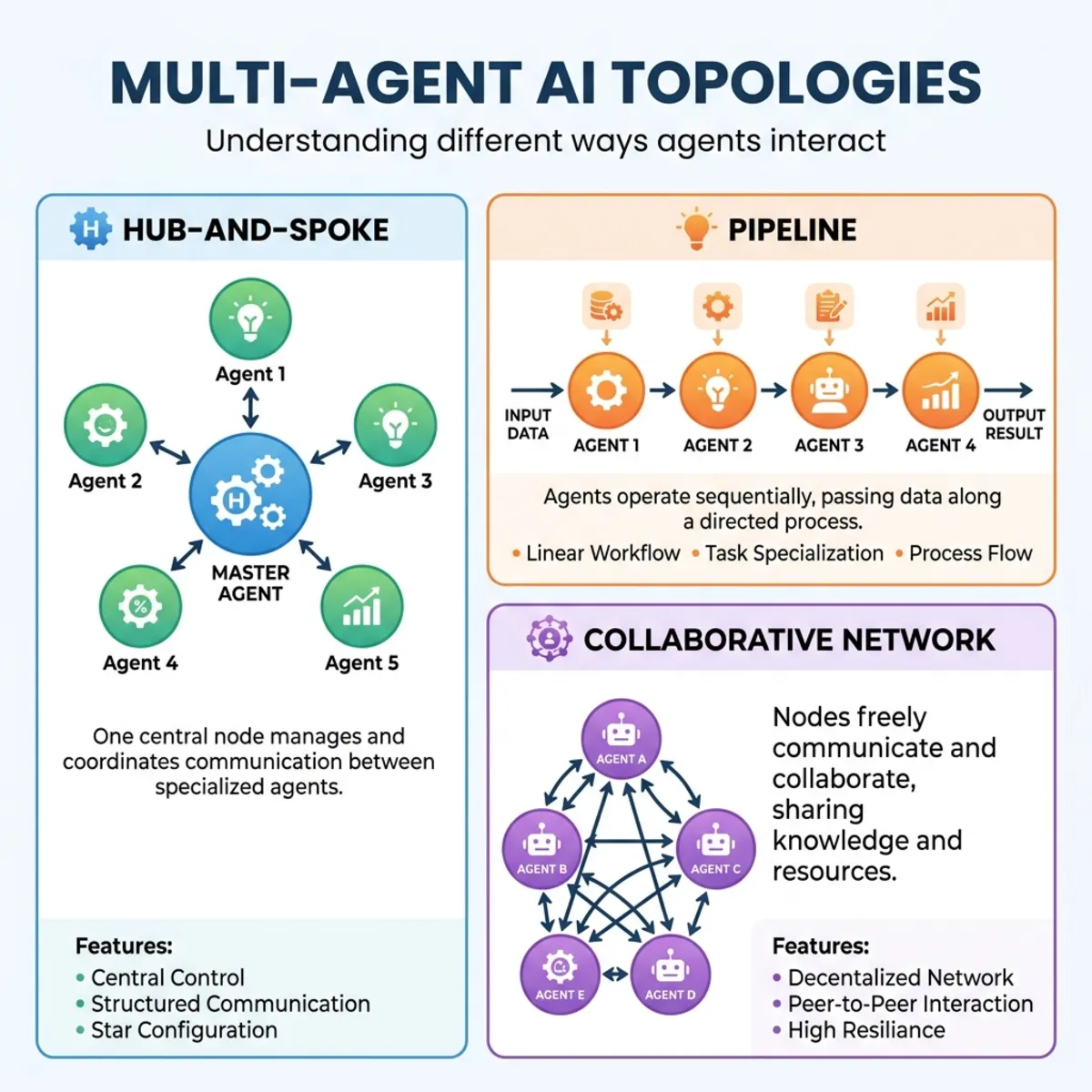
Hub-and-Spoke (Centralized Orchestrator)
A single master parent agent sits in the center, intercepts the initial user interaction, assesses the core intent, and routes execution to the relevant sub-agent. The sub-agent completes its objective and bubbles the results back up to the hub.
The Pipeline (Sequential Chain)
Tasks flow in a linear, predictable sequence. Agent A handles intake and data parsing, passes structured payloads directly to Agent B for validation/screening, which then passes the payload to Agent C for final execution.
Collaborative Network (Council of Agents)
Agents interact dynamically via a shared execution context. Agents can critique, debate, or explicitly delegate tasks to one another in non-linear loops, resulting in a collective final output.
5. Implementation Guide: Advanced Customizations, Tips, & Tricks
The following techniques demonstrate how to maximize the precision, flexibility, and control of your multi-agent architecture within Copilot Studio.
The Golden Rule of Routing: Descriptions as Code
In generative systems, names and descriptions are functional code. If an orchestration layer misroutes prompts, the root cause is almost always an ambiguous description asset.
- The Problem: Naming an asset “History Bot” but writing a description that mentions “handles general information including historical science” confuses the semantic router.
- The Fix: Write explicit, declarative scopes.
- Example: Use this agent exclusively for processing questions, retrieval queries, and verification workflows tied directly to historical events prior to the year 1900.
Intent Override: Deterministic Topics vs. Generative Routing
By default, if an intent matches both a custom-crafted Topic and a connected Sub-Agent, the routing engine prioritizes the Topic. You can leverage this behavior for deterministic execution:
- Intercept a specific user request via a tailored Topic trigger.
- Inside that topic workflow, explicitly inject an “Add an Agent” node to call your sub-agent deterministically.
This guarantees the sub-agent is invoked on your exact terms, bypassing generative selection.
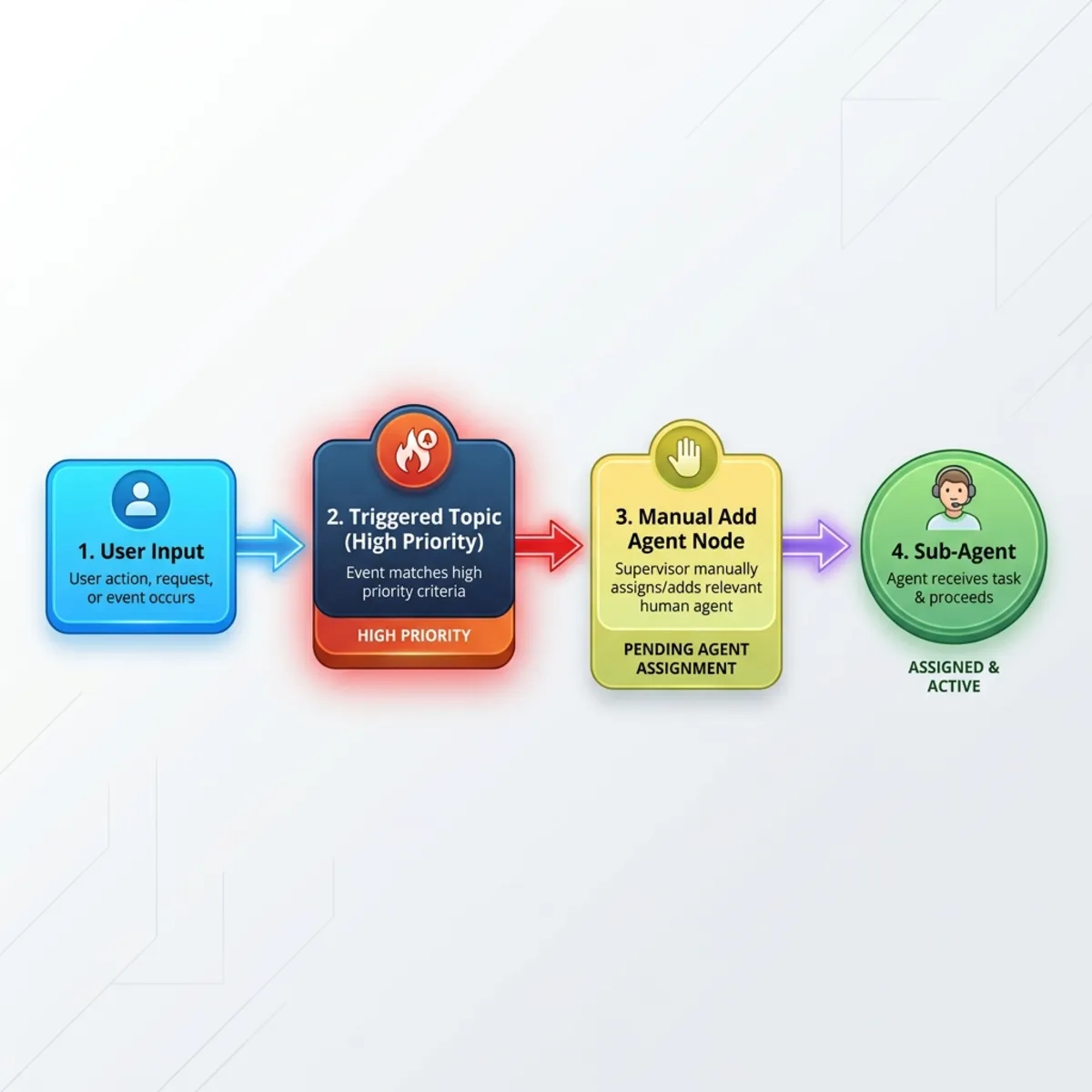
UI Decoupling: Variable Capture and Adaptive Cards
To prevent a sub-agent from instantly dumping unformatted raw text back to the end-user, decouple its execution from the chat interface:
- Configure explicit Outputs inside your sub-agent settings.
- Map the generated data to an internal variable within the parent topic.
- Pass that text variable into a cleanly styled Adaptive Card component. This allows the parent agent to format complex data structures gracefully before rendering them to the client.
Runtime Access Control: Conditional Agent Invocation
You can dynamically toggle an agent’s availability at runtime using global state variables. This is highly useful for enforcement policies or user-scoped visibility:
- Navigate to your sub-agent’s Advanced Settings.
- Inject an evaluation condition tied to a global variable (e.g.,
Global.AllowedQuizzes). - If an employee’s session profile doesn’t include the required permission tags in that variable, the orchestration framework ignores that sub-agent entirely during semantic routing, falling back to safe handlers.
Context Conservation Strategy
When wireframing a deterministic node call to a Connected Agent, you will discover the configuration switch: “Pass conversation history to this agent.”
- Turn it ON: For general, fluid requests where the sub-agent requires the full conversation context to resolve reference pronouns (such as “it”, “they”, “the previous option”).
- Turn it OFF: For transactional utility agents (e.g., a specific calculating agent or currency converter). Disabling context passing saves massive amounts of tokens, prevents context window bloat, and lowers overall latency.
6. Real-World Architectural Blueprint: Enterprise Training & Reimbursement System
To see multi-agent architecture in action, consider a distributed production blueprint designed for enterprise compliance and financial oversight:
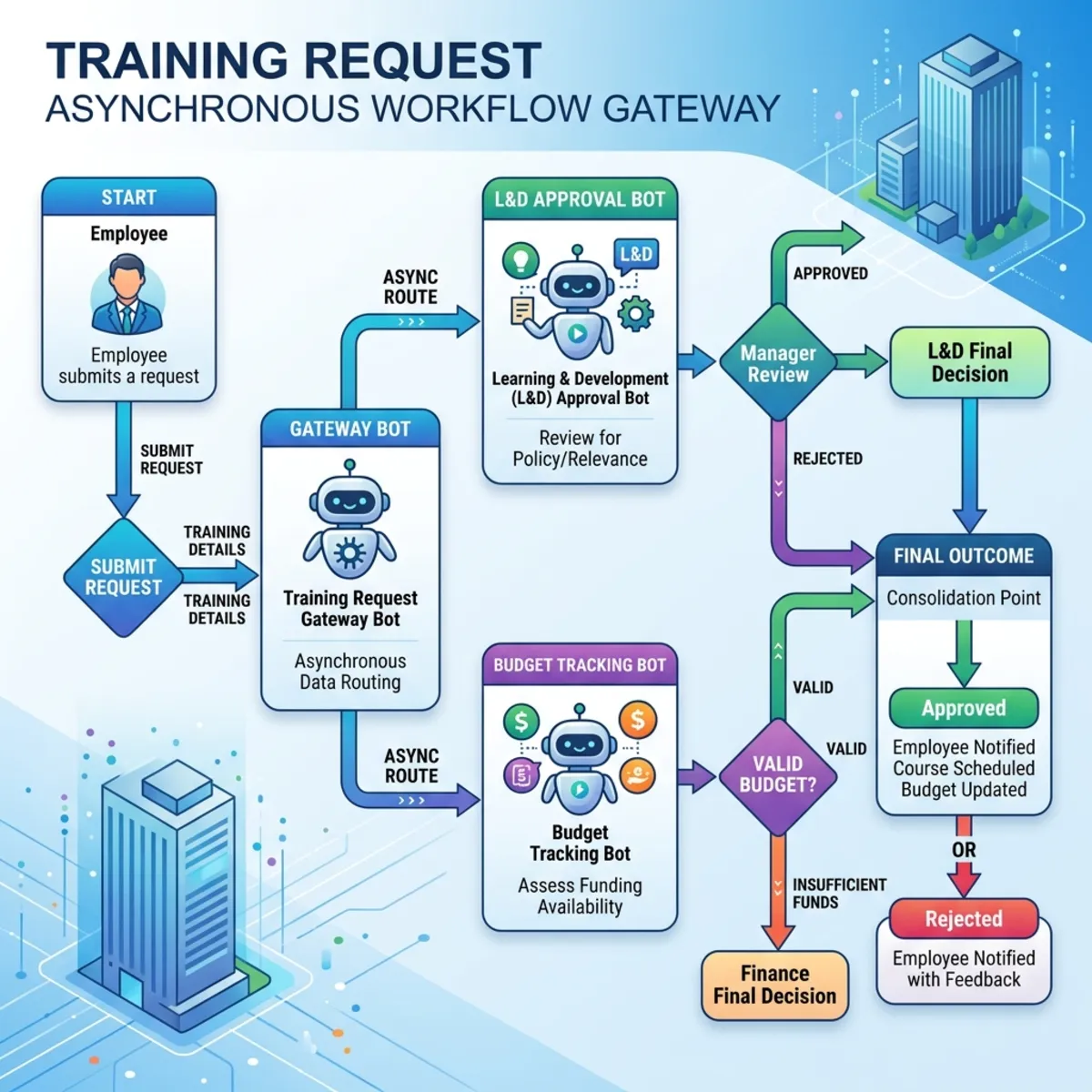
1. The Gateway (Training Request Bot)
An employee requests funding for an advanced cloud certification costing $180. This orchestrator triggers a structured process to pull internal employee profile IDs securely.
2. The Policy Gatekeeper (L&D Approval Bot)
The orchestrator routes the request payload asynchronously to the L&D Connected Agent. This agent scans its underlying knowledge bases to verify if the vendor is approved for corporate sponsorship. If validation fails, it flags a violation back to the orchestrator.
3. The Financial Gatekeeper (Budget Tracking Bot)
Concurrently, the orchestrator passes the profile data to the Budget Tracking Connected Agent. This agent runs an independent data integration action via enterprise ERP hooks, verifying that the employee has enough remaining allowance for the fiscal year.
4. Consolidated Resolution
Because the budget tracking agent determines the employee’s remaining balance is only $150 (violating the $180 requirement), it returns a failure code. Even though the user explicitly instructed the front-end agent to “place a training request,” the orchestrator halts the pipeline. It safely bypasses the transactional execution step (Create_Training_Record_Workflow), reporting the policy shortfall clearly back to the user without writing invalid entries to the database.
Read next