Microsoft Entra in the Age of AI Agents: From Identity Management to Adaptive Access Control

Writer

AI agents are changing a basic assumption behind enterprise identity security: the identity requesting access is no longer necessarily a person. It might be a background agent processing documents, a desktop coding assistant invoking a remote tool, or a digital teammate acting for an employee. Some agents run in Microsoft services; others live on third-party clouds or employee devices. And unlike a traditional user session, an agent may continuously decide which systems to contact and which actions to attempt.
This creates a deceptively simple problem. How do you know which agents exist, what authority they have, who is accountable for them, and when to stop them?
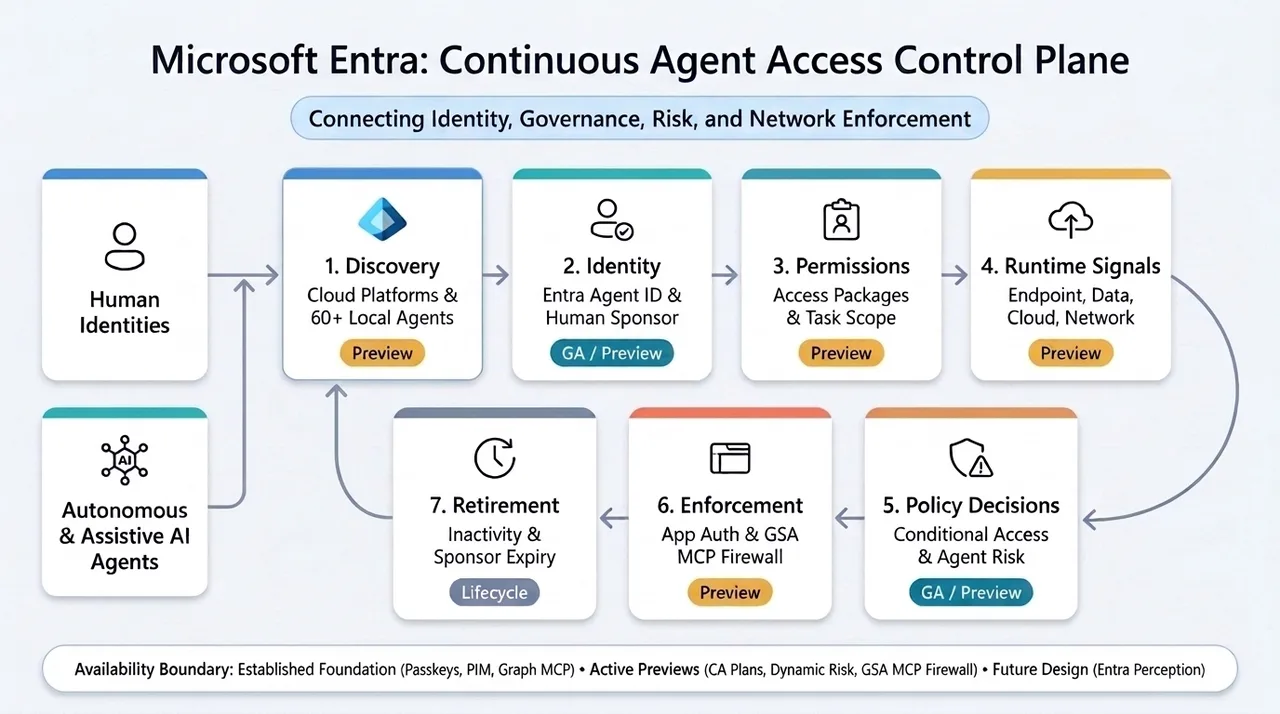
Microsoft’s Entra announcements at Ignite 2026 suggest a larger architectural shift: identity is becoming a common control plane for people and agents, with governance, risk evaluation, and network enforcement working together. The most important change is not any single new feature. It is the attempt to connect discovery → identity → permissions → runtime signals → policy decisions → enforcement → retirement into a continuous access model.
That ambition is broader than what is generally available today. Some building blocks are established, some are in preview, and some were shown as future designs. Understanding the boundaries matters as much as understanding the vision.
The identity backlog becomes the agent security backlog
Traditional identity programs already struggle with accumulated privileges, abandoned accounts, weak recovery processes, inconsistent Conditional Access policies, and unclear ownership. Agents do not magically escape those weaknesses. If an assistant operates using a person’s broad access, or an autonomous agent receives permanent application permissions, it can magnify existing exposure.
Consider an employee who has gradually accumulated access to several finance and operations systems. A useful assistant may need to read one report and prepare a summary. It does not follow that the assistant should inherit every permission the employee possesses, including administrative or write access unrelated to that task.
This is why Microsoft’s strategy begins with the human identity foundation rather than treating agents as a completely separate security domain.
Strong sign-in is not enough if recovery is weak
Passkeys use public-key cryptography and are resistant to phishing based on lookalike sign-in domains. Microsoft says passkeys are now the default for new Entra accounts. But authentication assurance depends on more than the sign-in ceremony: enrollment, credential replacement, and account recovery can become alternate paths for an attacker.
High-assurance credentials (preview) extend identity verification to sensitive moments in the credential lifecycle. Microsoft’s demonstration showed a Teams meeting configured so that a participant could present a verifiable credential and complete a face-match check before bypassing the lobby. The broader design also covers onboarding, account recovery, and access to sensitive resources, using Microsoft Entra Verified ID and supported verification partners.
A verified credential can provide stronger evidence about a person’s identity. It does not, by itself, prove that every subsequent action is safe, nor does biometric matching eliminate the need for sound recovery and authorization policies.
Microsoft is also previewing a secure enterprise browser experience combining Edge for Business with Entra Global Secure Access (GSA) for access to private applications from personally owned devices. This is a narrower, identity-aware alternative to granting broad network reach through a conventional VPN, not a claim that every VPN use case disappears.
Reduce permanent privilege before automating access
Privileged Identity Management (PIM) addresses another old problem: access that remains active long after the task requiring it ends. The Ignite demonstration showed an eligible user activating access to a virtual machine through My Access, providing justification, and connecting through Azure Bastion. The expanded experience includes session oversight and recordings for supported scenarios, with capabilities such as broader VM and agent coverage in preview.
The principle is straightforward: eligibility can be persistent; elevated authority should be temporary. That principle becomes even more important when software agents can initiate actions at machine speed.
Conditional Access becomes a structured policy model
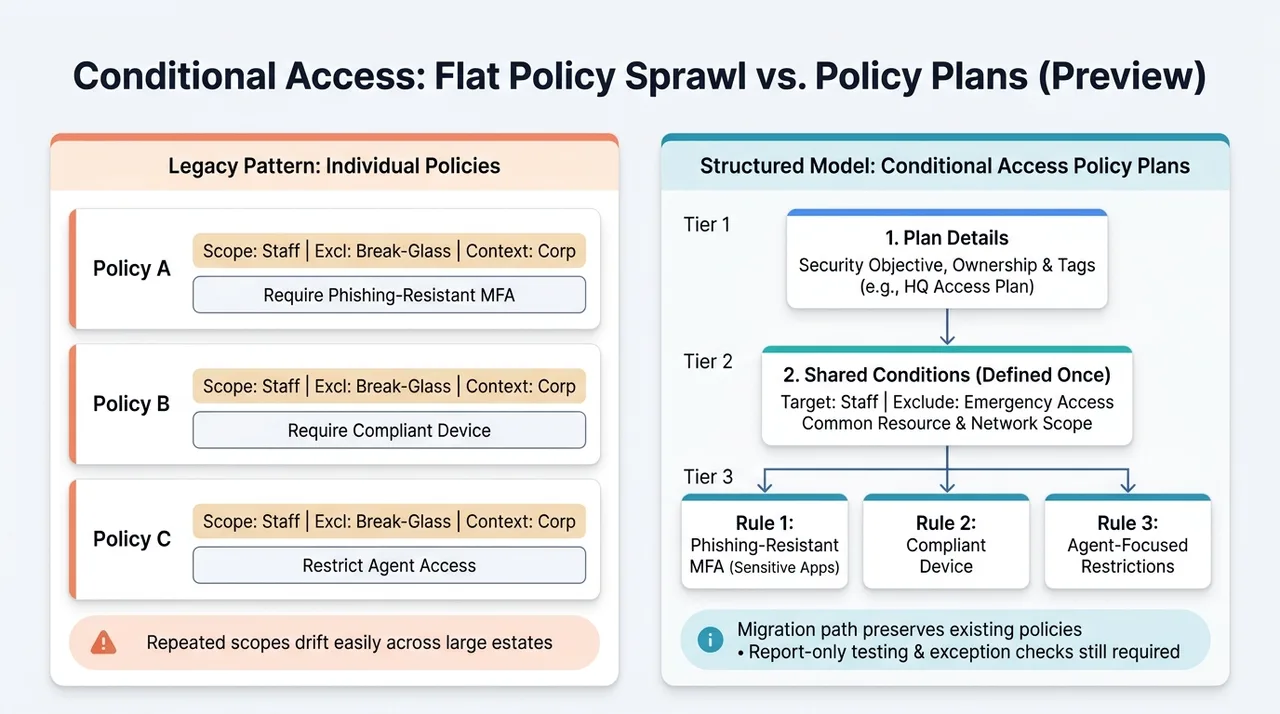
Conditional Access is powerful, but a large estate of individually configured policies can become difficult to understand. The same user scopes, exclusions, device conditions, and network conditions often recur across many policies. Small differences are easy to miss.
Conditional Access policy plans (public preview) introduce a hierarchy:
- Plan details describe the security objective, ownership, and tags.
- Shared conditions define common identity, resource, and contextual scope once.
- Rules inherit that scope and add specific requirements, such as phishing-resistant multifactor authentication (MFA), compliant devices, or agent-focused restrictions.
Imagine a headquarters access plan that targets staff while excluding emergency access accounts. One rule requires phishing-resistant MFA for sensitive resources; another requires a compliant device. The administrator no longer needs to duplicate the common scope in each rule. Templates can accelerate creation, and Microsoft provides a migration path for existing policies. Existing policies can remain enforced during the transition.
This is primarily a manageability and consistency improvement, not a replacement for careful policy design. A shared mistake can also propagate consistently, so report-only evaluation, exception handling, and testing remain essential.
Microsoft’s Conditional Access policy plans announcement explains the model and its preview status.
First find the agents, then decide what identity means
An agent cannot be governed if the organization does not know it exists. Discovery is harder than it sounds because agents occupy different environments and use different authorization patterns.
A useful distinction is between registered agents and discovered agents:
| Category | How it becomes visible | What that visibility establishes |
|---|---|---|
| Registered or connected cloud agent | The agent is provisioned on a supported Microsoft platform or discovered through a connected third-party platform | An Entra-linked identity and management context for supported integrations |
| Discovered local agent | Endpoint and network signals identify supported agent software running on a device | Inventory and agent-specific control context, with enforcement depending on the integration |
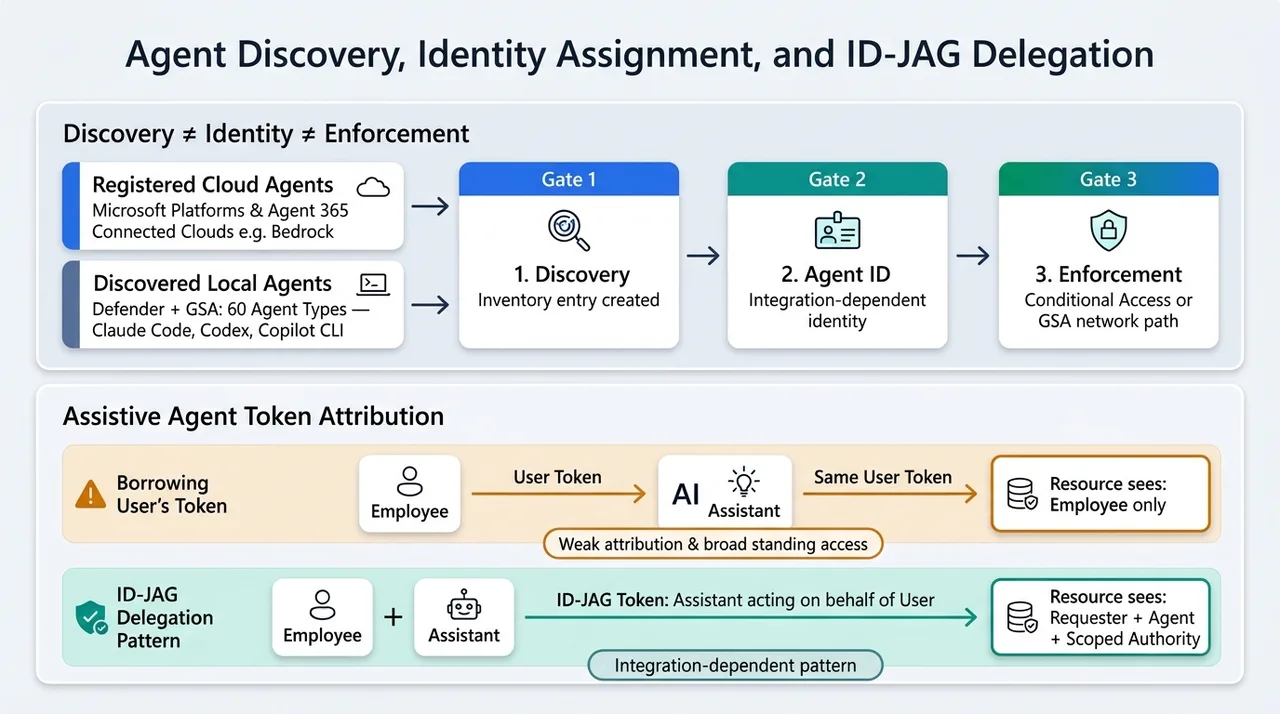
Microsoft Agent 365 connected platforms can discover agents from supported third-party environments using platform integrations, APIs, and identity federation. Microsoft has announced preview integrations across platforms including Amazon Bedrock and other providers. The degree of identity assignment and governance varies by platform; connecting a platform should not be confused with automatically rewriting an agent’s existing authentication code or granting universal control over every action it performs.
For local agents, Microsoft announced preview discovery of 60 agent types using Defender and Global Secure Access, including coding assistants such as Claude Code, OpenAI Codex, and GitHub Copilot CLI. This helps expose software that might otherwise operate outside central agent inventory.
Crucially, discovering an agent, assigning an Agent ID, and enforcing its access are three different steps. An inventory entry does not automatically mean that every downstream resource recognizes that identity. Where a service integrates with Entra, Conditional Access may apply. Where it does not, network controls through GSA may provide a different enforcement point. Coverage is conditional on the agent, traffic path, and supported integration.
For an overview of the announced coverage, see Microsoft’s Ignite 2026 Entra announcement and Agent 365 connected-platform updates.
Agent identity is not the same as borrowing a user’s token
There are at least two important operating models:
- Autonomous agents act under their own identity and assigned authority.
- Assistive agents work on behalf of a person but should still be distinguishable from that person.
If an assistant simply presents the employee’s token everywhere, a downstream application may see the employee as the actor without a clear agent-specific identity in the access path. That complicates least privilege and attribution.
The session described an identity-delegation approach referred to as ID-JAG, in which a token used by an assistant can identify the assistant acting on behalf of a user rather than impersonating the user as an indistinguishable principal. The intended result is more explicit attribution and more tightly scoped authority. This should be understood as an integration-dependent delegation pattern, not as a universal token transformation available for arbitrary applications. Resource-side support and the actual token and authorization design remain decisive.
The deeper lesson is that who requested the work, which agent executed it, and what authority the resource accepted are related but distinct facts. A secure architecture should preserve those distinctions in both authorization and audit records.
Govern agents like identities, but at software scale
A human account usually has an onboarding event, an owner, a set of entitlements, periodic reviews, and an offboarding event. Agents need equivalent lifecycle discipline, but manual review cannot scale if an organization operates thousands of short-lived or departmental agents.
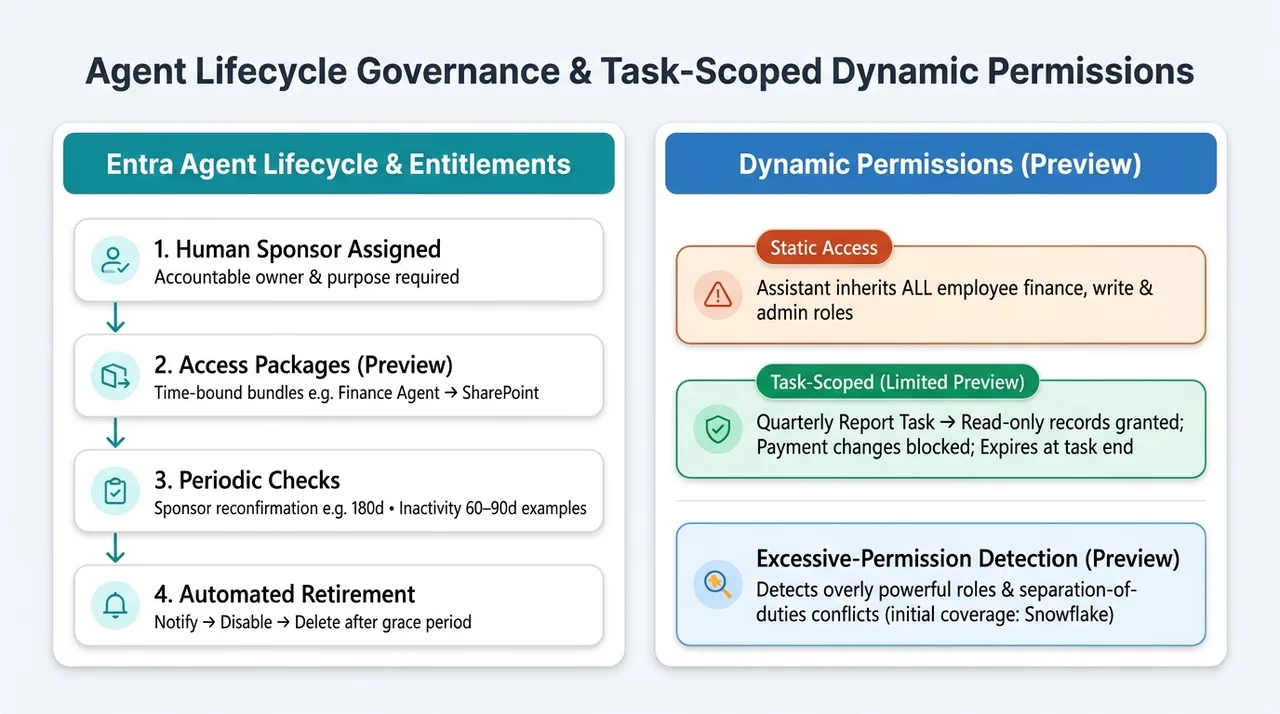
Microsoft Entra agent lifecycle policies evaluate criteria such as:
- Whether an agent has a human sponsor.
- Whether sponsorship has been reconfirmed within a defined period.
- Whether the identity has been active recently.
- Whether the identity should be notified, disabled, or deleted after a grace period.
The demo used illustrative settings such as sponsor reconfirmation every 180 days and inactivity checks over 90 days. Those were example policy choices, not universal requirements. Microsoft has also described an out-of-box policy that disables agent identities after 60 days of inactivity. Availability documentation has evolved: the Ignite announcement describes automated lifecycle management as generally available, while some individual Learn pages still label the policy experience preview. Verify the precise capability and tenant rollout before depending on it in production.
Access packages extend entitlement management to agents and digital teammates. An access package can bundle resource access, approval requirements, and expiration rules. For example, a finance-focused agent might receive access to a SharePoint resource through a package instead of accumulating permanent grants one application at a time. Access-package support for digital teammates was announced in preview.
The operational rule is simple: every agent should have accountable sponsorship, a documented reason to exist, and an expiration path. An abandoned agent identity is a service-account problem with a new name.
See Entra agent identity governance and agent lifecycle policy documentation.
Dynamic permissions: authorize the task, not the entire person
Least privilege is easy to say and difficult to maintain. Traditional entitlements are often static: an identity receives a role and retains it until someone removes it. Agents introduce a more fluid requirement. Their permissions should ideally match the current task and shrink again when that task ends.
Microsoft’s Dynamic permissions work separates two related capabilities:
- Excessive-permission detection and remediation (preview): assess connected application identities for overly powerful roles and separation-of-duties conflicts. Microsoft documents initial preview coverage for Snowflake.
- Task-scoped permission assignment (limited preview): interpret an agent’s requested task, apply organizational boundaries, and grant a time-limited subset of authority when permitted.
Suppose an assistant is asked to prepare a quarterly report. Reading the relevant records may be justified; changing payment instructions is not. If a later step genuinely needs additional access, the system could evaluate that request against policy rather than simply giving the assistant all of the employee’s standing permissions from the outset.
This is a promising direction, but the session’s fluid permission-escalation demonstration must not be mistaken for a broadly available, general-purpose authorization engine. Microsoft’s documentation distinguishes the previews and invites selected participants to explore task-scoped assignment. Policies and application-specific authorization models still define the outer boundaries.
Microsoft Entra Dynamic permissions documentation is particularly useful for separating the current preview from the longer-term model.
From static access decisions to continuously assessed agent risk
An agent’s identity and permissions tell only part of the story. The same agent may be low-risk while reading public documentation and much higher-risk when invoking an unfamiliar tool against sensitive data.
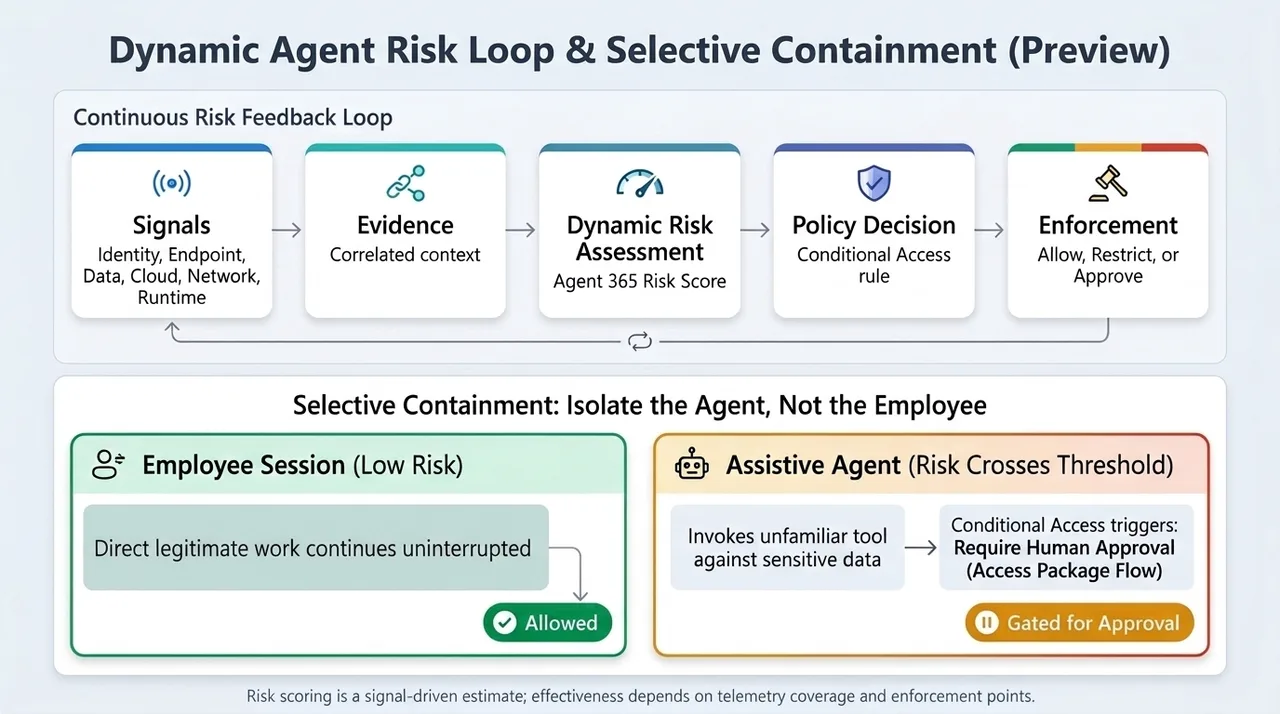
Microsoft’s proposed feedback loop can be expressed as:
Signals → evidence → dynamic risk assessment → policy decision → enforcement.
Dynamic Agent Risk, announced in Agent 365 preview, combines signals from identity, endpoint, data, cloud, network, and runtime activity. The goal is to let policy react to changing conditions rather than treating every action by a known agent as equally trustworthy.
In a Conditional Access preview scenario, an administrator could target assistive agents separately from their human users, select sensitive actions or destinations, and apply controls when agent risk crosses a threshold. The demonstration showed a require human approval control connected to an access-package approval flow. That is a specific preview scenario, not evidence that arbitrary applications already support uniform human approval for every agent action.
A particularly valuable distinction is contain the risky agent without unnecessarily blocking the employee. If the system can distinguish the two actors, it can limit the agent’s action while preserving the person’s legitimate work.
Risk scoring is still a signal-driven estimate, not proof of malicious intent. Its usefulness depends on telemetry coverage, classification quality, and the enforcement points that actually honor the decision.
The network becomes an enforcement point for agent tools
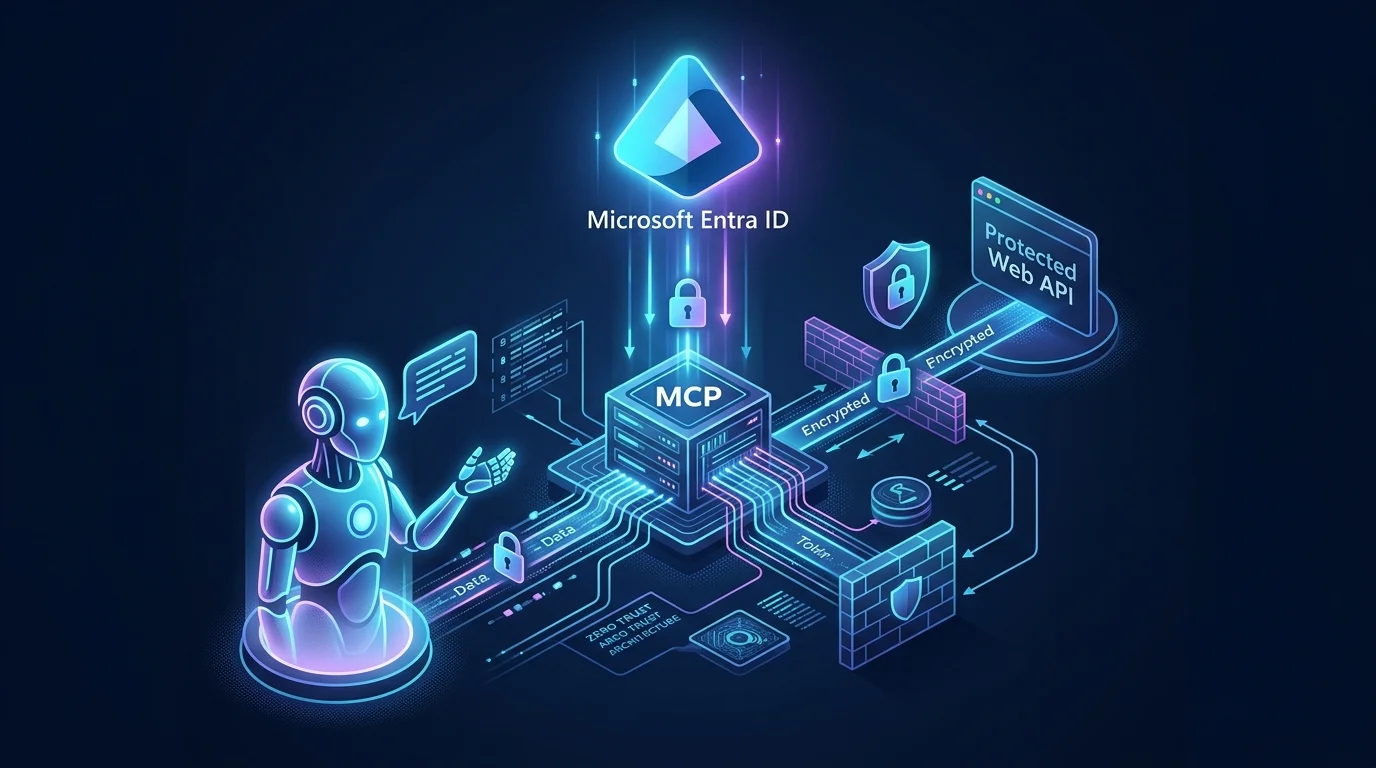
Identity-aware application policies are not sufficient when an agent calls external web services or remote Model Context Protocol (MCP) servers. MCP is a standard way for AI applications to discover and invoke tools and access resources. A tool might read a record, send a message, or execute a write operation. The distinction between those actions matters.
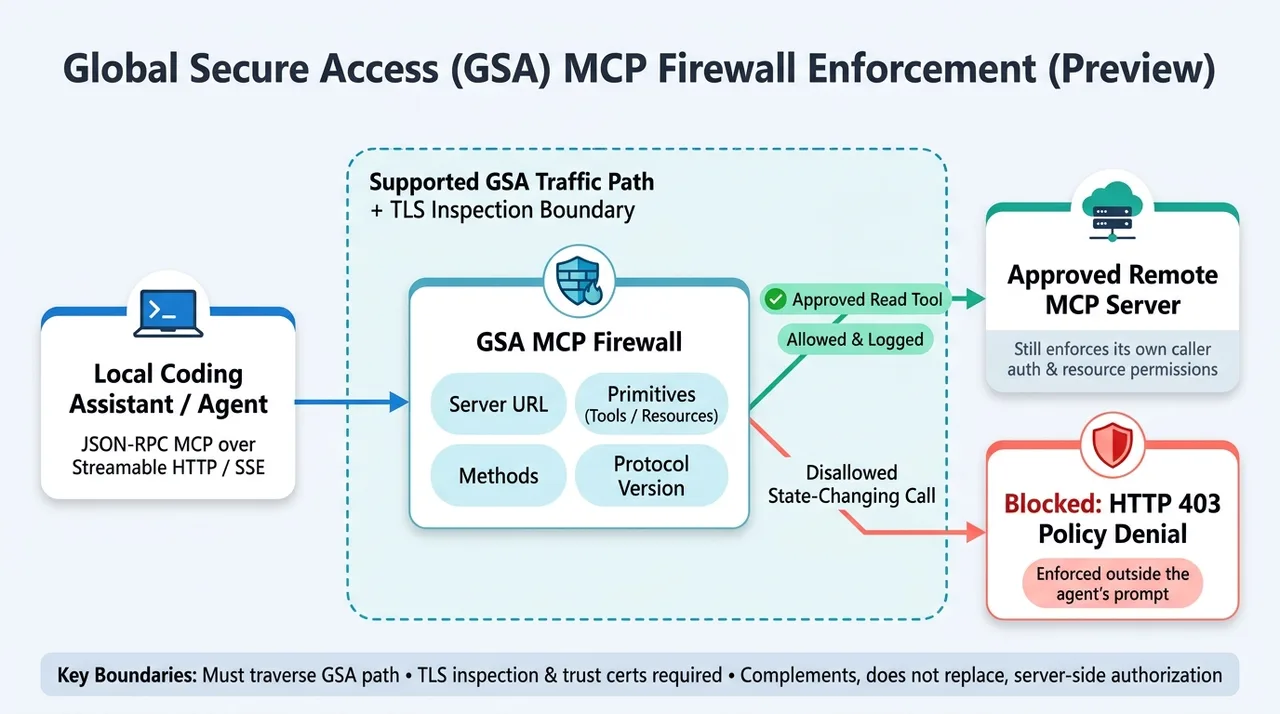
Microsoft’s Global Secure Access MCP firewall (preview) adds protocol-aware controls for MCP traffic that traverses GSA. Policies can match supported MCP server URLs, primitives such as tools and resources, methods, and protocol versions. The service can allow or block interactions and produce monitoring records.
Consider an illustrative coding assistant that may consult an approved MCP server but must not invoke certain state-changing tools. A network-layer policy could permit approved MCP interactions while blocking disallowed calls. The demo showed a denied request returning an HTTP 403 response with a policy-related explanation. The important point is not the status code; it is that the enforcement decision can be made outside the agent’s own prompt or instructions.
There are important boundaries:
- Traffic must be routed through the supported GSA path. A policy cannot inspect traffic it never sees.
- TLS inspection and associated trust configuration may be necessary to inspect encrypted MCP payloads. This introduces certificate, compatibility, privacy, and operational considerations.
- Protocol support is specific. Microsoft’s documentation describes inspection for supported JSON-RPC MCP traffic over streamable HTTP and Server-Sent Events; it is not a blanket guarantee for every transport or proprietary tool call.
- Network policy complements, rather than replaces, resource authorization. An MCP server must still authenticate callers and enforce its own permissions.
This layered approach matters especially for agents that are discovered locally but do not directly use Entra authentication. Network controls can constrain reachable destinations and supported operations even when the application itself is not Entra-native.
See GSA MCP firewall configuration and limitations and TLS inspection documentation.
Fleet governance also needs tenant consistency and recovery
Agent security does not stop at an individual identity. Large organizations may operate multiple Entra tenants, each with different configurations and a different mix of Microsoft and third-party agents.
Entra Tenant Governance cross-tenant configuration management and resource policy (preview) aim to define desired configurations, detect drift across supported identity and productivity workloads, and prevent selected noncompliant changes. Microsoft has also announced preview extensions for Agent 365 and Copilot. This is a way to reason about configuration consistency across tenants, not a guarantee that every workload setting can already be centrally enforced.
Resilience matters for the same reason. A mistaken policy edit or deletion of a critical agent identity can disrupt operations. Entra Backup and Recovery supports daily backups of specified directory objects and policies. Standard retention is up to seven days; Premium (preview) extends it to up to 30 days and integrates with the Microsoft 365 Backup experience. Premium is a separately enabled, consumption-billed option, not an automatic 30-day entitlement for every tenant. Hard-deletion protection for selected critical objects is also in preview.
The architectural distinction is worth keeping clear: governance tries to prevent or detect drift; backup and recovery help restore supported objects after something goes wrong. Neither substitutes for the other.
See Tenant Governance announcements and Entra Backup and Recovery plans.
AI can also become an interface for identity administration
So far, the discussion has been about controlling agents. Microsoft is also using agents to help administrators control the environment.
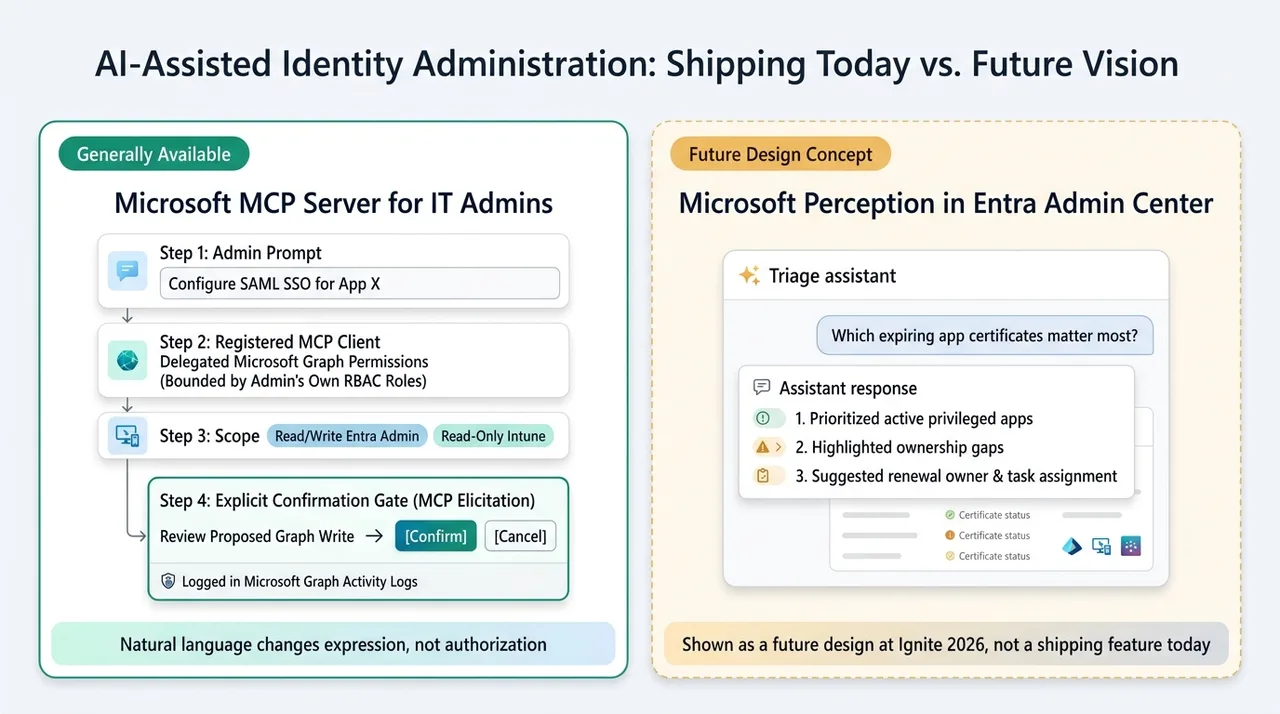
The Microsoft MCP Server for IT Admins is generally available. It exposes supported Microsoft Graph operations through MCP, enabling an AI client to translate an administrator’s natural-language request into API calls. The Ignite demonstration used an external AI assistant to configure SAML single sign-on for an enterprise application, with the administrator reviewing proposed changes before execution.
The distinction between a helpful interface and unrestricted automation is critical. According to current documentation:
- An MCP client is registered and granted the required delegated Microsoft Graph permissions.
- The signed-in administrator’s own roles and privileges still limit the operations.
- The agent can suggest and execute supported Graph requests.
- Write operations require explicit confirmation through supported MCP elicitation; clients that cannot provide the required confirmation cannot perform those writes.
Current documented scope includes read/write Entra administration and read-only Intune scenarios, rather than unrestricted access to every Microsoft 365 workload. A client app registration and consent configuration are still required for the documented setup. Microsoft also documents Microsoft Graph activity logging for auditing the resulting API calls.
This is a useful model for AI-assisted administration: natural language changes how the request is expressed, not who is authorized to perform it.
See MCP Server for IT Admins overview and setup prerequisites.
From query assistance to agentic defense
Microsoft also demonstrated a future vision for Microsoft Perception inside the Entra admin center. In the scenario, an administrator asked which expiring application certificates mattered most. The assistant prioritized active, highly privileged applications, identified ownership gaps, suggested an appropriate person to handle renewals, and showed how tasks could be assigned.
That Entra-embedded workflow was explicitly presented as a future design, not an available admin-center feature. Separately, Microsoft announced Microsoft Perception and new security playbooks, including identity-focused scenarios for reducing credential-phishing exposure and investigating identity attack paths. These developments point toward AI-assisted triage and remediation, but they should not be collapsed into a claim that the exact certificate-renewal workflow is shipping today.
Microsoft’s Perception Ignite announcement provides the broader product context.
What the architecture changes, and what it does not
The announcements are best understood as a move from identity as a sign-in record to identity as the anchor for continuously governed action.
In that model, an agent has an identifiable existence and an accountable sponsor. Its permissions are bounded by policy and, where supported, by the task. Runtime evidence can change its assessed risk. Application and network controls can then limit what it does. When the agent is no longer needed, lifecycle policy removes its access and eventually retires its identity.
Yet this is not one seamless switch that an administrator can turn on across every agent and cloud. Different integrations provide different levels of discovery, identity, permission insight, and enforcement. Several of the most interesting pieces, especially dynamic task-scoped permissions, agent risk controls, and MCP firewall enforcement, remain in preview. Existing application authorization, careful policy design, and human accountability remain essential.
For architects, the most useful questions are therefore concrete:
- Can we identify this agent and its human sponsor?
- Does the target resource see the agent, the user, or only an opaque service credential?
- Which permissions are actually exercised, and can they expire?
- What runtime signals can change the decision?
- Where is the decision enforced: the application, Entra, the network, or some combination?
- Can we audit the action and retire the identity without leaving access behind?
Those questions apply regardless of whether the agent was built with Microsoft tooling, runs in another cloud, or lives on a developer’s laptop.
Conclusion: identity must follow the action
The most compelling part of Microsoft’s Entra direction is not the prospect of managing vastly more identities. It is the prospect of making an agent’s authority explicit, bounded, observable, and reversible.
Passkeys, PIM, Conditional Access, tenant governance, and recovery remain foundational. Agent IDs, lifecycle policies, dynamic permissions, agent risk, and MCP-aware network controls extend that foundation into a world where software increasingly acts for people. AI-assisted administration and Perception add another layer: using agents to help security teams understand and manage the complexity agents themselves introduce.
The destination is clear, even if the product journey is unfinished. In an agentic environment, knowing who signed in is no longer enough. Security needs to know which agent acted, for whom, with what authority, under which conditions, and whether that authority should still exist.
Product availability and documentation checked against Microsoft’s November 2026 Ignite announcements and linked Microsoft Learn pages. Preview features, integration coverage, and prerequisites may change.
Read next