The Microsoft AI Ecosystem Explained: Use It, Build It, Ground It, Govern It

Writer

Choosing a Microsoft AI tool is difficult because the product names do not describe the same kind of thing. Copilot is an experience people use. Copilot Studio is a place to build. Microsoft Foundry provides an engineering platform. Work IQ supplies context. Agent 365 provides oversight.
Put them into one list and they look like competing answers. Separate their responsibilities and the architecture becomes much easier to understand.
The useful question is not “Which Microsoft AI product is best?” It is “Which part of my solution am I choosing?”
This guide explains the ecosystem through four responsibilities: using AI, building solutions, grounding them in relevant information, and governing their operation. It is written for architects, developers, Power Platform makers, and IT professionals who need a practical map without mistaking a product overview for a deployment recipe.
Availability checkpoint: November 19, 2026. Microsoft’s November 17 Ignite announcement states that Copilot Home, Office in Copilot, and Copilot Managed Runtime are generally available; Copilot Code is expected to become generally available in the coming weeks; and Autopilot is beginning its Frontier rollout. Some earlier documentation and product pages still describe older preview states. General availability also does not mean every tenant immediately has every feature. See the dated Ignite announcement.
A map of responsibilities, not a rigid stack
The four-layer model is a mental framework, not a claim that every Microsoft AI solution passes through four separate products.
| Responsibility | Question it answers | Representative capabilities |
|---|---|---|
| Use it | How will people interact with AI and delegate work? | Copilot Chat, Cowork, Autopilot, Copilot in Microsoft 365 apps |
| Build it | How will we create the agent, application, or process? | Agent Builder, Copilot Code, Copilot Studio, Power Platform, Microsoft Foundry, GitHub Copilot |
| Ground it | What information gives the system relevant context? | Work IQ, Fabric IQ, Foundry IQ, Web IQ |
| Govern it | Who owns it, what may it access, and how is it monitored and paid for? | Agent 365, Microsoft Entra Agent ID, platform-specific controls, cost management |
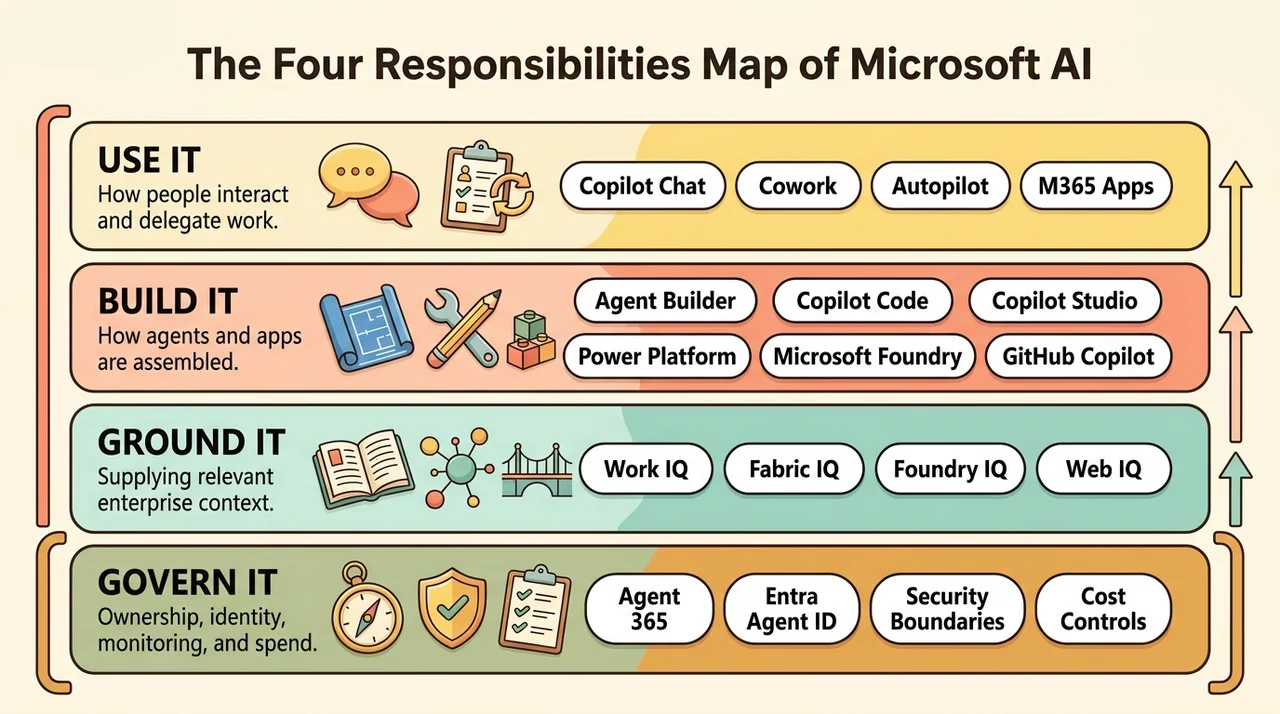
A single product can participate in several responsibilities. Copilot Studio is a builder with runtime and governance capabilities. GitHub Copilot helps create software but is not necessarily where that software runs. Microsoft IQ supplies context across multiple experiences rather than belonging to one chat interface.
Think of a workshop: the interface is where someone requests work, the builder determines how the solution is assembled, grounding supplies the reference material, and governance defines the operating boundaries. The analogy stops at the idea of clean separation. In practice, these capabilities overlap and integrate.
1. Use it: ask, delegate, and sustain work
The user-facing layer is the natural starting point when the objective is productivity rather than a new application.
Copilot Chat: work through a conversation
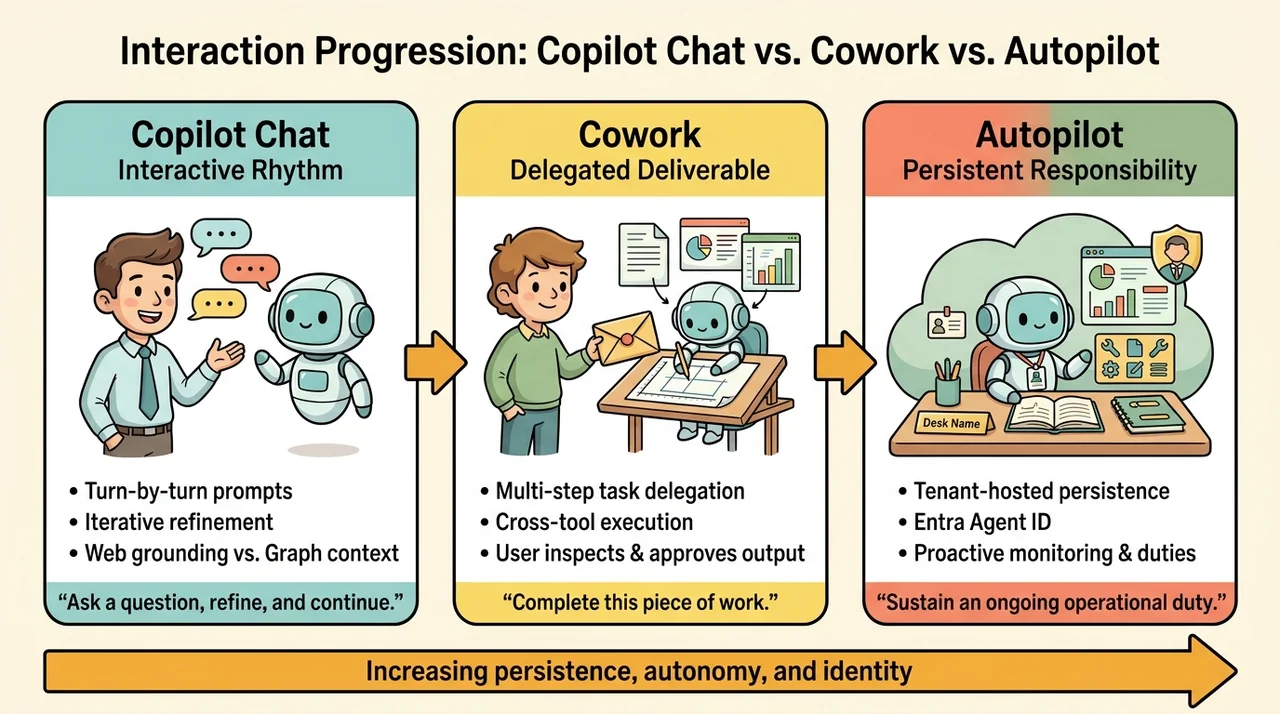
Chat supports an interactive rhythm: ask a question, inspect the answer, refine the request, and continue. Typical tasks include drafting text, researching a topic, explaining a document, and finding relevant information.
The important distinction is not simply whether a user can open Chat. It is what the experience can use as context.
Microsoft distinguishes web-grounded access from fuller work-data reasoning through Microsoft Graph and Work IQ. A qualifying Microsoft 365 business or enterprise subscription can provide Copilot Chat without the paid Copilot add-on. The add-on expands access to work context and capabilities; app access also depends on the user’s license and experience. Do not assume that opening Copilot Chat means it can search the user’s entire mailbox or all organizational files. The Microsoft Support comparison explains these boundaries.
Copilot also appears inside Word, Excel, PowerPoint, Outlook, and Teams. These are task-specific surfaces, not proof that every Microsoft product exposes an identical set of AI features. A slide-authoring experience and an email-assistance experience have different tools, context, and interaction patterns.
Cowork: delegate an outcome
Cowork changes the interaction from “help me with the next step” to “complete this piece of work.”
For example, an illustrative request might be:
Prepare a project briefing from the approved documents, create an editable presentation, and identify the decisions that still need confirmation.
The distinction is the execution pattern. Cowork can carry out multistep work across supported tools and return completed artifacts, while the user can clarify or steer the task. Microsoft describes this contrast between conversational Chat and delegated Cowork in its Copilot experience announcement.
This does not mean that creating a file always requires Cowork. Office in Copilot also supports creating and editing real Word documents, Excel workbooks, and PowerPoint presentations. The dividing line is the nature of the work, not the file extension.
Nor does delegation remove the need for review. A finished presentation can still contain a mistaken interpretation. An action-capable workflow still needs appropriate permissions and confirmation boundaries.
Autopilot: persistent, proactive work
Autopilot adds persistence. Rather than waiting for a new prompt each time, it is designed to follow ongoing work, monitor relevant activity, and carry out recurring responsibilities.
One architectural correction matters here: Autopilot is not defined as Cowork running on your local machine. Microsoft’s September announcement explicitly describes it as cloud-hosted. Its November announcement describes an agent living in the tenant with its own identity, memory, tools, and named manager. Local PC context and local actions are discussed separately through Windows Hybrid Intelligence. See the September announcement and November update.
The useful progression is therefore:
- Chat: an interactive conversation.
- Cowork: a delegated task or outcome.
- Autopilot: an ongoing responsibility with persistence and proactive activity.
These are interaction patterns, not interchangeable promises of autonomy. Autopilot’s Frontier rollout should also not be confused with unrestricted general availability.
2. Build it: choose the right authoring and operating model
Once the requirement becomes repeatable, specialized, or integrated with business systems, the question shifts from using AI to building a solution.
A no-code-to-pro-code spectrum is useful, but incomplete. The more important dimensions are integration depth, distribution, lifecycle management, runtime control, and who will maintain the result.
Agent Builder: specialize Copilot without starting a software project
Agent Builder creates declarative agents for Microsoft 365. A declarative agent supplies instructions, knowledge, and supported capabilities while relying on the host’s orchestration rather than requiring the maker to implement a separate agent engine.
A team onboarding assistant grounded in approved SharePoint content is a natural example. So is a writing assistant that applies organizational guidance.
Agent Builder is lightweight, but “lightweight” does not mean it is restricted to three or four users. That is a possible usage pattern, not a product limit. Microsoft documents using, sharing, and publishing these agents, as well as adding supported skills and knowledge sources. Its Agent Builder overview also states an important boundary: Agent Builder does not support authoring actions that integrate external services.
When the requirement grows into external actions, deeper integration, richer analytics, or structured release management, Microsoft provides Copy to Copilot Studio. This is a copy operation, not a reason to assume every configuration becomes a continuously synchronized pair. See Copy an agent to Copilot Studio.
SharePoint agents are another focused entry point for content-centered assistance. They belong in the same broad conversation about scoped knowledge experiences, but do not replace a general integration platform.
Copilot Code: create software through conversation
Copilot Code turns a description into working software. Microsoft documents internal tools, dashboards, static websites, data transformations, and scripts, with live previews and iterative refinement. It supports local and cloud workflows, GitHub integration, and publishing supported applications to Copilot Managed Runtime. See the Copilot Code documentation.
This is not simply a new name for Power Apps. The authoring experience uses an AI coding agent rather than requiring the maker to assemble a traditional low-code application.
It is also not only for nondevelopers. A business user may work entirely through the preview, while a developer may inspect the code, work with repositories, and use more conventional development workflows.
The practical attraction is clear: a small tracker or interactive tool can be more useful than another spreadsheet workaround. But fast generation does not establish production readiness. The result still needs validation of calculations, data access, accessibility, error handling, and maintenance ownership.
Copilot Studio: agents and workflows with deeper business integration
Copilot Studio is the natural fit when an agent needs more than scoped answers: tools, APIs, workflows, connected agents, deployment channels, and a managed lifecycle.
An illustrative service-desk agent might gather request details, retrieve approved guidance, call an authorized backend, and route exceptions for human review. The conversational layer handles interaction; the backend remains responsible for enforcing the business rules of the action.
However, “Copilot Studio agent” is no longer a sufficiently precise architectural description on its own. The harness matters.
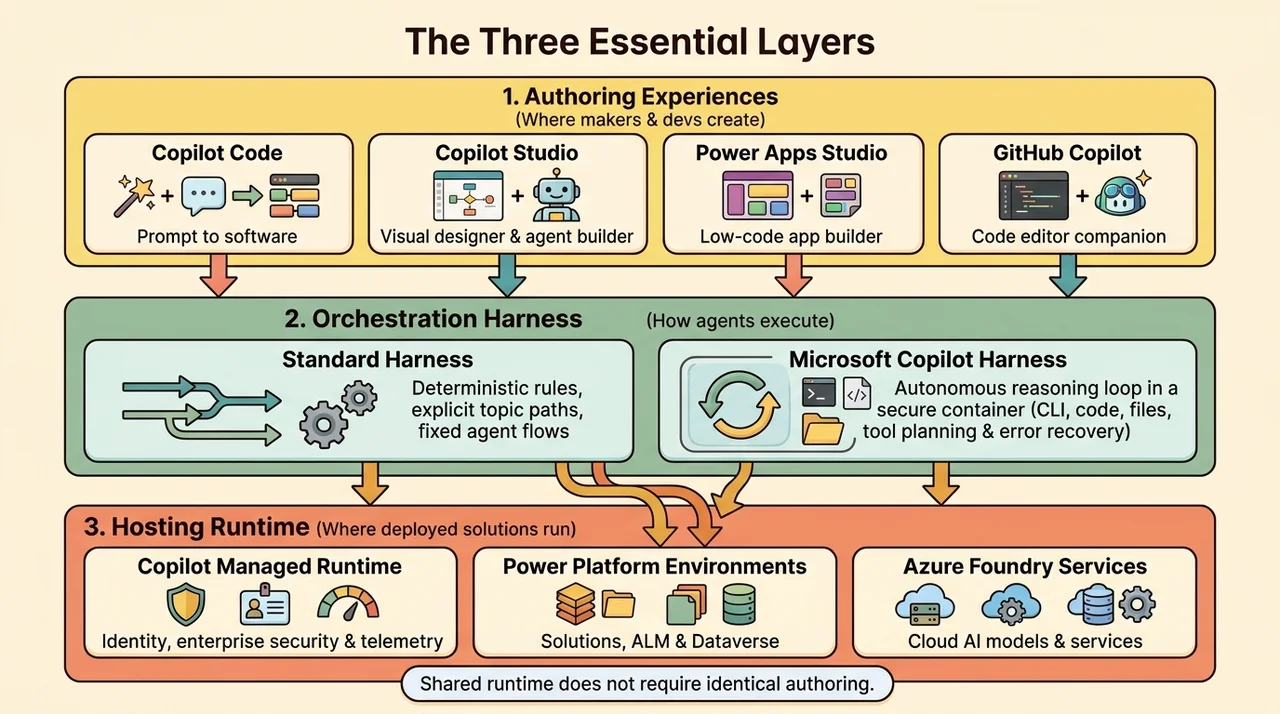
A harness is the orchestration runtime between the agent definition and the model. It determines when to call the model, what context to provide, how to interpret the result, and which tools to invoke. It is not the model itself.
Microsoft currently documents three harnesses:
- Standard harness: explicit components, conversation paths, rules, and agent flows.
- Microsoft Copilot harness: reasoning-heavy, multistep agents and workflows that can plan and adapt across tools.
- Customer Conversation harness: customer issue resolution over voice and chat.
Their capabilities and billing differ. See Harnesses in Copilot Studio. Older material may call the Microsoft Copilot harness the GitHub Copilot harness; Microsoft announced the name change on October 28, 2026.
The key lesson is to choose both the platform and the execution model. A feature available on one harness should not automatically be assumed available on another.
Copilot Studio also supports application-building experiences and workflows. That broadens its role, but does not erase the distinction between an agent, a workflow, and an application.
Power Platform: the business application and process foundation
Power Platform remains important when the solution needs structured data, business applications, process automation, and controlled deployment.
Its principal roles include:
- Power Apps: business application development.
- Power Automate: process automation.
- Power Pages: external-facing websites and portals.
- Copilot Studio: agents and related workflow capabilities.
- Power BI: business analytics, also a central workload in Microsoft Fabric.
Dataverse is a native data platform for many of these solutions, not a mandatory database behind every Power Platform workload. Connectors also enable access to other systems.
The lifecycle distinction is especially useful. An environment is an administrative and operational boundary. A solution packages components for deployment. They solve different problems: an environment is where components operate; a solution is how supported components move together.
Microsoft’s application lifecycle management overview describes solutions as the mechanism for distributing components across environments through export and import. Application lifecycle management, or ALM, includes testing, deployment, maintenance, governance, and change management, not merely exporting a package.
Power Platform can still support personal productivity. Its value is not that every project must be enterprise-wide, but that it provides a mature route from a useful prototype to a managed business solution.
Microsoft Foundry: engineering custom AI systems
Microsoft Foundry fits teams that need developer-oriented control over models, agents, evaluation, and operations on Azure.
It is tempting to describe Foundry as “Copilot Studio with no ceiling.” That captures the appeal of customization, but is technically misleading. Foundry has service limits, regional constraints, model-specific terms, and feature-specific availability. More control also means more engineering responsibility.
Its model catalog includes offerings from Microsoft, Azure OpenAI, Anthropic, DeepSeek, Meta, Mistral, and others. Catalog inclusion does not mean every model has the same deployment method, regional availability, support terms, or lifecycle. Nor should the presence of one provider be used to infer the availability of another. The Foundry Models overview explains these distinctions.
Observability is another important part of the platform. Traces expose execution details such as tool usage, inputs, outputs, retries, and latency. Evaluation addresses whether the result meets defined quality criteria. Monitoring tracks behavior over time. These are related but different jobs. See the agent tracing overview.
A trace helps explain the execution path. It is not a complete window into a model’s private reasoning, and it does not prove that an answer is correct.
GitHub Copilot: the development companion, not the deployment destination
GitHub Copilot helps developers create, understand, debug, and review software. Its surfaces include editor integrations, the command-line interface, GitHub-based agent workflows, and the GitHub Copilot desktop app. See the GitHub Copilot product overview.
This makes it complementary to Foundry and Power Platform, not simply the next product on a maturity ladder. A developer can use GitHub Copilot to build a Foundry application, implement an API for a Copilot Studio agent, or develop supporting automation.
Extensions and Model Context Protocol, or MCP, servers can expose additional tools and context. They do not automatically grant access to a tenant or bypass authorization. The GitHub Copilot CLI documentation explains its operating modes and the risks of broad automatic tool approval.
The distinction to remember is straightforward: GitHub Copilot helps build the software; the chosen platform hosts and operates it.
The missing distinction: authoring, orchestration, and hosting
Three concepts often get collapsed into one:
- Authoring experience: where the maker or developer creates the solution.
- Harness: how an agent orchestrates model calls, tools, and intermediate work.
- Hosting runtime: where the deployed artifact executes.
Copilot Managed Runtime addresses the third responsibility. Microsoft describes it as managed hosting and execution for supported apps, agents, and workflows, with identity, governed data access, and IT visibility. Supported projects can come from Microsoft experiences or third-party development tools through the SDK and CLI. See the Copilot Managed Runtime product documentation.
An application created through Cowork, Copilot Code, or Copilot Studio can therefore share a hosting foundation without sharing an identical authoring experience.
A shared runtime is not a claim that every artifact, connector, deployment route, or governance control behaves identically. Check support for the specific workload rather than assuming that every Power Platform control automatically applies in the same way.
This is also why Copilot Managed Runtime should not be treated as a replacement for every Azure hosting option or every Power Platform environment.
3. Ground it: give the system the right context
A capable model does not automatically know your organization’s policies, business definitions, or current project decisions.
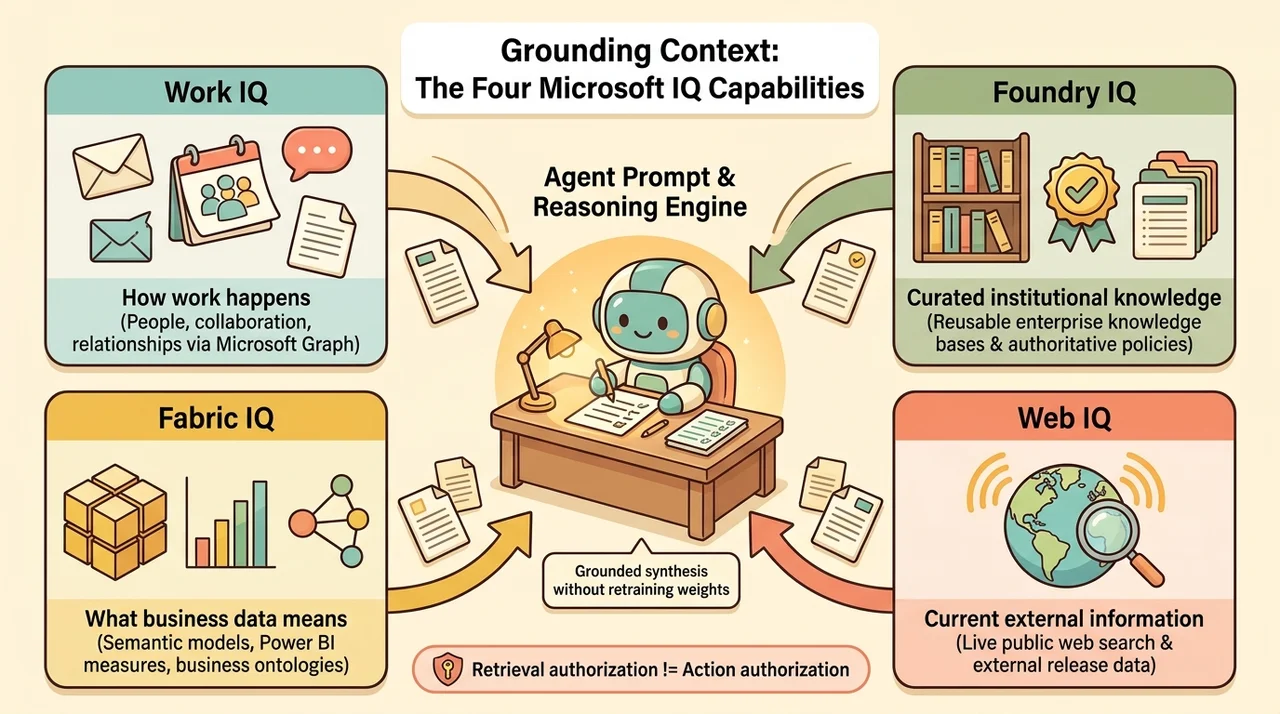
Grounding supplies relevant information to support an answer or action. It is different from retraining the model. Retrieval-augmented generation, or RAG, is one common pattern: retrieve useful material and provide it as context during generation.
Microsoft IQ brings together four context capabilities. The Microsoft IQ documentation distinguishes them by the information they contribute.
Work IQ: how work happens
Work IQ supplies context about people, collaboration, and workflows. Emails, meetings, chats, documents, and organizational relationships can help identify what matters to the current task.
For example, finding a project decision may require understanding which discussion superseded an earlier proposal, not merely matching a keyword in a file.
This is richer than “search all my documents,” but it is not omniscience. Access remains permission-scoped, and retrieved evidence still needs careful interpretation. An email exchange may suggest a collaborator is relevant; it does not establish that the person must attend every future meeting.
Fabric IQ: what business data means
Fabric IQ supplies context about business entities and the state of the business. Its role is not just exposing rows from OneLake.
Power BI semantic models define measures, dimensions, and hierarchies. Ontologies represent business entities and relationships in a machine-understandable form. Microsoft documents ontology as a preview component within the Fabric IQ workload. See the Fabric IQ overview.
The distinction matters because “revenue,” “active customer,” and “late shipment” are business definitions, not self-explanatory column names. A useful agent needs consistent meaning, not merely access to more data.
Foundry IQ: curated institutional knowledge
Foundry IQ provides a managed knowledge layer for authoritative documents, policies, and reusable knowledge bases. It supports multi-source retrieval rather than being limited to indexing a folder of files.
Microsoft’s IQ engineering examples demonstrate knowledge bases combining search indexes and remote sources, including other IQ capabilities.
The architectural value is reuse: multiple agents can consume a curated knowledge layer instead of each team constructing an isolated retrieval pipeline.
Web IQ: current external information
Web IQ supplies fresh context from the public web. It complements internal knowledge when the question depends on changing external information.
That creates a useful distinction: internal policy may be authoritative for an organizational procedure, while current public documentation may be authoritative for a product release. A grounded answer should preserve that difference rather than merging both into an undifferentiated source pool.
Grounding does not guarantee correctness
More context can improve relevance, but it does not eliminate stale documents, ambiguous definitions, conflicting evidence, or incorrect synthesis.
Nor does retrieval authorization equal action authorization. Being allowed to read a procedure does not grant permission to execute the administrative operation it describes.
The four IQs are complementary context services, not four boxes every agent must enable. Choose the context the task actually needs, and verify the integration, permissions, and availability for the consuming experience.
4. Govern it: make ownership and boundaries explicit
Governance becomes more consequential as AI moves from producing text to calling tools and sustaining work.
Agent 365: oversight across the agent estate
Agent 365 provides a control plane for agent inventory, ownership, observability, governance, security, and business-value management. Microsoft describes support for agents built with Microsoft services, the Agent 365 SDK, and connected external platforms. See the Agent 365 overview.
Cross-platform support is important, but it is not automatic control over every agent on the internet. Visibility and enforcement depend on the integration, telemetry, identity, and supported management capabilities.
For example, Microsoft documents third-party integration patterns for platforms such as n8n and AWS Bedrock. Those patterns require configuration; the platform name alone does not establish that the agent is governed. See third-party agent integration.
Entra Agent ID: identity and access for agents
Microsoft Entra Agent ID addresses agent identity, access, sponsorship, and lifecycle. Its capabilities are available within Agent 365 for managed agents. See the Entra Agent ID overview.
Agent 365 and Agent ID are related, but not synonymous. One provides broader estate oversight; the other supplies identity and access capabilities.
For an action-capable agent, the questions remain concrete:
- Who owns it and can disable it?
- Which identity does it use?
- Which resources and tools may it access?
- When is it acting on behalf of a user?
- Which actions require approval?
- What evidence will show what it actually did?
These controls complement backend authorization and platform-specific policies. They do not replace validation inside the API or business system performing the action.
Payment: access, consumption, and hosting are different costs
Licensing belongs in this map because the source of access and the source of consumption charges are not always the same.
The useful financial model is three separate questions:
- What license gives the user or maker access?
- What usage is metered?
- What infrastructure and external services must be operated?
Microsoft’s usage-based billing documentation describes Copilot Credits as a common currency for eligible services, complementing fixed subscription licensing. Supported purchase methods include pay-as-you-go and prepaid options. Administrators can use cost management to establish spending controls and monitor consumption.
Several shortcuts are worth avoiding:
- Copilot Chat does not universally require the paid Copilot add-on. Qualifying subscriptions can provide a more limited experience.
- A Copilot subscription does not cover every advanced agentic workload or external dependency. Cowork, Code, APIs, hosting, and integrations can introduce separate consumption or service costs.
- A prompt is not a universal billing unit. Consumption depends on the workload’s documented meter and the work performed. Elapsed development time alone is not a reliable cost estimate.
- Copilot Credits do not make every service commercially identical. Harness, distribution route, entitlement, and purchase method still matter.
Microsoft’s official credit estimator displays a USD $0.01-per-credit reference and explicitly warns that its estimates are informational, not guaranteed forecasts. Use published rates with the applicable workload rules, not as a promise that every prompt costs one cent.
Power Platform also cannot be reduced to “buy Power Apps Premium or Power Automate Premium.” User licenses, capacity, included use rights, and consumption models vary by product and scenario. See the Power Platform licensing overview.
One specific correction is important: Power Apps per-app licensing was not simply retired everywhere. Microsoft’s January 2026 licensing update distinguishes purchasing channels and existing-customer rights, including continued purchase, use, and renewal for Cloud Solution Provider customers. End of sale in a channel is not the same as end of life for the capability.
Foundry and GitHub Copilot also have their own commercial models. Do not assume that a Microsoft 365 Copilot license or a Copilot Credit balance pays for all development tools, Azure model usage, databases, networking, or telemetry.
Where should you start?
Start with the smallest approach that meets the requirement and has a credible operating model.
| Primary requirement | Sensible starting point | What to verify next |
|---|---|---|
| Interactive help with existing work | Copilot Chat and app experiences | Available work context and license scope |
| A delegated multistep deliverable | Cowork | Supported tools, review boundaries, and consumption policy |
| Persistent proactive responsibilities | Autopilot | Frontier access, identity, scope, and approval boundaries |
| A scoped assistant over approved content | Agent Builder or a focused SharePoint agent | Knowledge support and distribution requirements |
| A prompt-built application or small tool | Copilot Code | Validation, hosting support, and maintenance ownership |
| An integrated agent or agentic workflow | Copilot Studio | Harness, channels, integrations, and lifecycle |
| A structured business app and process | Power Platform | Data model, environments, solutions, and licensing |
| Custom AI engineering and model control | Microsoft Foundry | Deployment options, evaluation, limits, and operations |
| AI-assisted software development | GitHub Copilot | Repository workflow, tools, permissions, and target platform |
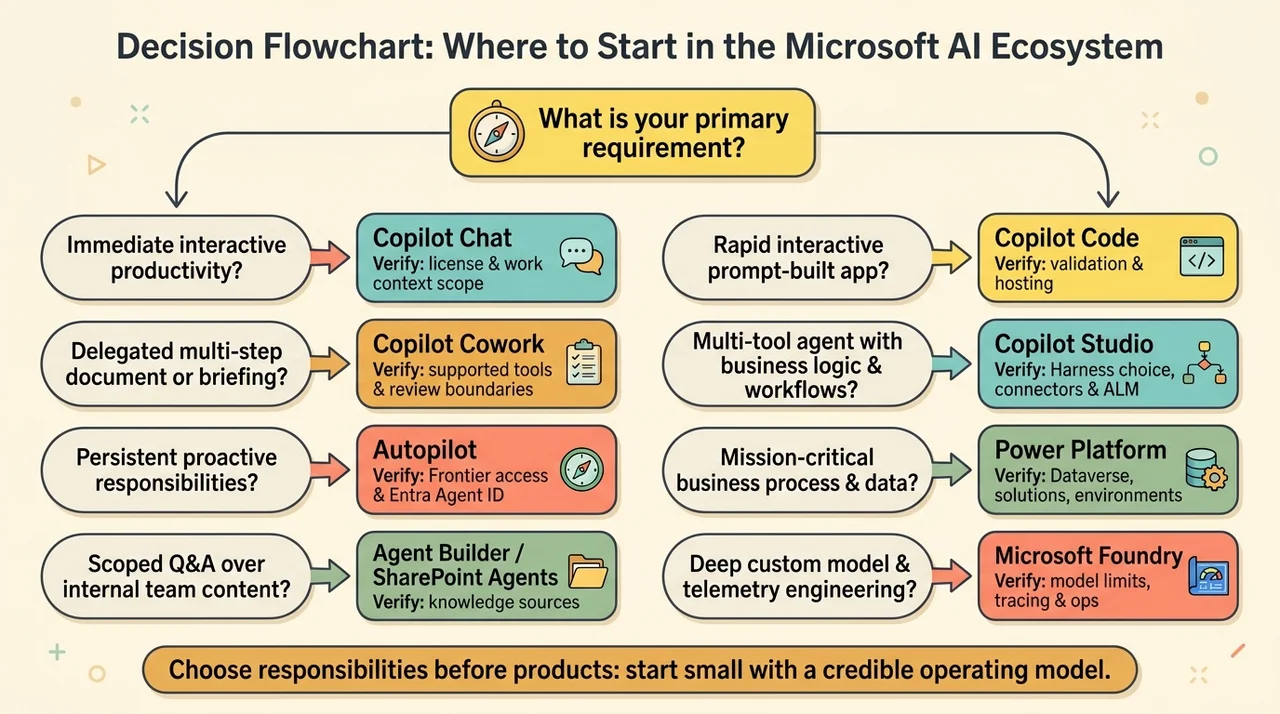
This is a starting-point matrix, not an exclusivity rule. An organization-wide agent does not automatically require Copilot Studio. A small application does not automatically belong in Copilot Code. A developer using GitHub Copilot may still deploy the result through Power Platform or Foundry.
Consider an illustrative employee-support solution. Copilot Studio could provide the conversation and orchestration, approved documents could supply knowledge, an authorized API could execute a service request, Power Platform could manage structured process data, and GitHub Copilot could help develop the integration. Agent identity and governance would span the resulting system.
That is not unnecessary product sprawl if each component has a clear responsibility. It becomes sprawl when products are added without a requirement, an owner, or a defined boundary.
Conclusion: choose responsibilities before products
Microsoft’s AI ecosystem is easier to navigate when it stops looking like a contest between product names.
First decide whether the requirement is a conversation, a delegated outcome, a persistent responsibility, or a reusable solution. Then choose the authoring model, execution approach, relevant context, and operating controls.
The strongest architecture is not the one with the most advanced agent or the longest list of Microsoft services. It is the one where you can explain, without hand-waving, how work enters the system, how it executes, what evidence it uses, and who remains accountable for the result.
Read next