
Microsoft Agent Framework in May 2026: The Comprehensive Migration Guide

Writer
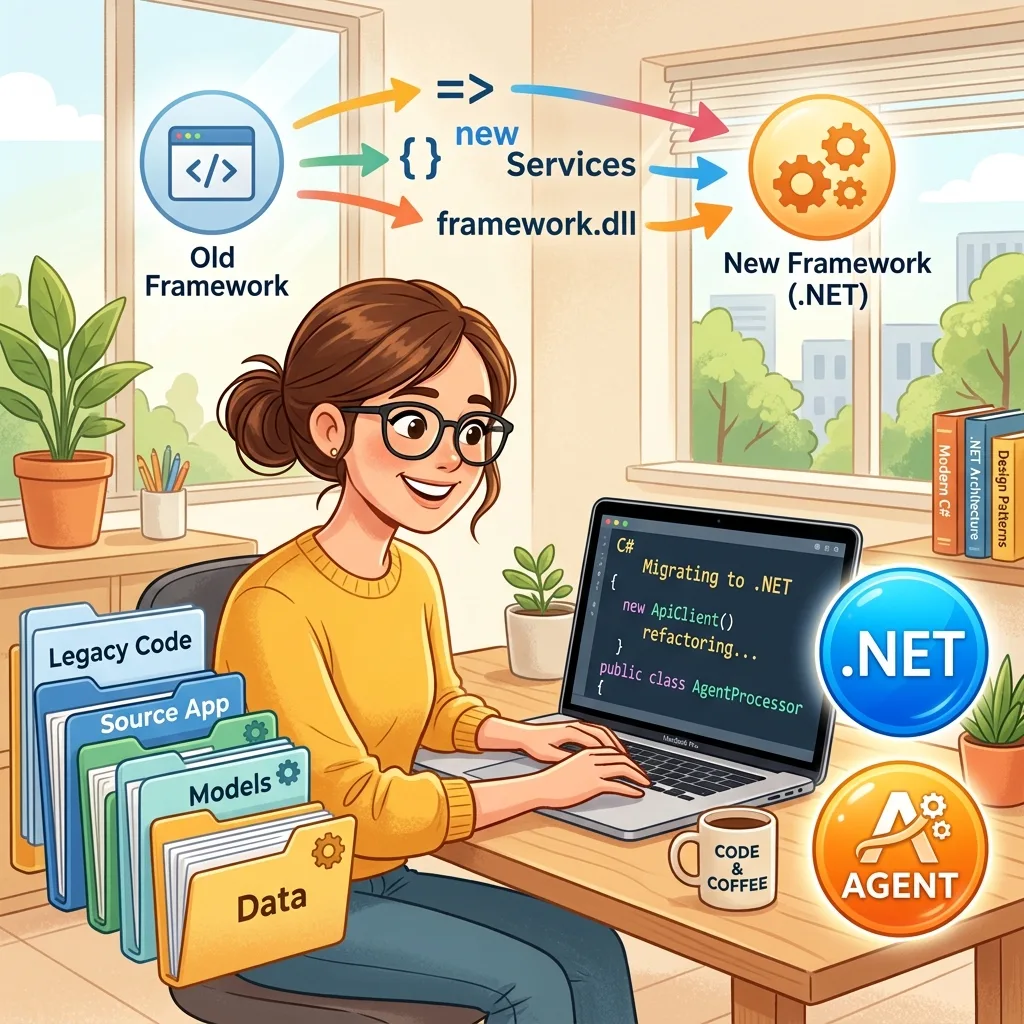
🚀 5-Minute Migration Summary
- Replace
Microsoft.Agents.AI.AzureAI→Microsoft.Agents.AI.Foundry- Update
Azure.AI.Projectsto v2.0.0+- Change
InvokeAsync()→RunAsync(),AgentResponseItem<T>→AgentResponse- Register tools via
AIFunctionFactory.Create()instead of[KernelFunction]- Use
AIProjectClient+DefaultAzureCredentialfor cloud authStuck? Run the official migration assistant for automated code analysis.
The era of rapid, prompt-driven prototyping—often referred to as “vibe coding”—has served its purpose for initial concept validation. However, enterprise systems demand predictability, robust state management, and clear orchestration. The transition to Agentic Engineering is how development moves from unstable demos to highly secure, production-grade backends.
With the Microsoft Agent Framework (MAF) reaching its 1.0 General Availability (GA) milestone in April 2026, the ecosystem has officially matured. This is a production-ready SDK for building intelligent agents and multi-agent workflows in .NET. However, the road to 1.0 brought a wave of package consolidations, rebrands, and architectural shifts.
If your backend is suddenly failing to resolve preview packages, or you are looking to architect a new AI system this month, this guide breaks down the current state of MAF, the exact features each package provides, and how to migrate your existing code.
✅ Pre-Migration Checklist
Before diving into code changes, verify your environment is ready:
- Inventory all
Microsoft.Agents.AI.AzureAInamespace references in your codebase - Verify your Azure subscription has Microsoft Foundry enabled
- Test
DefaultAzureCredentialauth flow in your dev environment (az login --tenant <your-tenant>) - Audit custom plugins for
[KernelFunction]→AIFunctionFactoryconversion - Plan observability strategy: OpenTelemetry endpoint, log retention policy, and evaluation metrics
- Backup existing agent definitions and conversation logs before migration
The Great Consolidation: Pre-1.0 to GA Migration
To align with the Microsoft Foundry branding (evolved from Azure AI Studio in late 2024, rebranded to Microsoft Foundry at Ignite 2025) and streamline the developer experience, Microsoft aggressively cleaned up overlapping responsibilities in the SDKs leading up to the 1.0 release.
Here is the definitive mapping of what happened to the release candidate (RC) and beta packages:
| Pre-1.0 Package (Preview/RC) | Current Stable Package (May 2026) | Action Required |
|---|---|---|
Microsoft.Agents.AI.AzureAI | Microsoft.Agents.AI.Foundry | Renamed. The AzureAI identifier was completely retired to match the Foundry platform name. |
Azure.AI.Projects.Agents | Consolidated into Azure.AI.Projects | Removed. Agent-specific management APIs were folded directly into Azure.AI.Projects. |
Microsoft.Agents.AI | Microsoft.Agents.AI (v1.0.0) | Stable. The core execution engine is finalized. |
Microsoft.Agents.AI.Abstractions | Microsoft.Agents.AI.Abstractions (v1.0.0) | Stable. Core interfaces finalized. |
Microsoft.Extensions.AI | Microsoft.Extensions.AI (v10.5.1) | Stable. Lowest-level abstractions finalized alongside .NET 10. Stabilizes CodeInterpreter, WebSearch, and ImageGeneration tool content types. |
Azure.AI.Projects | Azure.AI.Projects (v2.0.0) | Stable for core resource management. Uses v1 of the AI Foundry data plane REST APIs. Advanced features like hosted agent deployment may require preview add-on packages. |
⚠️ Version Note:
Azure.AI.Projectsv2.0.0 is GA for core resource management. Advanced features like hosted agent deployment and evaluation dashboards may require preview add-on packages (e.g.,Azure.AI.Projects.OpenAI).
Official Migration Assistants
If you are staring at a massive codebase built on earlier iterations of Semantic Kernel or AutoGen, you do not have to upgrade manually. Microsoft has released official migration tooling to automate the transition to MAF 1.0.
These tools analyze your existing codebase and generate a step-by-step upgrade plan, flagging deprecated APIs and suggesting replacement patterns.
- Official Semantic Kernel to Agent Framework Migration Guide
- Official AutoGen Migration Guides (via the Agent Framework Hub)
- Migration Assistant Tool (GitHub)
The Anatomy of the Framework: Package Breakdown
To successfully architect an agentic system today, you must understand the layered architecture of MAF. Each package and class has a strict, isolated responsibility.
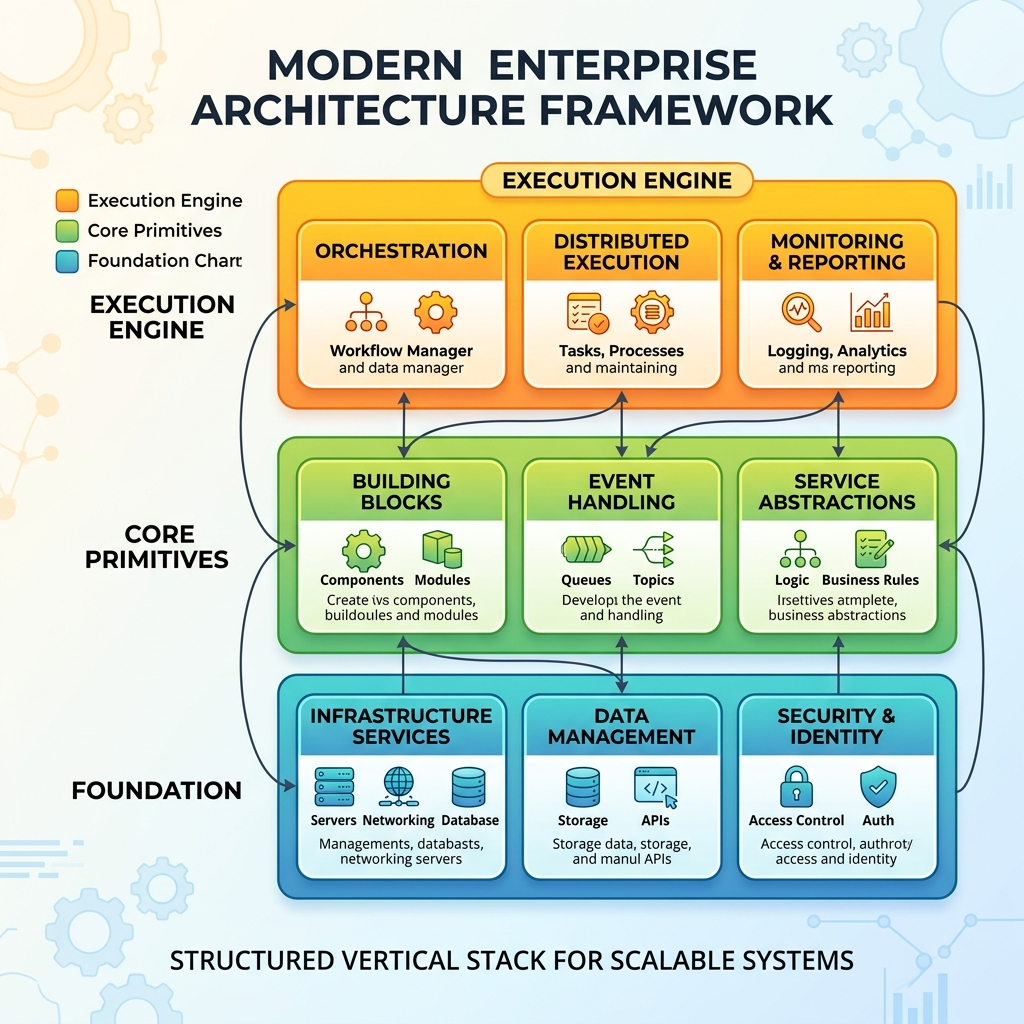
1. The Foundation: Microsoft.Extensions.AI (v10.5.1)
This is the vendor-neutral bedrock. Programming against these interfaces ensures your backend architecture isn’t permanently coupled to a single provider. For example, if you are developing and running local inference models on a 128GB Mac Studio with an M4 chip to avoid cloud costs, this abstraction layer allows you to seamlessly swap your local model for a deployed Azure OpenAI endpoint when moving to production, without changing your core business logic.
IChatClient: The core interface for interacting with models. It abstracts away the specific HTTP calls, serialization, and connection streaming, allowing you to focus strictly on the conversation logic.IEmbeddingGenerator: Standardized interface for generating vector embeddings across providers.AIFunctionFactory: This is the lifeblood of tool-calling. It seamlessly wraps standard C# methods into “AIFunction” objects that the AI can understand, invoke, and correctly map JSON parameters to.ChatResponseFormatJson: Enforce structured outputs to ensure machine-parseable responses—critical for reducing parsing errors in agentic workflows.CachingChatClient: A built-in delegating client that caches responses, vastly reducing API costs and latency during local testing and development.
2. The Core Primitives: Microsoft.Agents.AI.Abstractions (v1.0.0)
This lightweight library defines the foundational contracts that every agent must follow. Build custom plugins, tools, or memory providers in isolated, lean class libraries without dragging in the heavy orchestration engine.
AIAgent(andIAgent): This is the definition of a reactive entity in your system. It represents an actor that can process information, reason, and act. It defines how an agent identifies itself, its system instructions, and how it receives inputs.IMessage: The universal carrier for information. Unlike a simple string, anIMessagecarries vital metadata about the sender, the recipient, the intent, and any structured tool-call data (like JSON payloads). It is the standardized language used for agents to “talk” to each other in multi-agent systems.IPlugin: Think of this as a “Backpack of Capabilities.” AnIPluginis a container for one or moreAIFunctions. By attaching anIPluginto an agent, you are injecting a distinct set of skills into its context window (e.g., attaching an “HR Directory Plugin” or a “Database Query Plugin”).
3. The Execution Engine: Microsoft.Agents.AI (v1.0.0)
This is the operational brain of the framework. It implements the abstractions and handles the complex orchestration required for autonomous systems.
- Multi-Agent Workflows: It manages graph-based execution, supporting sequential routing, concurrent background tasks, and complex group chats.
- Model Context Protocol (MCP): This allows agents to dynamically discover and connect to external enterprise tools. Instead of writing manual HTTP wrappers for every new internal API, your agent can connect to an MCP server to instantly understand available enterprise tools.
- Agent-to-Agent (A2A) Protocol: Coming Soon – A structured messaging protocol enabling cross-runtime collaboration (e.g., .NET agent coordinating with Python agent). A2A 1.0 support is expected in a future update.
⚠️ Protocol Status Note: MCP integration is GA in MAF 1.0. A2A (Agent-to-Agent) protocol support is currently in preview with 1.0 GA expected in a future update.
Deep Dive: The Foundry Connection
When you integrate cloud resources into your .NET backend, the integration relies heavily on the Azure ecosystem SDKs.
Azure.AI.Projects and AIProjectClient
The Azure.AI.Projects.AIProjectClient is your programmatic entry point to the Microsoft Foundry ecosystem. Think of it as the central control plane for your cloud project resources, including telemetry, datasets, and endpoint configurations.
It establishes a secure connection using Azure.Identity.DefaultAzureCredential.
DefaultAzureCredential: This is an intelligent authentication chain. It automatically inspects your environment to determine how to securely authenticate. If you are developing locally, it intercepts your Azure CLI or Visual Studio login tokens. If the backend is running in the cloud, it automatically authenticates using the Managed Identity of the host server. This completely eliminates the need for hardcoded connection strings or rotating secrets in your configuration files.
The Critical Role of Microsoft.Agents.AI.Foundry
A major architectural question often arises: “If my backend is just hitting an LLM model endpoint deployed on Foundry, but I am orchestrating the agents locally and NOT using the fully managed Foundry Agent service, do I still need the Microsoft.Agents.AI.Foundry package?”
The answer is Yes, and it comes down to enterprise observability, state management, and ecosystem access. Even if your multi-agent engine runs entirely in your own backend, this package provides indispensable integration capabilities:
- Native OpenTelemetry and Tracing:
Microsoft.Agents.AI.Foundryprovides highly optimized, Foundry-specific extensions forIChatClientthat automatically format and stream rich OpenTelemetry data directly to Foundry’s evaluation and tracing dashboards. This allows you to visually debug token usage, tool invocation latency, and exact reasoning steps without writing custom logging middleware. - Managed Memory (Threads) Offloading: Building custom databases to track complex, multi-turn conversational state is difficult. This package allows your local orchestrator to seamlessly offload conversational history to Foundry’s managed “Threads.” You simply pass a Thread ID, and the package handles retrieving and appending the context window directly from Azure’s highly available storage.
- Zero-Boilerplate RAG (Retrieval-Augmented Generation): If you have documents indexed in Azure AI Search, the Foundry package provides native integration. It allows your standard
IChatClientto perform complex vector searches and ground its answers using your specific Foundry data connections, bypassing the need to manually orchestrate the embedding generation and database querying steps.
✅ Initialization Example (GA 1.0)
📌 Source: Official .NET quickstart uses
GetChatClient()and requires explicitcredentialparameter.
Middleware: The Secret Weapon for Production Safety
The middleware pipeline intercepts every agent turn—before and after LLM calls—enabling critical production capabilities without modifying your core agent logic.
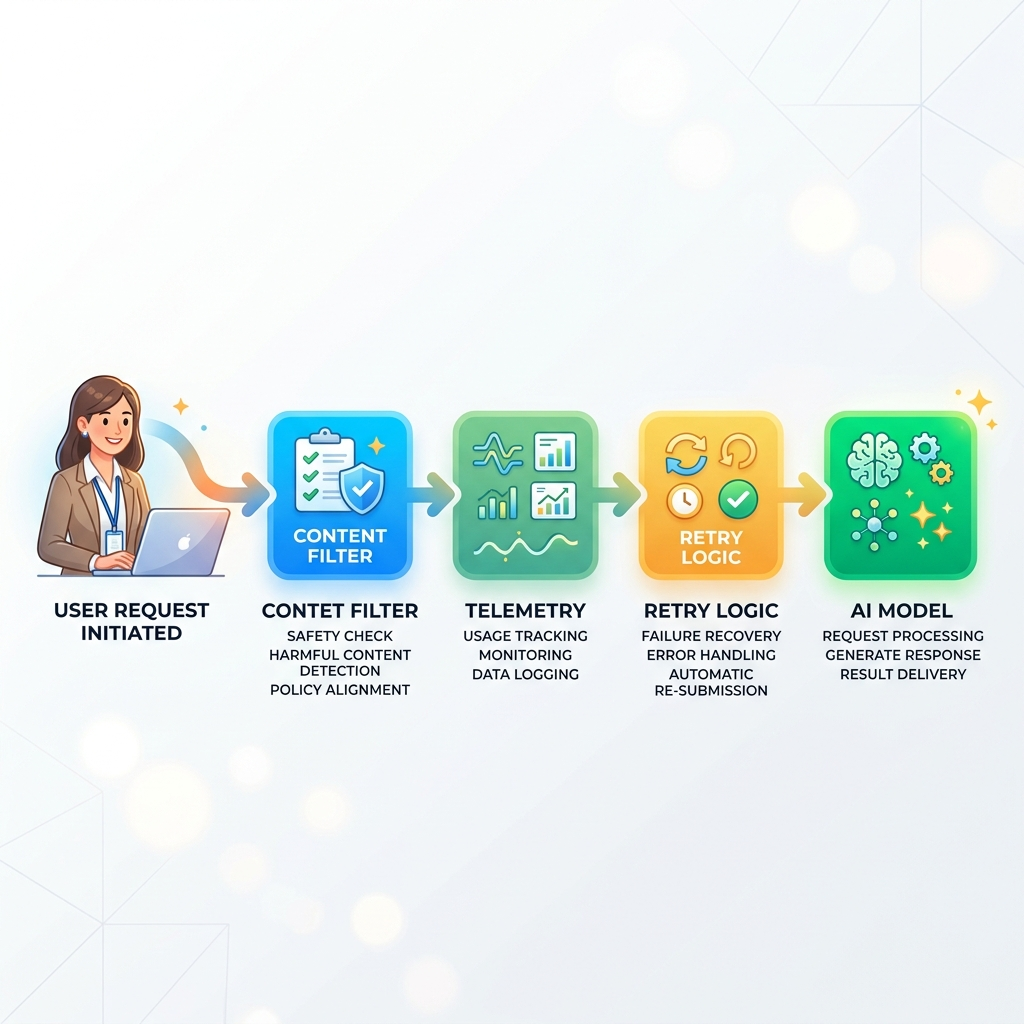
Common Middleware Patterns
Middleware Capabilities Overview
| Capability | Use Case | Implementation |
|---|---|---|
| Content Filtering | Block PII, toxic content, policy violations | Custom middleware with regex/NLP checks |
| Observability | Trace token usage, latency, tool calls | UseOpenTelemetry() extension |
| Retry/Resilience | Handle rate limits, transient errors | UseRetry() with exponential backoff |
| Caching | Reduce API costs during testing | CachingChatClient delegating handler |
| Logging | Audit trails, debugging, compliance | Custom ILogger integration |
Memory Management: Choosing the Right Backend
Agentic systems require robust state management. MAF 1.0 supports pluggable memory architectures—choose the backend that fits your use case.
| Memory Backend | Best For | Setup Complexity | Cost Model |
|---|---|---|---|
| Foundry Managed Threads | Quick start, Azure-native apps, multi-turn chat | Low (zero config via Microsoft.Agents.AI.Foundry) | Pay-per-token + storage |
| Redis | Low-latency, high-throughput apps, session caching | Medium (infra setup, connection config) | Infrastructure cost |
| Neo4j / Graph DB | Complex relationship-aware agents, knowledge graphs | High (graph modeling, schema design) | Infrastructure + licensing |
Custom IConversationStore | Full control, on-prem requirements, compliance | High (implement interface, handle serialization) | Your infrastructure |
Example: Using Foundry Managed Threads
Debug Like a Pro: Using the DevUI
MAF 1.0 includes a browser-based debugger that visualizes agent behavior during local development—no code changes required.
What DevUI Shows You
- 🔄 Message flow between agents in multi-agent workflows
- ⚡ Tool invocation timing, parameters, and results
- 💬 Token consumption per reasoning step
- 🎯 Checkpoint hydration points for stateful agents
- 🛑 Human-in-the-loop approval gates
Enable DevUI in Your Project
💡 Pro Tip: DevUI works with both local and cloud-hosted agents. Use it to validate tool schemas, debug conversation loops, and profile performance before deployment.
Human-in-the-Loop: Adding Approval Gates for High-Risk Actions
Enterprise adoption requires explicit approval workflows for sensitive operations. Use checkpointing to persist state during approval waits.
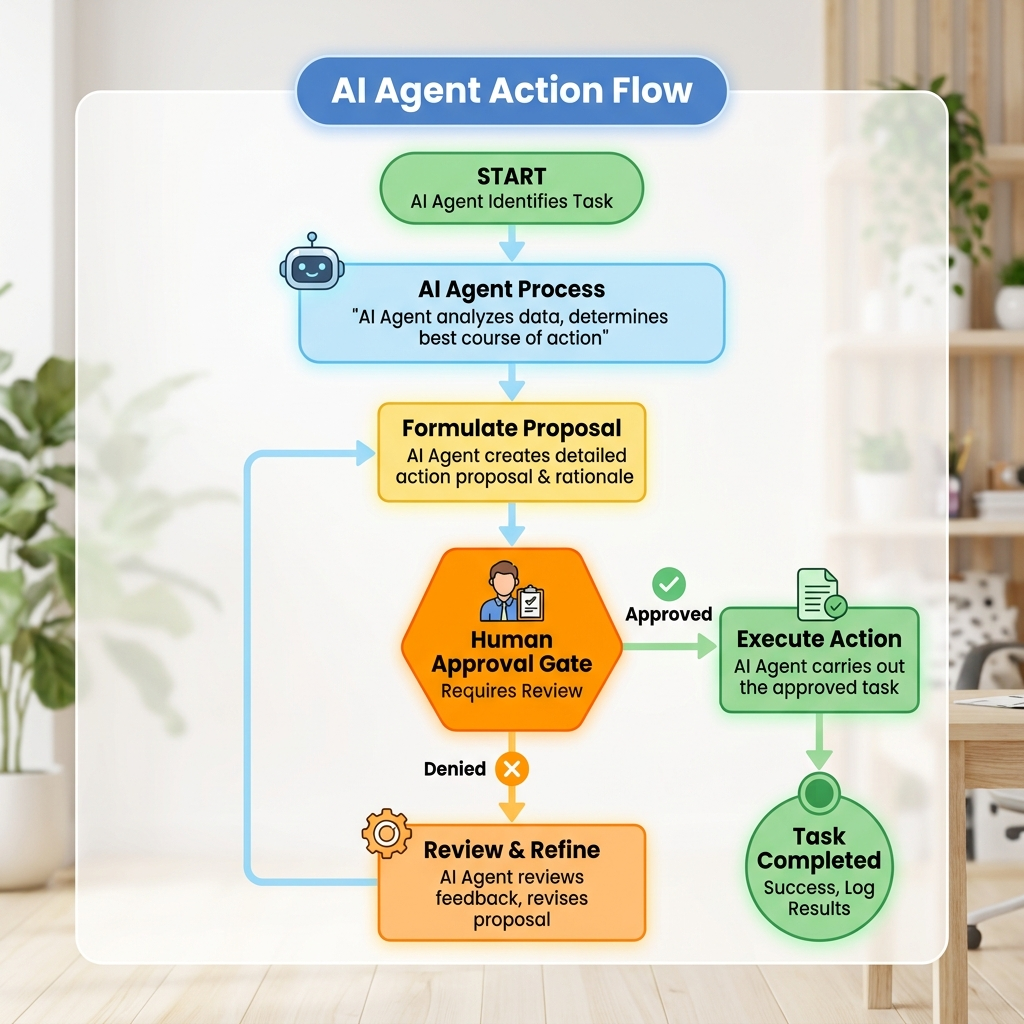
Example: Approval Gate for AD Sync Operations
🔒 Security & Validation: The Non-Negotiables
Critical patterns for enterprise-grade agentic systems:
-
Tool Authorization: Never trust agent-selected parameters. Validate all inputs before execution.
Code -
Timeout Policies: Set explicit timeouts on external API calls to prevent hanging agents.
Code -
Structured Output Enforcement: Use
ChatResponseFormatJsonto ensure machine-parseable responses, reducing parsing errors.Code -
Secrets Management: Never hardcode credentials. Use
DefaultAzureCredential+ Azure Key Vault for sensitive configuration.
🛠️ Troubleshooting Common Migration Issues
Based on community feedback, here are frequent pain points and solutions:
| Symptom | Likely Cause | Fix |
|---|---|---|
Namespace 'Microsoft.Agents.AI.Foundry' not found | Missing package reference | dotnet add package Microsoft.Agents.AI.Foundry |
Authentication failed with DefaultAzureCredential | Azure CLI not logged in or wrong tenant | Run az login --tenant <your-tenant>; verify subscription access |
Tool execution returns null | Missing [AIFunction] attribute or parameter name mismatch | Verify method signature matches JSON schema; use AIFunctionFactory.Create() |
DevUI won't load on localhost | Port conflict or HTTPS cert issue | Try https://localhost:5002/devui; disable HTTPS in dev via ASPNETCORE_ENVIRONMENT=Development |
GetChatClient method not found | Using pre-1.0 Azure.AI.Projects package | Update to Azure.AI.Projects v2.0.0+ |
Structured output parsing fails | Model not respecting ChatResponseFormatJson | Set Temperature = 0; use newer models (gpt-4.5+) with structured output support |
Declarative vs. Programmatic Agent Definition: When to Use Which
MAF 1.0 supports both YAML-based declarative definitions and programmatic construction. Choose based on complexity:
| Approach | Best For | Limitations |
|---|---|---|
| Declarative (YAML) | Configuration-driven agents, simple instruction/tool sets, GitOps workflows | Limited conditional logic; dynamic tool selection not supported |
Programmatic (AIAgent class) | Complex branching logic, runtime-generated instructions, dynamic tool routing | More code to maintain; requires stronger typing discipline |
Rule of Thumb: Use declarative YAML for configuration-driven agents (instructions, tools, memory config). Use programmatic
AIAgentconstruction when you need dynamic logic, conditional tool selection, or runtime-generated instructions.
Declarative Example (agent.yaml)
Programmatic Example
Final Thoughts: From Vibe Coding to Production Engineering
Vibe coding is an excellent way to learn the syntax of an API, but Agentic Engineering builds the resilient backend systems that power real businesses. By upgrading to the MAF 1.0 stable release, mapping your AzureAI references to Foundry, and strictly relying on the Microsoft.Extensions.AI abstractions for model neutrality, you establish an architecture that is:
✅ Secure: DefaultAzureCredential, tool validation, and secret management built-in
✅ Observable: Native OpenTelemetry integration with Foundry dashboards
✅ Scalable: Pluggable memory, middleware pipelines, and cloud-native orchestration
✅ Maintainable: Vendor-neutral abstractions enable provider swaps without rewrites
📚 Essential Resources
| Resource | Link |
|---|---|
| 📦 NuGet Packages | https://www.nuget.org/packages/Microsoft.Agents.AI |
| 🐍 PyPI Packages | https://pypi.org/project/agent-framework/ |
| 📖 Official Docs | https://learn.microsoft.com/en-us/agent-framework/ |
| 💬 Community Discord | https://aka.ms/foundry/discord |
| 🧪 Sample Code Repo | https://github.com/microsoft/agent-framework |
| 🔄 Migration Guides | https://learn.microsoft.com/en-us/agent-framework/migration-guide/ |
| 🔐 Security Best Practices | https://learn.microsoft.com/en-us/azure/foundry/agents/concepts/tool-best-practice |
| 📊 Structured Outputs Tutorial | https://learn.microsoft.com/en-us/agent-framework/agents/structured-outputs |
🚀 Next Steps
- Run the migration assistant against your codebase
- Update package references using the migration table above
- Instrument your agents with
UseOpenTelemetry()for immediate observability - Add validation middleware to high-risk tool calls
- Test locally with DevUI before deploying to Foundry
Remember: Agentic Engineering isn’t about replacing developers—it’s about empowering you to build systems where AI participates reliably in structured workflows. With MAF 1.0, Microsoft has given .NET teams the toolkit to do exactly that.
Related Articles
More articles coming soon...