Anatomy of a TypeScript M365 Agent: SDK Deep Dive

Writer
Quiz available
Take a quick quiz for this article.

The M365 Agents SDK is a powerful framework for building intelligent conversational agents. Below is an analysis of your specific agent’s structure, the libraries it relies on, and a look at what advanced capabilities you can unlock with additional modules.
Core Libraries & Modules
Your agent is built on a modern TypeScript stack, leveraging specific libraries from the @microsoft/agents-* family and Azure’s AI ecosystem.
1. Hosting & Server
- Library:
@microsoft/agents-hosting-express - Purpose: This is the backbone of your agent. It wraps a standard Express.js server with the specific middleware and routing logic required to communicate with the Microsoft Bot Framework protocol.
- Why it matters: It handles the HTTP requests (webhooks) from Microsoft Teams/M365, parses the incoming JSON payloads, and routes them to your agent logic securely.
2. Agent Application Logic
- Library:
@microsoft/agents-hosting - Key Modules:
AgentApplication,MemoryStorage,TurnContext - Purpose:
AgentApplication: The central controller. It manages the conversation flow, event listeners (likeonMessageormembersAdded), and state.MemoryStorage: A volatile, in-memory database used to store conversation state. Note: This data is lost if the server restarts.TurnContext: Represents the current “turn” of the conversation, providing methods to send replies (sendActivity) and inspect the user’s message.
3. Activity Protocol
- Library:
@microsoft/agents-activity - Key Modules:
ActivityTypes - Purpose: Defines the standard schema for messages. Whether it’s a text message (
ActivityTypes.Message) or a system event (like a user joining), these types ensure your agent understands exactly what is happening in the chat.
4. AI Capabilities (The Brain)
- Library:
@azure/openai&@azure/identity - Purpose:
AzureOpenAI: The client that talks to GPT-4 (or other models). This is where the magic happens—sending user text to the LLM and getting a completion back.@azure/identity: Handles authentication securely. Instead of hardcoding keys locally, it usesClientSecretCredential(and likely Managed Identity in production) to authenticate with Azure services without managing rotation manually.
Structure of the Agent
Your project follows a clean, “Configuration as Code” structure standard for Microsoft 365 Agents Toolkit projects.
1. The Application Logic (/src)
index.ts: The Bootstrapper. It imports your agent app and hands it over tostartServer. Ideally, this file remains minimal.agent.ts: The Brain. This is where the behaviors live.- It initializes the
AgentApplication. - Defines the
systemPrompt(“You are an AI agent…”). - Sets up the loop: User sends message -> Agent application captures it -> Sends to Azure OpenAI -> Returns response to User.
- It initializes the
config.ts: The Configuration. A central place to map environment variables (likeAZURE_OPENAI_ENDPOINT) to code constants.
2. The Lifecycle Management (m365agents.yml)
This is the Orchestrator. It tells the Microsoft 365 Agents Toolkit CLI how to:
- Provision: Create resources in Azure (App Service, Azure OpenAI) using Bicep templates (
/infra). - Deploy: Build the code, zip it, and push it to the Azure App Service.
- Publish: Register the app in the M365 Developer Portal.
3. The Manifest (/appPackage)
Contains manifest.json. This file tells Microsoft 365 “I exist, I am a bot, and here are my permissions.” It creates the app icon and definition you see in the Teams store.
Expanding Horizons: What’s Missing?
Your current agent is a Stateless Echo Bot. It listens, consults an LLM, and replies. Through online analysis of the generic M365 Agents SDK ecosystem, here are modules and libraries available by default but not yet used in your project:
1. @microsoft/agents-hosting-dialogs (Structured Interactions & Guided UX)
- What it is: A specialized library for managing deterministic, structured flows and rich UI prompts. While your LLM handles general conversation memory, this package allows you to guide users through specific processes (like a multi-choice survey or a troubleshooting wizard) using validated input elements instead of just plain text.
🔥 Deep Dive: What’s Possible?
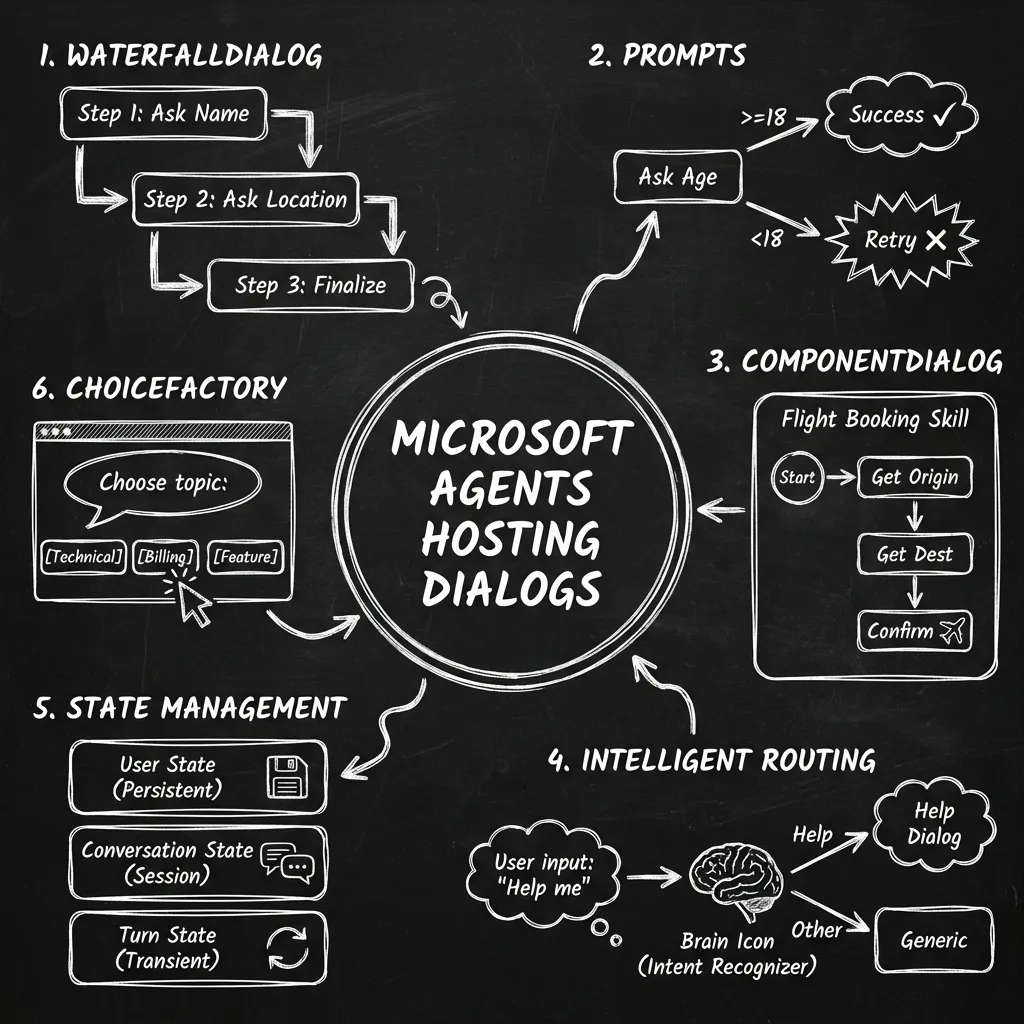
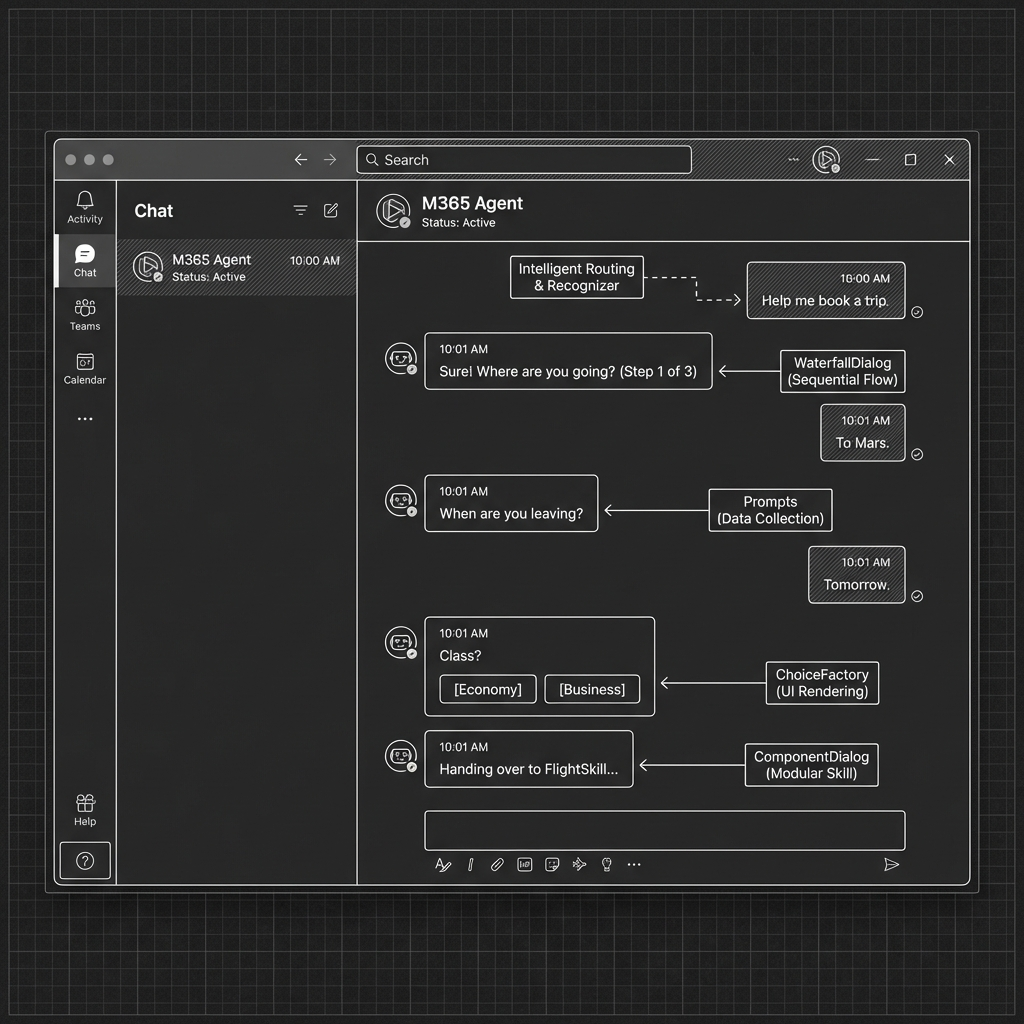
This module unlocks the ability to create structured, guided interactions. Here is a breakdown of the powerful constructs you can build:
-
Guided Flows (Waterfalls):
- Class:
WaterfallDialog - Concept: Execute a sequence of steps (like a waterfall).
- Use Case: Perfect for linear tasks like onboarding, troubleshooting wizards, or collecting form data.
- Step 1: Ask “What is your name?” -> Waits for input.
- Step 2: Ask “What is your email?” -> Waits for input.
- Step 3: Confirm “Is this correct?” -> Processes Yes/No.
- Class:
-
Data Collection (Prompts):
- Classes:
TextPrompt,NumberPrompt,ChoicePrompt,ConfirmPrompt,AttachmentPrompt,DateTimePrompt. - Capability: These special dialogs ask a question and validate the answer. If the user answers a “Age Check” prompt with “Banana”, the prompt handles the re-prompt (“Please enter a valid number”) automatically.
- Design Choice: You can enforce strict types (dates, numbers) without writing custom regex for every turn.
- Classes:
-
Modular “Skills” (Component Dialogs):
- Class:
ComponentDialog - Capability: Encapsulate a complex flow (e.g., “flightBookingDialog”) into a single black box.
- Design Choice: Your main agent can simply say “Begin FlightBooking”, and the reusable component takes over until it’s done. This enables a modular architecture where different teams build different “skills” for the same bot.
- Class:
-
Intelligent Routing:
- Classes:
Recognizer,DialogManager,getTopScoringIntent. - Capability: Determine which dialog to start based on natural language.
- Use Case: User says “Help me reset my password”. The
Recognizeridentifies thePasswordResetintent, and theDialogManagerautomatically spins up the correctWaterfallDialog.
- Classes:
-
Sophisticated State Management:
- Classes:
DialogStateManager,MemoryScope(UserMemoryScope,ConversationMemoryScope,TurnMemoryScope). - Capability: Granular control over memory.
- Turn Scope: Data only needed for the current millisecond response.
- Dialog Scope: Data needed while booking the flight (Destination, Date).
- User Scope: Permanent settings like “Vegetarian Meal Preference”.
- Power: You can reference these variables in your prompts directly (e.g., “Hello @user.name, do you want to fly to @dialog.destination?”).
- Classes:
-
Decision Making (Choice Factory):
- Class:
ChoiceFactory,findChoices. - Capability: Automatically generate button lists or numbered choices for the user, and intelligently fuzzy-match their text response back to the option (e.g., User types “The first one” -> Agent maps it to Option 1).
- Class:
2. @microsoft/agents-hosting-teams (Teams Native Features)
- What it is: Extensions specifically for Microsoft Teams.
- Why use it: If you want your agent to handle Meeting events (start/end), interact with Tabs, or send Adaptive Cards (rich UI elements like forms and buttons) instead of just plain text.
3. Persistent Storage Options
- Current State:
MemoryStorage(RAM) - State is lost on restart. - Upgrade Path: To persist state (user preferences, conversation context) permanently, you must choose a backing storage provider. The M365 Agents SDK offers two primary packages for this, each with distinct trade-offs.
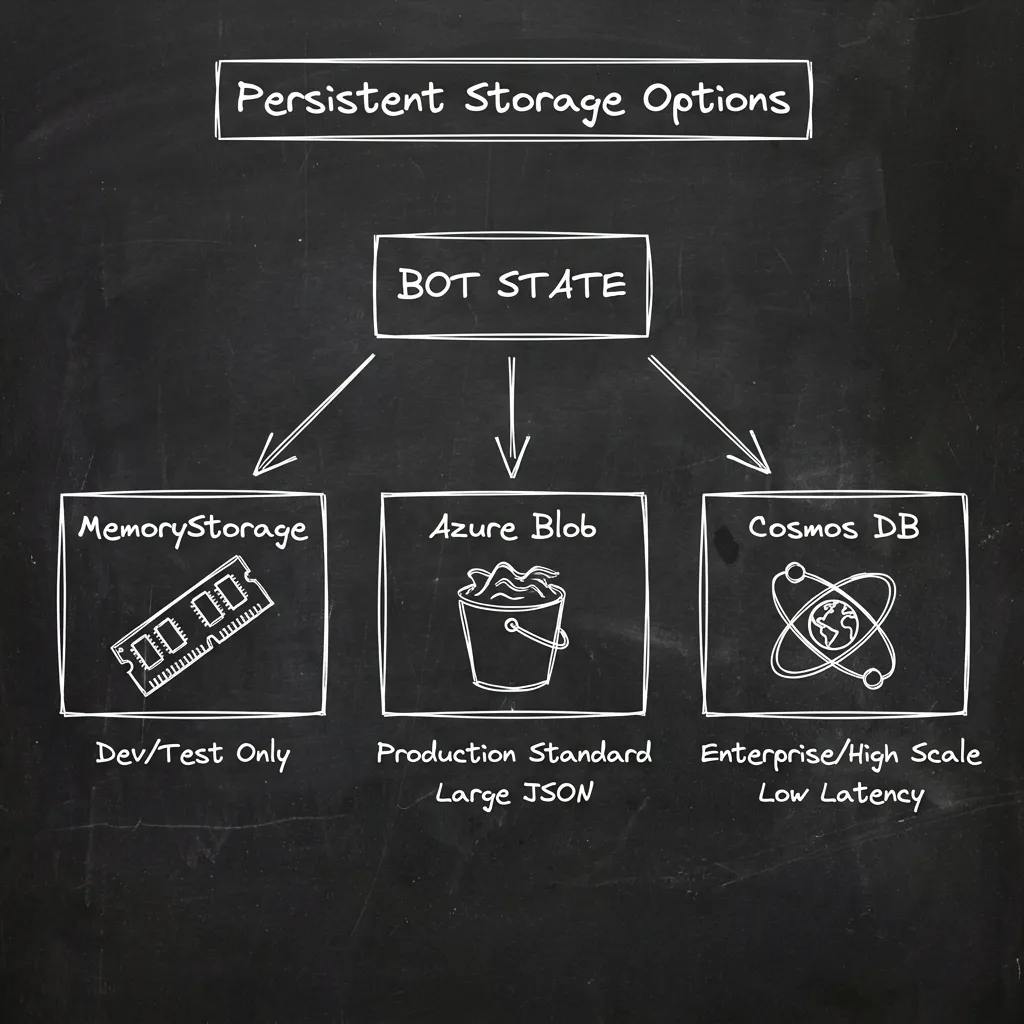
Comparison: Blob Storage vs. Cosmos DB
| Feature | @microsoft/agents-hosting-storage-blob | @microsoft/agents-hosting-storage-cosmos |
|---|---|---|
| Backing Service | Azure Blob Storage (Object Storage) | Azure Cosmos DB (NoSQL Database) |
| Best For | Archival, low-cost, or simple agents. | High-performance, high-traffic, real-time agents. |
| Cost | $ (Very Low) | $$$ (Moderate to High) |
| Performance | Slower latency (milliseconds to seconds). | Extremely fast (single-digit milliseconds). |
| Data Structure | Stores state as a single JSON file per key. | Stores state as a JSON document with indexed fields. |
| Query Capability | None. Must download whole file to read. | High. Can run SQL queries against data. |
1. @microsoft/agents-hosting-storage-blob
This package saves your agent’s state as text files (JSON blobs) in a storage container.
-
Benefits:
- Extremely Low Cost: You pay pennies per GB. Best for hobby projects or internal tools.
- Simplicity: No schema management; it just saves/loads objects.
- Great for Large Objects: Handles massive conversation history chunks better than Cosmos DB (which has a 2MB limit).
-
Downsides:
- Concurrency: Susceptible to “Last Write Wins” overwrites if multiple requests hit simultaneously.
- Latency: Reading from disk is slower than a memory-optimized DB.
- Opaque Data: You cannot search users (e.g., “Find all users with Dark Mode”) without processing every file.
2. @microsoft/agents-hosting-storage-cosmos
This package saves your agent’s state as documents in a NoSQL database (Azure Cosmos DB).
-
Benefits:
- Low Latency & Speed: Designed for real-time apps; writes/reads happen in milliseconds.
- Optimized for Concurrency: Locking models prevent data corruption in high-traffic scenarios.
- Queryable Data: You can run SQL queries (e.g.,
SELECT * FROM c WHERE c.state.user.isPremium = true) for analytics or debugging. - Global Distribution: Automatically replicates data to different regions for worldwide users.
-
Downsides:
- Cost: Significantly more expensive (Provisioned Throughput or Serverless), especially for idle agents.
- Document Size Limit: Strict 2MB limit per document. Infinite conversation histories will fail.
Which one should you choose?
| Choose Storage-Blob if… | Choose Storage-Cosmos if… |
|---|---|
| You are cost-sensitive (hobby/internal tool). | Performance is critical (customer-facing/support bots). |
| Traffic is low (no concurrent user issues). | High traffic (need to scale to thousands of users). |
| State is simple (preferences/short context). | Data utility matters (need to run queries/analytics). |
| No analytics needed (data is blob only). | Serverless is an option (can mitigate costs for erratic traffic). |
4. Orchestration & Advanced AI (Semantic Kernel / LangChain)
- Current State: Direct calls to
AzureOpenAI. - Enhanced Intelligence: You can integrate Semantic Kernel (Microsoft’s open-source orchestrator) to handle more complex scenarios:
- RAG (Retrieval Augmented Generation): Use vector databases to search over your own company PDFs or wikis.
- Function Calling (Tools): Give the AI “Tools” (like a SQL database or Jira API) and let it decide when to use them via a Planner.
- Memory: Use Semantic Kernel’s memory connectors for long-term “semantic” recall rather than just keyword matches.
Read next