Local Code Interpreter in .NET: Mastering CodeAct and Hyperlight in the Microsoft Agent Framework

Writer
Quiz available
Take a quick quiz for this article.

Traditional tool calling in Large Language Model (LLM) applications is inherently chatty. When an agent needs to orchestrate a complex, multi-step task involving several distinct tools, it typically enters a repetitive back-and-forth loop with the LLM.
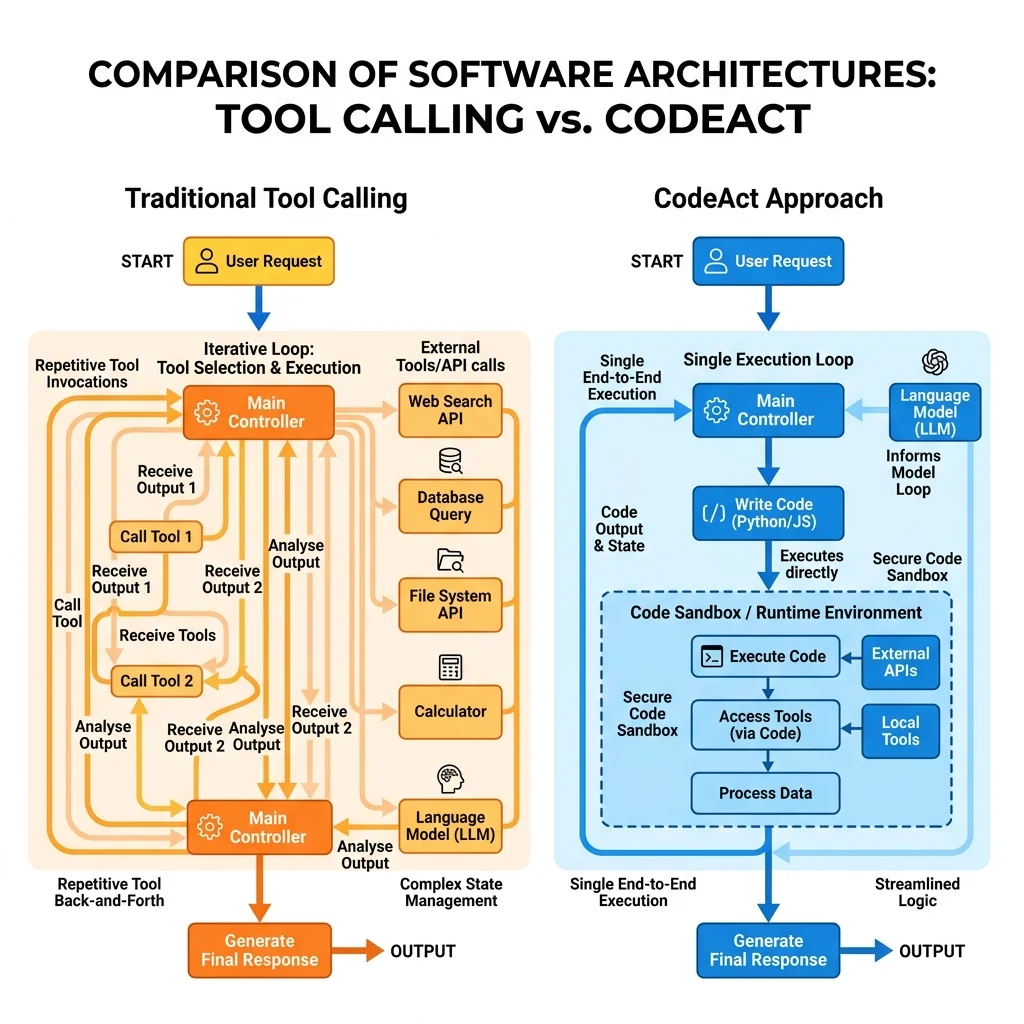
Each iteration incurs massive token consumption (as the entire chat history and all tool definitions are resent) and substantial network latency.
To solve this efficiency bottleneck, the Microsoft Agent Framework introduces support for the CodeAct paradigm paired with Hyperlight sandboxing. This technical guide explores how to shift your AI orchestration away from chat loops and into safe, local, high-performance code execution using C# and .NET.
1. The Paradigm Shift: Traditional Tool Calling vs. CodeAct
To appreciate CodeAct, it helps to analyze the architecture it aims to replace.
Traditional Tool Calling
In a standard agent setup, you provide the LLM with a list of discrete tool schemas. If a task requires three sequential tool executions, the conversation graph looks like this:
- User sends a prompt.
- LLM analyzes the prompt, matches it against schemas, and returns a
tool_callpayload. - App Client executes the tool natively, gathers the output, and sends it back to the LLM in a tool message.
- LLM analyzes the intermediate result, outputs the next
tool_call, and the process repeats.
This multi-turn ping-pong rapidly burns through context windows and increases response times.
The CodeAct Approach
CodeAct reduces this surface area down to a single, generalized tool: execute_code.
Instead of exposing dozens of specialized micro-tools to the LLM, you provide the model with an execution environment. The LLM acts as an engineer: it analyzes your request, constructs a complete script (in JavaScript or Python) containing the logic for all steps, and sends that script to be executed in one single roundtrip.
2. Enter Hyperlight: Secure Local Sandboxing
Executing code generated on the fly by an LLM presents an obvious security hazard. Running this code natively on your host machine risks system compromise, data leaks, or infinite resource loops.
While cloud providers offer remote code interpreters (such as the OpenAI Assistants API Code Interpreter), hosting environments in the cloud is expensive and introduces external network dependencies.
Hyperlight is a specialized framework delivered via native NuGet packages—specifically Microsoft.Agents.AI.Hyperlight—that solves this problem. It allows your .NET application to spin up lightweight, secure, local sandboxes to execute LLM-generated JavaScript or Python code natively on your server or client machine, without leaking access to your host system.
3. Implementation Blueprint: JavaScript Sandbox (Default)
JavaScript is the default runtime environment for Hyperlight because it is lightweight, highly performant, and requires no complex underlying dependencies to initialize a secure sandbox out of the box.
Basic Setup with an AI Context Provider
By utilizing an AIContextProvider, the Microsoft Agent Framework automatically handles the prompt injection and tool schema management needed to teach the LLM how to write sandboxed code.
What Happens Under the Hood?
The LLM does not guess the math. It responds with a function call to execute_code, passing a block of JavaScript resembling this:
Hyperlight captures the standard output (stdout) of this local execution loop, returns it directly to the .NET client pipeline, and provides the finalized calculation safely and instantly.
4. Advanced Orchestration: Chaining C# Tools inside the Sandbox
CodeAct is not limited to math; it can actively orchestrate native infrastructure. If your LLM needs to interact with your system tools, CodeAct exposes those tools inside the sandbox script via a proxy function called call_tool().
The Architecture of Nested Tooling
When you pass traditional .NET tools into a CodeAct-enabled agent, Hyperlight maps those tools into the JavaScript runtime context.
When you prompt the agent with: “What is the weather like in Paris?”, the LLM generates an orchestrated script that targets your native tool internally:
The Execution Workflow
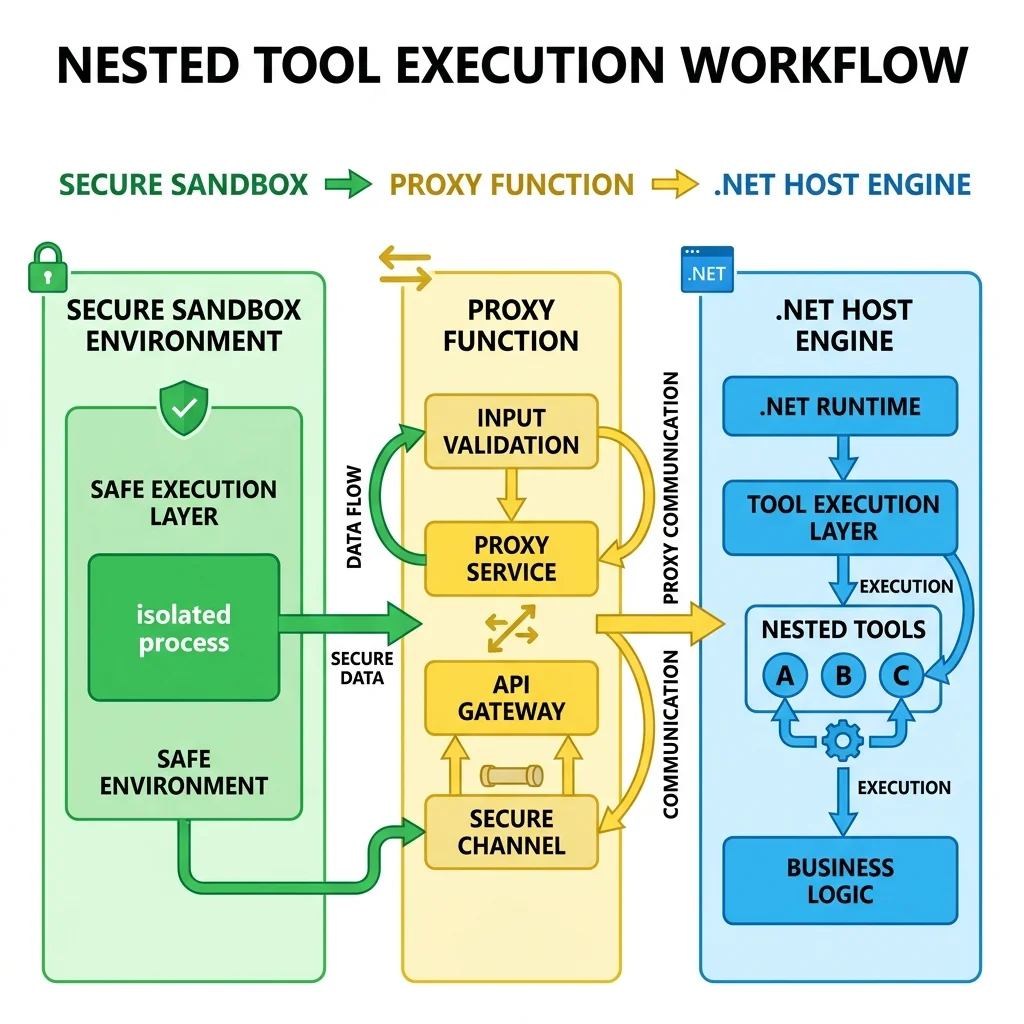
- The sandbox encounters the
call_toolprimitive during execution. - Execution pauses momentarily, yielding control back to the host .NET engine.
- The host executes the native C# method (
getWeatherForCity) safely. - The result flows back into the sandbox variable context, and the script finishes execution.
If your task requires calling three different APIs sequentially, this setup executes them entirely within a single LLM generation turn, avoiding multiple roundtrips over the network to the model endpoint.
5. Running Python Locally: The Wasm/AOT Sandbox Architecture
If your workflow demands Python (for libraries like NumPy, Pandas, or complex string manipulation), Hyperlight supports it. However, because Python does not have a lightweight native runtime embedded natively in Windows/.NET like JavaScript V8 engines, it uses a compiled sandbox layout.
The 40MB Standalone Sandbox Gotcha
To run Python safely and locally without relying on a global machine installation, Hyperlight relies on an Ahead-Of-Time (AOT) or WebAssembly (Wasm) compiled Python runtime file.
- The Asset: This runtime container presents itself as a standalone file roughly 40MB in size.
Pro Tip: If this file is missing or fails to execute across varying developer workstations, you can generate or compile a compliant runtime target by prompting an advanced coding LLM to package a minimal Python execution binary targeted for WebAssembly/Wasm integration.
6. Lower-Level Control: Manual Tool Building
If you prefer to avoid the automated AIContextProvider wrapper and want granular control over how and when the execution tool is exposed to your agent system, you can build the core Hyperlight tools manually.
The framework exposes the low-level primitive HyperlightExecuteCodeFunction. You can use this class to extract the raw schemas and prompt strings directly:
When you call BuildInstructions(), the framework generates the precise system instructions required by the LLM:
“You can execute code in a secure sandbox by calling the execute tool. Any tools listed in the tool’s description are only accessible within the toolbox via the call_tool function. They cannot be invoked directly…”
This explicit design prevents the model from accidentally invoking unauthorized tools outside the secure perimeter of the sandbox runtime, guaranteeing predictable, deterministic security boundaries.
Read next