Mastering Multi-Agent Orchestration in Copilot Studio: Child Agents & Dynamic Routing

Writer
Quiz available
Take a quick quiz for this article.

If you are building complex enterprise Copilots, you will eventually hit a wall where a “one-size-fits-all” approach to knowledge and tools simply doesn’t work.
Imagine a Global HR bot: the parental leave policies and legal compliance for an employee in the USA are vastly different from an employee in Germany or the UK. Or consider an IT support bot that needs to trigger different shipping workflows depending on whether the employee is remote or office-based.
How do you instruct your Copilot to automatically pivot to the correct dataset and compliance rules without forcing the user to constantly clarify their context? In this post, we’re going deep into Copilot Studio to learn how to dynamically shift tools and knowledge based on variables and formulas using Child Agents and Power Fx.
🧠 Understanding the Core: The Power of Child Agents
In Copilot Studio’s orchestration engine, Child Agents are your best friends for context-switching. Think of a child agent as a logical container—a subcomponent of your parent agent—that bundles specific capabilities together.
When you open up a child agent, it contains much more than just a list of plugins. A fully configured child agent includes:
- Tools & Knowledge: The specific APIs, actions, and datasets the agent can access.
- Instructions & Descriptions: System prompts that dictate exactly how this specific grouping of tools should behave.
- Capabilities: Toggles to allow or restrict web search for this specific context.
- Inputs & Outputs: Defined data schemas for what the agent expects to receive from the parent orchestrator, and the data it returns back.
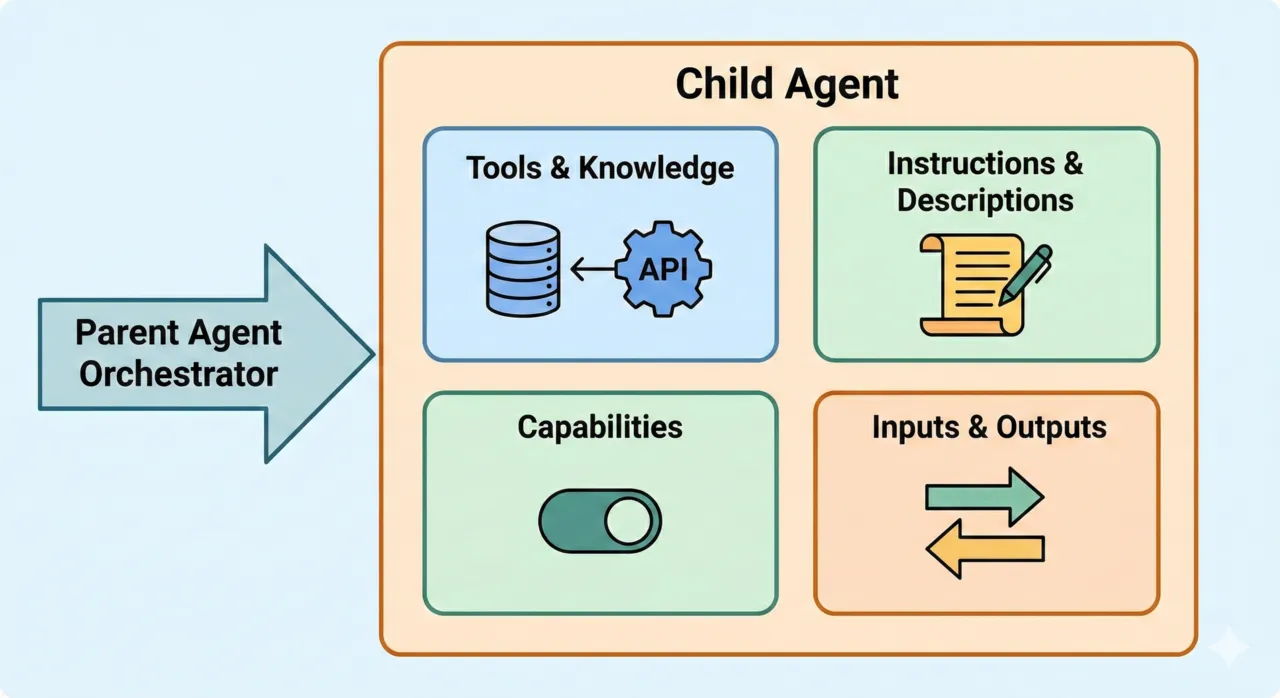 Diagram 1: Inside a Child Agent
Mastering child agents and their instructions/descriptions is the key to modern Copilot architecture. By properly grouping capabilities into child agents, you can build incredibly flexible bots that practically eliminate the need for traditional, rigid “Topics.”
🚀 The Architectural Advantage: Scaling Beyond Limits
One of the most overlooked benefits of Child Agents is limit management. Copilot Studio has recommended limits on the number of tools and knowledge sources per agent to maintain performance.
| Architecture | Tool Capacity | Performance | Maintenance |
|---|---|---|---|
| Flat Bot (Standard) | Limited by single Orchestrator | Slower (LLM sifts through noise) | High (Complex Topics) |
| Orchestrated (Multi-Agent) | Unlimited (Nested scalability) | Fast (Narrow, scoped context) | Low (Modular, isolated logic) |
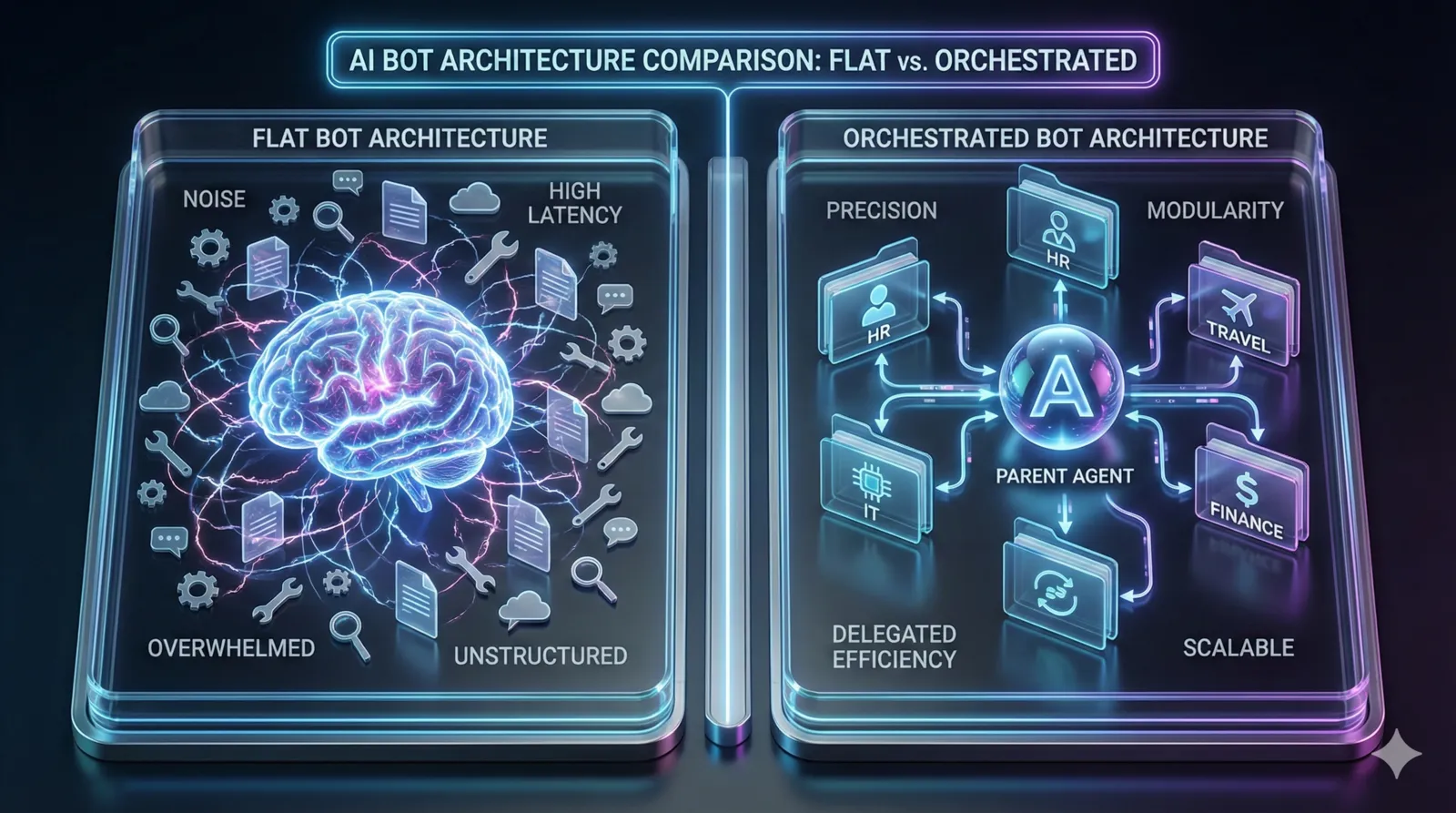 Diagram 2: Flat vs. Orchestrated Architecture Comparison—Transitioning from a chaotic ‘one-brain’ model to an efficient ‘delegated’ model.
However, each Child Agent has its own orchestration engine. This means:
- Separate Limits: A Child Agent’s tools and knowledge do not count against the Parent’s limits.
- Micro-Orchestration: You can build massive Copilots by nesting specialized sub-agents, each focused on a narrow domain with its own dedicated resources.
- Reduced Latency: By scoping knowledge to a small sub-agent, the LLM doesn’t have to “sift” through thousands of irrelevant documents, leading to faster, more accurate responses.
🔍 Under the Hood: Context Management
One of the most frequent questions architects ask is: “If I hand off to a Child Agent, does the user have to explain everything all over again?”
The answer is no, thanks to how Copilot Studio manages context. It uses a Hybrid Context model where the conversation flow remains seamless even while the internal “brain” (knowledge and tools) switches.
| Feature | Parent Agent | Child Agent | Relationship |
|---|---|---|---|
| Conversation History | Visible | Inherited | Shared: Child sees prior turns for seamless flow. |
| Knowledge Base | Configured Set | Configured Set | Isolated: Child only sees its own region-specific docs. |
| Tools/Actions | Configured Set | Configured Set | Isolated: Child only triggers its own regional APIs. |
| Instructions | Orchestrator | Task-Specific | Scoped: Child follows its own regional guidelines. |
| Variables | Global & Local | Global & Local | Hybrid: Shared if Global. prefix is used. |
1. The Heritage of History
When a Parent orchestrates a handoff, the recent conversation turns are passed to the Child Agent’s LLM call. This ensures that if a user tells the Parent “I’m planning to take time off for my newborn next month” and then later asks “What forms do I need to fill out?”, the Child Agent immediately understands the user is asking for parental leave forms, not just general HR forms. It prevents the user from having to repeat themselves or start from a “blank slate.”
2. Isolated Knowledge & Tools (The Guardrail)
While history is shared, the Knowledge & Tools are strictly scoped. This is the core benefit demonstrated in this tutorial: your Germany Agent will answer using German documents, not USA documents. This isolation prevents “knowledge bleed” and ensures that the AI only uses the specific tools (Power Automate, APIs) configured for that sub-task.
⚡ Demystifying Power Fx: The Logic Layer
Before we route these agents, we need to understand the language used to build the routing logic: Power Fx.
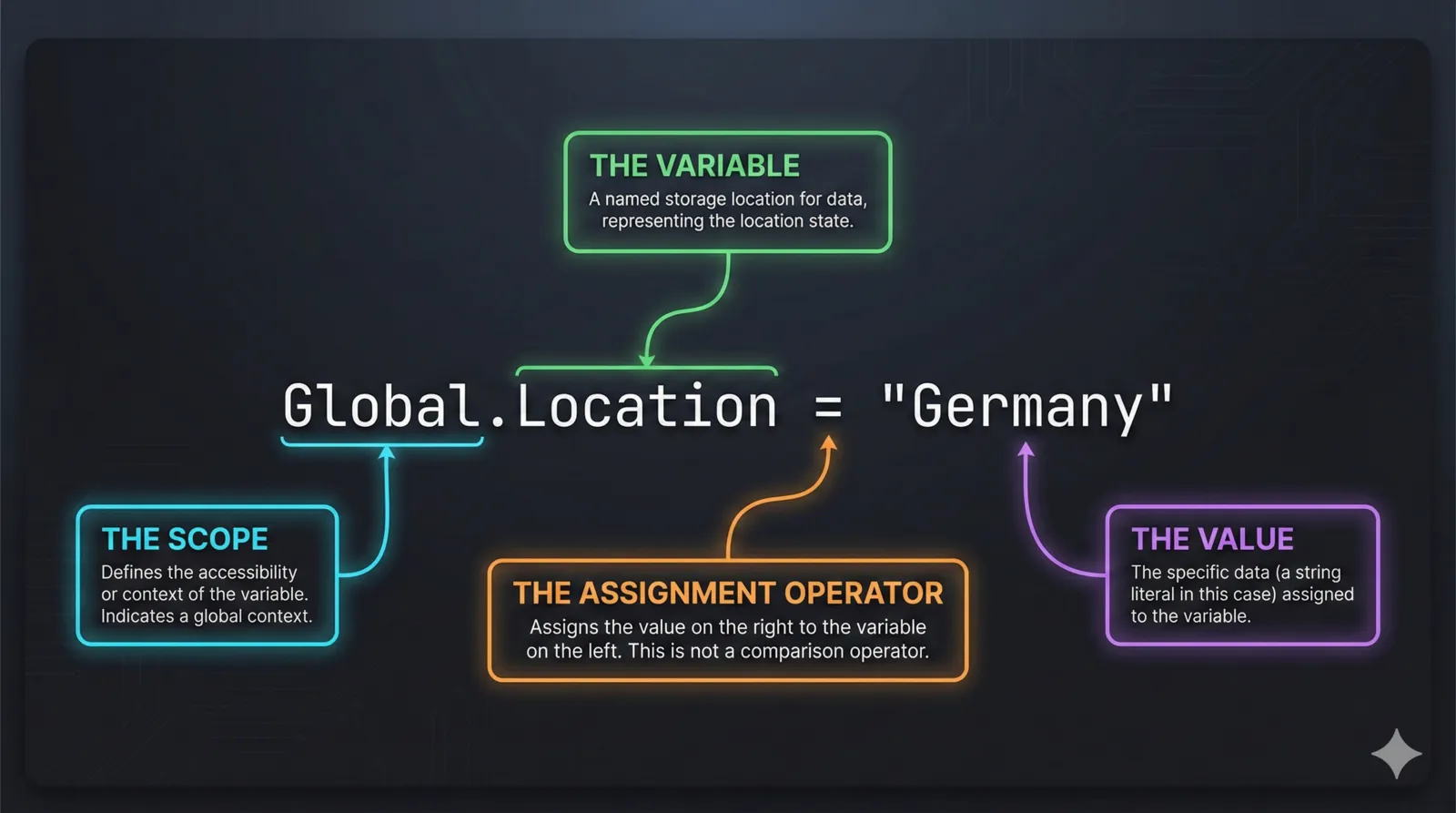 Diagram 3: Anatomy of a Power Fx Formula—Breaking down the prefix, variable, and comparison logic.
What is Power Fx?
Power Fx is Microsoft’s open-source, low-code logic language. It is strongly typed, declarative, and designed to evaluate data and return a result instantly. In the context of Copilot Studio, Power Fx is the brain behind Conditions, allowing you to write the exact rules that determine when an agent should be triggered.
Important Note on Syntax: Power Fx in Copilot Studio uses US-style
numbering. This means the decimal separator is a period (.) and the
parameter separator is a comma (,). For example: DateAdd(Now(), 14).
1. Variable Scoping: The “Prefix” Rule
To use a variable in a Power Fx formula within Copilot Studio, you must add a prefix to indicate its scope. Without these, the formula will fail to resolve the variable.
System.: For system-defined variables (e.g.,System.Conversation.Id,System.User.DisplayName).Global.: For variables shared across all topics in the session.Topic.: For variables local to the current topic.Environment.: For environment variables defined in the Power Platform environment.
2. Literal Values & Data Types
When writing formulas, you’ll often need to hardcode specific values. Power Fx requires strict formatting depending on the data type:
| Type | Format / Example |
|---|---|
| String | "Hello World", "Germany" (Always use double quotes) |
| Boolean | true or false (Lower case) |
| Number | 1, 5.25, -92 (No quotes) |
| DateTime | Date(2024, 12, 25), Time(14, 30, 0), Now() |
| Record | { Name: "Can", Role: "Admin" } |
| Table | ["Apple", "Banana", "Cherry"] or [{ID: 1}, {ID: 2}] |
| Blank | Blank() |
3. Practical Power Fx Examples for Copilot Routing
| Logic Type | Power Fx Example | Result / Use Case |
|---|---|---|
| Basic Exact Match | Global.Location = "Germany" | Evaluates to true if the variable matches exactly, triggering the German HR Child Agent. |
| Complex Condition | Topic.bookingDate > (DateAdd(Now(), 14)) | Checks if a selected date is more than 14 days in the future. Useful for lead-time constraints. |
| Multiple Conditions | And(Global.Location = "USA", Global.EmploymentType = "FullTime") | Evaluates to true only if both conditions are met. Perfect for differentiating between employment types. |
| Checking for Missing Data | IsBlank(Global.Location) | Evaluates to true if the system doesn't know the user's location, allowing for a fallback flow. |
4. Common Formula Quick Reference
While there are hundreds of functions, these are the heavy hitters you’ll use 90% of the time:
- String Manipulation:
Text(),Lower(),Upper(),Substitute(),Len(),IsMatch(). - Logic & Branching:
If(),Switch(),And(),Or(),Not(). - Math:
Round(),Int(),Abs(),Sum(). - Table/Record Ops:
LookUp(),Filter(),First(),CountRows(),ForAll(). - Date/Time:
DateAdd(),DateDiff(),Today(),Now(),TimeZoneOffset().
Beyond “The Agent Chooses”: Event-Driven Triggers
While we focus on dynamic routing (where the Parent chooses), Child Agents can also intercept specific Events. In the “When will this be used?” settings, you can configure agents to fire on:
- Message Received: The default behavior for user queries.
- Inactivity Threshold: Trigger a proactive follow-up if the user stops responding.
- Conversation Update: Fired when a user joins or metadata changes (e.g., in MS Teams).
- Custom Client Events: Perfect for triggering specific logic based on frontend interactions.
🏗️ Step-by-Step Scenario: Localizing Parental Leave Policies
Let’s build a practical scenario. We have employees querying our HR Copilot about Parental Leave. The laws governing this are fundamentally different depending on the country.
- USA Users need answers sourced from the FMLA (Family and Medical Leave Act) handbook. They need to be informed about the 12-week unpaid limit and short-term disability options.
- Germany Users need answers sourced from Bundeselterngeld- und Elternzeitgesetz (BEEG). They need information on Elternzeit (up to 3 years of protection) and state-funded allowances.
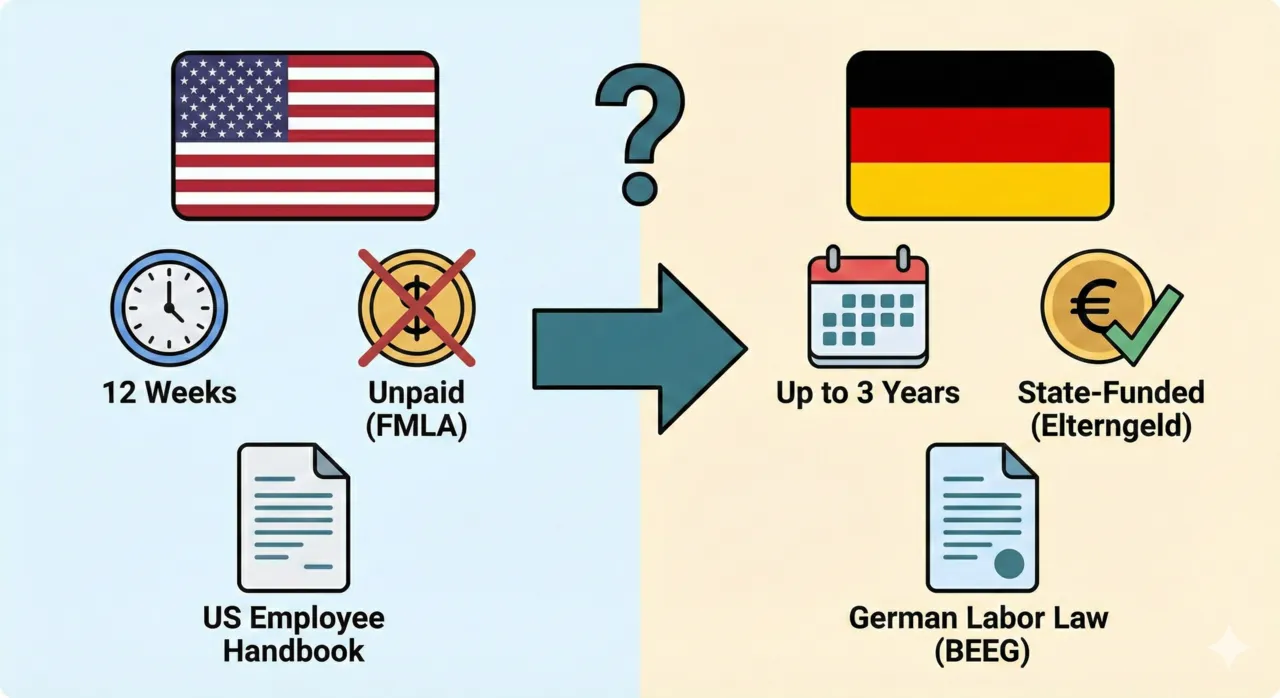 Diagram 4: The HR Scenario – USA vs. Germany
Step 1: Capture and Set the Variable
Before the Copilot can route the user, it needs to know who the user is.
- Navigate to Topics > System Topics.
- Open the Conversation Start topic.
- Add a node to set a global variable. For example, create
Global.Locationand set its value to"USA"or"Germany".
Production Note: In a production environment, you would dynamically populate this via authentication claims, SSO tokens, or a preceding form.
Step 2: Build the Localized Child Agents
Next, you need to create your logical containers (Child Agents) for each region.
Agent A: USA (FMLA)
- Name/Description: Clearly label this “HR - United States”. Do not just use “US”. Spelling it out gives the AI orchestrator maximum semantic clarity.
- Knowledge: Connect to the US Employee Handbook and FMLA PDF documents.
- Instructions: Explicitly state: “You are providing information for the US workforce. Explain that leave is generally unpaid unless short-term disability applies. strictly follow FMLA guidelines.”
Agent B: Germany (Elternzeit)
- Name/Description: Label as “HR - Germany”.
- Knowledge: Connect to the German Labor Law database or specific localized policy documents.
- Instructions: Explicitly state: “You are providing information for the German workforce. Explain the 3-year parental leave protection and state-funded parental allowance (Elterngeld).”
Step 3: The “Secret Sauce” — Advanced Settings & Routing
A common trap makers fall into is relying purely on the agent’s Description to handle routing. Do not do this for variable-based routing. If you rely on descriptions, the AI orchestrator requires semantic clues in the user’s prompt. This means the user would literally have to type, “What is the parental leave policy in Germany?” If they just ask “What is the policy?”, the orchestrator won’t know where to send them.
By using explicit Conditions instead, the routing happens invisibly based on context (Global.Location). The user asks simple questions, and Copilot does the heavy lifting.
- Open your Germany Child Agent.
- Navigate to the Advanced Settings panel.
- Locate the Condition or Trigger section. This dictates the prerequisites that must be met before the orchestrator is even allowed to look at this agent.
- Switch to the Formula view and enter your Power Fx logic:
Global.Location = "Germany". - Repeat this for the USA agent, setting the condition to
Global.Location = "USA".
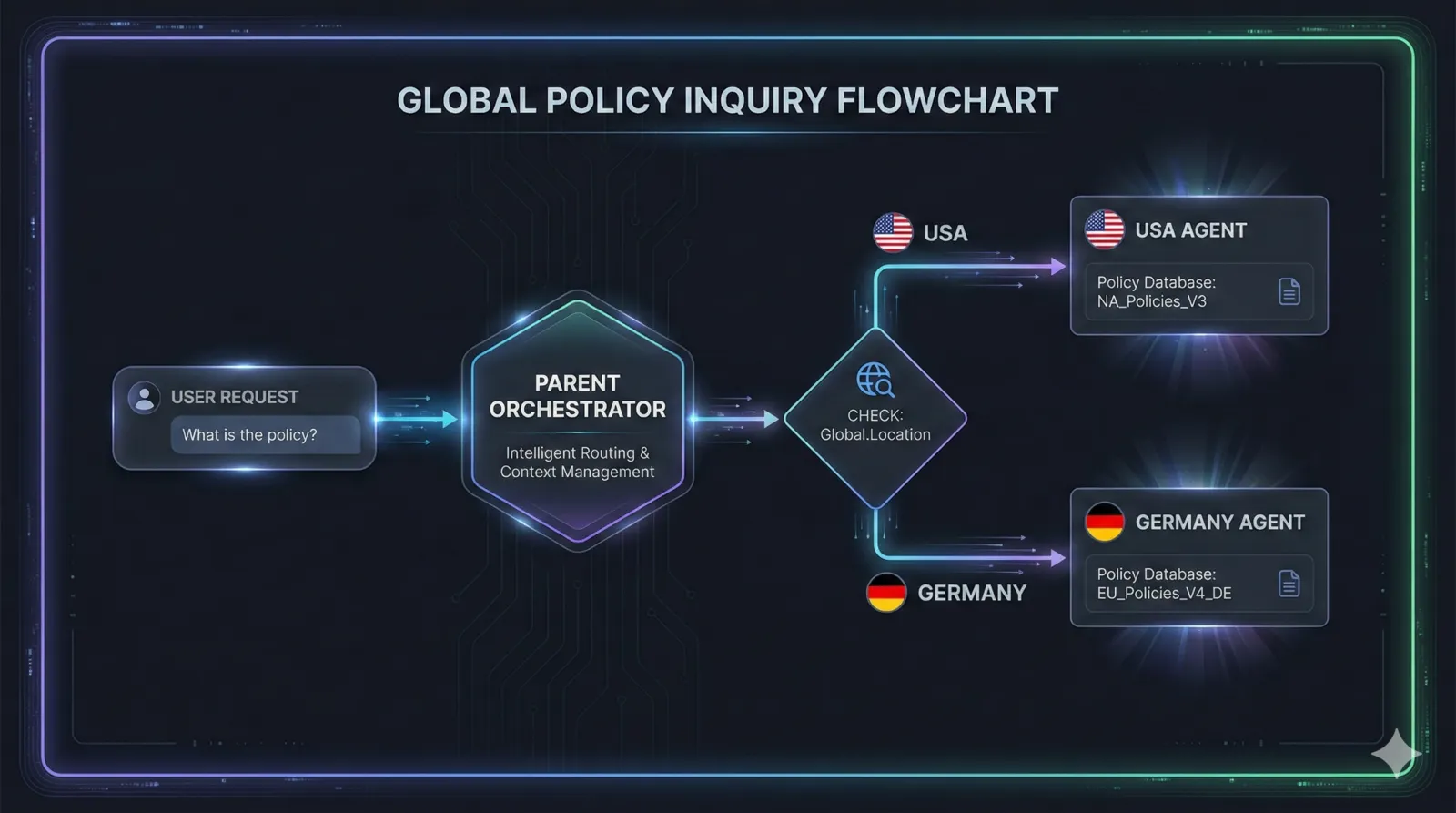 Diagram 5: Orchestration Macro-Flow—Visualizing the invisible handoff from Parent to Child based on Global Variables.
Step 4: Testing and Validation
To verify the dynamic shift is working, you need to test both flows.
Crucial Testing Tip: Always start a brand new conversation to reset your global variables. The AI’s memory of the previous context can interfere with routing evaluation if not properly cleared.
- Test the USA Flow: Ensure
Global.Locationis set to"USA"in the Conversation Start topic. Save and hit New Conversation. Ask: “What are my parental leave options?”- Result: You should see answers referencing “12 weeks,” “unpaid leave,” and “FMLA.”
- Test the Germany Flow: Change
Global.Locationto"Germany". Save and start a completely new test conversation. Ask the exact same question.- Result: The Copilot should pivot entirely, returning information about “3 years protection,” “Mutterschutz,” and “Elterngeld.”
Step 5: The Return Trip – Configuring Child-to-Parent Handoff
The routing is only half the battle. Once your Child Agent finishes its specialized task—like calculating the exact state-funded allowance in Germany—how does it pass that information back to the Main Parent Agent so the conversation can continue smoothly?
In Copilot Studio, data flow between agents is managed through explicit Inputs and Outputs. You cannot rely on the LLM to just “remember” everything across the agent boundary; you must pass the precise structured data back.
Here is exactly how to configure the handoff:
-
Configure Output Variables in the Child Agent:
- Open your Child Agent and navigate to its Details or Settings.
- Locate the Outputs section and select Add Output.
- Define a descriptive Display name (e.g.,
ReturnMessageorCalculatedAllowance) and set the Data type (String, Number, or Boolean). - In the Child Agent’s topic logic, ensure you map the result of its work (e.g., the final calculation or generated text) to this output variable.
-
Access Output Variables in the Parent Agent:
- Back in your Main Orchestrator (Parent Agent), when you configure the action or flow that calls the Child Agent, look for the mapped outputs.
- The Parent Agent will now expose the Child Agent’s Output variables, allowing you to save them directly to variables within the Parent’s scope.
- You can then use these variables in subsequent nodes. For example, you can take the
CalculatedAllowancefrom the Germany Child Agent and use it in the Parent topic to seamlessly summarize the findings, send a final confirmation email, or update a Dataverse record.
Context Isolation (Preventing Pollution): A massive architectural benefit to using strict Outputs is that it prevents context pollution. The raw data reading, reasoning traces, and intermediate tool calls the Child Agent performs stay inside the Child Agent. The Parent Agent’s context window does not get flooded with thousands of tokens of localized law snippets or backend API JSON payloads; it only receives the result. This keeps the Parent Orchestrator incredibly fast, focused, and immune to lower-level hallucinations.
By explicitly capturing the child agent’s findings into defined Outputs, the Parent Agent regains control of the conversational flow equipped with new, structured data.
 Diagram 6: The ‘Return Trip’ Data Flow—Ensuring structured data (Outputs) returns to the Parent without carrying the Child’s internal ‘mess.’
🏆 Technical Best Practices for Dynamic Orchestration
To ensure your enterprise Copilots are scalable and bulletproof, keep these mechanics in mind:
- Scoped Instructions (System Prompts): Even though the Child Agent sees the conversation history, it processes that history through its own Instructions. Always reinforce regional identity (e.g., “Always answer in EUR and follow GDPR”) within the child agent’s System Prompt to maintain the correct behavioral guardrails.
- Priority & Conflict Resolution: If multiple agents or topics qualify for the same trigger, use the Priority property. A lower number indicates a higher priority. The internal execution order follows:
Activity Occurs->Message Received->Agent Chooses. - Advanced Input Controls: Don’t just pass variables; configure the Child Agent to handle missing data. Use the “Should prompt user” and “Reprompt” settings to allow the Child Agent to autonomously gather missing required inputs. For instance, if the USA Agent needs an
EmploymentType(Full-Time vs. Contractor) to calculate leave properly, it can prompt the user directly for that missing piece without breaking the main conversational flow. - Customized Completion Behavior: You can control what the Parent does once the Child finishes. Options include returning a specific Gen-AI summary of the child’s work (e.g., “I’ve verified your FMLA eligibility based on what the HR agent provided”) or sending a structured Adaptive Card with a confirmation button to cleanly close the loop.
- Variable Hygiene & Global Prefixes: Stick to global variables (prefixed with
Global.) for routing logic. This is how the Parent tells the Child “You are the Germany Agent” without the User having to say it.
By leveraging Child Agents with conditional logic and Power Fx, you can build sophisticated orchestration layers that adapt to the user’s profile or business needs in real-time, preventing hallucinations and ensuring contextually perfect responses.
Read next