Building the AI-Native Enterprise: Scaling Apps and Agents with Microsoft Dataverse

Writer
Quiz available
Take a quick quiz for this article.
Building the AI-Native Enterprise: Scaling Apps and Agents with Microsoft Dataverse
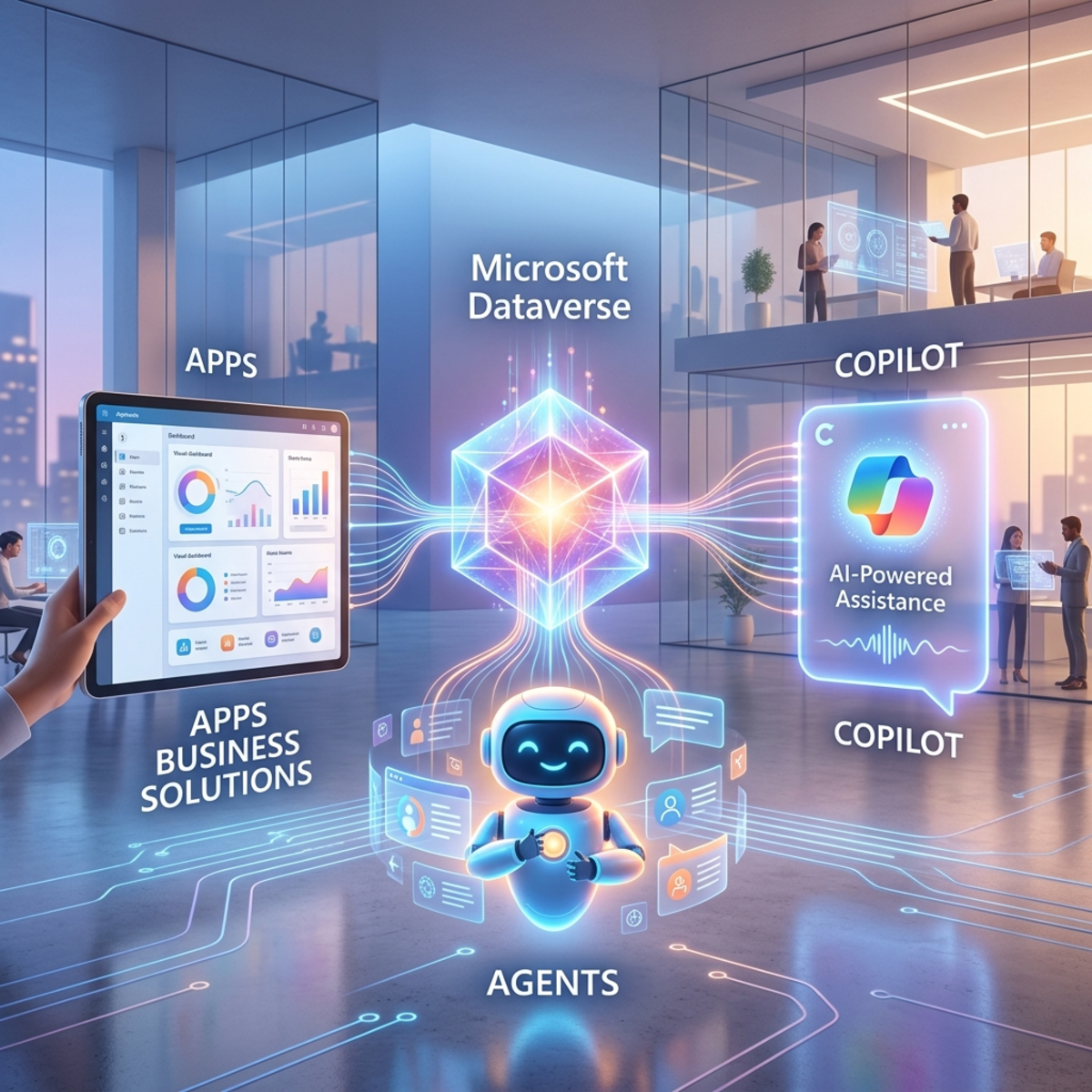
The enterprise landscape is undergoing a massive paradigm shift. Organizations are rapidly evolving from traditional, app-centric models to dynamic environments where apps and autonomous agents coexist. To make this work at an enterprise scale, organizations need a foundation that seamlessly integrates data management, robust security, and cutting-edge generative AI capabilities.
Enter Microsoft Dataverse. In this post, we will dive deep into the technical capabilities of Dataverse, exploring how it acts as the hyperscale engine powering the next generation of business solutions.
“The transition to an AI-first enterprise isn’t just about adopting LLMs; it’s about connecting those models to your operational data securely and at scale.”
1. The Modern Enterprise Paradigm
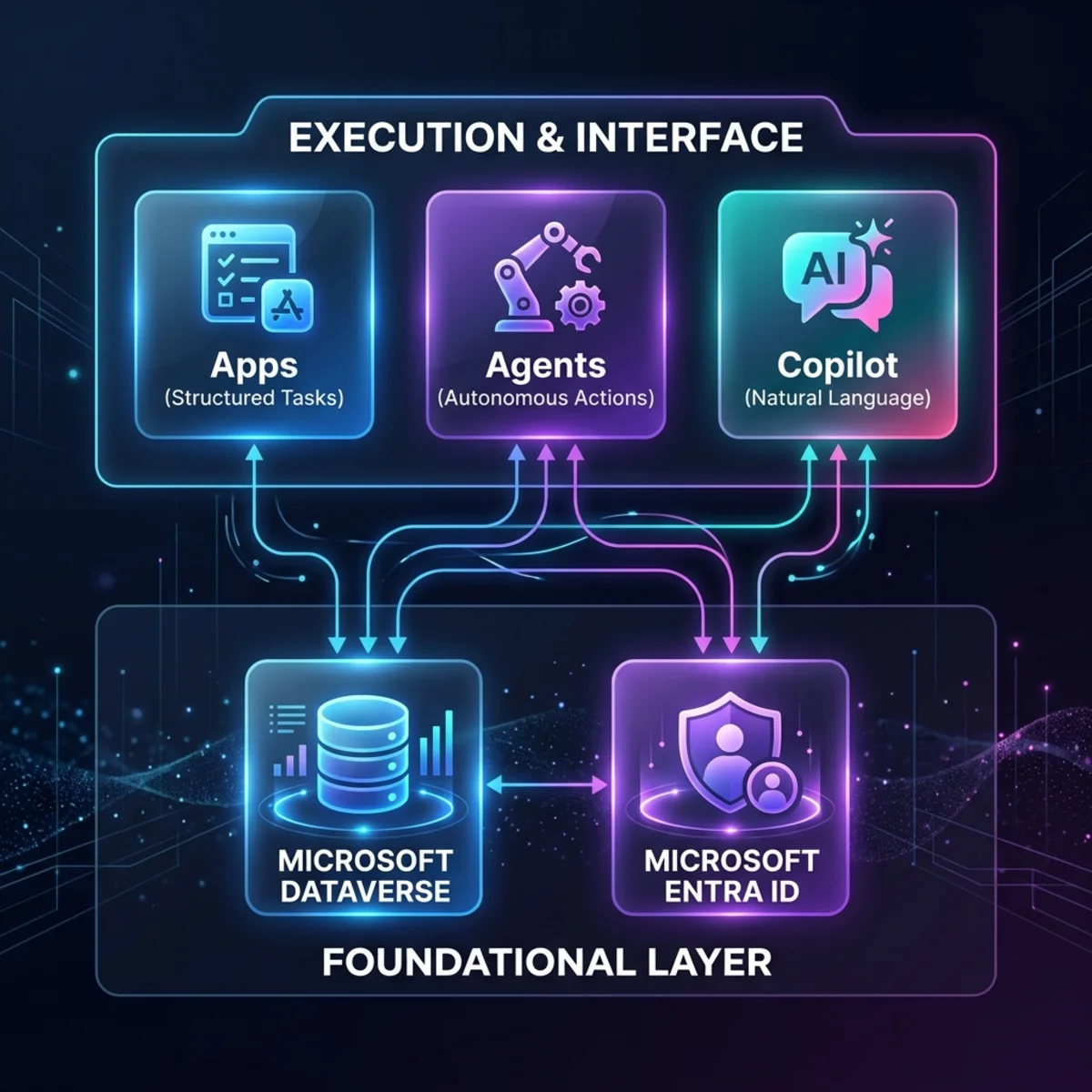
Before diving into the architecture, it’s crucial to understand how modern work flows across an organization. It relies on three synergistic components:
- Apps: The structured environments where human oversight, judgment, and exception handling occur.
- Agents and Workflows: The execution layer. Agents use AI to reason over context and execute multi-step actions, while workflows ensure predictable background processes run reliably.
- Copilot: The natural language interface that keeps users in the flow of work without context switching.
Underpinning all of this is Dataverse (providing the shared data model and business logic) and Microsoft Entra (enforcing identity, access, and policy controls). We are seeing a distinct evolution from purely app-based workloads to agentic workloads.
2. Dataverse Core Pillars & Hyperscale
Dataverse removes the operational toil of scaffolding infrastructure, offering a turnkey infrastructure solution for developers. As data estates grow, Dataverse empowers users with contextual data and optimizes costs through Data Archival and Long-Term Retention (LTR), ensuring compliance while offloading frequently accessed operational data.
It also comes with built-in enterprise IT security and governance right out of the box, ensuring that as you scale, your data remains secure and manageable.
3. Microsoft Fabric Integration
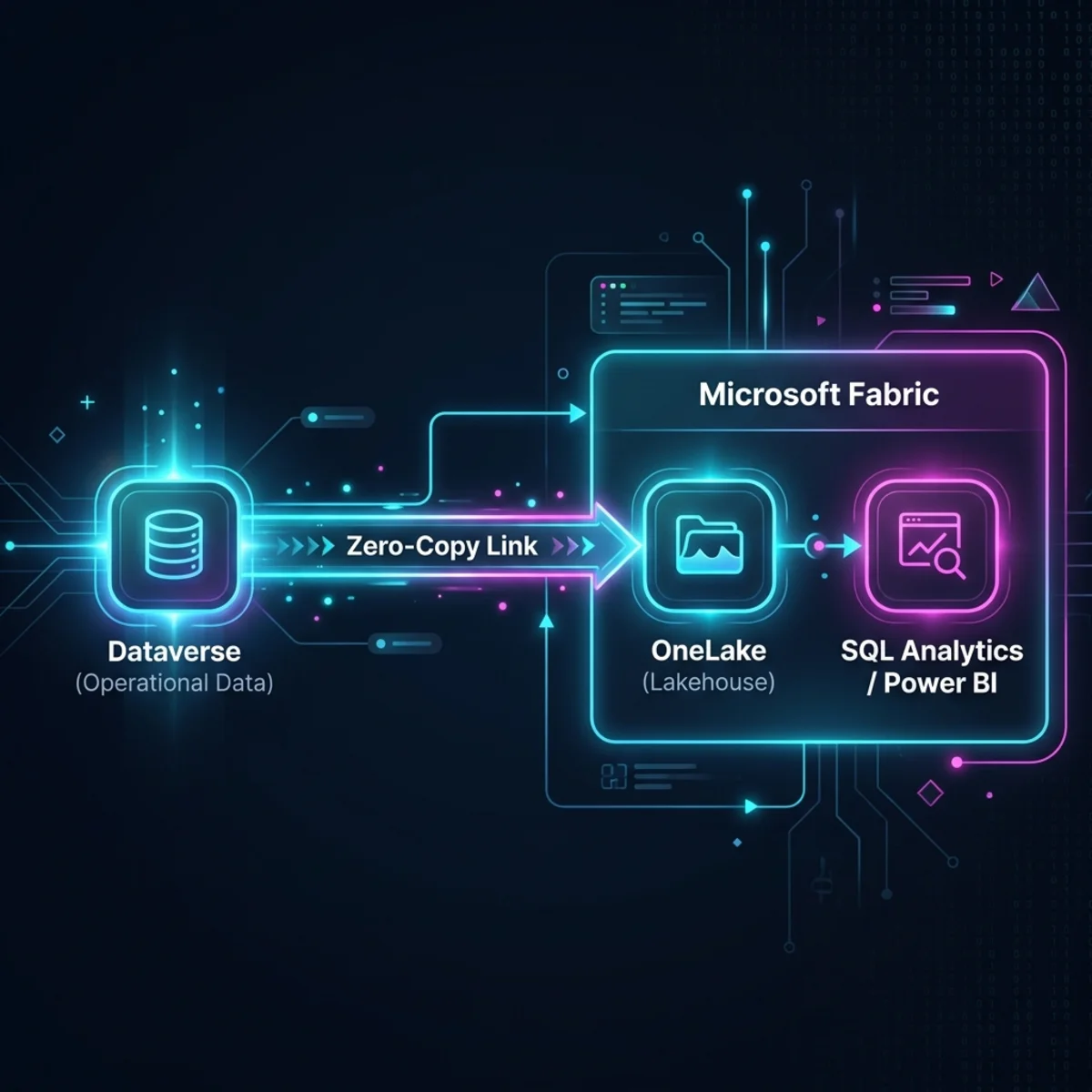
One of Dataverse’s most powerful features is its native, real-time, zero-copy integration with Microsoft Fabric. You no longer need complex ETL pipelines to blend operational and analytical data.
How to configure: From the Power Apps experience, navigate to Analyze > Link to Microsoft Fabric.
Pro Tip: Instead of syncing your entire Dataverse environment, you can select specific tables to sync. This drastically reduces compute costs and syncing time. Once linked, you can utilize Fabric data agents to run personalized, highly pointed queries against your real-time operational data.
4. Making Dataverse AI-Native: Search and Copilot Studio Knowledge
Intelligent, Multi-Faceted Search
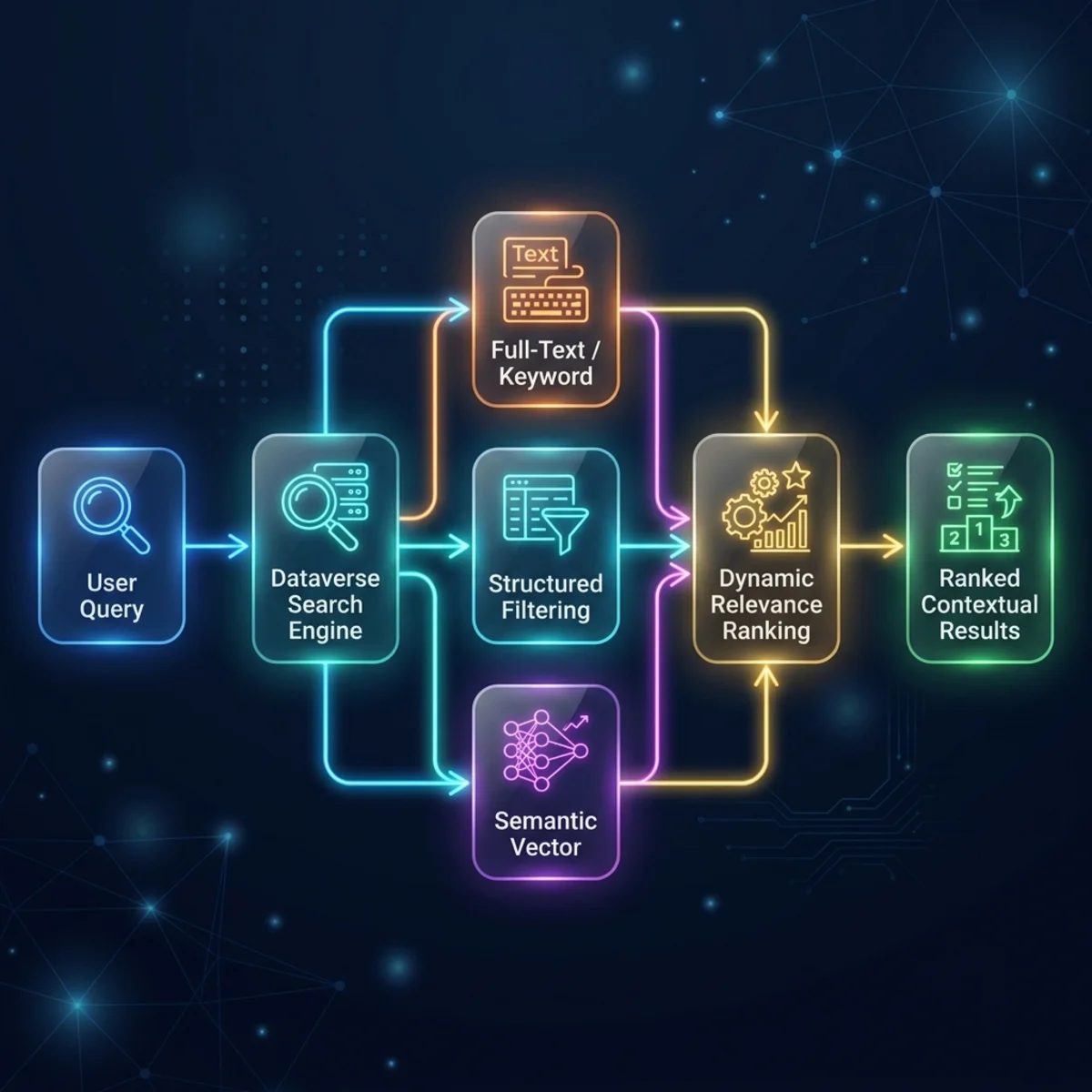
Search is the brain behind how Copilot reasons over your business data. Dataverse search combines three key types of search capabilities:
| Search Type | Primary Targets | Logic |
|---|---|---|
| Full-Text | Text fields, Logs, Notes | Keyword matching |
| Structured | Relational DBs, Choices | Precise filtering |
| Unstructured | Files, Attachments, Images | Semantic & Vector |
Dynamic Ranking: Search relevance isn’t static. It adapts to user behavior in real-time. If a user frequently interacts with a specific record, the system automatically boosts its ranking over alphabetically superior but less relevant records (e.g., the “Third Coffee” vs. “Fourth Coffee” example).
Multimodal Grounding: Copilot Studio can natively ground agents using Dataverse files. It supports semantic and vector search for uploaded files, including embedded image understanding for PDFs, meaning agents can interpret visual charts and diagrams within documents.
The Glossary Trick: Avoid complex prompt engineering for internal jargon. Navigate to your Dataverse Knowledge Source in Copilot Studio and use the built-in Glossary feature. For example, you can define an internal metric like HRR as “Happy Review Rate”. The agent will instantly understand and calculate this in future queries without additional prompt engineering.
5. The Model Context Protocol (MCP)
The Dataverse MCP server is arguably the biggest leap in making the platform AI-native. It acts as a standardized bridge, allowing any AI assistant to interact directly with your database without requiring custom APIs or SDKs.
- Natural Language to CRUD: MCP translates natural language (“Show me accounts in Seattle” or “Create a new account called Northwind Traders”) into precise tool calls (
list tables,describe table,read query,create record). It supports full CRUD (Create, Read, Update, Delete) operations.
The Dataverse MCP server acts as a standardized bridge, allowing any AI assistant (GitHub Copilot, Copilot Studio) to interact directly with your database without requiring custom APIs or SDKs.
Configuration Tip: Admins enable this via the Power Platform Admin Center (PPAC) -> Settings > Features > Dataverse MCP. Advanced settings allow you to explicitly authorize specific clients, such as GitHub Copilot.
6. Low-Code AI Tooling
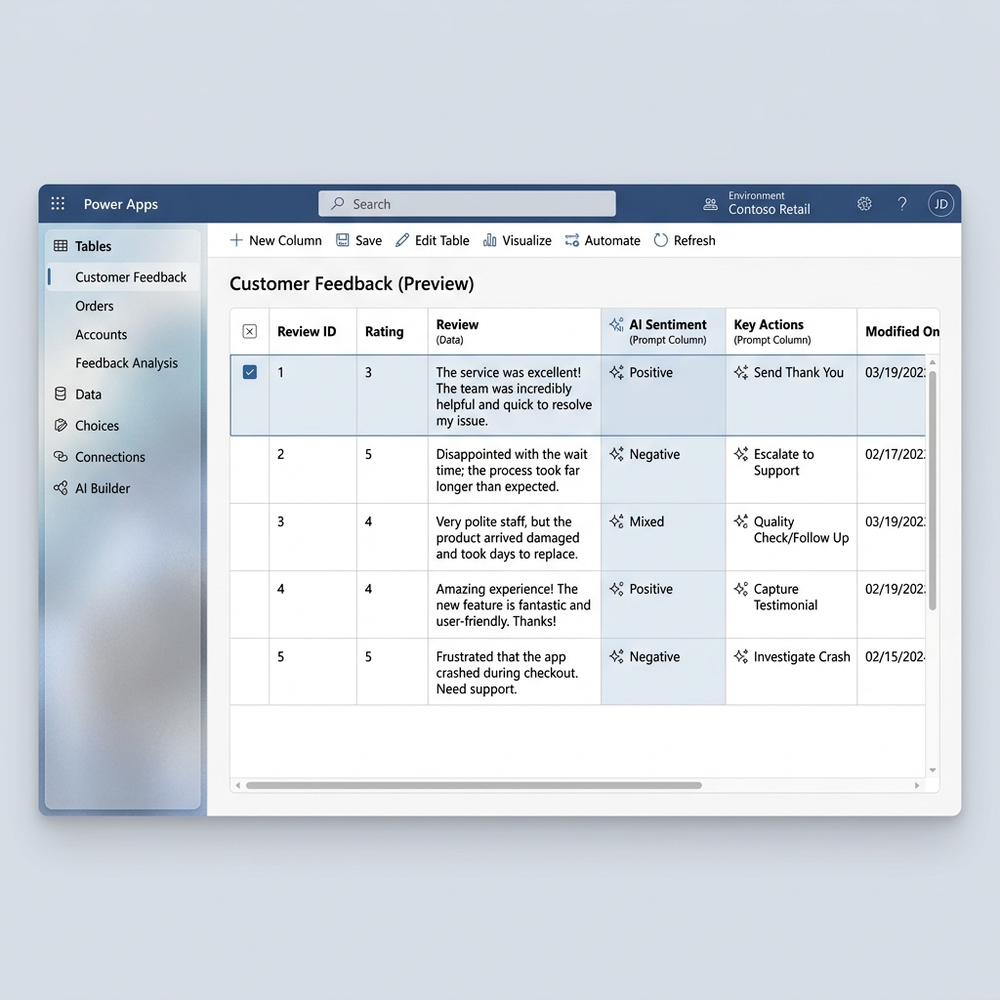
Dataverse brings generative AI directly to the schema level.
- Prompt Columns: Developers can define business logic dynamically using generative AI directly inside a table column on existing data. By selecting the “Prompt” data type, you can instruct the column to evaluate other fields. Example Use Cases: Creating a column that automatically detects the sentiment of a “Review Text” column, or a column that automatically redacts PII and brand names from incoming user feedback.
- Wipe Coding: Because real-world operations require humans in the loop, Dataverse supports AI-assisted, human-in-the-loop app building. Teams can collaborate with AI to design complex data models, map out solution architectures (including agents and workflows), and generate production-grade code rapidly.
7. Enterprise Security, Compliance & Governance
Scaling agentic workloads requires impenetrable security. Dataverse centralizes its security hub in the Power Platform Admin Center, combining several critical layers:
| Security Layer | Core Capabilities | Impact |
|---|---|---|
| Network & Access |
| Revokes sessions in near real-time if risk changes. |
| Protection |
| Prevents session hijacking and infrastructure attacks. |
| Data Access |
| Granular access control tailored to user/agent needs. |
| Compliance |
| Ensures strict oversight and data sovereignty. |
- Threat Detection: Dataverse integrates directly with Microsoft Sentinel for real-time, identity-based threat detection. Unusual spikes in CRUD operations or Purview auditing triggers automated response workflows that can disable users or alert SOC teams immediately.
8. The Future: Agent Identity (Agent 365)
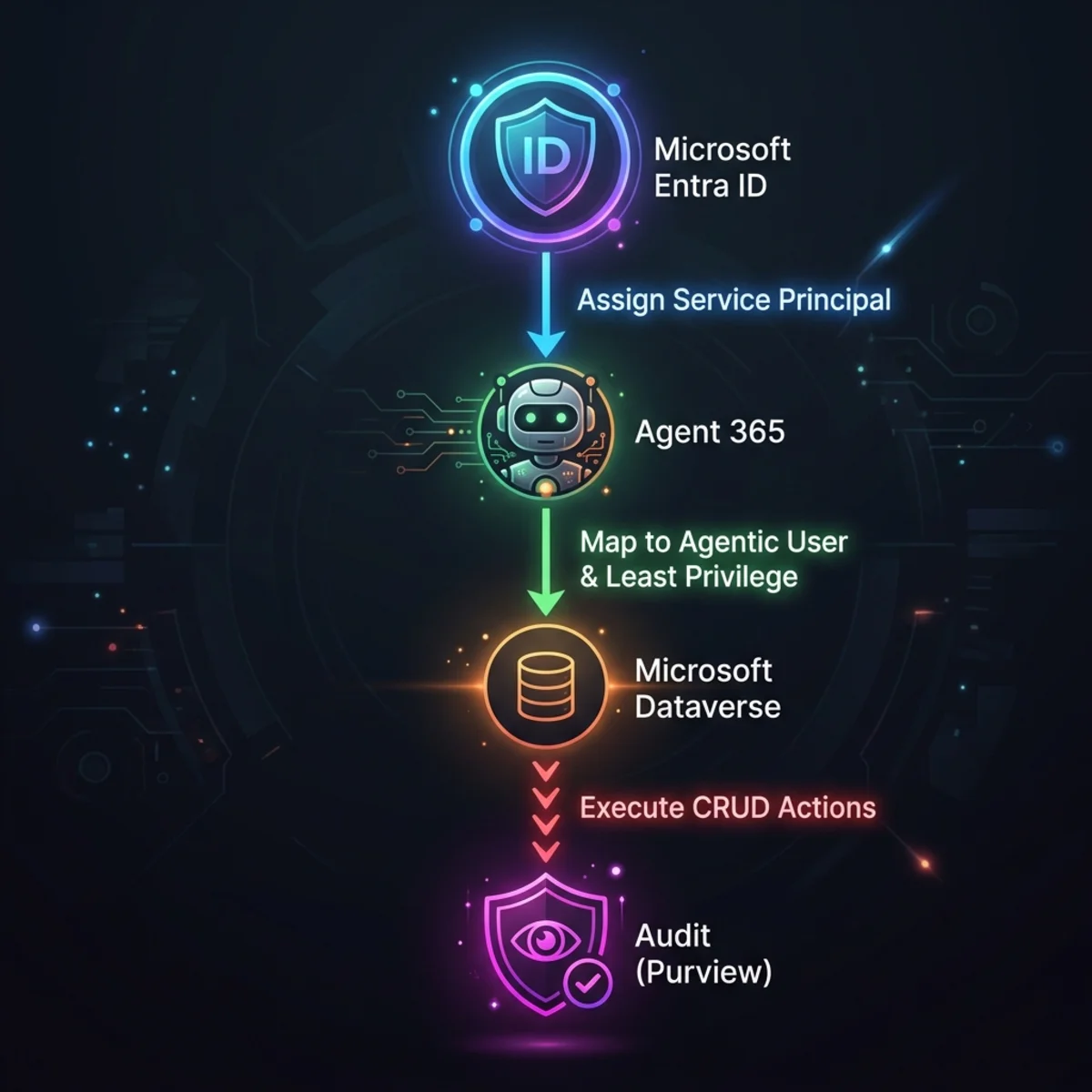
As autonomous agents execute tasks, they do not piggyback on shared or human user accounts. Through Agent 365, every agent receives its own dedicated Microsoft Entra ID (first-class security principals).
Mapped to a Dataverse “agentic user,” this ensures the absolute enforcement of the principle of least privilege. An agent only gets the security roles required for its specific job, and all agent CRUD activities are fully audited and observable in Purview and Dataverse auditing, ensuring complete forensic traceability.
Conclusion
The transition to an AI-first enterprise isn’t just about adopting large language models; it’s about connecting those models to your operational data securely and at scale. With capabilities like MCP, real-time Fabric integration, semantic search, and ironclad Agent Identities, Microsoft Dataverse proves itself as the ultimate foundational platform for the next generation of business solutions.
Read next